pengenalan
Terima kasih kerana membeliasing the Marantz CD5005 CD Player. This manual provides detailed instructions for the proper setup, operation, and maintenance of your new audio component. The CD5005 is designed to deliver high-quality audio playback from various disc formats, including CD, CD-R, CD-RW, MP3, and WMA files. It features high-quality audio components such as the CS4398 DAC and Marantz HDAM SA2, ensuring exceptional sound reproduction. Please read this manual thoroughly before using the unit to ensure optimal performance and longevity.
Arahan Keselamatan
Always follow these basic safety precautions when operating the CD5005 CD Player:
- Sumber Kuasa: Sambungkan unit hanya kepada saluran keluar AC voltage dinyatakan pada panel belakang.
- Pengudaraan: Ensure adequate ventilation. Do not block ventilation openings. Avoid installing in confined spaces.
- Air dan Kelembapan: Do not expose the unit to rain, moisture, or excessive humidity. Do not place objects filled with liquids on the unit.
- haba: Jauhkan unit daripada sumber haba seperti radiator, daftar haba, dapur, atau radas lain yang menghasilkan haba.
- Pembersihan: Cabut plag unit daripada soket dinding sebelum membersihkan. Gunakan kain kering sahaja.
- Servis: Jangan cuba servis unit sendiri. Rujuk semua servis kepada kakitangan perkhidmatan yang berkelayakan.
- Pengendalian Cakera: Kendalikan cakera pada tepinya. Elakkan menyentuh permukaan yang berkilat. Pastikan cakera bersih dan bebas daripada calar.
Kandungan Pakej
Sahkan bahawa pakej anda mengandungi item berikut:
- Marantz CD5005 CD Player
- Kabel Kuasa Boleh Tanggalkan
- Audio Cables (L/R Analog)
- Digital Audio Cable (Coaxial)
- Unit Kawalan Jauh
- Bateri AA untuk Alat Kawalan Jauh (x2)
- Quick Setup Guide (Printed)
- Interactive CD-ROM Manual (except Japan)
Produk Selesaiview
Panel Depan

Rajah 1: Depan view of the Marantz CD5005 CD Player. This image shows the disc tray, display, control buttons, and headphone jack on the front panel.
The front panel of the CD5005 features the disc tray, a clear dual-line display, essential playback control buttons (Play, Pause, Stop, Skip), and a headphone output with a dedicated volume control. The power button is located on the left side.
Panel Belakang

Rajah 2: Belakang view of the Marantz CD5005 CD Player. This image displays the various input and output terminals, including analog audio outputs, digital coaxial and optical outputs, and the AC power inlet.
The rear panel provides connectivity options including gold-plated analog audio outputs, digital coaxial output, and digital optical output for connecting to an amplifier or receiver. A remote control input/output terminal is also present for system integration, along with the detachable AC power inlet.
Alat Kawalan Jauh
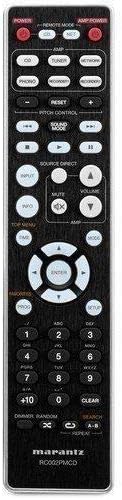
Figure 3: The remote control unit for the Marantz CD5005 CD Player. This remote allows for comprehensive control of the CD player's functions, including playback, track selection, pitch control, and display dimmer.
The included remote control unit provides full functionality for the CD5005, including features not available on the front panel such as pitch control, display dimmer, track randomization, and various repeat functions. It also allows for control of other compatible Marantz components.
Persediaan
1. penempatan
Place the CD5005 on a stable, level surface away from direct sunlight, heat sources, and excessive vibration. Ensure there is adequate space around the unit for proper ventilation.
2. Menyambungkan Kabel Audio
Choose one of the following methods to connect the CD5005 to your amppengalir atau penerima:
- Sambungan Analog: Use the supplied L/R analog audio cables to connect the AUDIO OUT jacks on the CD5005 to the corresponding CD input jacks on your amplifier. Ensure red plugs connect to red jacks (right channel) and white plugs to white jacks (left channel).
- Digital Coaxial Connection: Use the supplied digital coaxial cable to connect the COAXIAL DIGITAL AUDIO OUT jack on the CD5005 to a digital coaxial input on your amppenguat atau penerima.
- Sambungan Optik Digital: Use an optical digital audio cable (not supplied) to connect the OPTICAL DIGITAL AUDIO OUT jack on the CD5005 to a digital optical input on your amppenguat atau penerima.
Nota: Do not connect both analog and digital outputs to the same input on your amplifier simultaneously, as this may cause interference or unexpected behavior. Select the appropriate input on your amplifier after connecting.
3. Menyambungkan Kord Kuasa
Connect the detachable power cord to the AC inlet on the rear panel of the CD5005, then plug the other end into a suitable AC wall outlet.
4. Memasang Bateri Kawalan Jauh
Open the battery compartment on the back of the remote control unit. Insert two AA batteries, ensuring correct polarity (+/-) as indicated inside the compartment. Close the cover securely.
Arahan Operasi
Main Semula CD Asas
- Tekan ke KUASA button on the front panel or remote control to turn on the unit.
- Tekan ke BUKA/TUTUP butang untuk membuka dulang cakera.
- Place a CD, CD-R, CD-RW, MP3, or WMA disc onto the disc tray with the label side facing up.
- Tekan ke BUKA/TUTUP butang sekali lagi untuk menutup dulang cakera. Unit ini akan membaca cakera.
- Tekan ke BERMAIN butang untuk memulakan main balik.
- Untuk menjeda main balik, tekan butang JEDA butang. Tekan sekali lagi untuk menyambung semula.
- Untuk menghentikan main balik, tekan BERHENTI butang.
- Gunakan SKIP butang untuk menavigasi antara trek.
Advanced Features (Remote Control)
- Kawalan Padang: Gunakan KAWALAN PITCH buttons on the remote to adjust the playback speed and pitch.
- Paparan Teks CD: If a disc supports CD Text, the display will show track and artist information. Use the PAPARAN button on the remote to cycle through display modes.
- Ulang Main semula: Tekan ke ULIKAN button on the remote to select repeat modes (e.g., repeat one track, repeat all tracks, repeat A-B segment).
- Random Playback: Tekan ke RANDOM button on the remote to play tracks in a random order.
- Output Fon Kepala: Connect headphones to the front panel headphone jack. Adjust the TINGKAT knob next to the jack to control headphone volume independently. Note that plugging in headphones does not mute the main analog or digital outputs.
- Kawalan Apl: The CD5005 supports app control via RC-5 with a compatible Marantz network player. Refer to the network player's manual for details on this integration.
Penyelenggaraan
Membersihkan Unit
Wipe the exterior surfaces of the CD5005 with a soft, dry cloth. Do not use abrasive cleaners, waxes, or solvents, as these can damage the finish. Avoid spraying liquids directly onto the unit.
Disc Handling and Care
- Always hold discs by their edges to prevent fingerprints and scratches on the playing surface.
- If a disc is dirty, wipe it gently from the center outwards with a soft, lint-free cloth. Do not use circular motions.
- Do not use solvents such as benzene, thinner, or commercially available record cleaners, as they may damage the disc.
- Store discs in their cases when not in use to protect them from dust and scratches.
- Avoid exposing discs to direct sunlight or high temperatures for extended periods.
Menyelesaikan masalah
If you experience issues with your Marantz CD5005, refer to the following common problems and solutions:
| Masalah | Kemungkinan Punca | Penyelesaian |
|---|---|---|
| Tiada kuasa | Kord kuasa tidak disambungkan dengan selamat. | Periksa sambungan kord kuasa ke unit dan alur keluar dinding. |
| Tiada keluaran bunyi | Sambungan kabel audio salah; input salah dipilih pada amplebih hidup; ampisipadu pengalir terlalu rendah. | Verify audio cable connections. Select the correct input on your amppeningkatan. ampisipadu penguat. |
| Cakera tidak dimainkan / ralat "Tiada Cakera" | Disc inserted incorrectly; disc is dirty or scratched; disc format not supported. | Insert disc with label side up. Clean the disc. Try a different disc. Ensure disc format (CD, CD-R/RW, MP3, WMA) is supported. |
| Skipping or intermittent playback | Disc is dirty or scratched; unit is subject to vibration. | Bersihkan cakera. Letakkan unit pada permukaan yang stabil jauh daripada getaran. |
| Alat kawalan jauh tidak berfungsi | Batteries are depleted or inserted incorrectly; obstacle between remote and unit; remote sensor blocked. | Replace batteries, ensuring correct polarity. Remove any obstacles. Ensure the remote sensor on the unit is clear. |
Jika masalah berterusan selepas mencuba penyelesaian ini, sila hubungi khidmat pelanggan Marantz.
Spesifikasi
| Ciri | Perincian |
|---|---|
| Nombor Model | CD5005 |
| Keserasian Cakera | CD, CD-R/RW, MP3, WMA |
| Penukar Digital-ke-Analog (DAC) | CS4398 |
| Analog Output Circuit | Marantz HDAM SA2 |
| Keluaran | Analog L/R (Gold-plated), Digital Coaxial, Digital Optical, Headphone |
| Ciri Khas | Pitch Control, CD Text Display, App Control (via RC-5 with Marantz network player), Auto Standby |
| Penggunaan Kuasa (Bersedia) | rendah |
| Dimensi Produk (W x D x H) | 17.3 x 14.6 x 4.1 inci (43.9 x 37.1 x 10.4 cm) |
| Berat Barang | 11.02 paun (5.0 kg) |
| Pengeluar | Marantz |
| warna | Hitam |
Waranti dan Sokongan
For warranty information and customer support, please refer to the warranty card included with your product or visit the official Marantz webtapak. Simpan bukti pembelian anda untuk tuntutan waranti.
Marantz Official Webtapak: www.marantz.com