1. Pengenalan
This manual provides comprehensive instructions for the installation, operation, and maintenance of the Visionis FPC-5012 Electromagnetic Lock Kit. This standalone access control system is designed to secure outswinging doors, allowing controlled entry and exit via wireless remote and an exit button. Please read this manual thoroughly before installation and operation to ensure proper functionality and safety.
2. Komponen Termasuk
The Visionis FPC-5012 kit includes the following components:
- (1) VIS-ML600LED: 600lbs Indoor Electric Lock with LED Sensor
- (1) VIS-8004: 1-Channel Receiver 315mhz 11-24 VAC/DC
- (2) VIS-8005: Fixed Code Transmitter, Pre-coded Wireless Remote
- (2) VISCP200: 12v 2000ma Power Supply
- (1) VIS-7000: Green Push to Exit Button Illuminated with LED

3. Spesifikasi Produk
| Ciri | Spesifikasi |
|---|---|
| Jenama | Visionis |
| Nombor Model | FPC-5012 |
| Sumber Kuasa | DC |
| Teknologi Ketersambungan | Tanpa wayar |
| Jenis Pemasangan | Skru Masuk |
| Jenis Makluman | Alat Kawalan Jauh |
| Berat Barang | 7 paun |
| Voltage | 12 Volt (Dwi Voltantage 12V/24V selectable) |
| Kaedah Kawalan | Jauh |
| Maximum Range (Remote) | 300 Kaki |
| Maglock Holding Force | 600 paun |
| Maglock Power Consumption (600lb) | 500mA @ 12V, 250mA @ 24V |
4. Persediaan dan Pemasangan
4.1 Pertimbangan Penting
- This electromagnetic lock is designed for kegunaan dalaman sahaja. Do not install in outdoor applications.
- This kit is specifically for outswinging doors. For inswinging door applications, please refer to Visionis kits FPC-5191 (300lb), FPC-5192 (600lb), or FPC-5193 (1200lb) which include the necessary brackets.
- The maglock can be installed on both wood and metal doors.
- Ensure the door and frame are strong enough to withstand the specified holding force of the maglock.
4.2 Maglock Features
- Dwi Voltage: The maglock supports both 12V and 24V operation. The default voltage is 12V. A jumper inside the terminal allows voltage selection. Refer to the user manual for detailed instructions on changing the voltage.
- Pemantauan Status Pintu: Each maglock includes a white wire built into the cap for door status monitoring. This can be connected as a hard-wired alarm contact to your system. If not used, this wire can be cut.
- Penggunaan Kuasa Rendah: The 600lb maglock uses 500mA at 12V and 250mA at 24V.
- Penunjuk LED: An integrated LED light indicates the lock status. Red indicates unlocked, green indicates locked.
- Fail-Safe Operation: All Visionis maglocks are fail-safe, meaning they will unlock when power is lost.
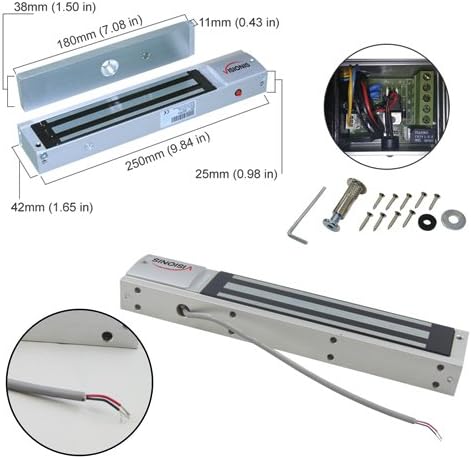

4.3 Installation Steps (Outswinging Door)
Follow these steps for installing the electromagnetic lock on an outswinging door:
- Sediakan Bingkai Pintu: Use the provided installation template to mark and drill holes on the door frame for the mounting plate.
- Pasang Badan Kunci: Separate the cover from the lock body. Secure the mounting plate to the door frame using the provided screws. Ensure the wire for the lock passes through the designated hole. Hang the lock body onto the mounting plate and fasten its screws.
- Install the Armature Plate: Insert the guide pins into the armature plate. Attach the armature plate to the door leaf, ensuring it aligns with the maglock. Fasten the inner hex nut on the back side of the door leaf and secure the screw on the armature plate. Add rubber washers and metal washers if needed to ensure a complete fit with the magnetic lock.
- Sambungan Pendawaian: Refer to the wiring diagram in Section 4.4 for detailed connections.
4.4 Arahan Pendawaian
The following diagram illustrates the wiring connections for the FPC-5012 kit components:

- Sambungkan Red wire from the Maglock kepada Red wire of the first Power Supply.
- Sambungkan Red wire from the Exit Button kepada Red wire of the first Power Supply.
- Sambungkan Black wire from the first Power Supply kepada COM Yellow wire of the Wireless Receiver.
- Sambungkan Black wire from the Maglock kepada COM Green wire of the Exit Button.
- Sambungkan NC Orange wire from the Exit Button kepada White wire of the Wireless Receiver.
- Sambungkan Red wire from the second Power Supply kepada Red wire of the Wireless Receiver.
- Sambungkan Black wire from the second Power Supply kepada Black wire of the Wireless Receiver.
Nota Keselamatan Penting:
- Sebelum pembelianasing or installing this kit, it is recommended that the customer checks with their local fire authority to see if there is any additional product they may need in order to comply with the local fire codes.
- Pastikan untuk memotong penyambung pada kedua-dua bekalan kuasa, kemudian tanggalkan wayar wayar sebelum memasang.
- Untuk memasang kit ini dengan betul adalah disyorkan agar anda menggunakan wayar tolok 18/2 atau 20/2.
- Make sure that when you are installing this kit you have all components turned off. We are not responsible for any type of short circuits.
- Kami tidak bertanggungjawab atas pemasangan produk kami yang tidak betul atau sebarang jenis yuran yang boleh ditanggung jika tidak mematuhi pihak berkuasa bomba tempatan anda.
- If you are not handy with electrical components please consult with a certified electrician or locksmith.
5. Arahan Operasi
5.1 Wireless Receiver and Remotes (VIS-8004 & VIS-8005)
The VIS-8004 is a 1-Channel 315MHz RF receiver supplied with an antenna. The VIS-8005 is a one-channel remote. Both are commonly used for opening doors, garage doors, and gates. You just press the button on the remote control, and the door will unlock.

- 4-Second Delay: The lock releases for 4 seconds and then re-locks. (Default function)
- Togol Suis: Press once to unlock, press again to lock.
- Press ON: The lock remains unlocked as long as the remote button is pressed.
- Diselak: The lock remains unlocked until a second button on the remote is pressed (requires a 2-button remote like VIS-8008 and VIS-8007 receiver).
Refer to the receiver's specific manual for detailed programming instructions for each function.
5.2 Indoor Exit Button (VIS-7000)
The Visionis 7000 is a standard-sized push-to-exit button. It is suitable for residential, commercial, and industrial applications. It features an illuminated backlight and a stainless steel plate for a professional look. This exit button is for indoor use only.

6. Penyelenggaraan
To ensure optimal performance and longevity of your Visionis FPC-5012 system, regular maintenance is recommended:
- Pembersihan: Periodically clean the surface of the electromagnetic lock and armature plate with a soft, dry cloth. Avoid abrasive cleaners or solvents.
- Pemeriksaan: Regularly inspect all wiring connections for any signs of wear, damage, or loose connections. Ensure all screws are tight.
- Ujian Kefungsian: Periodically test the system's functionality by using the remote controls and the exit button to ensure the lock engages and disengages correctly.
- Bekalan Kuasa: Ensure power supplies are free from damage and are providing stable power to the system.
7. Penyelesaian masalah
If you encounter issues with your Visionis FPC-5012 system, consider the following troubleshooting steps:
- Kunci Tidak Terkunci/Terlepas:
- Check all power connections to ensure they are secure and receiving power.
- Verify the power supplies are functioning correctly.
- Ensure the armature plate and maglock are properly aligned and free of debris.
- Confirm the remote controls are programmed correctly and have working batteries.
- Check the wiring connections to the receiver and exit button as per the wiring diagram.
- Penunjuk LED Tidak Berfungsi:
- Ensure the maglock is receiving power.
- Check for any loose internal connections within the maglock.
- Isu Julat Kawalan Jauh:
- Ensure the receiver's antenna is unobstructed.
- Gantikan bateri kawalan jauh jika perlu.
- Kurangkan gangguan daripada peranti wayarles lain.
If problems persist after attempting these steps, please contact Visionis customer support for assistance.
8. Waranti dan Sokongan
The Visionis FPC-5012 Electromagnetic Lock Kit comes with a Waranti 3 tahun dari tarikh pembelian. Waranti ini melindungi kecacatan pada bahan dan mutu kerja di bawah penggunaan biasa.
For technical support, warranty claims, or any questions regarding your product, please visit the official Visionis website or contact their customer service department. Ensure you have your product model number (FPC-5012) and proof of purchase available when seeking support.


