pengenalan
This manual provides detailed instructions for the setup, operation, and maintenance of your La Crosse Technology Model 302-604R-TBP Indoor Digital Thermometer and Hygrometer Station. Please read this manual thoroughly before using the device to ensure proper function and longevity.
Ciri-ciri
- Indoor Temperature Display (Fahrenheit/Celsius)
- Indoor Humidity Display (%RH)
- Minimum/Maximum Value Records for Temperature and Humidity
- Comfort Level Icon Indicator
- Manual Set Time (12/24 Hour Format)
- Compact Tabletop or Wall-Mount Design
Produk Selesaiview
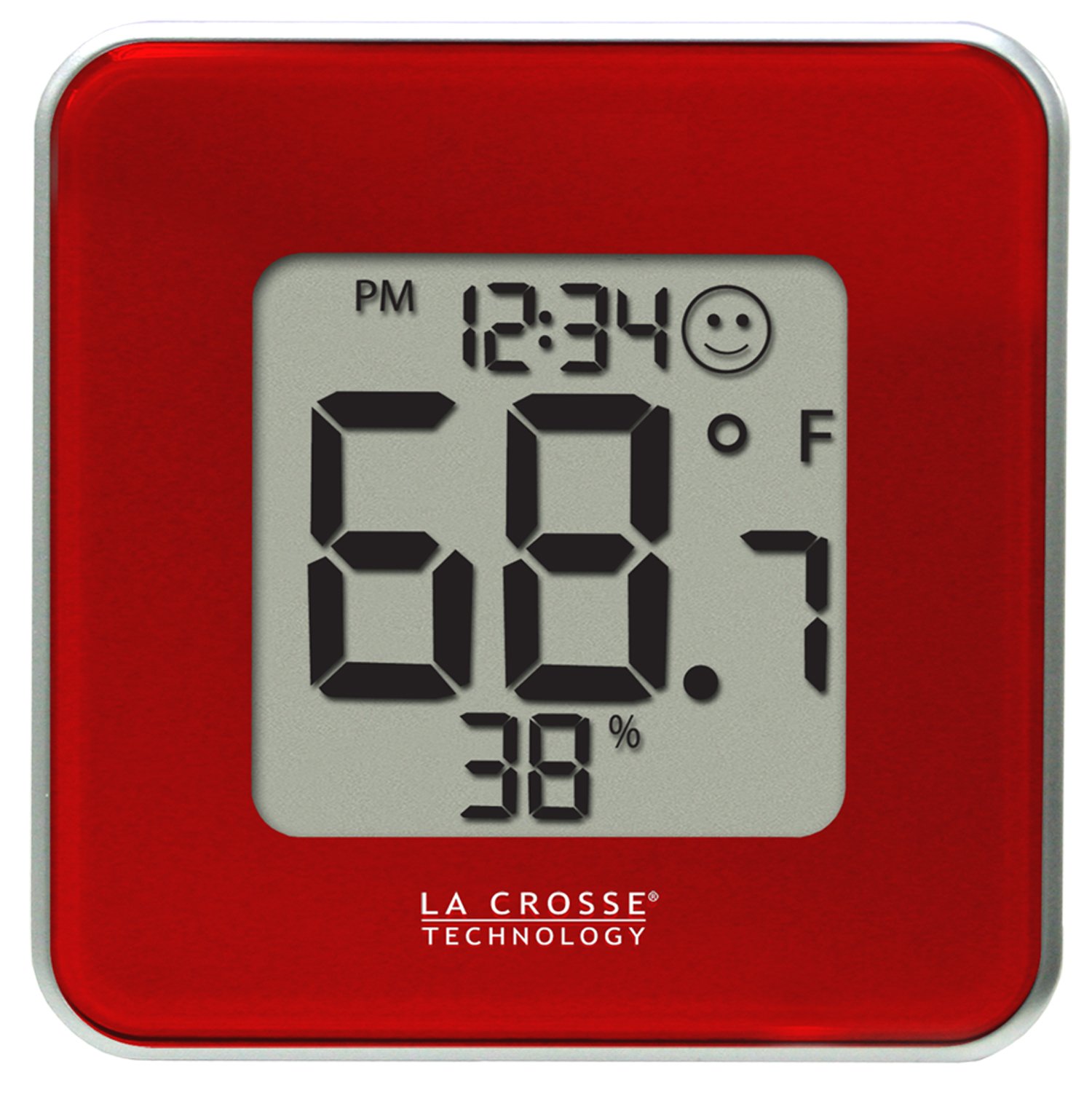
Rajah 1: Depan view of the La Crosse Technology 302-604R-TBP station. The display shows the current time, indoor temperature, indoor humidity, and a comfort level indicator. The device is red with a silver trim.
Persediaan
1. Pemasangan Bateri
- Cari petak bateri di bahagian belakang unit.
- Tanggalkan penutup petak bateri.
- Masukkan satu bateri CR2032, pastikan kekutuban yang betul (+/-).
- Replace the battery compartment cover. The unit will power on automatically.
2. penempatan
The 302-604R-TBP can be placed on a tabletop using its integrated stand or mounted on a wall. Choose a location away from direct sunlight, heat sources, or vents for accurate readings.
Operasi
The device features three buttons on the back: SET/CF, TUKAR, dan MAX/MIN.
Menetapkan Masa
- Tekan dan tahan butang SET/CF button for approximately 3 seconds to enter time setting mode. The hour digit will flash.
- Tekan ke TUKAR butang untuk menyesuaikan jam.
- Tekan ke SET/CF button again to confirm the hour and move to minute setting. The minute digit will flash.
- Tekan ke TUKAR butang untuk menyesuaikan minit.
- Tekan ke SET/CF butang sekali lagi untuk mengesahkan mod tetapan minit dan keluar dari masa.
Changing 12/24 Hour Format
While in time setting mode (hour flashing), press the MAX/MIN button to toggle between 12-hour (with AM/PM) and 24-hour time formats.
Changing Temperature Units (Fahrenheit/Celsius)
Tekan ke SET/CF button briefly (not held) to switch between Fahrenheit (°F) and Celsius (°C) temperature display.
Viewing Minimum/Maximum Values
- Tekan ke MAX/MIN button once to display the maximum recorded temperature and humidity.
- Tekan ke MAX/MIN button a second time to display the minimum recorded temperature and humidity.
- Tekan ke MAX/MIN button a third time to return to current readings.
- To clear the MIN/MAX records, press and hold the MAX/MIN button for 3 seconds while the MIN or MAX values are displayed.
Ikon Tahap Keselesaan
The display includes a comfort level icon (a smiley face) that indicates the general comfort level based on current temperature and humidity. This is an approximate indicator and not a precise measurement.
Penyelenggaraan
Penggantian Bateri
When the battery indicator appears on the display, replace the CR2032 battery as described in the "Battery Installation" section. Old batteries should be disposed of according to local regulations.
Pembersihan
Bersihkan unit dengan lembut, damp kain. Jangan gunakan pembersih atau pelarut yang kasar, kerana ini boleh merosakkan paparan atauasing. Ensure no moisture enters the battery compartment or other openings.
Menyelesaikan masalah
| Masalah | Penyelesaian |
|---|---|
| Tiada paparan atau paparan samar | Gantikan bateri CR2032. Pastikan kekutuban yang betul. |
| Bacaan suhu/kelembapan yang salah | Ensure the unit is not in direct sunlight, near heat sources, or in a draft. Allow 20-30 minutes for readings to stabilize after initial setup or relocation. |
| Butang tidak bertindak balas | Tanggalkan dan masukkan semula bateri untuk melakukan tetapan semula lembut. Jika masalah berterusan, gantikan bateri. |
Spesifikasi
- model: 302-604R-TBP
- Jenama: Teknologi La Crosse
- Julat Suhu Dalaman: Not specified in provided data, typical range is 0°C to 50°C (32°F to 122°F).
- Julat Kelembapan Dalaman: Not specified in provided data, typical range is 10% to 99% RH.
- Keperluan Kuasa: 1 x bateri CR2032 (termasuk)
- Dimensi: 4.13 x 1.15 x 4.13 inci (10.49 x 2.92 x 10.49 cm)
- Berat Barang: 4 auns (113.4 gram)
- Jenis Pemasangan: Tabletop or Wall-mount
Waranti dan Sokongan
For warranty information or technical support, please refer to the documentation included with your product packaging or visit the official La Crosse Technology weblaman web. Maklumat hubungan untuk khidmat pelanggan biasanya tersedia di laman web pengilang webtapak.


