1. Pengenalan
The FiiO E12 DIY Limited Edition is a high-performance portable headphone amplifier designed to enhance your audio experience. This special edition allows for user-replaceable operational amppenyelamat (op-amps) and buffers, offering a unique opportunity to customize the sound signature to your preference. Its robust power output is capable of driving a wide range of headphones, from sensitive in-ear monitors to demanding over-ear models, ensuring clear and dynamic sound reproduction on the go.
2. Safety Information and Warranty
PENTING: ONCE YOU REMOVE THE TAMPER EVIDENT STICKER FROM THE DEVICE, WARRANTY/RETURN WILL BE VOIDED. NO EXCEPTIONS.
Please read and follow all instructions carefully to ensure safe operation and to maintain your warranty. Do not expose the device to water, moisture, extreme temperatures, or direct sunlight. Avoid dropping or subjecting the device to strong impacts. Use only the specified charging accessories. Any unauthorized modification or disassembly of the device, beyond the intended op-amp swapping, will void the warranty.
3. Produk Lebihview
The FiiO E12 DIY features a durable aluminum chassis and intuitive controls. Key components include:
- Tombol Kelantangan: Mengawal tahap output audio.
- Audio Input (Line In): 3.5mm stereo jack for connecting to your audio source.
- Output Fon Kepala: 3.5mm stereo jack for connecting your headphones.
- Suis Keuntungan: Melaraskan amplification level for different headphone impedances.
- Bass Boost Switch: Meningkatkan tindak balas frekuensi rendah.
- Power/Charging Indicator LED: Displays power status and charging activity.
- Port USB Mikro: Untuk mengecas bateri dalaman.
- Internal Op-Amp Soket: Allows for swapping operational amplifiers and buffers (under the removable cover).
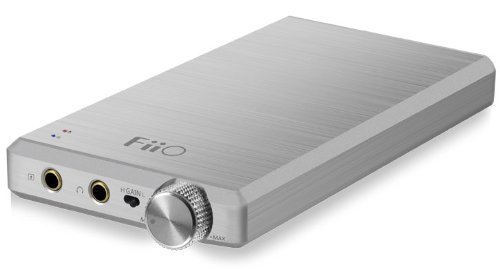
Image: FiiO E12 DIY Limited Edition Portable Headphone Amplifier. This image shows the compact design and typical layout of a portable amplifier, including input/output jacks and control switches.
4. Persediaan
- Mengecas Peranti: Connect the supplied USB cable to the Micro USB port on the E12 DIY and the other end to a USB power adapter (not included) or a computer's USB port. The indicator LED will show charging status. A full charge typically takes several hours.
- Menyambung ke Sumber Audio: Use a 3.5mm audio cable (not included) to connect your audio source (e.g., smartphone, DAP, computer) to the Talian Di jack on the E12 DIY.
- Fon Kepala Menyambung: Pasangkan fon kepala anda ke dalam Output Fon Kepala jack on the E12 DIY.
- Op-Amp Swapping (Optional): If you intend to swap op-amps, ensure the device is powered off and disconnected from all cables. Carefully remove the designated cover (refer to specific FiiO DIY instructions for your model if available) to access the op-amp sockets. Handle components with care, using appropriate tools and anti-static precautions. Re-secure the cover after swapping. Remember, removing the tamper-evident sticker voids the warranty.
5. Arahan Operasi
- Menghidupkan/Mematikan: Rotate the volume knob clockwise until you hear a click to power on the device. The power indicator LED will illuminate. Rotate counter-clockwise until you hear a click to power off.
- Melaraskan Kelantangan: Start with the volume knob at its lowest setting. Begin playing audio from your source, then slowly increase the volume on the E12 DIY to a comfortable listening level. Avoid excessively high volumes to prevent hearing damage.
- Using the Gain Switch: The gain switch allows you to adjust the amplification level. Use the low gain setting for sensitive headphones or when the audio source output is strong. Switch to high gain for less sensitive, high-impedance headphones that require more power. Experiment to find the optimal setting for your headphones and source.
- Using the Bass Boost Switch: Flip the bass boost switch to activate or deactivate the bass enhancement feature. Use this according to your personal preference and the characteristics of your headphones and music.
6. Penyelenggaraan
- Pembersihan: Gunakan kain lembut dan kering untuk membersihkan bahagian luar peranti. Jangan gunakan pembersih cecair atau pelarut.
- Penjagaan Bateri: Untuk memanjangkan hayat bateri, elakkan daripada kerap mencas sepenuhnya bateri. Jika menyimpan peranti untuk tempoh yang lama, cas sehingga kira-kira 50% dan cas semula setiap beberapa bulan.
- Storan: Store the E12 DIY in a cool, dry place away from direct sunlight and extreme temperatures.
7. Penyelesaian masalah
- Tiada Bunyi:
- Ensure the device is powered on and the volume is turned up.
- Check all cable connections (source to E12 DIY, E12 DIY to headphones) are secure.
- Verify the audio source is playing and its volume is not muted or too low.
- Confirm headphones are functioning correctly by testing them with another device.
- Bunyi Herot:
- Reduce the volume on both the E12 DIY and the audio source.
- Try switching the gain setting (low/high) to match your headphones.
- Ensure the audio cables are not damaged.
- Peranti Tidak Mengecas:
- Verify the USB cable is properly connected to both the E12 DIY and the power source.
- Cuba kabel USB atau penyesuai kuasa yang lain.
- Ensure the power source (USB port, wall adapter) is functional.
- Ketidakseimbangan Bunyi:
- Check headphone connections and ensure the headphone cable is not damaged.
- If op-amps were swapped, ensure they are correctly seated and oriented.
8. Spesifikasi
| Ciri | Perincian |
|---|---|
| Dimensi Produk | 7.4 x 5.2 x 2 inci |
| Berat Barang | 1.01 paun |
| Bateri | 1 Bateri Litium Polimer diperlukan (termasuk) |
| Pengeluar | FiiO |
| ASIN | B00J7RY6WK |
| Tarikh Mula-mula Tersedia | 24 Mac 2014 |
9. Sokongan
For further assistance, technical support, or inquiries regarding your FiiO E12 DIY Limited Edition, please visit the official FiiO website or contact their customer service directly. Remember that removing the tamper-evident sticker will void the product warranty, as stated in the safety information.
FiiO Rasmi Webtapak: www.fiio.com