1. Pengenalan
This instruction manual provides essential information for the safe and efficient operation of your Nuwave Pro Plus Infrared Oven. Please read all instructions thoroughly before initial use to ensure proper function and to prevent injury or damage. Keep this manual for future reference.
2. Arahan Keselamatan Penting
Apabila menggunakan peralatan elektrik, langkah berjaga-jaga keselamatan asas hendaklah sentiasa diikuti untuk mengurangkan risiko kebakaran, renjatan elektrik dan kecederaan kepada orang, termasuk yang berikut:
- Baca semua arahan sebelum mengendalikan perkakas.
- Jangan sentuh permukaan panas. Gunakan pemegang atau tombol.
- Untuk melindungi daripada kejutan elektrik, jangan rendamkan kord, palam, atau perkakas di dalam air atau cecair lain.
- Pengawasan rapi diperlukan apabila sebarang perkakas digunakan oleh atau berhampiran kanak-kanak.
- Cabut plag dari soket apabila tidak digunakan dan sebelum membersihkan. Biarkan sejuk sebelum memakai atau menanggalkan bahagian.
- Jangan kendalikan sebarang perkakas dengan kord atau palam yang rosak, atau selepas perkakas tidak berfungsi atau rosak dalam apa jua cara.
- Penggunaan lampiran aksesori yang tidak disyorkan oleh pengilang perkakas boleh menyebabkan kecederaan.
- Jangan gunakan di luar rumah.
- Jangan biarkan kord tergantung di tepi meja atau kaunter, atau menyentuh permukaan panas.
- Jangan letakkan pada atau berhampiran gas panas atau penunu elektrik, atau dalam ketuhar yang dipanaskan.
- Berhati-hati yang melampau mesti digunakan apabila menggerakkan perkakas yang mengandungi minyak panas atau cecair panas lain.
- Sentiasa pasangkan plag pada perkakas terlebih dahulu, kemudian pasangkan kord ke dalam salur keluar dinding. Untuk memutuskan sambungan, matikan mana-mana kawalan kepada 'mati', kemudian tanggalkan palam dari alur keluar dinding.
- Jangan gunakan perkakas untuk kegunaan selain daripada yang dimaksudkan.
3. Komponen Produk
The Nuwave Pro Plus Infrared Oven consists of several key components designed for efficient cooking.

Figure 3.1: The Nuwave Pro Plus Infrared Oven, shown with its instruction manual and a recipe CD.
- Ketua Kuasa: Contains the heating element, fan, and control panel.
- Kubah: A transparent, heat-resistant dome that covers the cooking area.
- Rak memasak: Used to elevate food for even cooking.
- Base Pan: Collects drippings and holds the cooking rack.
- Panel Kawalan Digital: For setting time, temperature, and other functions.

Rajah 3.2: Jarak dekat view of the heating element and internal fan located within the power head.
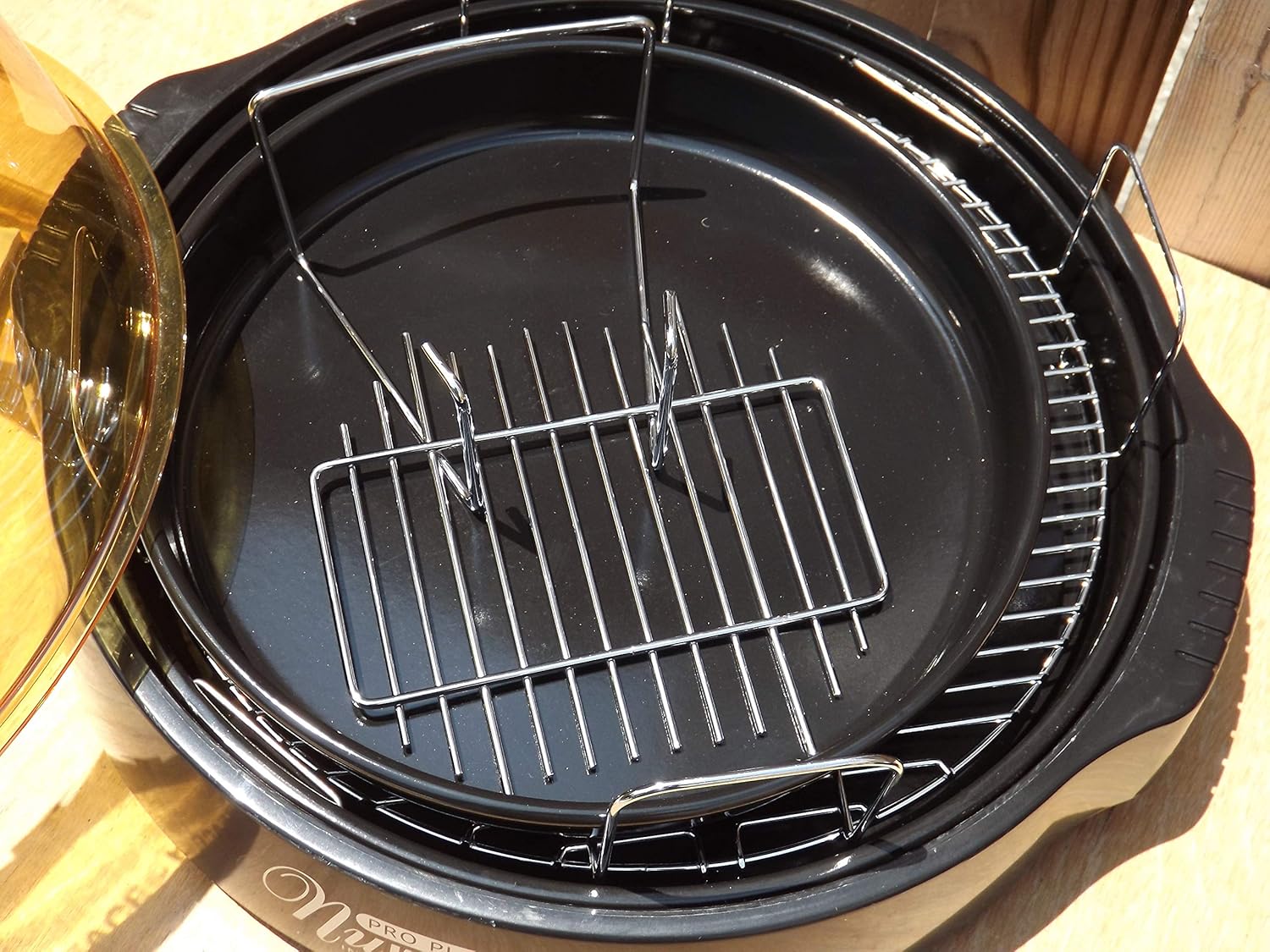
Figure 3.3: The cooking racks positioned within the oven's base pan, ready for food placement.
4. Persediaan
Before first use, ensure all packaging materials are removed and the appliance is assembled correctly.
- Bongkar: Keluarkan semua komponen dari pembungkusan dengan berhati-hati.
- Bersih: Wash the dome, cooking rack, and base pan with warm, soapy water. Rinse thoroughly and dry completely. The power head should only be wiped with a damp kain.
- Berhimpun: Place the base pan on a stable, heat-resistant surface. Insert the desired cooking rack into the base pan. Place the food on the rack. Carefully position the dome over the base pan. Finally, place the power head securely on top of the dome.
- Sambungan Kuasa: Palamkan kord kuasa ke soket elektrik 120V AC standard.
5. Arahan Operasi
The Nuwave Pro Plus Infrared Oven features a digital control panel for precise cooking.

Figure 5.1: The digital control panel with buttons for Cook Time, Cook Temp, Reheat, Warm, Delay, Pause/Clear, Start, and numerical input.
- Hidupkan kuasa: Once plugged in, the display will illuminate.
- Tetapkan Masa Memasak: Press the 'Cook Time' button. Use the numerical keypad to enter the desired cooking duration in minutes. Press 'Start' to confirm.
- Set Cooking Temperature: Press the 'Cook Temp' button. Use the numerical keypad to enter the desired temperature in degrees Fahrenheit. Press 'Start' to confirm.
- Mula Memasak: After setting time and temperature, press the 'Start' button to begin the cooking cycle.
- Pause/Clear: To temporarily stop cooking, press 'Pause/Clear'. Press 'Start' to resume. To cancel the current program, press 'Pause/Clear' twice.
- Fungsi Panaskan semula: Press the 'Reheat' button for a preset reheating cycle. Adjust time if necessary using 'Cook Time'.
- Fungsi Hangat: Press the 'Warm' button to keep food warm after cooking.
- Fungsi kelewatan: Press the 'Delay' button to set a delayed start time for cooking. Follow on-screen prompts to set the delay duration.
Always monitor food during cooking. Cooking times may vary based on food type, quantity, and desired doneness.
6. Penyelenggaraan dan Pembersihan
Regular cleaning ensures optimal performance and extends the life of your Nuwave Pro Plus Infrared Oven.
- Cabut dan Sejukkan: Always unplug the oven from the power outlet and allow all components to cool completely before cleaning.
- Dome, Rack, and Base Pan: These components are dishwasher safe or can be washed by hand with warm, soapy water. Use a non-abrasive sponge or cloth. Rinse thoroughly and dry completely.
- Ketua Kuasa: The power head contains electrical components and should NEVER be immersed in water. Wipe the exterior with a damp kain. Untuk kotoran degil, gunakan detergen lembut pada kain, kemudian lap dengan bersih, damp kain. Pastikan ia benar-benar kering sebelum penyimpanan atau penggunaan seterusnya.
- Storan: Simpan ketuhar di tempat yang bersih dan kering apabila tidak digunakan.
7. Penyelesaian masalah
Rujuk bahagian ini untuk isu biasa dan penyelesaiannya.
| Masalah | Kemungkinan Punca | Penyelesaian |
|---|---|---|
| Ketuhar tidak dihidupkan. | Tidak dipasang; kuasa outage; outlet rosak. | Pastikan kord kuasa dipasang dengan kukuh. Periksa pemutus litar. Cuba soket lain. |
| Makanan tidak masak sekata. | Improper food placement; too much food; incorrect temperature/time. | Ensure food is placed on the rack and not directly on the base. Do not overcrowd the oven. Adjust cooking time or temperature as needed. |
| Asap atau bau luar biasa semasa operasi. | Food drippings on heating element; residue from previous cooking. | Unplug immediately. Allow to cool and clean all components thoroughly. Ensure no food particles are on the heating element. |
| Control panel unresponsive. | Temporary electrical glitch; power head not seated correctly. | Unplug the oven for 1 minute, then plug back in. Ensure the power head is securely placed on the dome. |
8. Spesifikasi
Detailed technical specifications for the Nuwave Pro Plus Infrared Oven.
- Jenama: Nuwave
- Nama Model: Nu-Wave Oven
- Jenis Kawalan: Knob (Digital Keypad)
- Gaya Pintu: Side Swing (Dome Lift)
- Komponen yang Disertakan: Crumb Tray (Base Pan), Cooking Rack
- Jenis Selesai: Dilukis
- Jenis Bahan Pintu: Stainless Steel (referring to internal components/accents)
- Sumber Kuasa: Penyesuai AC
- Bilangan Rak: 1 (Cooking Rack)
- Saiz: Sederhana
- Berat Barang: 14.26 paun
- Dimensi Pakej: 15.8 x 14.9 x 12.1 inci
- ASIN: B00IXC09QC
- UPC: 652185206021
9. Waranti dan Sokongan
For warranty information and customer support, please refer to the documentation included with your purchase or visit the official Nuwave webtapak. Simpan resit pembelian anda sebagai bukti pembelian untuk sebarang tuntutan waranti.
For further assistance, you may contact Nuwave customer service directly. Contact details are typically found on the product packaging or the manufacturer's official webtapak.


