pengenalan
The Vivitar Tag & Blast Wireless Bluetooth Speaker is designed for portable audio enjoyment. This speaker features Bluetooth technology for wireless connectivity with compatible devices, offering a digital stereo sound experience. Its compact design makes it suitable for use in various outdoor and indoor settings. The speaker includes a rechargeable battery for extended use.
Apa yang ada dalam Kotak
- Vivitar Tag & Blast Wireless Bluetooth Speaker
Produk Selesaiview
The Vivitar Tag & Blast speaker is engineered for simplicity and portability. Below is an image of the speaker, highlighting its general appearance.
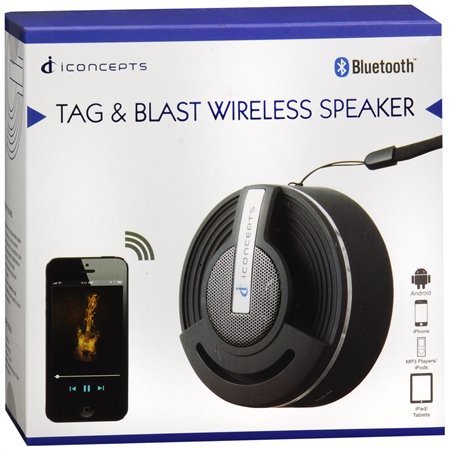
Ciri-ciri utama termasuk:
- Bluetooth technology for wireless audio streaming.
- Compatibility with various Bluetooth-enabled devices such as iPod, iPhone, iPad, smartphones, and tablets.
- Designed for ultimate portability, allowing you to take your music anywhere.
Persediaan
Mengecas Speaker
The Vivitar Tag & Blast speaker is powered by a rechargeable battery. Before initial use, ensure the speaker is fully charged.
- Cari port pengecasan pada pembesar suara.
- Connect the appropriate charging cable (not specified in product details, typically USB) to the speaker and a power source.
- Allow the speaker to charge until the charging indicator (if present) shows a full charge.
Berpasangan Bluetooth
Untuk menyambungkan pembesar suara anda ke peranti yang didayakan Bluetooth:
- Ensure the speaker is powered on and in pairing mode. (Refer to the speaker's physical controls for specific pairing button/indicator, if available).
- Pada peranti anda (telefon pintar, tablet, dll.), navigasi ke tetapan Bluetooth.
- Dayakan Bluetooth dan cari peranti yang tersedia.
- Select "Vivitar Tag & Blast" or a similar name from the list of found devices.
- Once connected, the speaker will indicate a successful pairing (e.g., an audible tone or LED indicator).
Arahan Operasi
Hidupkan/Mati Kuasa
To power the speaker on or off, locate the power button (control method is 'Touch' as per specifications) and press and hold it until the speaker indicates power status (e.g., LED light, sound cue).
Main Balik Audio
Once paired with your device, audio played on your device will stream through the Vivitar Tag & Blast speaker. Use your connected device to control playback (play/pause, skip tracks) and volume.
Penyelenggaraan
To ensure the longevity and optimal performance of your Vivitar Tag & Blast speaker:
- Keep the speaker clean by wiping it with a soft, dry cloth. Avoid using harsh chemicals or abrasive cleaners.
- Jangan dedahkan pembesar suara kepada suhu yang melampau, cahaya matahari langsung atau kelembapan yang tinggi.
- While designed for outdoor use, the speaker is not waterproof. Avoid submerging it in water or exposing it to heavy rain.
- Simpan pembesar suara di tempat yang sejuk dan kering apabila tidak digunakan.
Menyelesaikan masalah
If you encounter issues with your Vivitar Tag & Blast speaker, try the following solutions:
- Tiada Kuasa: Pastikan pembesar suara dicas sepenuhnya. Sambungkannya ke sumber kuasa dan biarkan ia dicas selama sekurang-kurangnya 30 minit sebelum cuba menghidupkannya semula.
- Tidak Boleh Berpasangan dengan Peranti:
- Pastikan pembesar suara berada dalam mod berpasangan.
- Ensure Bluetooth is enabled on your device and it is within range (typically 10 meters or 33 feet).
- Matikan dan hidupkan kedua-dua pembesar suara dan Bluetooth peranti anda.
- If previously paired, try forgetting the speaker from your device's Bluetooth list and re-pairing.
- Tiada Bunyi atau Kelantangan Rendah:
- Semak tahap kelantangan pada kedua-dua pembesar suara dan peranti anda yang disambungkan.
- Pastikan pembesar suara dipasangkan dengan betul dan disambungkan ke peranti anda.
- Cuba mainkan audio daripada aplikasi atau sumber lain pada peranti anda.
- Kualiti Audio Lemah:
- Gerakkan pembesar suara lebih dekat ke peranti anda untuk mengurangkan gangguan.
- Pastikan tiada halangan antara pembesar suara dan peranti anda.
- Check for other active Bluetooth devices in the vicinity that might cause interference.
Spesifikasi
| Ciri | Perincian |
|---|---|
| Nama Model | BTSP-TAG |
| Jenama | Vivitar |
| Teknologi Ketersambungan | Bluetooth |
| Teknologi Komunikasi Tanpa Wayar | Bluetooth |
| Jenis Pembesar Suara | Bookshelf (Portable) |
| Mod Keluaran Audio | Stereo |
| Konfigurasi Saluran Bunyi Sekeliling | 2.0 |
| Kaedah Kawalan | Sentuh |
| Sumber Kuasa | Dikuasakan Bateri |
| Bateri | 2 bateri Lithium Ion diperlukan (termasuk) |
| Peranti Serasi | Pemain MP3, Telefon Pintar, Tablet |
| Penggunaan yang Disyorkan | For Smartphones or Tablets, For Outdoor Use |
| warna | Perak |
| Dimensi Produk | 5 x 2.5 x 5 inci |
| Berat Barang | 7.2 auns (0.45 paun) |
| Adakah Kalis Air | PALSU |
| Pengeluar | Sakar International, Inc. |
Waranti dan Sokongan
The Vivitar Tag & Blast Wireless Bluetooth Speaker comes with a Waranti Terhad. For specific details regarding warranty coverage, duration, and how to obtain service, please refer to the warranty card included with your product or contact Vivitar customer support directly. Contact information for support can typically be found on the manufacturer's official webtapak atau pada pembungkusan produk.