pengenalan
This manual provides essential information for the safe and efficient operation of your InFocus IN124a XGA Wireless-Ready Projector. Please read this manual thoroughly before using the projector and retain it for future reference. This projector is designed for displaying content with XGA (1024 x 768) native resolution, offering 3500 lumens of brightness and a 15000:1 contrast ratio.
Maklumat Keselamatan
- Keselamatan Elektrik: Sentiasa sambungkan projektor ke soket kuasa yang dibumikan. Jangan gunakan kord kuasa yang rosak. Putuskan sambungan kuasa sebelum membersihkan atau menservis.
- Haba dan Pengudaraan: Pastikan pengudaraan yang mencukupi di sekitar projektor. Jangan halang bukaan pengudaraan. Elakkan meletakkan projektor berhampiran sumber haba.
- Lamp Keselamatan: Projektor lamp operates at high temperatures and pressures. Allow the projector to cool down before moving or replacing the lamp. Do not look directly into the lens when the lamp sedang aktif.
- Pengendalian: Kendalikan projektor dengan berhati-hati. Elakkan daripada menjatuhkan atau mendedahkannya kepada hentaman yang kuat.
- Kelembapan: Do not expose the projector to rain, moisture, or excessive humidity.
Kandungan Pakej
Sahkan bahawa semua item terdapat dalam pakej:
- InFocus IN124a Projector
- Kabel HDMI
- Kabel VGA
- Kord Kuasa
- Alat Kawalan Jauh (tidak disenaraikan secara eksplisit tetapi standard)
- Optional USB adapter for wireless connectivity (if purchased separately)
Produk Selesaiview
Familiarize yourself with the physical components and connections of your InFocus IN124a projector.

This image displays the rear panel of the InFocus IN124a projector, highlighting various connectivity options including HDMI, VGA (Computer 1 and 2), Monitor Out, S-Video, Video, Audio In (1 and 2), Audio Out, RS-232, USB-B, USB Mini-B, and USB-A ports. The power input is located on the lower left.

The top panel of the InFocus IN124a projector is shown, featuring the control buttons for power, menu navigation (up, down, left, right, enter), source selection, blank screen function, and indicators for temperature and lamp status. The focus and zoom adjustment rings are also visible.

A depan view of the InFocus IN124a projector, showing the main projection lens and the power indicator light. The focus and zoom rings are visible near the lens.

This image presents a side view of the InFocus IN124a projector, emphasizing the ventilation grilles designed for heat dissipation, crucial for maintaining optimal operating temperature.
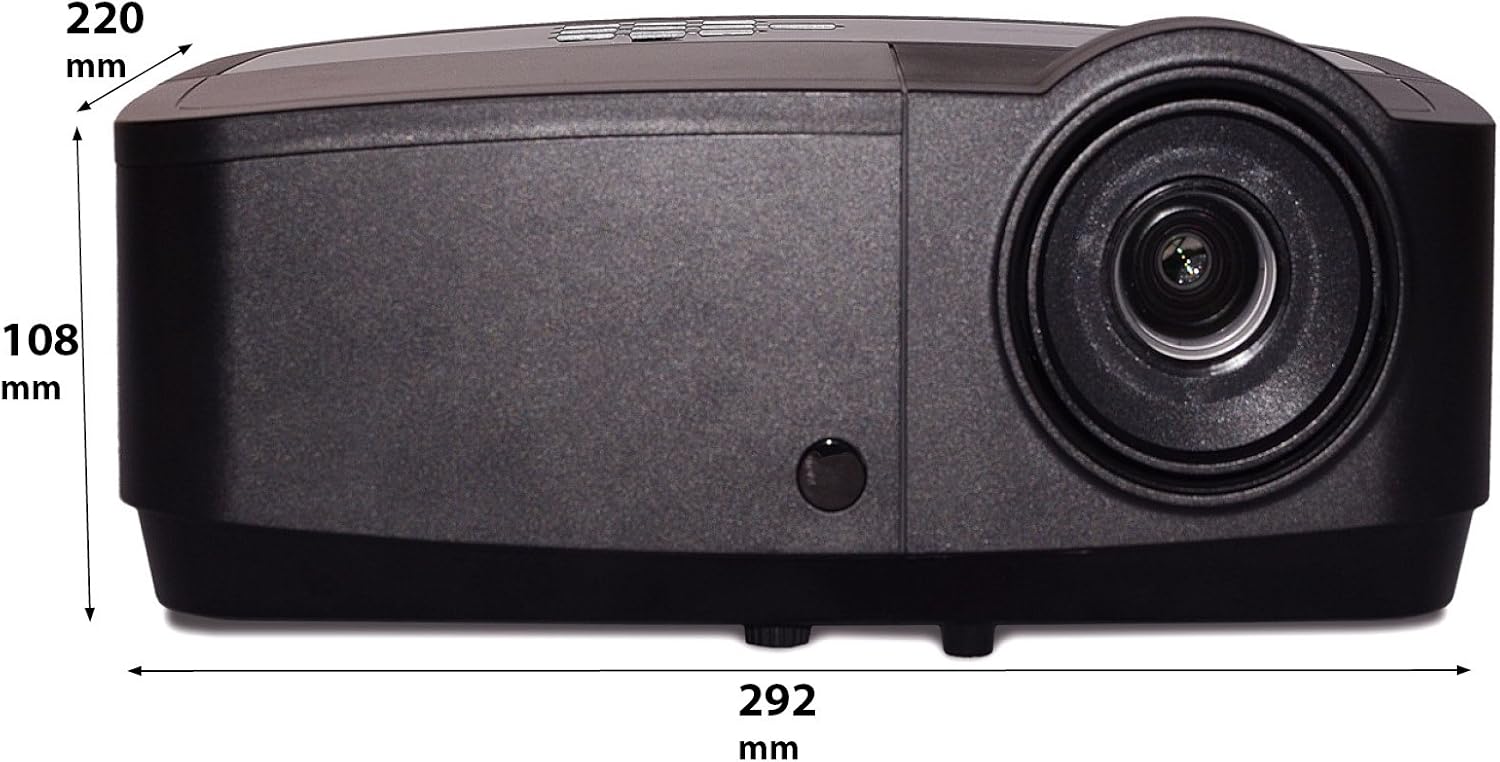
Imej ini menunjukkan pro sampinganfile of the InFocus IN124a projector, illustrating its physical dimensions: approximately 292 mm in length, 108 mm in height, and 220 mm in width.
Persediaan
1. penempatan
Position the projector on a stable, flat surface or mount it securely. Ensure the projector is at an appropriate distance from the screen to achieve the desired image size. Avoid direct sunlight or strong ambient light on the screen for optimal viewing.
2. Kuasa Penyambung
- Sambungkan kord kuasa ke salur masuk kuasa projektor.
- Palamkan hujung kord kuasa yang lain ke dalam salur keluar elektrik yang dibumikan.
3. Menghubungkan Sumber Video
The IN124a offers multiple connectivity options:
- HDMI: Connect an HDMI cable from your source device (e.g., laptop, Blu-ray player) to the HDMI port on the projector.
- VGA (Komputer 1/2): Use a VGA cable to connect your computer to either the 'COMPUTER 1' or 'COMPUTER 2' port.
- S-Video/Video: For older devices, connect S-Video or composite video cables to the respective ports.
- USB: The USB-A port can be used for displaying content directly from a USB drive. The USB-B port supports USB display functionality.
- Audio: Connect external audio sources to 'AUDIO 1' or 'AUDIO 2' inputs, and use 'AUDIO OUT' for external speakers if needed.
4. Wireless Setup (Optional)
For wireless connectivity, an optional USB adapter is required. Insert the wireless USB adapter into the designated USB port on the projector. Refer to the adapter's specific instructions for software installation and connection procedures on your source device.
Beroperasi
1. Menghidupkan/Mematikan
- Hidupkan kuasa: Press the 'Power' button on the projector's control panel or remote control. The power indicator light will turn steady blue.
- Matikan: Press the 'Power' button again. A confirmation message may appear. Press 'Power' a second time to confirm shutdown. The fan will continue to run briefly to cool the lamp before shutting down completely.
2. Melaraskan Imej
- Fokus: Rotate the focus ring around the lens until the image appears sharp and clear.
- Zum: Rotate the zoom ring around the lens to adjust the image size without moving the projector.
- Pembetulan Keystone: Jika imej kelihatan trapezoid, gunakan fungsi pembetulan keystone dalam menu projektor untuk menyegiempatkan imej.
3. Pemilihan Sumber
Press the 'Source' button on the control panel or remote control repeatedly to cycle through available input sources (HDMI, Computer 1, Computer 2, S-Video, Video, USB). The projector will automatically detect an active signal.
4. Navigasi Menu
Press the 'Menu' button to access the On-Screen Display (OSD) menu. Use the arrow buttons to navigate through options and 'Enter' to select. Press 'Menu' or 'Exit' to close the OSD.
5. Mod 3D
The InFocus IN124a is 3D-Ready. To utilize 3D functionality, you will need compatible 3D content, a 3D-capable source device, and active 3D glasses. Refer to your 3D source device's manual for specific setup instructions. The projector will automatically detect a 3D signal when available.
Penyelenggaraan
1. Lamp Penggantian
Projektor lamp mempunyai jangka hayat sehingga 7,000 jam. Apabila lamp life is nearing its end, a warning message may appear, or the lamp indicator light will illuminate. Only replace the lamp with an authorized InFocus replacement lamp. Always allow the projector to cool completely before attempting lamp penggantian.
2. Pembersihan
- Projektor Casing: Gunakan kain yang lembut dan tidak berbulu dampened with a mild, non-abrasive cleaner. Do not use harsh chemicals.
- Kanta: Gently wipe the lens with a lens cleaning cloth or lens tissue. Avoid touching the lens surface with your fingers.
- Bolong Udara: Periodically check and clean the air vents to prevent dust buildup, which can lead to overheating. Use a soft brush or compressed air to clear obstructions.
Menyelesaikan masalah
Jika anda menghadapi masalah dengan projektor anda, rujuk kepada masalah dan penyelesaian biasa berikut:
| Masalah | Kemungkinan Punca | Penyelesaian |
|---|---|---|
| Tiada imej dipaparkan | Power not connected; Incorrect input source; Source device not active. | Check power connection; Select correct input source; Ensure source device is on and outputting signal. |
| Imej kabur atau tidak fokus | Lens focus not adjusted; Projector too close/far from screen. | Adjust the focus ring on the lens; Adjust projector distance or use zoom ring. |
| Alat kawalan jauh tidak berfungsi | Bateri berkurangan; Halangan antara alat kawalan jauh dan projektor; Sensor alat kawalan jauh tersekat. | Replace batteries; Remove obstructions; Ensure remote sensor on projector is clear. |
| Projektor terlalu panas dan mati | Blocked ventilation; Dusty air filter. | Ensure vents are clear; Clean air filter (if applicable) and vents. |
Spesifikasi
| Ciri | Spesifikasi |
|---|---|
| Resolusi Asli | XGA (1024 x 768) |
| Kecerahan | 3500 Lumen |
| Nisbah Kontras | 15000:1 |
| Lamp kehidupan | Sehingga 7,000 jam (Mod Eko) |
| Teknologi Ketersambungan | Wireless (with optional adapter), HDMI, USB video |
| Ciri Khas | 3D-Sedia |
| Dimensi Produk | 14.25 x 12 x 7.75 inci (36.2 x 30.5 x 19.7 cm) |
| Berat Barang | 5.4 paun (2.45 kg) |
| Penggunaan yang Disyorkan | Dalaman/Luar |
Waranti dan Sokongan
For warranty information and technical support, please refer to the warranty card included with your product or visit the official InFocus webtapak. Simpan resit pembelian anda sebagai bukti pembelian untuk tuntutan waranti.


