pengenalan
The One For All OARUSB04G is a versatile four-device universal remote control designed to simplify your home entertainment experience. It allows you to control up to four different devices, such as your TV, DVD player, amplifier, and cable/satellite/streaming player, with a single remote. This manual provides detailed instructions for setup, operation, and maintenance.
Produk Selesaiview
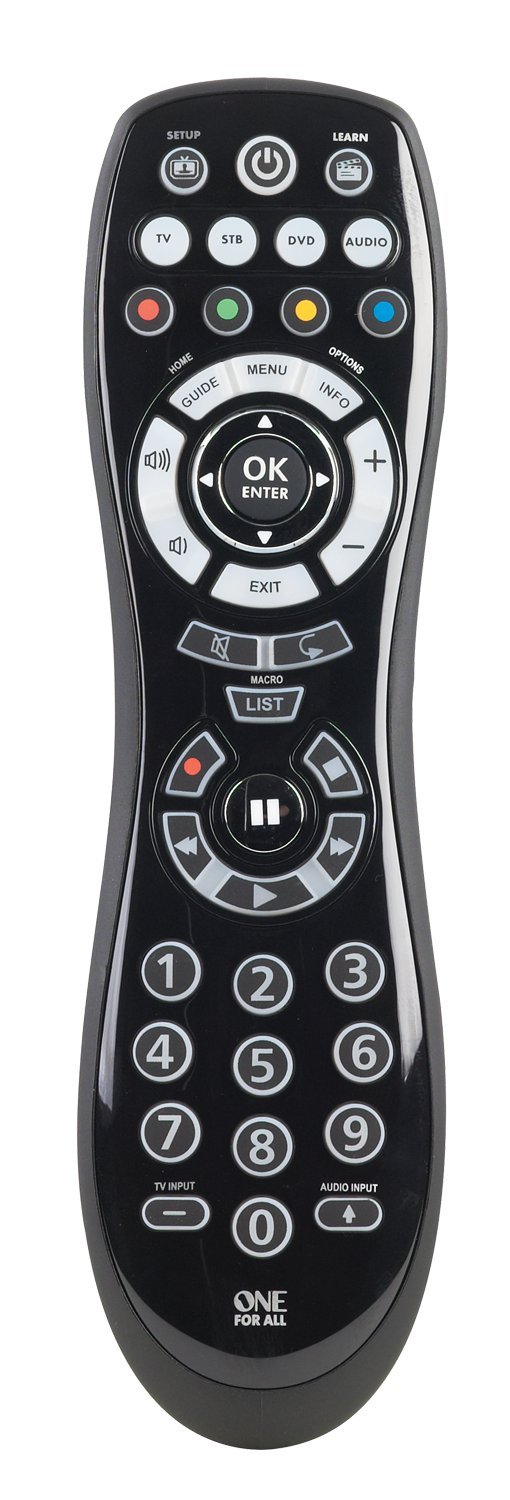
This image displays the front of the One For All OARUSB04G universal remote. It features a black ergonomic design with clearly labeled buttons for device selection (TV, STB, DVD, AUDIO), power, setup, learn, navigation, number pad, and media playback controls. The keypad is backlit for visibility in low light conditions.
Ciri-ciri Utama:
- Controls up to four programmable devices: TV, DVD, Amplifier, and Cable/Satellite/Streaming player.
- Compatible with over 6000 brands.
- "Smart Control" feature allows one button press to power on all necessary devices.
- Simple setup via on-remote code library or the SimpleSet online tool.
- Backlit keypad for easy viewing.
- Includes a USB cable for computer-assisted programming.
Persediaan
Pemasangan Bateri
The remote requires 2 AA batteries. Open the battery compartment cover on the back of the remote. Insert the batteries, ensuring correct polarity (+/-). Close the battery compartment. Note that the USB port for programming is located within the battery compartment.
Kaedah Pengaturcaraan
The One For All OARUSB04G offers several methods for programming your devices:
- Using the SimpleSet Webtapak:
- Connect the remote to your computer using the included USB cable. The USB port is located inside the battery compartment.
- Visit the SimpleSet webtapak (simpleset.com).
- Muat naik
settings.binfile from the remote's drive (which appears as a removable disk on your computer) to the webtapak. - Select the devices you wish to control (TV, STB, DVD, Audio) and their respective brands on the webtapak.
- Download the new
settings.binfile dihasilkan oleh website. It is recommended to save it to your computer first, then copy it to the remote's drive, overwriting the existing file. - Safely eject the remote from your computer and disconnect the USB cable. Reinstall the battery compartment cover.
- Test the remote with your devices.
- Fungsi Pembelajaran:
- Ensure you have the original, functioning remote for the device you want to program.
- Tekan dan tahan butang BELAJAR button on the One For All remote for 3 seconds until the device button (e.g., TV) blinks twice.
- Select the device key (TV, STB, DVD, Audio) on the One For All remote that corresponds to the device you are programming.
- Press the key on the One For All remote that you wish to program. Do not hold it down for more than 3 seconds, as this will clear its programming.
- Point the original remote and the One For All remote at each other (ends facing) and press the corresponding button on the original remote. The device button on the One For All remote will blink twice to confirm successful learning.
- Repeat for other keys if needed.
- Tekan dan tahan butang BELAJAR button for 3 seconds to exit learning mode and save the changes. The device button will blink twice.
- Direct Code Set:
- Locate the 4-digit code for your device brand from the included code list or online resources.
- Pastikan peranti yang anda ingin kawal dihidupkan.
- Tekan dan tahan butang SETUP button for 3 seconds until a device button blinks twice.
- Select the device key (TV, STB, DVD, Audio) for the device you are programming.
- Enter the 4-digit code using the number pad. The device key will blink twice.
- Aim the remote at your device and press the KUASA key. If the device turns off, the code is correct. If not, repeat steps 3-6 with the next code for your brand.
- Carian Auto:
- Pastikan peranti yang anda ingin kawal dihidupkan.
- Tekan dan tahan butang SETUP button for 3 seconds until a device button blinks twice.
- Select the device key (TV, STB, DVD, Audio) for the device you are programming.
- Tekan dan lepaskan OK kunci.
- Point the remote at your device. The remote will automatically send different power off signals every 3 seconds.
- As soon as your device turns off, immediately press and release the OK key to save the code.
- If some keys do not work correctly, repeat the auto search process, pressing OK at the next instance the device turns off, to try a different configuration.
Mengendalikan Alat Jauh
To control a specific device, press the corresponding device key (TV, STB, DVD, AUDIO) at the top of the remote. The selected device key will illuminate.
- Gunakan KUASA button to turn devices on or off.
- Laraskan kelantangan menggunakan VOLUME NAIK/TURUN butang.
- Tukar saluran menggunakan SALURAN KE ATAS/BAWAH butang.
- Navigate menus using the directional pad and OK/MASUK butang.
- The 'Smart Control' feature allows you to turn on all linked devices with a single press of the power button after initial setup.
- The backlit keypad activates when buttons are pressed, improving visibility in dark environments.
Penyelenggaraan
- Replace batteries when the remote's performance diminishes or the indicator light flashes. Always use 2 new AA batteries.
- Clean the remote with a soft, dry cloth. Avoid using liquid cleaners or abrasive materials.
- Keep the remote away from extreme temperatures and moisture.
Menyelesaikan masalah
Isu dan Penyelesaian Biasa:
- Jauh tidak bertindak balas:
- Periksa tahap bateri dan ganti jika perlu.
- Ensure the remote is pointed directly at the device.
- Verify that the correct device key (TV, STB, DVD, AUDIO) is selected.
- Device not turning off/on or responding to commands:
- Re-attempt the programming process (SimpleSet, Learning, Direct Code, or Auto Search) for the affected device.
- For Direct Code Set or Auto Search, try alternative codes or configurations for your device brand.
- Ensure the original remote is functioning correctly if using the Learning function.
- Specific keys not working after programming:
- Use the Learning function to program individual keys from your original remote.
- Ensure you press and hold the BELAJAR button for 3 seconds to save changes after programming individual keys.
Sumber Dalam Talian:
- For additional support, updated code lists, and advanced programming options, visit the official One For All webtapak atau simpleset.com.
- Community forums like hifi-remote.com may also offer user-contributed solutions and advanced tips for JP1 compatible remotes.
Menetapkan semula Alat Jauh:
To reset the remote to its factory default settings, consult the One For All support website or the full manual available online, as this procedure may vary.
Spesifikasi
- Dimensi Produk: 8.23 x 2.14 x 1.33 inci
- Berat Barang: 1 auns
- Bateri: 2 bateri AA diperlukan
- Bilangan Maks Peranti yang Disokong: 4
- Peranti Serasi: Television, DVD, Amplifier, Cable/Satellite/Streaming Player
- Ciri Khas: Lampu belakang, Universal
- warna: Hitam
Waranti dan Sokongan
Untuk maklumat jaminan dan sokongan pelanggan, sila rujuk dokumentasi yang disertakan dengan pembelian anda atau lawati laman web rasmi One For All. webtapak. Simpan bukti pembelian anda untuk tuntutan waranti.