1. Pengenalan
This manual provides essential instructions for the safe and efficient installation, operation, and maintenance of your Intel DPS-750PB AXX750WPS 750W Power Supply. This power supply unit (PSU) is designed to provide stable and reliable power to your personal computer components. Please read this manual thoroughly before proceeding with installation or operation.
2. Maklumat Keselamatan
Sentiasa patuhi langkah keselamatan berikut untuk mengelakkan kecederaan atau kerosakan pada peralatan anda:
- Putuskan Kuasa: Before installing, removing, or servicing the power supply, always ensure the computer is turned off and unplugged from the wall outlet.
- Pembumian yang betul: Ensure your computer system is properly grounded to prevent electrical shock.
- Jangan buka: The power supply unit contains high voltage components. Do not open the casing; there are no user-serviceable parts inside. Opening the unit will void the warranty and poses a risk of electric shock.
- Pengudaraan: Pastikan aliran udara mencukupi di sekeliling bekalan kuasa. Jangan sekat bukaan pengudaraan.
- Kelembapan: Keep the power supply away from water, humidity, and other liquids.
- Suhu: Operate the power supply within its specified temperature range. Avoid extreme heat or cold.
3. Kandungan Pakej
Sahkan bahawa pakej anda mengandungi item berikut:
- Intel DPS-750PB AXX750WPS 750W Power Supply Unit
- (Power cable and mounting screws may be included depending on the retailer)
4. Persediaan dan Pemasangan
Follow these steps to install your Intel DPS-750PB AXX750WPS power supply:
- Penyediaan: Turn off your computer completely and unplug the power cord from the wall outlet. Open your computer case.
- Keluarkan PSU Lama (jika berkenaan): If replacing an existing power supply, disconnect all cables from the motherboard and components. Unscrew and remove the old PSU from the case.
- Pasang PSU Baharu: Carefully slide the Intel DPS-750PB AXX750WPS into the power supply bay of your computer case. Ensure the fan is oriented correctly for optimal airflow (usually facing downwards or towards the rear vent).
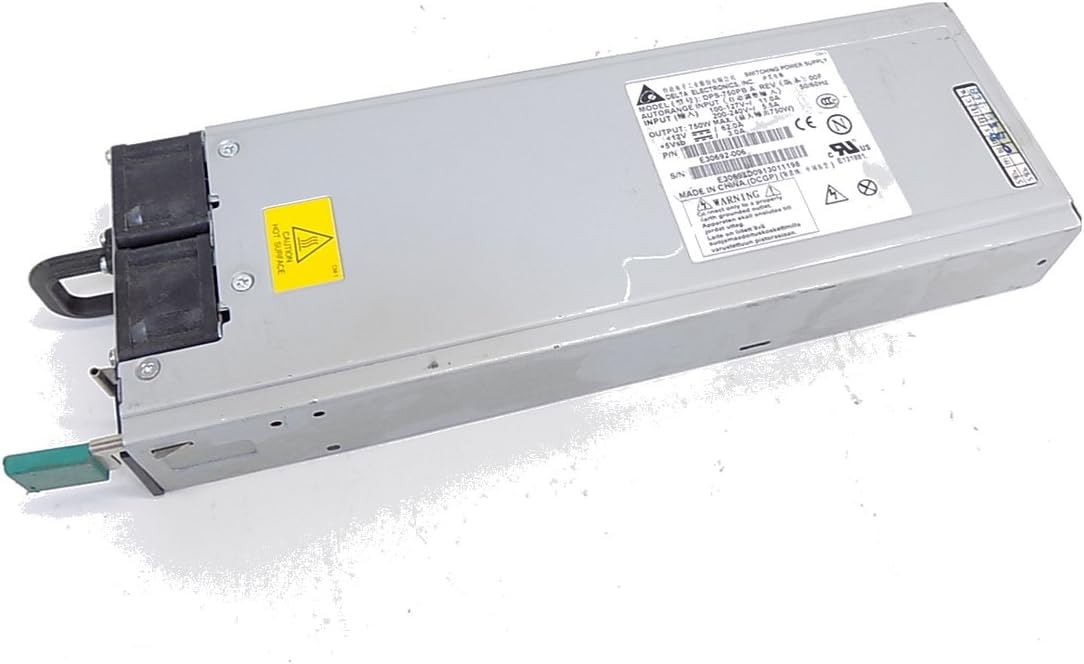
Rajah 4.1: Depan view of the Intel DPS-750PB AXX750WPS Power Supply, showing the cooling fan and AC power input.
- Selamatkan PSU: Align the screw holes on the power supply with those on the computer case. Secure the PSU using the appropriate screws (typically 4 screws).
- Sambungkan Kabel: Connect the power supply cables to your motherboard and other components. Refer to your motherboard manual for specific connector locations.
- Penyambung Papan Induk ATX 24-pin: Sambungkan kabel kuasa utama ini ke papan induk anda.
- 4/8-pin CPU Power Connector: Connect this to the CPU power socket on your motherboard.
- PCIe Connectors: Connect these to your graphics cards (if applicable).
- Penyambung Kuasa SATA: Connect these to your SATA hard drives, SSDs, and optical drives.
- Penyambung persisian (Molex): Connect these to other peripherals that require Molex power.

Rajah 4.2: Belakang view of the Intel DPS-750PB AXX750WPS Power Supply, illustrating the various output connectors for system components.
- Pengurusan Kabel: Route cables neatly to improve airflow and aesthetics within the case.
- Tutup Kes: Setelah semua sambungan selamat, tutup bekas komputer anda.
5. Arahan Operasi
Selepas pemasangan berjaya, ikuti langkah-langkah berikut untuk mengendalikan sistem anda:
- Sambungkan Kuasa: Plug the AC power cord into the power supply's inlet and then into a grounded wall outlet.
- Hidupkan kuasa: Flip the power switch on the back of the power supply to the 'ON' (I) position.
- Start Computer: Press the power button on your computer case. The system should power on and begin the boot sequence.
- Operasi Biasa: The power supply will operate quietly, providing stable power to your components. The fan will adjust its speed based on the internal temperature to maintain optimal cooling.
6. Penyelenggaraan
Penyelenggaraan berkala membantu memastikan jangka hayat dan prestasi optimum bekalan kuasa anda:
- Pastikan Ventilasi Bersih: Ensure that the intake and exhaust vents of the power supply are not obstructed by dust, cables, or other objects.
- Pembersihan Habuk: Periodically (e.g., every 6-12 months), use compressed air to gently clean dust from the power supply's fan and vents. Ensure the computer is powered off and unplugged before cleaning.
- Pemeriksaan Kabel: Occasionally inspect all power cables connected to the PSU for any signs of wear, fraying, or loose connections.
7. Penyelesaian masalah
If you encounter issues with your power supply, refer to the following troubleshooting tips:
- Tiada Kuasa:
- Pastikan kord kuasa AC dipasang dengan kukuh pada kedua-dua bekalan kuasa dan soket dinding.
- Check that the power switch on the back of the PSU is in the 'ON' (I) position.
- Sahkan bahawa soket dinding berfungsi dengan mengujinya dengan peranti lain.
- Confirm all internal power cables (24-pin ATX, CPU, PCIe, SATA) are firmly connected.
- Ketidakstabilan Sistem/Penutupan Rawak:
- Ensure the power supply's wattage (750W) is sufficient for all your system components.
- Check for overheating. Ensure proper ventilation and clean any dust from the PSU fan and case.
- Sahkan semua sambungan kuasa selamat.
- Bunyi Kipas Berlebihan:
- Tahap bunyi kipas tertentu adalah normal, terutamanya di bawah beban.
- If the noise is unusually loud or grinding, it may indicate dust buildup or a failing fan. Clean the fan as described in the Maintenance section.
If problems persist after attempting these steps, contact customer support or a qualified technician.
8. Spesifikasi
The following table details the technical specifications of the Intel DPS-750PB AXX750WPS Power Supply:
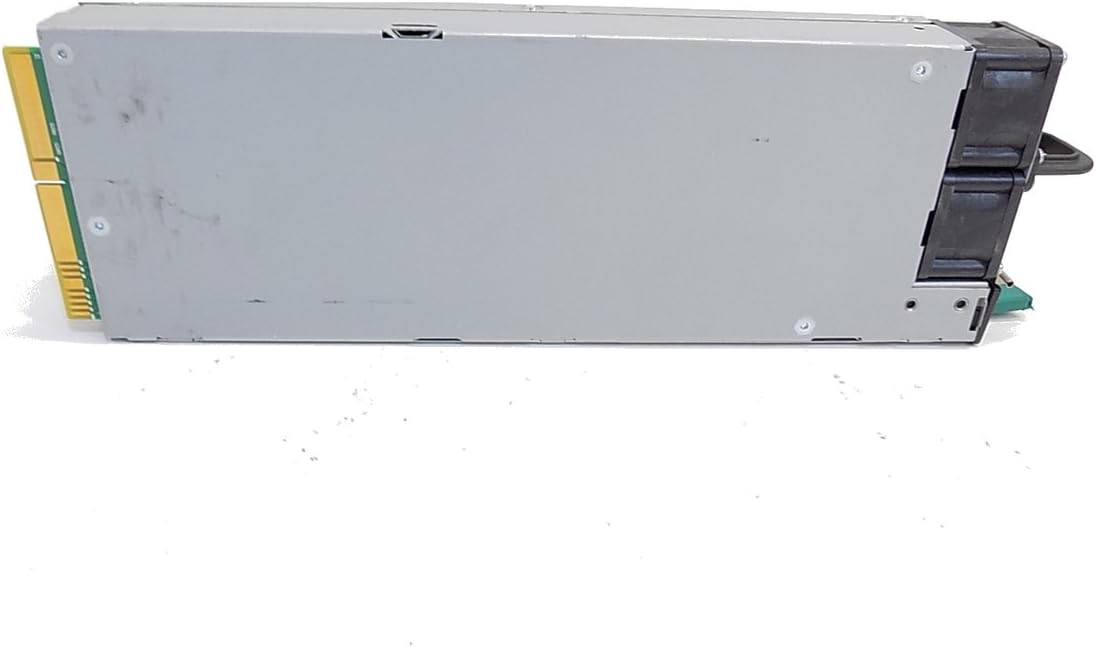
Rajah 8.1: Sisi view of the Intel DPS-750PB AXX750WPS Power Supply, showing the product label with detailed specifications.
| Ciri | Spesifikasi |
|---|---|
| Nama Model | AXX750WPS |
| Jenama | Intel |
| Peranti Serasi | Komputer Peribadi |
| Jenis Penyambung | ATX |
| Output Wattage | 750 Watt |
| Faktor Bentuk | ATX |
| Kaedah Penyejukan | Udara |
| Berat Barang | 5 paun |
| Kiraan Peminat | 1 |
| Input Maksimum Voltage | 240 Volt (AC) |
| Input Minimum Voltage | 110 Volt (AC) |
| UPC | 796762576876 |
| Nombor Bahagian Pengilang | AXX750WPS |
9. Maklumat Waranti
This Intel power supply is covered by a manufacturer's warranty. The specific terms and duration of the warranty may vary based on your region and point of purchase. Please retain your proof of purchase for warranty claims. For detailed warranty information, refer to the official Intel webtapak atau hubungi peruncit anda.
10. Sokongan Pelanggan
For technical assistance, troubleshooting beyond this manual, or warranty inquiries, please contact Intel customer support through their official website. You may also reach out to your product retailer for support.
When contacting support, please have your product model (AXX750WPS) and serial number (if available) ready.


