1. Pengenalan
Thank you for choosing the Rabbit Air BioGS 2.0 Air Purifier. This advanced system is designed to significantly improve your indoor air quality by effectively removing allergens, pollutants, odors, and harmful particles. Featuring a 4-stage filtration and deodorization process, including a BioGS HEPA filter and activated carbon filter, the SPA-550A is engineered for quiet operation and long-lasting performance. Please read this manual thoroughly to ensure proper setup, operation, and maintenance of your air purifier.

Rajah 1: Depan view of the Rabbit Air BioGS 2.0 Air Purifier.
2. Arahan Keselamatan Penting
Untuk mengurangkan risiko kebakaran, kejutan elektrik atau kecederaan, sentiasa ikuti langkah berjaga-jaga keselamatan asas ini:
- Baca semua arahan sebelum mengendalikan perkakas.
- Sentiasa cabut plag penulen udara sebelum mengalihkan, membersihkan atau melakukan sebarang penyelenggaraan.
- Do not operate any appliance with a damaged cord or plug. If the cord or plug is damaged, contact customer support.
- Jauhkan kord kuasa daripada permukaan yang dipanaskan.
- Jangan gunakan penulen udara di luar atau di permukaan basah.
- Jangan halang bukaan udara atau letakkan unit di atas permukaan lembut di mana bukaan mungkin tersumbat.
- Jangan masukkan objek asing ke dalam sebarang pengudaraan atau bukaan ekzos.
- Perkakas ini mempunyai palam terkutub (satu bilah lebih lebar daripada yang lain). Untuk mengurangkan risiko kejutan elektrik, palam ini bertujuan untuk dimuatkan dalam alur keluar terkutub hanya satu arah. Jika palam tidak muat sepenuhnya di dalam alur keluar, undurkan palam. Jika masih tidak muat, hubungi juruelektrik bertauliah. Jangan cuba untuk mengalahkan ciri keselamatan ini.
3. Produk Lebihview
The BioGS 2.0 Air Purifier features an intuitive design with easy-to-access controls and indicators. Familiarize yourself with the main components and functions:

Figure 2: Top control panel and indicators.
Komponen:
- Saluran Udara: Tempat udara yang telah ditulenkan dilepaskan.
- Pemegang Jauh: Convenient storage for the remote control.
- Butang Kawalan: Main power and mode selection.
- Petunjuk Kualiti Udara: LED lights indicating current air quality.
- Penunjuk Kelajuan Kipas: Displays the current fan speed setting (1-5).
- Timer Indicators: Shows active timer settings.
- Negative Ion On/Off: Indicator for the negative ionizer function.
- Pengambilan Udara: Located on both sides and bottom for efficient air circulation.
- Penderia Kualiti Udara: Detects odors and particles in the air.
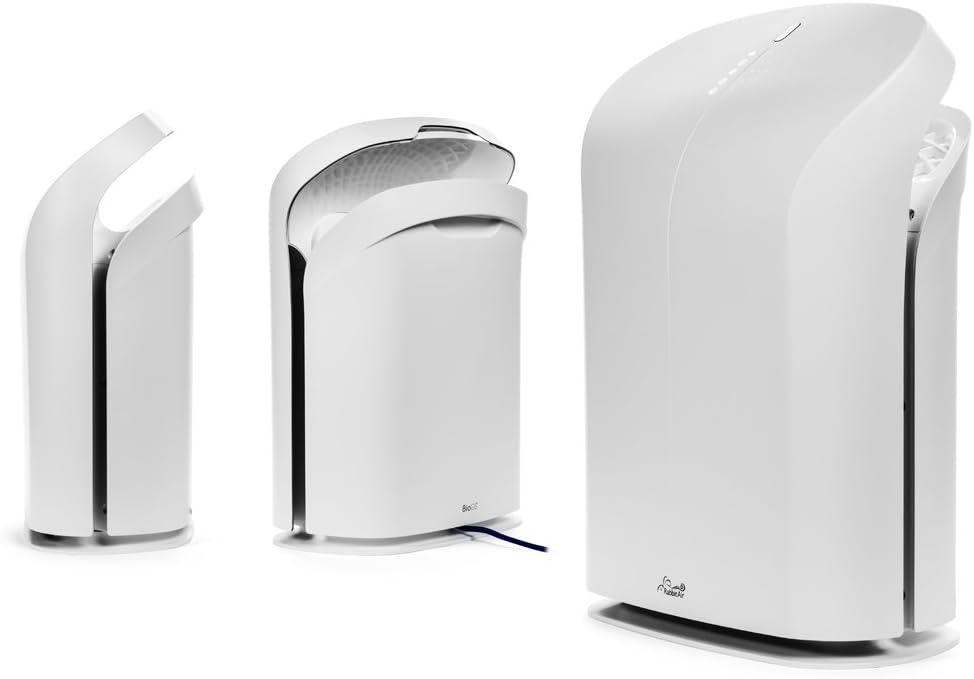
Rajah 3: Pelbagai views of the BioGS 2.0 Air Purifier.
4. Persediaan Awal
Follow these steps to set up your BioGS 2.0 Air Purifier:
- Buka bungkusan Unit: Keluarkan penulen udara daripada pembungkusannya dengan berhati-hati. Simpan pembungkusan untuk pengangkutan atau penyimpanan pada masa hadapan.
- Pemasangan Penapis: The filters are typically pre-installed. However, ensure all protective plastic packaging is removed from the filters before first use. Refer to the 'Maintenance' section for filter access.
- penempatan: Place the air purifier on a firm, level surface. Ensure there is adequate space around the unit (at least 6 inches from walls or furniture) for optimal air intake and output. Avoid placing it near heat sources or in direct sunlight.
- Sambungan Kuasa: Palamkan kord kuasa ke soket elektrik standard.

Figure 4: Recommended placement in a living room setting.
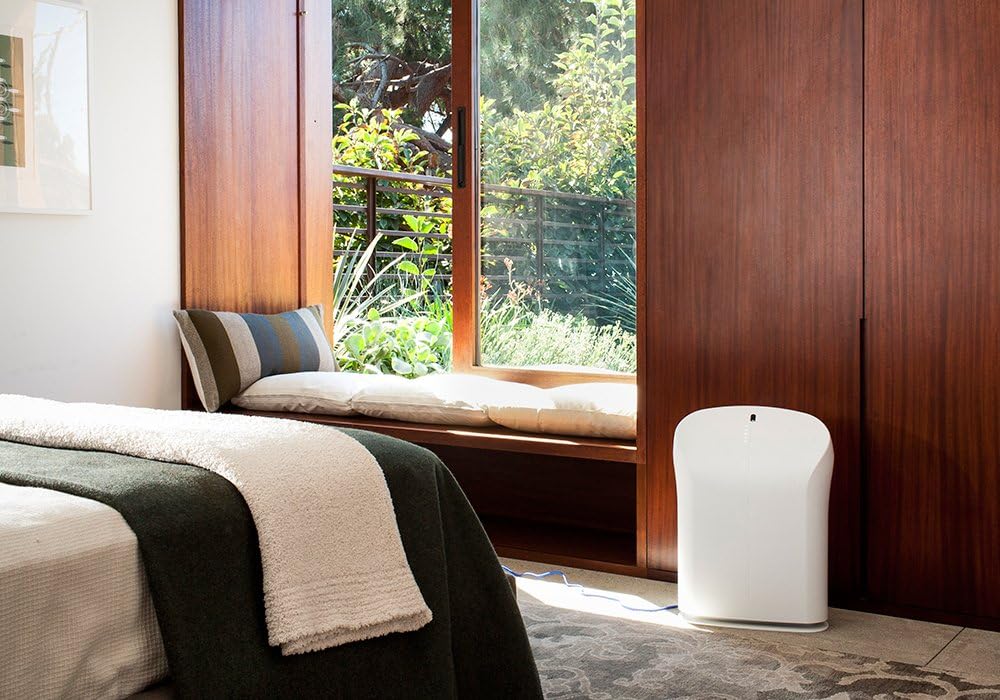
Figure 5: Recommended placement in a bedroom setting.
5. Arahan Operasi
The BioGS 2.0 can be operated using the control panel on the unit or the included remote control.

Figure 6: Remote control for the BioGS 2.0 Air Purifier.
5.1. Hidupkan/Mati Kuasa
Press the power button (usually indicated by a circle with a vertical line) on the control panel or remote to turn the unit on or off.
5.2. Pelarasan Kelajuan Kipas
The unit has five adjustable fan speeds. Press the fan speed button (often depicted as a gear or fan icon) repeatedly to cycle through the speeds. The corresponding LED indicators will illuminate.
5.3. Mod Auto
Activate Auto Mode by pressing the dedicated button (often an 'A' or circular arrow icon). In this mode, the air purifier automatically adjusts the fan speed based on the detected air quality, optimizing performance and energy consumption.
5.4. Fungsi Pemasa
Use the timer button (clock icon) to set the operating duration. You can typically set the unit to run for a specific number of hours before automatically turning off.
5.5. Negative Ion Function
The negative ionizer can be turned on or off by pressing its respective button (often a smiling face or wave icon). This function helps to freshen the air by releasing ion negatif.
5.6. Petunjuk Kualiti Udara
The LED lights on the control panel provide a visual indication of the current air quality, allowing you to monitor your environment at a glance.
6. Penyelenggaraan dan Penjagaan
Penyelenggaraan tetap memastikan prestasi optimum dan memanjangkan jangka hayat pembersih udara anda.
6.1. Pembersihan Pra-Penapis
The washable pre-filter captures larger particles. It should be cleaned regularly, typically once a month or as needed. To clean:
- Cabut palam unit.
- Remove the front panel and carefully detach the pre-filter.
- Vacuum the pre-filter with a brush attachment or rinse it under cool running water.
- Allow the pre-filter to air dry completely before reinstalling.
6.2. HEPA and Activated Carbon Filter Replacement
The BioGS HEPA and Charcoal-Based Activated Carbon Filters are designed to last up to three years with 12-hour daily use. Filter life may vary based on usage and air quality. Replace filters when the filter indicator light illuminates or when you notice a decrease in performance or an increase in odors.
- Cabut palam unit.
- Keluarkan panel hadapan dan penapis lama.
- Install new genuine Rabbit Air replacement filters, ensuring they are correctly seated.
- Reset the filter life indicator according to the instructions provided with the replacement filters or in the full user manual.
6.3. Pembersihan Am
Wipe the exterior of the unit with a soft, dry cloth. Do not use abrasive cleaners or solvents. Ensure the unit is unplugged before cleaning.
7. Panduan Penyelesaian Masalah
Rujuk jadual ini untuk isu biasa dan penyelesaiannya:
| Masalah | Kemungkinan Punca | Penyelesaian |
|---|---|---|
| Unit tidak dihidupkan. | No power, power cord loose, unit not plugged in. | Periksa sambungan kuasa, pastikan soket berfungsi. |
| Aliran udara yang lemah. | Clogged pre-filter, dirty HEPA/Carbon filters. | Clean pre-filter, replace HEPA/Carbon filters. |
| Bunyi yang tidak biasa. | Foreign object in fan, unit not on a level surface. | Unplug and check for obstructions. Place on a stable surface. |
| Bau berterusan. | Activated carbon filter saturated, source of odor too strong. | Replace activated carbon filter. Identify and remove odor source. |
8. Spesifikasi Teknikal
| Ciri | Spesifikasi |
|---|---|
| Nombor Model | SPA-550A |
| Dimensi Produk (D x W x H) | 9.8" x 16.6" x 22.2" |
| Berat badan | 16.8 paun |
| Kawasan Lantai yang Disyorkan | Sehingga 550 Kaki Persegi |
| Tahap Kebisingan | 25 Decibels (at lowest setting) |
| Wattage | 39 watt |
| Jangka Hayat Penapis | Up to 3 years (HEPA & Activated Carbon, 12-hour daily use) |
9. Waranti dan Sokongan Pelanggan
Rabbit Air stands behind the quality of its products. The BioGS 2.0 Air Purifier comes with an industry-leading five-year warranty, covering defects in materials and workmanship under normal use.
For technical assistance, warranty claims, or general inquiries, Rabbit Air offers 24/7 lifetime technical support. Please visit the official Rabbit Air website or refer to the contact information provided in your product packaging for the most current support details.
Sumber Dalam Talian: For additional information, FAQs, and filter purchasing, please visit the Rabbit Air Store on Amazon.


