1. Pengenalan
This manual provides essential information for the safe and effective use of your Sony FE 24-70mm f/4 Vario-Tessar T* OSS Zoom Lens. This compact full-frame Carl Zeiss mid-range zoom lens offers a versatile 24mm to 70mm focal length range with a constant maximum aperture of F4, ensuring consistent exposure. It is designed for use with full-frame and APS-C E-mount cameras and features dust and moisture resistance for reliable performance.
2. Maklumat Keselamatan
- Do not expose the lens to direct sunlight for extended periods, as this may damage the camera's image sensor.
- Elakkan daripada menjatuhkan atau mendedahkan kanta kepada hentaman yang kuat.
- Keep the lens away from water and moisture to prevent malfunction.
- Jangan cuba membuka atau mengubah suai kanta. Pembaikan hanya boleh dilakukan oleh kakitangan servis yang dibenarkan.
- Store the lens in a cool, dry place away from extreme temperatures.
3. Kandungan Pakej
- Lensa
- Lens hood (ALC-SH130: petal shape, bayonet type)
- Penutup hadapan kanta
- Penutup belakang lensa
- Kes
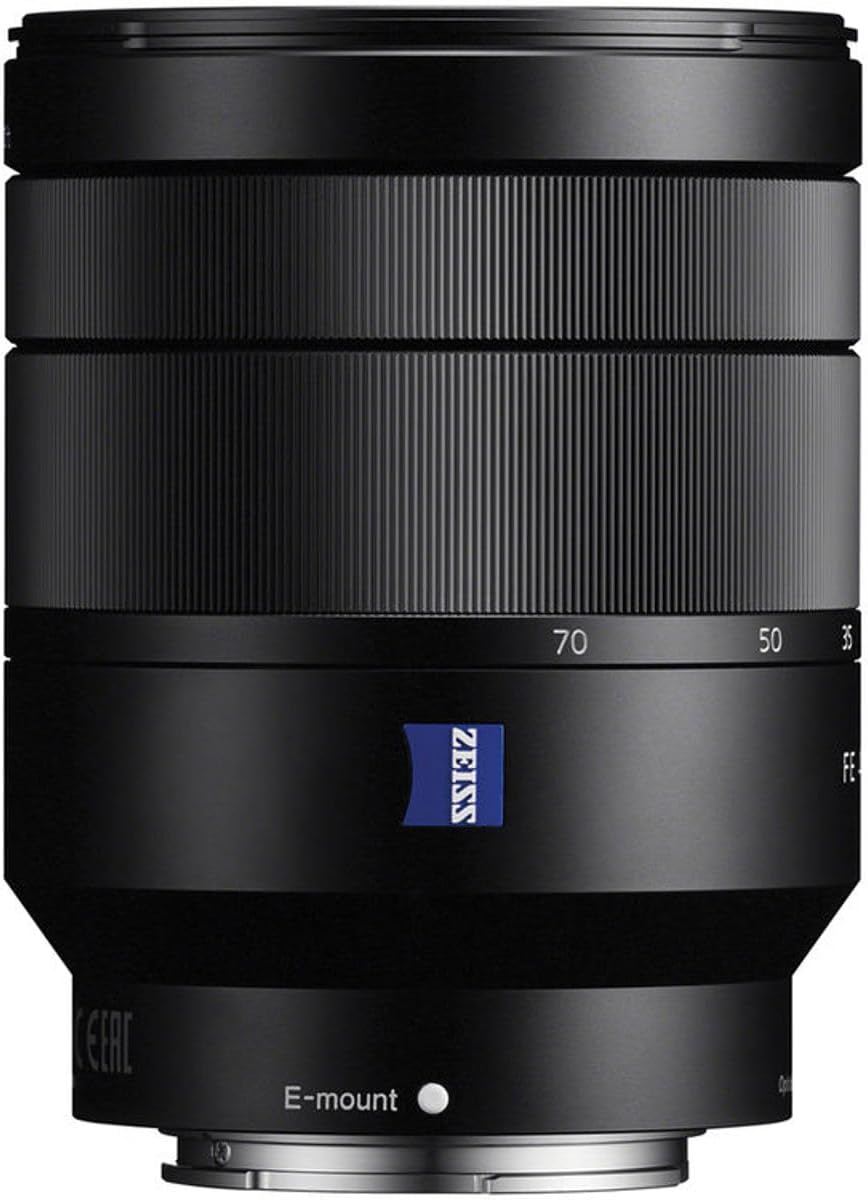
4. Pengenalan Bahagian
Familiarize yourself with the key components of your lens.

- Cincin Fokus: Digunakan untuk pemfokusan manual.
- Cincin Zum: Adjusts the focal length between 24mm and 70mm.
- E-mount Index: Align with the camera's mount index for attachment.
- Lens Hood Attachment Mark: For attaching the lens hood.
- Optical SteadyShot Switch: Activates or deactivates image stabilization.
- Tapis Benang: For attaching filters (67mm diameter).
5. Persediaan
Memasang Lensa
- Tanggalkan penutup lensa belakang dan penutup badan kamera.
- Align the white index mark on the lens with the white index mark on your camera body.
- Lekapkan kanta dengan memusingkannya mengikut arah jam sehingga ia berbunyi pada tempatnya.
- Attach the lens hood by aligning its mark with the lens hood attachment mark on the lens, then turn it clockwise until it locks.
Menanggalkan Kanta
- While pressing the lens release button on the camera body, turn the lens counter-clockwise until it stops.
- Keluarkan kanta.
- Attach the lens caps to protect the lens and camera sensor.
6. Mengendalikan Lensa
Mengezum
Rotate the zoom ring to adjust the focal length from 24mm (wide-angle) to 70mm (telephoto).
Memberi tumpuan
- Autofokus (AF): Set your camera to AF mode. The lens will automatically focus on your subject.
- Fokus Manual (MF): Set your camera to MF mode. Rotate the focus ring to achieve desired focus.
Optical SteadyShot (Image Stabilization)
This lens features built-in Optical SteadyShot image stabilization. Activate it via the switch on the lens or through your camera's menu for sharper images, especially in low light or when shooting handheld.
Kawalan Aperture
The lens maintains a constant maximum aperture of f/4 across the entire zoom range. Adjust the aperture through your camera's settings to control depth of field and exposure.
Video Usage
The lens's quiet linear motors and image stabilization are beneficial for video recording, minimizing operational noise and camera shake.
7. Penyelenggaraan dan Penjagaan
- Membersihkan Permukaan Lensa: Use a lens blower to remove dust, then gently wipe with a soft, clean lens cloth. Do not use organic solvents.
- Membersihkan Badan Lensa: Lap dengan kain lembut dan kering.
- Storan: When not in use, attach both front and rear lens caps. Store in a dry, well-ventilated area, away from direct sunlight and chemicals.
- Rintangan Habuk dan Kelembapan: While resistant, avoid exposing the lens to heavy rain or dust storms.
8. Penyelesaian masalah
Lens not attaching properly
- Ensure the index marks on the lens and camera body are aligned.
- Check for any obstructions on the lens mount or camera mount.
Autofokus perlahan atau tidak tepat
- Check camera's focus mode settings.
- Ensure there is sufficient light on the subject.
- Bersihkan sesentuh kanta pada kedua-dua kanta dan badan kamera.
Penstabilan imej tidak berfungsi
- Verify the Optical SteadyShot switch on the lens is set to ON.
- Check camera menu settings for image stabilization.
9. Spesifikasi
| Ciri | Penerangan |
|---|---|
| Panjang Fokus | 24-70mm |
| Apertur Maksimum | f/4 |
| Aperture minimum | F22 |
| Sudut dari View (35mm) | 84°-34° |
| Jarak Fokus Minimum | 1.32 kaki (0.4 m) |
| Nisbah Pembesaran Maksimum | 0.20x |
| Bilah Apertur | 7 (circular) |
| Filter Thread Diameter | 67mm |
| Jenis Kanta | Zum Standard |
| Pemasangan yang Serasi | Sony E |
| Dimensi | 3.74 x 2.87 x 2.87 inci |
| Berat Barang | 15 auns |
| Ciri Khas | Carl Zeiss T* coating, ED glass, Aspherical elements, Optical SteadyShot |
10. Waranti dan Sokongan
Untuk maklumat waranti dan sokongan pelanggan, sila rujuk Sony rasmi website or contact your local Sony service center. Keep your proof of purchase for warranty claims.
Online resources and FAQs may also be available on the Sony support portal.
This product is covered by Sony's standard warranty. Additional protection plans may be available for purchase.