Eurotime LCD Digital Alarm Clock Model 23708-00 User Manual
Model: 23708-00
pengenalan
This manual provides instructions for the setup, operation, and maintenance of your Eurotime LCD Digital Alarm Clock, Model 23708-00. Please read this manual thoroughly before using the product to ensure proper function and longevity.
The Eurotime LCD Digital Alarm Clock features an LCD display, 7-color changing LED lighting, multiple natural alarm tones, and displays time, date, day of the week, and indoor temperature. It also includes a snooze function and a countdown feature.
Maklumat Keselamatan
- Jauhkan peranti daripada air dan kelembapan yang tinggi.
- Jangan dedahkan peranti kepada cahaya matahari langsung atau suhu yang melampau.
- Use only the specified battery type (3 x 1.5V AAA batteries).
- Jangan campurkan bateri lama dan baharu, atau jenis bateri yang berlainan.
- Buang bateri terpakai secara bertanggungjawab mengikut peraturan tempatan.
- Jangan cuba membuka atau membaiki peranti sendiri. Hubungi kakitangan yang berkelayakan untuk perkhidmatan.
Kandungan Pakej
- Eurotime LCD Digital Alarm Clock (Model 23708-00)
- 3 x Bateri AAA 1.5V
- Manual Pengguna (dokumen ini)
Produk Selesaiview
Biasakan diri anda dengan komponen dan kawalan jam loceng anda.
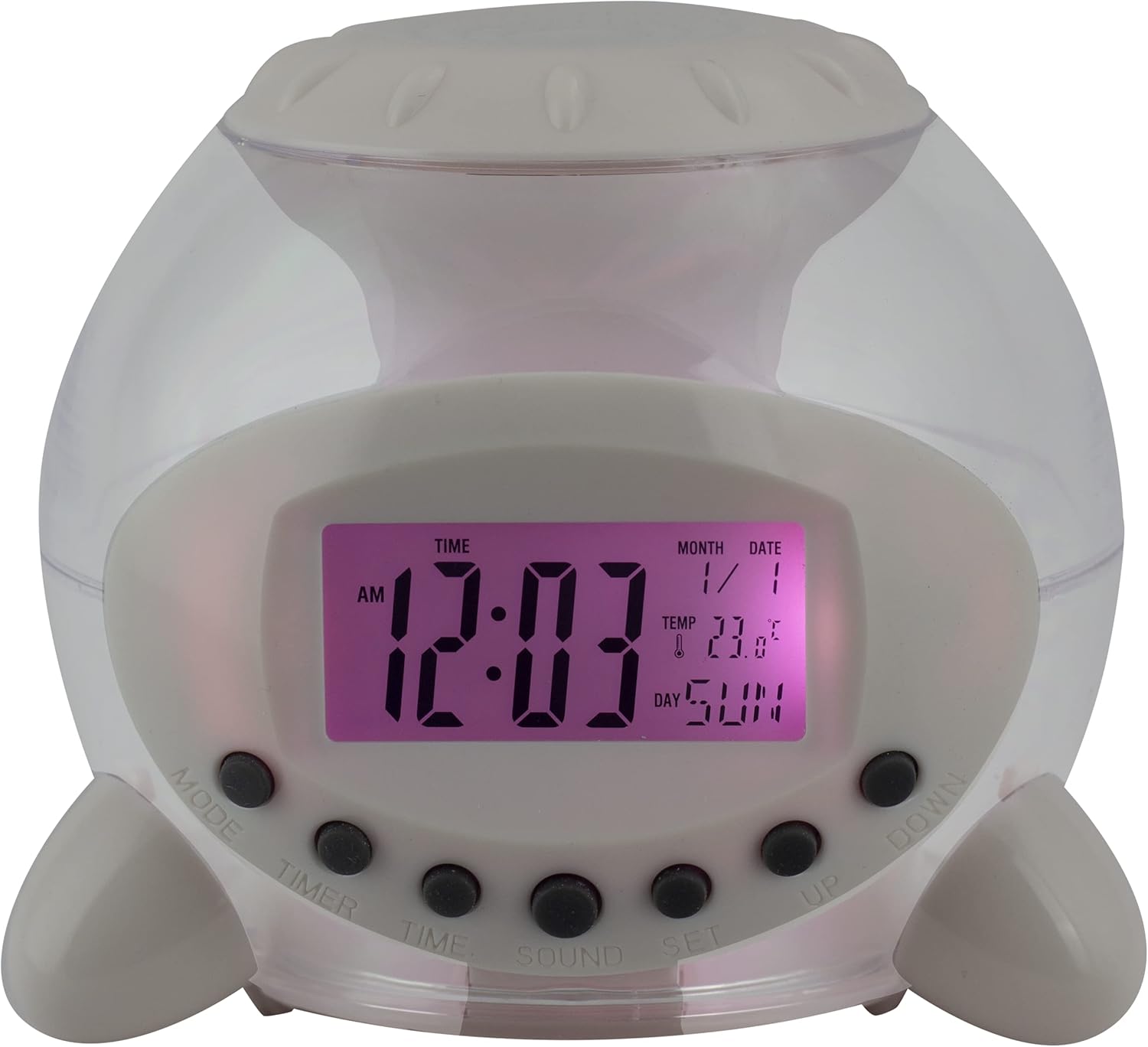
Rajah 1: Depan View of the Alarm Clock. This image displays the front of the Eurotime LCD Digital Alarm Clock, highlighting its transparent plastic housing and the central LCD screen. The screen shows the time (12:03 AM), month (1), date (1), temperature (23.8°C), and day (SUN). Below the screen are control buttons labeled MODE, TIMER, TIME, SOUND, and SET, along with UP and DOWN buttons.

Rajah 2: Sisi View with Control Buttons. This image shows a side perspective of the alarm clock, emphasizing the array of control buttons located on the front-bottom edge. The transparent housing allows a glimpse of the internal structure and the LED lighting effect. The buttons are clearly visible for user interaction.

Rajah 3: Sisi View with Internal Lighting. Imej ini memberikan sisi lain view, illustrating the transparent housing and the internal LED lighting. The light emanates from the base, creating a soft glow within the clock's structure, demonstrating its color-changing feature.
Butang Kawalan:
- ARAHAN: Switches between time display, alarm setting, and countdown timer.
- PEMASA: Activates and sets the countdown timer.
- MASA: Used to set the current time and date.
- BUNYI: Selects alarm tones or natural sounds.
- SET: Confirms settings or enters setting mode.
- ATAS BAWAH: Adjusts values during setting modes.
Persediaan
1. Pemasangan Bateri
- Locate the battery compartment on the bottom of the alarm clock.
- Buka penutup petak bateri.
- Masukkan tiga (3) bateri AAA 1.5V, pastikan kekutuban (+/-) yang betul.
- Tutup penutup petak bateri dengan selamat.
Nota: The clock will automatically power on after battery installation. The display may flash, indicating it's ready for time setting.
Arahan Operasi
1. Menetapkan Masa dan Tarikh
- Dalam mod paparan masa biasa, tekan butang MASA butang sekali. Digit jam akan berkelip.
- Gunakan UP or TURUN butang untuk melaraskan jam.
- Tekan MASA again to move to minute setting. Adjust with UP or TURUN.
- Teruskan menekan MASA to cycle through year, month, and date settings, adjusting each with UP or TURUN.
- After setting the date, press MASA one last time or wait a few seconds for the settings to be saved and return to normal display.
2. Menetapkan Penggera
- Tekan ke MODE button until "ALARM" appears on the display (or an alarm icon).
- Tekan ke SET butang. Angka waktu penggera akan berkelip.
- Gunakan UP or TURUN butang untuk melaraskan jam penggera.
- Tekan SET again to move to minute setting. Adjust with UP or TURUN.
- Tekan SET one last time to confirm the alarm time.
- Untuk mengaktifkan/menyahaktifkan penggera, tekan butang UP button in alarm display mode. An alarm icon will appear/disappear.
3. Fungsi Tunda
When the alarm sounds, press any button (except SET or MODE) to activate the snooze function. The alarm will pause and sound again after a few minutes (duration is adjustable, refer to advanced settings if available).
Untuk mematikan penggera sepenuhnya, tekan butang SET button when it is sounding.
4. Color Changing LED Lighting
The alarm clock features a 7-color changing LED light. This function typically activates automatically when the alarm sounds or can be manually toggled. Refer to the MODE or SET button for specific controls related to the lighting, if available.
5. Natural Alarm Tones
To select an alarm tone:
- In alarm setting mode (after pressing MODE to display alarm time), press the BUNYI butang.
- Gunakan UP or TURUN buttons to cycle through the available natural alarm tones.
- Tekan SET untuk mengesahkan pilihan anda.
6. Countdown Feature
Untuk menggunakan pemasa undur:
- Tekan ke MODE button until "TIMER" appears on the display.
- Tekan ke PEMASA butang. Angka jam akan berkelip.
- guna UP or TURUN to set the desired countdown hour.
- Tekan PEMASA again to set minutes, then seconds.
- Tekan SET untuk memulakan kira detik.
- To pause or resume, press SET. Untuk menetapkan semula, tekan MODE.
Penyelenggaraan
Pembersihan
- Lap jam dengan kain lembut dan kering.
- Do not use abrasive cleaners or solvents, as they may damage the plastic housing or display.
Penggantian Bateri
When the display dims or functions become erratic, it is time to replace the batteries. Follow the "Battery Installation" steps in the Setup section.
Menyelesaikan masalah
| Masalah | Kemungkinan Punca | Penyelesaian |
|---|---|---|
| Paparan kosong atau malap. | Low or depleted batteries. Incorrect battery installation. | Replace batteries with new 1.5V AAA batteries. Ensure correct polarity. |
| Penggera tidak berbunyi. | Alarm is not activated. Alarm volume is too low (if adjustable). | Ensure the alarm icon is displayed. Check alarm settings. |
| Masa/Tarikh tidak betul. | Not set correctly after battery installation or power interruption. | Follow "Setting Time and Date" instructions to reset. |
| Color changing light not working. | Feature not activated or malfunction. | Check operating instructions for light activation. If problem persists, contact support. |
Spesifikasi
- Jenama: Eurotime
- Nombor Model: 23708-00
- Dimensi Produk: 8.99 x 8.99 x 8 cm
- Berat: 120 g
- Bahan: plastik
- Jenis Paparan: LCD Digital
- Ciri Khas: Calendar display, Snooze, Alarm, 7-Color Changing LED, Natural Alarm Tones, Countdown Feature, Indoor Temperature Display
- Sumber Kuasa: 3 x Bateri AAA 1.5V (termasuk)
Waranti dan Sokongan
For warranty information or technical support, please refer to the retailer where the product was purchased or visit the official Eurotime webtapak. Simpan resit pembelian anda sebagai bukti pembelian.


