pengenalan
This manual provides comprehensive instructions for the setup, operation, maintenance, and troubleshooting of your Memorex MVR-4049 Hi-Fi Stereo Video Cassette Recorder (VCR). Please read this manual thoroughly before operating the unit to ensure proper use and to maximize its performance and longevity.
Langkah-langkah Keselamatan
- Do not expose the VCR to rain or moisture.
- Jangan menyekat bukaan pengudaraan.
- Do not place objects filled with liquids, such as vases, on the VCR.
- Rujuk semua servis kepada kakitangan perkhidmatan yang berkelayakan.
- Unplug the VCR from the wall outlet during lightning storms or when unused for long periods.
Persediaan
Membongkar dan Kandungan
Carefully remove the VCR from its packaging. Ensure all components are present. Typically, the package includes:
- Memorex MVR-4049 VCR Unit
- Kord Kuasa AC
- Kabel Audio/Video (jenis RCA)
- Alat Kawalan Jauh (jika disertakan dengan model anda)
Connecting Your VCR
Before connecting, ensure the VCR and all connected devices are powered off.
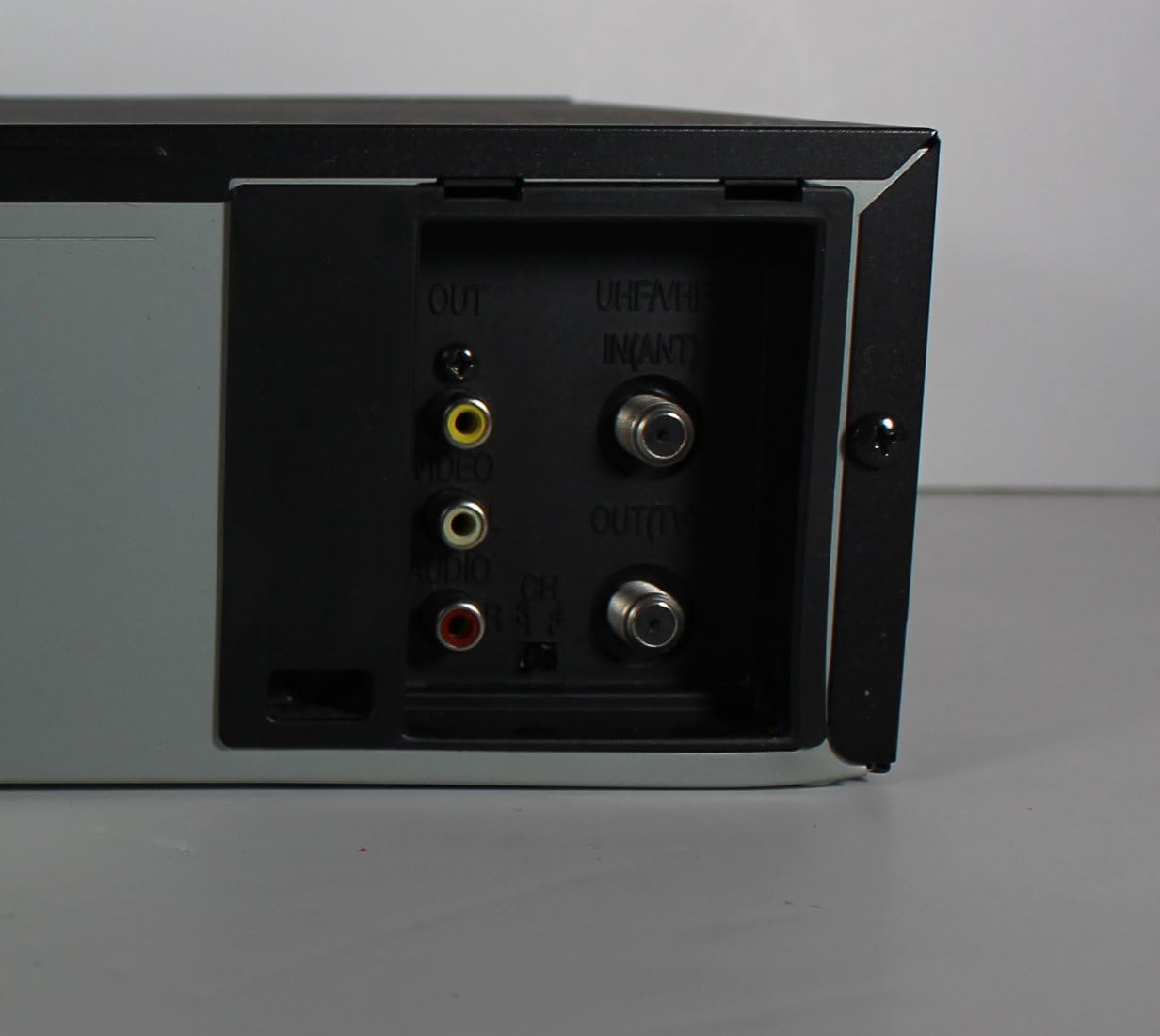
Figure 1: Rear panel connections of the Memorex MVR-4049 VCR. This image displays the various audio, video, and antenna input/output ports, including composite video (yellow), stereo audio (red/white), and RF coaxial connections.
- Audio/Video Connection (RCA):
Connect the yellow (video), white (audio left), and red (audio right) RCA cables from the VCR's "VIDEO OUT" and "AUDIO OUT" ports to the corresponding "VIDEO IN" and "AUDIO IN" ports on your television or receiver. For recording from an external source, connect the source's "VIDEO OUT" and "AUDIO OUT" to the VCR's "VIDEO IN" and "AUDIO IN" ports.
- Antenna/Cable Connection (RF Coaxial):
If connecting to an antenna or cable TV, connect the incoming coaxial cable to the VCR's "UHF/VHF IN (ANT)" port. Then, connect a coaxial cable from the VCR's "OUT (TV)" port to the "ANTENNA IN" or "RF IN" port on your television.
- Sambungan Kuasa:
Once all audio/video and antenna connections are made, plug the VCR's AC power cord into a standard electrical outlet.
Kuasa Awal Hidup
Tekan ke KUASA button on the VCR's front panel or remote control. The VCR should power on, and the display will illuminate. Follow any on-screen prompts for initial setup, such as setting the clock or tuning channels, if applicable.
Arahan Operasi
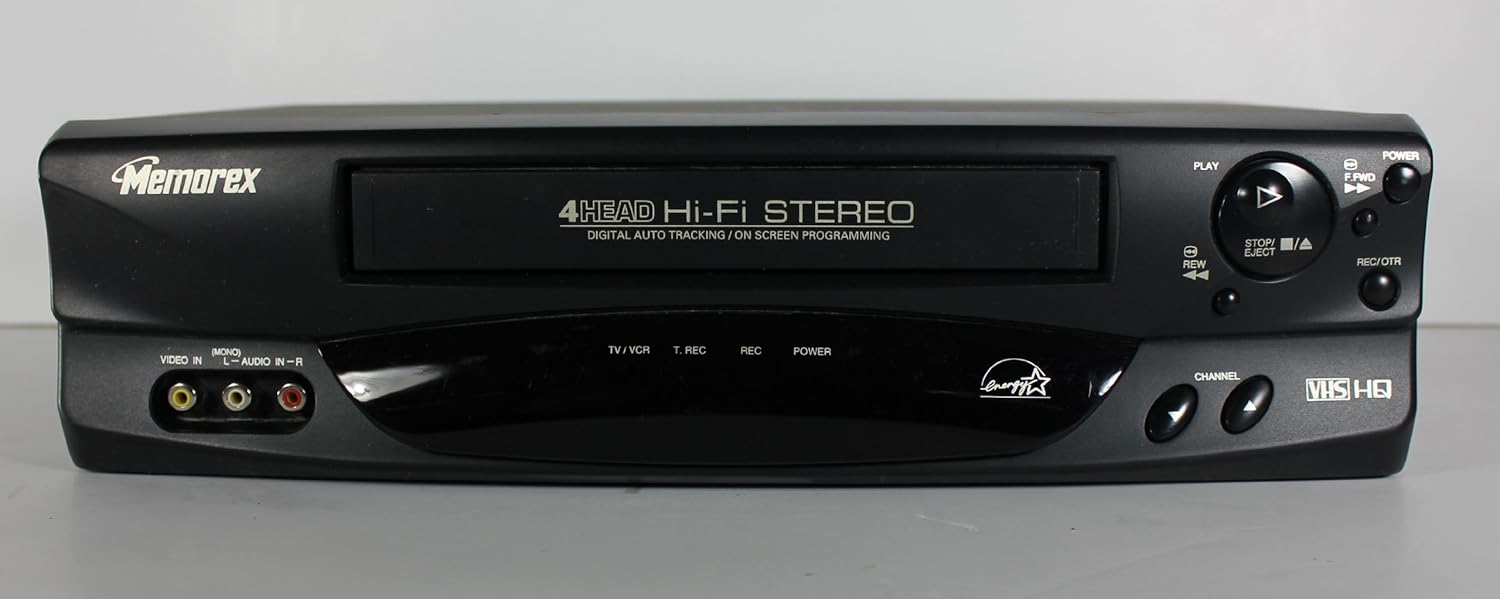
Figure 2: Front panel of the Memorex MVR-4049 VCR, showing the tape loading slot, playback controls (Play, Stop, Rewind, Fast Forward, Eject), power button, recording button, and input jacks.
- Masukkan Pita: Gently insert a VHS cassette into the tape slot with the label side facing up. The VCR will automatically pull the tape in.
- Main: Tekan ke MAIN (►) butang. VCR akan mula memainkan pita.
- Berhenti: Tekan ke BERHENTI (■) butang untuk menghentikan main balik.
- Rewind/Fast Forward: Tekan ke REW (◀◀) or F.FWD (▶▶) buttons to rewind or fast forward the tape.
- Keluarkan: Tekan ke EJECT (▲) button to remove the tape.
Rakaman
The Memorex MVR-4049 features 4-Head Hi-Fi Stereo recording and Digital Auto Tracking for optimal recording quality.
- Rakaman Satu Sentuhan (OTR):
With a blank or recordable tape inserted, tune the VCR to the desired channel or select the appropriate input source (e.g., VIDEO IN). Press the REC/OTR button. Each press typically adds 30 minutes to the recording time. Press BERHENTI untuk menamatkan rakaman.
- Timer Recording (On Screen Programming):
Utilize the On Screen Programming feature to set up timed recordings. Access the VCR's menu system (usually via a MENU or SETUP button on the remote, if available) and navigate to the timer recording settings. You will typically set the start time, end time, channel, and recording speed (SP/LP/EP).
Digital Auto Tracking
The MVR-4049 automatically adjusts the video heads for optimal picture quality during playback. If the picture appears noisy or distorted, the VCR's auto-tracking system will attempt to correct it. Manual tracking adjustment may be available via the remote control if needed for severely damaged tapes.
Penyelenggaraan
Membersih Bahagian Luar
Wipe the exterior of the VCR with a soft, dry cloth. For stubborn stains, use a slightly damp cloth with a mild detergent, then wipe dry immediately. Do not use abrasive cleaners or solvents.
Pembersihan Kepala Pita
Over time, dust and tape residue can accumulate on the VCR's heads, leading to poor picture and sound quality. Use a dry-type VCR head cleaning cassette periodically (e.g., every 50-100 hours of use) according to the cleaning cassette's instructions. Avoid wet-type cleaners as they can damage the heads.
Penjagaan Pita
- Store tapes in their cases to protect them from dust and physical damage.
- Avoid exposing tapes to extreme temperatures or direct sunlight.
- Gulungkan pita sepenuhnya sebelum menyimpannya.
Menyelesaikan masalah
If you experience problems with your VCR, consult the following table before seeking professional service.
| Masalah | Kemungkinan Punca | Penyelesaian |
|---|---|---|
| Tiada Kuasa | Kord kuasa dicabut; Salur keluar kuasa tidak aktif. | Pastikan kord kuasa dipasang dengan kukuh; Uji soket dengan peranti lain. |
| Tiada Gambar/Bunyi | Incorrect input selected on TV; Loose A/V cables; Incorrect channel. | Select correct TV input (e.g., Video 1, AV); Check A/V cable connections; Ensure VCR is on correct channel for TV signal. |
| Poor Picture Quality (Snowy/Distorted) | Dirty VCR heads; Damaged tape; Incorrect tracking. | Use a VCR head cleaning cassette; Try a different tape; Allow auto-tracking to adjust or manually adjust if remote allows. |
| Tape Won't Eject | Power failure; Tape jammed. | Ensure VCR is powered on; Do not force the tape, seek professional service if jammed. |
| Alat Kawalan Jauh Tidak Berfungsi | Dead batteries; Obstruction between remote and VCR. | Replace batteries; Remove any obstructions; Ensure remote is pointed at the VCR's sensor. |
Spesifikasi
The following specifications are for the Memorex MVR-4049 VCR:
- model: MVR-4049
- Ketua: 4-Kepala
- Audio: Stereo Hi-Fi
- Penjejakan: Digital Auto Tracking
- Pengaturcaraan: On Screen Programming
- Mod Output Audio: Stereo
- Dimensi (Lebih kurang): 50.04 x 31.5 x 18.29 cm (Dimensi Bungkusan)
- Berat (Lebih kurang): 3.58 kg
- Sumber Kuasa: AC 120V, 60Hz (Standard for North America)
- ASIN: B00F667E84
- Pertama Tersedia: 21 Oktober 2013
Catatan: Spesifikasi boleh berubah tanpa notis.
Maklumat Waranti
Memorex products are manufactured to high quality standards. This product is covered by a limited warranty against defects in materials and workmanship for a period specified at the time of purchase. Please retain your proof of purchase for warranty claims. For specific warranty terms and conditions, refer to the documentation included with your purchase or visit the official Memorex support webtapak.
This warranty does not cover damage caused by accident, misuse, abuse, improper installation or operation, lack of reasonable care, unauthorized modification, or the use of unauthorized parts.
Sokongan Pelanggan
For technical assistance, troubleshooting beyond this manual, or service inquiries, please contact Memorex customer support. Support contact information can typically be found on the official Memorex webtapak atau pada pembungkusan produk.
When contacting support, please have your product model number (MVR-4049) and a detailed description of the issue ready.


