1. Pengenalan
This manual provides instructions for the installation, programming, and operation of the Galcon 7101D 1-Station Battery Operated Irrigation Controller with a 3/4-inch waterproof valve. The 7101D controller is designed for automated operation of drip and sprinkler systems. It is completely waterproof and can be installed above or below ground, including in valve boxes or areas where it may be submerged up to 3 feet. The controller operates on a single 9V alkaline battery.
2. Maklumat Keselamatan
- Baca semua arahan dengan teliti sebelum pemasangan dan operasi.
- Use only a 9V alkaline battery. Do not use rechargeable batteries.
- Ensure proper sealing of the battery compartment to maintain waterproofing.
- This product is designed for use only in the USA and Canada.
- Jangan cuba membuka atau membaiki unit sendiri. Hubungi sokongan pelanggan untuk mendapatkan bantuan.
3. Kandungan Pakej
Sahkan bahawa semua komponen terdapat dalam pakej:
- Galcon 7101D 1-Station Battery Operated Controller
- 3/4-inch Inline Irrigation Valve
- Manual Pengguna (dokumen ini)
4. Ciri-ciri Produk
- Controller, solenoid, and 3/4" valve integrated into one unit.
- Easy programming with 6 large buttons.
- Manual operation and rain delay functions.
- Weekly or Cyclic programming options.
- Completely waterproof and UV resistant construction.
- Designed for use in the USA and Canada.
5. Persediaan dan Pemasangan
5.1 Pemasangan Bateri
- Cari petak bateri pada pengawal.
- Buka penutup petak bateri.
- Insert one new 9V alkaline battery, ensuring correct polarity.
- Tutup penutup petak bateri dengan kemas untuk mengekalkan pengedap kalis air.
5.2 Controller and Valve Installation
The Galcon 7101D integrates the controller and valve into a single unit.
- Identify the water flow direction. The valve has an arrow indicating the correct flow.
- Connect the inlet side of the valve to your main water supply line.
- Connect the outlet side of the valve to your irrigation system (drip or sprinkler lines).
- Pastikan semua sambungan rapat untuk mengelakkan kebocoran.
- The unit can be installed above ground or submerged in a valve box up to 3 feet deep.

Rajah 1: Galcon 7101D Controller and Valve Assembly. This image shows the integrated controller and valve unit, highlighting its compact design.
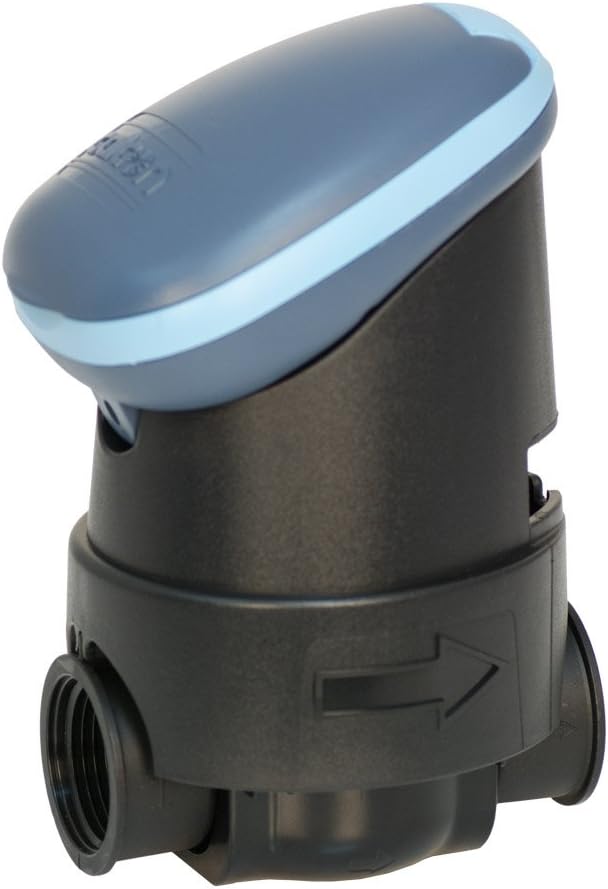
Rajah 2: Galcon 7101D Valve with Flow Direction Arrow. This image illustrates the valve component, showing the arrow indicating the correct water flow direction for installation.
6. Arahan Operasi
The Galcon 7101D features 6 large buttons for programming and operation. Refer to the on-screen prompts for specific settings.
6.1 Menetapkan Waktu dan Hari Semasa
Follow the on-screen instructions to set the current time and day of the week. This is crucial for accurate scheduling.
6.2 Pengaturcaraan Jadual Pengairan
The controller supports two main programming modes:
- Pengaturcaraan Mingguan: Set specific days of the week for irrigation.
- Pengaturcaraan Kitaran: Set an irrigation cycle (e.g., every 2 days) regardless of the day of the week.
Use the programming buttons to navigate through the menu and set:
- Start Time(s)
- Duration of watering (in minutes)
- Frequency (specific days or cycle interval)
6.3 Operasi Manual
To manually turn the water on or off, use the dedicated manual operation button. This allows for immediate watering outside of the programmed schedule.
6.4 Fungsi Kelewatan Hujan
Activate the rain delay function to temporarily suspend irrigation for a set period (e.g., 24, 48, 72 hours) after rainfall. This conserves water and prevents overwatering.
7. Penyelenggaraan
- Penggantian Bateri: Replace the 9V alkaline battery annually, or when the low battery indicator appears on the display.
- Pembersihan: Bersihkan bahagian luar pengawal dengan iklanamp kain. Jangan gunakan pembersih atau pelarut yang melelas.
- Musim sejuk: In freezing climates, remove the controller and valve from the irrigation system and store indoors to prevent freeze damage.
8. Penyelesaian masalah
| Masalah | Kemungkinan Punca | Penyelesaian |
|---|---|---|
| Paparan pengawal kosong. | Bateri mati atau tidak dipasang dengan betul. | Replace the 9V alkaline battery, ensuring correct polarity. |
| Injap tidak boleh dibuka/tutup. | Low battery, incorrect programming, or debris in valve. | Check battery, verify programming, or inspect valve for obstructions. |
| Kebocoran air daripada sambungan. | Sambungan longgar atau pengedap yang rosak. | Tighten connections. If leaks persist, check for damaged O-rings or seals. |
| Irrigation does not start at scheduled time. | Incorrect time/day setting, rain delay active, or programming error. | Verify current time and day, check if rain delay is active, review irrigation program. |
9. Spesifikasi
- model: 7101D
- Nombor Bahagian: GAR6S2312P0
- Injap Saiz: 3/4 inci
- Sumber Kuasa: 1 x 9V Alkaline Battery (required)
- Penilaian Kalis Air: IP-68 (submersible up to 3 feet)
- Pilihan Pengaturcaraan: Weekly or Cyclic
- Dimensi: 4.4 x 3.9 x 7.4 inci (Produk)
- Berat: 3.2 auns
- Pengeluar: Galcon USA, LTD
- Operating Region: Amerika Syarikat dan Kanada
10. Waranti dan Sokongan
For warranty information or technical support, please contact Galcon customer service. Refer to the product packaging or the official Galcon webtapak untuk butiran hubungan semasa.
Nota: Unauthorized disassembly or modification of the product may void the warranty.


