1. Pengenalan
This manual provides detailed instructions for the proper setup, operation, maintenance, and troubleshooting of your JVC HR-VP58U 4 Head Hi-Fi Stereo VCR. Please read this manual thoroughly before using the unit to ensure optimal performance and safety. Keep this manual for future reference.
2. Maklumat Keselamatan Penting
AMARAN: To reduce the risk of fire or electric shock, do not expose this appliance to rain or moisture. Do not remove the cover. Refer servicing to qualified personnel only.
- Pastikan bekalan kuasa voltage matches the rating on the unit.
- Jangan menyekat bukaan pengudaraan.
- Elakkan meletakkan unit berhampiran sumber haba atau di bawah cahaya matahari langsung.
- Jangan dedahkan unit kepada cecair yang menitis atau percikan.
- Cabut palam unit semasa ribut petir atau apabila tidak digunakan untuk tempoh yang lama.
3. Kandungan Pakej
Sahkan bahawa pakej anda mengandungi item berikut:
- JVC HR-VP58U VCR Unit
- Alat Kawalan Jauh
- Kord Kuasa (dipasang)
- Audio/Video Cables (RCA type, typically red, white, yellow)
- Manual Arahan (dokumen ini)
4. Produk Lebihview
4.1 Panel Depan

Rajah 1: Depan view of the JVC HR-VP58U VCR with its remote control. The VCR features a power button, tape slot, and front audio/video input jacks.

Rajah 2: Terperinci view of the JVC HR-VP58U VCR's front panel, showing playback controls (Play, Rewind, Fast Forward, Stop/Eject, Pause) and the remote control.
The front panel provides access to essential controls and input jacks for convenient operation. Key features include:
- Butang kuasa: Menghidupkan atau mematikan VCR.
- Tape Slot: Insert VHS tapes for playback or recording.
- VIDEO (MONO) L-AUDIO-R Jacks: Front panel audio/video input for temporary connections (e.g., camcorder).
- Kawalan Main Semula: Buttons for Play, Stop/Eject, Rewind, Fast Forward, and Pause.
- paparan: Shows current channel, time, and operational status.
4.2 Panel Belakang

Rajah 3: Rear panel of the JVC HR-VP58U VCR, displaying the power cord, serial number, and various audio/video input/output ports.
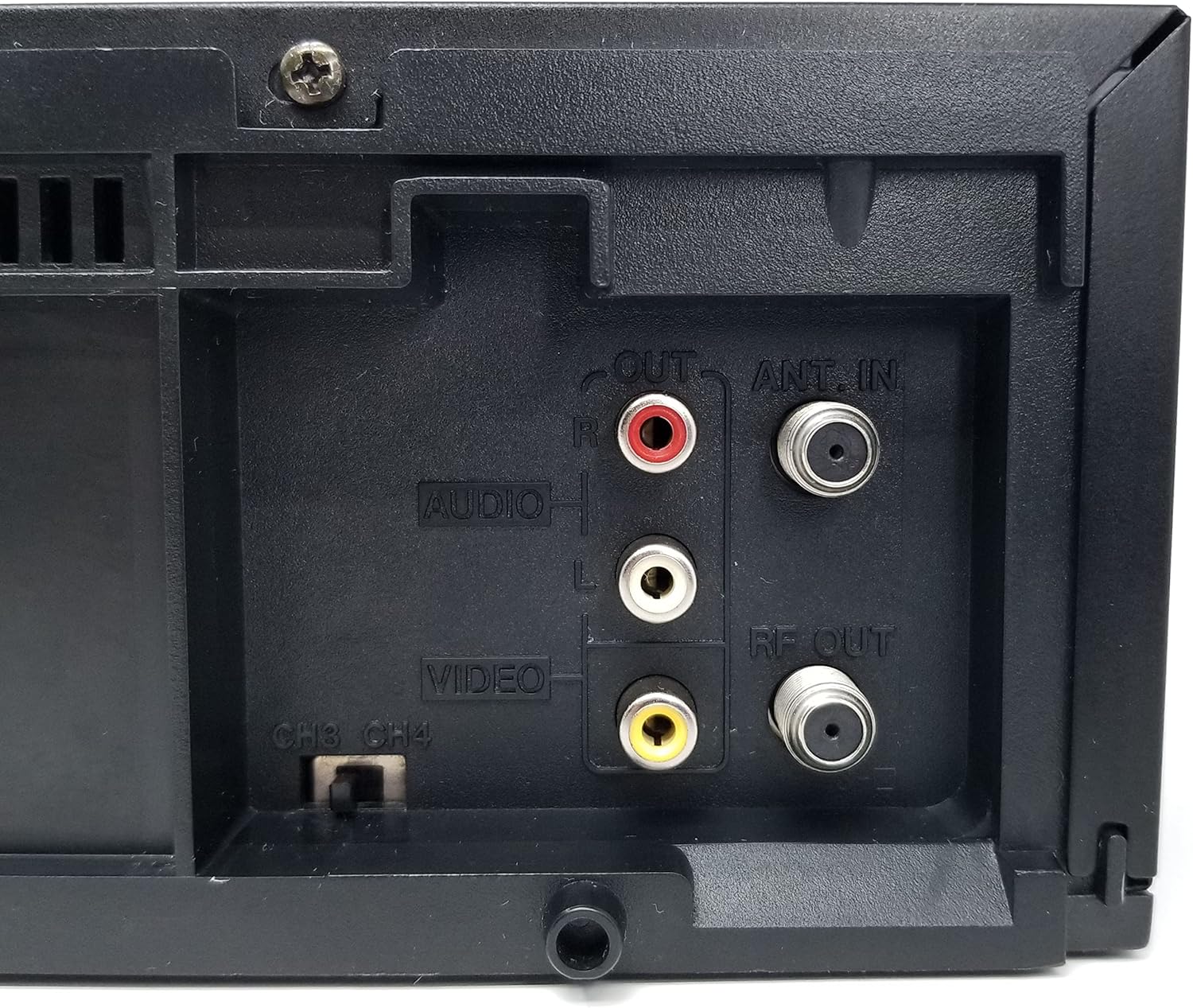
Rajah 4: Close-up of the rear audio (red/white RCA), video (yellow RCA), RF OUT, and ANT. IN connections on the JVC HR-VP58U VCR.
The rear panel houses all necessary connections for integrating the VCR into your home entertainment system.
- ANT. IN: Connects to your antenna or cable TV signal.
- RF KELUAR: Connects to your TV's antenna input (typically for older TVs).
- AUDIO OUT (L/R) & VIDEO OUT: RCA jacks (red, white, yellow) for connecting to your TV or audio receiver.
- AUDIO IN (L/R) & VIDEO IN: RCA jacks (red, white, yellow) for connecting external devices for recording.
- CH3/CH4 Switch: Selects the RF output channel for your TV.
5. Persediaan
5.1 Menyambung ke Televisyen
Terdapat dua kaedah utama untuk menyambungkan VCR anda ke televisyen:
- Using RCA Audio/Video Cables (Recommended for best quality):
- Connect the yellow VIDEO OUT jack on the VCR to the yellow VIDEO IN jack on your TV.
- Connect the white AUDIO OUT (L) jack on the VCR to the white AUDIO IN (L) jack on your TV.
- Connect the red AUDIO OUT (R) jack on the VCR to the red AUDIO IN (R) jack on your TV.
- Select the corresponding Video Input (e.g., Video 1, AV1) on your TV.
- Using an RF Coaxial Cable (for older TVs or limited inputs):
- Connect your antenna or cable TV signal to the ANT. IN jack on the VCR.
- Connect an RF coaxial cable from the RF OUT jack on the VCR to the ANT. IN jack on your TV.
- Set the CH3/CH4 switch on the VCR's rear panel to either 3 or 4.
- Tune your TV to the corresponding channel (3 or 4) to receive the VCR's signal.
5.2 Sambungan Kuasa
Plug the attached power cord into a standard AC wall outlet (120V, 60Hz).
6. Arahan Operasi
6.1 Main Semula Asas
- Turn on your TV and select the correct input source (AV input or Channel 3/4).
- Tekan ke KUASA butang pada VCR atau alat kawalan jauh untuk menghidupkan unit.
- Insert a VHS tape into the tape slot. The VCR will automatically load the tape.
- Tekan ke BERMAIN button on the VCR or remote control to begin playback.
- Gunakan REW (Undur) dan FF Butang (Maju Pantas) untuk menavigasi pita.
- Tekan ke JEDA butang untuk menghentikan main balik buat sementara waktu. Tekan sekali lagi untuk menyambung semula.
- Tekan ke BERHENTI/EJECT butang untuk menghentikan main balik dan mengeluarkan pita.
6.2 Rakaman
The JVC HR-VP58U allows for recording from various sources.
- Insert a recordable VHS tape with the erase protection tab intact.
- To record from TV: Select the desired TV channel on the VCR.
- To record from external device (e.g., camcorder): Connect the device to the front or rear AUDIO IN/VIDEO IN jacks. Select the appropriate input source on the VCR (e.g., Line 1, L1).
- Tekan ke REC (Record) button. Recording will begin immediately.
- Tekan ke BERHENTI butang untuk menamatkan rakaman.
Refer to the remote control section for advanced recording features like timer recording.
6.3 Fungsi Kawalan Jauh
The included remote control provides full functionality for your VCR. Familiarize yourself with its buttons for convenient operation.
- KUASA: Turns the VCR on/off.
- SHUTTLE PLUS: For variable speed playback and search.
- MENU/OK: Mengakses dan mengesahkan pilihan menu.
- CH +/-: Changes channels or navigates menus.
- TV/VCR: Bertukar antara mod TV dan VCR.
- REC/STOP/PLAY/PAUSE/FF/REW: Standard transport controls.
- PEMASA: Accesses timer recording settings.
- DISPLAY: Shows on-screen display information.
7. Penyelenggaraan
7.1 Membersihkan Unit
- Wipe the exterior of the VCR with a soft, dry cloth.
- Jangan gunakan pembersih cecair atau aerosol, kerana ia boleh merosakkan kemasan atau komponen dalaman.
- Untuk kotoran degil, sedikit dampbasahkan kain dengan air, kemudian lap sehingga kering dengan segera.
7.2 Tape Head Cleaning
Over time, tape heads can accumulate dirt, leading to poor picture or sound quality. Use a dry-type VHS head cleaning cassette periodically (e.g., every 50-100 hours of use) according to the cleaning cassette's instructions. Avoid wet-type cleaners unless specifically recommended, as they can cause damage if used improperly.
8. Penyelesaian masalah
| Masalah | Kemungkinan Punca | Penyelesaian |
|---|---|---|
| Tiada kuasa | Power cord unplugged; outlet not active. | Periksa sambungan kord kuasa; alur keluar uji dengan peranti lain. |
| No picture/sound during playback | Incorrect TV input selected; A/V cables loose or incorrect; dirty tape heads. | Select correct TV input; check all cable connections; use a head cleaning cassette. |
| Tape will not play or eject | Tape jammed; VCR malfunction. | Do not force the tape. Power cycle the VCR. If issue persists, seek professional service. |
| Kualiti gambar yang lemah (bersalji, herot) | Dirty tape heads; worn-out tape; weak signal. | Clean tape heads; try a different tape; check antenna/cable connection. |
| Alat kawalan jauh tidak berfungsi | Dead batteries; obstruction; remote sensor blocked. | Replace batteries; remove obstructions; ensure clear line of sight to VCR sensor. |
9. Spesifikasi
- model: HR-VP58U
- Ketua: Stereo Hi-Fi 4-Kepala
- Sistem Video: NTSC
- Bekalan Kuasa: AC 120V, 60Hz
- Dimensi (W x H x D): Approximately 19.72 x 8.82 x 13.82 inches (based on package dimensions, actual unit may vary slightly)
- Berat: Kira-kira 8.98 paun
- Audio: Stereo Hi-Fi
- Input: Front A/V (RCA), Rear A/V (RCA), RF (Coaxial)
- Keluaran: Rear A/V (RCA), RF (Coaxial)
10. Waranti dan Sokongan
For warranty information or technical support, please refer to the documentation provided at the time of purchase or contact your retailer. If you encounter any issues with the product, it is recommended to contact the seller directly for assistance before attempting repairs.
Note: This product is a JVC HR-VP58U VCR. For specific support related to this model, please have your model number and serial number ready when contacting support.


