1. Produk Lebihview
The CyberPower EC650LCD Ecologic Battery Backup & Surge Protector UPS System is designed to provide reliable power protection for your electronic devices. It features a compact design and incorporates energy-saving technologies to reduce power consumption.
Ciri-ciri Utama:
- Kapasiti 650VA/390W: Provides battery backup and surge protection for workstations, networking devices, and home entertainment equipment using simulated sine wave output.
- 8 Cawangan NEMA 5-15R: Includes four battery backup & surge protected outlets and four surge protected outlets (three of which are ECO controlled).
- Panel LCD Pelbagai Fungsi: Displays real-time information on battery status and power conditions.
- Mod ECO: Automatically powers off computer peripherals connected to ECO mode outlets when the UPS detects the computer is off or in sleep mode, reducing energy usage.
- Waranti 3 Tahun: Comprehensive warranty coverage, including the battery.
- $100,000 Connected Equipment Guarantee: Provides assurance for connected devices.
- FREE PowerPanel Personal Edition Management Software: Available for download to monitor and manage the UPS.

Rajah 1: Depan view of the CyberPower EC650LCD UPS System, showing the LCD panel and outlets.
2. Maklumat Keselamatan
Please read and follow all safety instructions carefully before installing, operating, or servicing the UPS system. Failure to do so may result in electric shock, fire, or serious injury.
- Do not open the UPS housing. There are no user-serviceable parts inside. Refer servicing to qualified service personnel.
- Do not use the UPS in environments with excessive humidity or extreme temperatures.
- Ensure the UPS is connected to a grounded outlet.
- Do not plug non-computer related items, such as medical equipment, life support equipment, or household appliances, into the UPS.
- Position the UPS in a well-ventilated area, away from direct sunlight or heat sources.
- Sekiranya berlaku kebakaran, gunakan alat pemadam api kimia kering. Air boleh menyebabkan renjatan elektrik.
3. Persediaan
3.1 Pengecasan Awal
Before initial use, the UPS must be connected to a grounded AC outlet and charged for at least 8 hours to ensure optimal battery performance. The unit will automatically charge when plugged in.
3.2 Menyambung Peranti
Identify the types of outlets on your UPS:
- Sandaran Bateri & Saluran Keluar Dilindungi Lonjakan: These outlets provide power from the battery during outages and protect against surges. Connect critical devices like your computer, monitor, and external hard drives here.
- Surge Protected Outlets (ECO Controlled): These outlets provide surge protection and can be automatically turned off by the ECO mode when the connected computer is off or in sleep mode. Connect non-critical peripherals like printers, speakers, or desk lampdi sini.
- Surge Protected Outlets (Always On): These outlets provide continuous surge protection but no battery backup.
Plug your devices into the appropriate outlets. Ensure the total load does not exceed the UPS's capacity (390W).

Rajah 2: Atas view of the UPS showing the layout of battery-supported and surge-protected outlets.
3.3 Port Komunikasi USB
Connect the included USB cable from the UPS to your computer's USB port. This enables communication between the UPS and your computer, allowing for automatic shutdown during extended power outages and monitoring via the PowerPanel Personal Edition software.
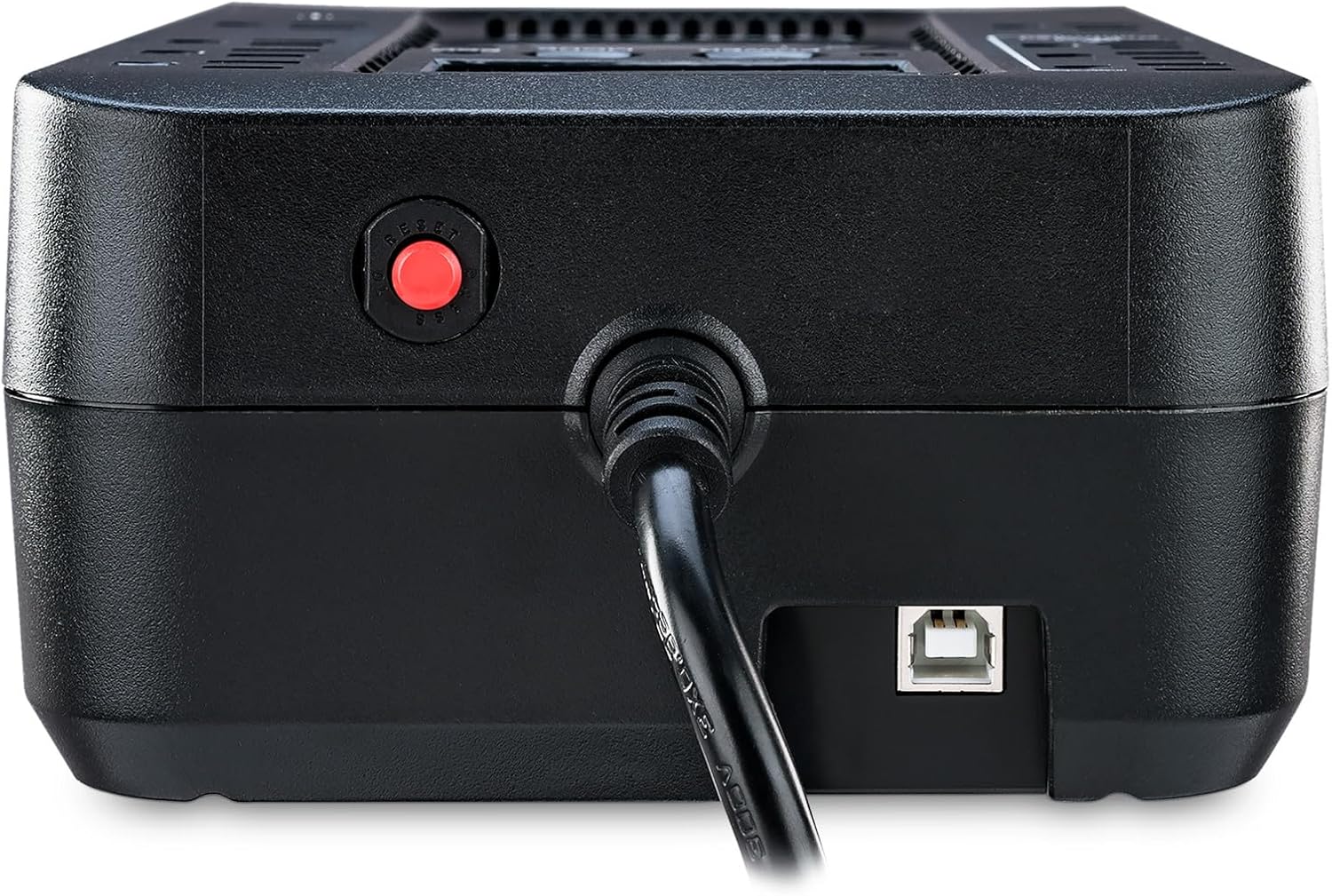
Rajah 3: Sisi view of the CyberPower EC650LCD UPS, showing the USB communication port and circuit breaker reset button.
4. Arahan Operasi
4.1 Menghidupkan/Mematikan
- Untuk Menghidupkan: Press and hold the POWER button for approximately 2 seconds until you hear a beep. The LCD display will illuminate.
- Untuk Mematikan: Press and hold the POWER button for approximately 2 seconds until you hear a beep. The LCD display will turn off.
4.2 Paparan dan Kawalan LCD
The multifunction LCD panel provides real-time status of the UPS. Use the MODE button to cycle through different display screens:
- Input Voltage: Displays the incoming AC voltage.
- Keluaran Voltage: Memaparkan voltage supplied by the UPS.
- Kapasiti Bateri: Shows the remaining battery charge level.
- Tahap Beban: Menunjukkan peratusantage kapasiti UPS yang digunakan oleh peranti yang bersambung.
- Anggaran Masa Larian: Provides an estimate of how long the UPS can power connected devices during an outage.
4.3 ECO Mode Operation
The ECO mode helps conserve energy. When the UPS detects that the computer connected via USB is off or in sleep mode, it will automatically cut power to the peripherals plugged into the ECO controlled outlets. This reduces phantom load and lowers energy costs.
To enable or disable ECO mode, refer to the PowerPanel Personal Edition software settings.
Video 1: Official CyberPower Systems Direct video demonstrating the features and benefits of the CyberPower Ecologic UPS Series, including ECO mode and power protection.
5. Penyelenggaraan
5.1 Penggantian Bateri
The UPS battery is designed for a lifespan of approximately 3-5 years under normal operating conditions. When the battery needs replacement, the UPS may indicate this via an alarm or the LCD display. To replace the battery:
- Turn off the UPS and disconnect it from the AC power outlet.
- Putuskan sambungan semua peranti yang disambungkan.
- Locate the battery compartment on the bottom of the UPS.
- Remove the screw securing the battery cover and slide it off.
- Carefully disconnect the battery terminals and remove the old battery.
- Insert the new battery (ensure it is a compatible sealed lead-acid battery) and connect the terminals securely.
- Gantikan penutup bateri dan kencangkannya dengan skru.
- Plug the UPS back into the AC outlet and allow it to charge for 8 hours.

Rajah 4: Bahagian bawah view of the CyberPower EC650LCD UPS, showing the battery compartment access.
5.2 Pembersihan
Regularly clean the exterior of the UPS with a dry, soft cloth. Do not use liquid or aerosol cleaners. Ensure ventilation openings are free from dust and debris.
6. Penyelesaian masalah
If the UPS is not functioning correctly, refer to the following common issues and solutions:
| Masalah | Kemungkinan Punca | Penyelesaian |
|---|---|---|
| UPS tidak dihidupkan. | Battery is low or discharged; UPS is not connected to AC power. | Connect to AC power and charge for 8 hours. Ensure the power button is pressed and held for 2 seconds. |
| UPS beeps continuously or shows overload. | Too many devices connected; short circuit in a connected device. | Disconnect non-essential devices to reduce load. Check connected devices for faults. |
| Masa penggunaan bateri yang singkat. | Battery is old or not fully charged; excessive load. | Charge the battery for 8 hours. Reduce the number of connected devices. Consider battery replacement if old. |
| ECO mode not functioning. | USB cable not connected; PowerPanel software not installed or configured. | Ensure USB cable is connected. Install and configure PowerPanel Personal Edition software. |
If the issue persists after attempting these solutions, please contact CyberPower customer support.
7. Spesifikasi
| Ciri | Perincian |
|---|---|
| Nombor Model | EC650LCD |
| Kapasiti (VA/Watts) | 650VA / 390W |
| Jenis Output | Gelombang Sinus Simulasi |
| Bilangan Outlet | 8 (4 Battery Backup & Surge, 4 Surge Only - 3 ECO Controlled) |
| Input Voltage | 120 Volt |
| Jenis Bateri | Sealed Lead Acid (1 x 12V) |
| Dimensi (D x W x H) | 5.9"D x 10.6"W x 3.1"H |
| Berat Barang | 6.4 paun |
8. Waranti dan Sokongan
The CyberPower EC650LCD UPS System comes with a Waranti 3 Tahun, yang merangkumi perlindungan untuk bateri. Selain itu, ia disokong oleh Jaminan Peralatan Terhubung $100,000, providing financial protection for equipment connected to the UPS in the event of damage due to a power surge while properly connected.
Untuk sokongan teknikal, tuntutan jaminan atau bantuan lanjut, sila lawati laman web rasmi CyberPower. website or contact their customer service department. You can also download the FREE PowerPanel Personal Edition Management Software from their website for advanced monitoring and control features.


