1. Pengenalan
This manual provides essential instructions for the proper setup, operation, and maintenance of your Elo Touch E568461 22C3 C-Series All-in-One Touch Computer. Please read this manual thoroughly before using the device to ensure optimal performance and safety. Keep this manual for future reference.
2. Maklumat Keselamatan
- Always use the power adapter supplied with the unit.
- Jangan dedahkan peranti kepada air atau kelembapan berlebihan.
- Elakkan meletakkan peranti di bawah cahaya matahari langsung atau berhampiran sumber haba.
- Pastikan pengudaraan yang betul di sekeliling unit untuk mengelakkan terlalu panas.
- Jangan cuba membuka atau menservis peranti ini sendiri. Rujuk semua servis kepada kakitangan yang berkelayakan.
- Disconnect power before cleaning the device.
3. Kandungan Pakej
Sahkan bahawa semua item terdapat dalam pakej:
- Elo Touch E568461 All-in-One Touch Computer
- Penyesuai Kuasa dan Kord Kuasa
- Panduan Mula Pantas (jika disertakan)
- Documentation CD/USB (if included)
4. Persediaan
Follow these steps to set up your All-in-One Touch Computer:
- Membongkar: Carefully remove the computer from its packaging.
- penempatan: Place the computer on a stable, flat surface with adequate ventilation.
- Sambungkan Kuasa: Connect the power adapter to the DC input port on the computer, then plug the power cord into a grounded electrical outlet.
- Sambungkan Peranti Periferal (Pilihan): Connect any desired peripherals such as a keyboard, mouse, or external storage devices to the available USB ports.
- Hidupkan kuasa: Press the power button, usually located on the side or back of the unit, to turn on the computer.
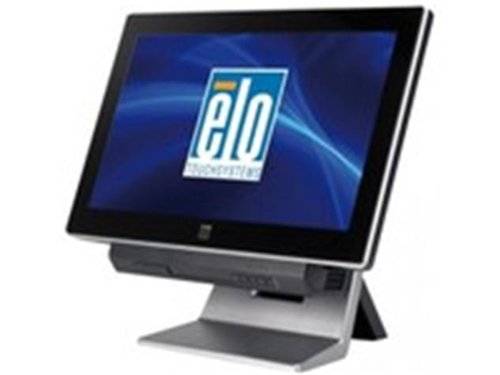
Image 1: The Elo Touch E568461 All-in-One Touch Computer. This image displays the front view of the black touch computer with the Elo logo visible on its screen, mounted on its stand.
5. Arahan Operasi
5.1 Operasi Skrin Sentuh Asas
- Ketik: Lightly touch the screen with your finger to select an item or activate a function, similar to a mouse click.
- Seret: Touch and hold an item, then move your finger across the screen to reposition it.
- Tatal: Swipe your finger up or down, or left or right, to navigate through content.
5.2 Ciri Sistem
The E568461 model is equipped with an Intel i3-3220 processor running at 3.0GHz, 2GB of RAM, and a 320GB HDD. It features Intel HD Graphics 2500 and an Intel H61 Express chipset, providing a robust platform for various applications.
6. Penyelenggaraan
6.1 Membersihkan Paparan
- Matikan komputer dan cabut kabel kuasa.
- Gunakan kain lembut yang tidak berbulu dampdicairkan dengan pembersih kaca bebas ammonia yang tidak kasar.
- Jangan sembur pembersih terus ke skrin.
6.2 Penjagaan Am
- Pastikan bukaan pengudaraan bersih daripada habuk dan serpihan.
- Elakkan suhu dan kelembapan yang melampau.
7. Penyelesaian masalah
Jika anda menghadapi masalah, rujuk kepada masalah dan penyelesaian biasa berikut:
- Tiada Kuasa: Ensure the power cord is securely connected to both the computer and the electrical outlet. Verify the outlet is functional.
- Tiada Paparan: Check if the computer is powered on. If the screen remains black, try restarting the unit.
- Skrin Sentuh Tidak Responsif: Restart the computer. If the issue persists, ensure the screen is clean and free of obstructions.
- System Slow: Close unnecessary applications. Ensure the operating system and drivers are up to date.
8. Spesifikasi
| Ciri | Penerangan |
|---|---|
| Nombor Model | E568461 |
| Jenama | Elo Touch |
| Saiz Paparan | 22 inci |
| Teknologi Sentuhan | iTouch Plus Saw LED |
| Pemproses | Intel Core i3-3220 (3.0GHz) |
| RAM | 2GB |
| Penyimpanan | HDD 320GB |
| Grafik | Intel HD Graphics 2500 |
| Chipset | Intel H61 Express |
| warna | Black (Dark Grey Enclosure) |
| Dimensi Produk | 20.79 x 11.65 x 16.06 inci |
| Berat badan | 28.06 paun |
9. Waranti dan Sokongan
For warranty information and technical support, please refer to the documentation provided with your product or visit the official Elo Touch website. Contact customer service for assistance with any issues not covered in this manual.


