1. Pengenalan
This manual provides instructions for the APEX LD200RM remote control, designed for use with various APEX LCD and LED television models. This remote control offers full functionality for your compatible APEX television, ensuring convenient operation of all features.
Compatible APEX TV Models:
- LD3249
- LD3288, LD3288T, LD3288M
- LD4077, LE4077M
- LD4088
- LD4688
- LE3212, LE3212D
- LE4012
- LE4612
- LE3242
- LE3942
- LE40B12
- LE4243
- LE4643
- LE5043
2. Persediaan
2.1 Pemasangan Bateri
The APEX LD200RM remote control requires two (2) AA batteries for operation. Follow these steps to install the batteries:
- Cari penutup petak bateri di belakang alat kawalan jauh.
- Tekan ke bawah pada tab dan luncurkan penutupnya.
- Masukkan dua bateri AA, pastikan terminal positif (+) dan negatif (-) sejajar dengan betul dengan tanda di dalam petak.
- Luncurkan penutup petak bateri kembali ke tempatnya sehingga ia berbunyi dengan selamat.
Nota: Sentiasa gantikan kedua-dua bateri pada masa yang sama. Jangan campurkan bateri lama dan baharu, atau jenis bateri yang berlainan.
2.2 Penggunaan Awal
The APEX LD200RM remote control is an original replacement and typically does not require any programming or pairing. Once batteries are installed, point the remote control towards your compatible APEX television and begin operation.
3. Arahan Operasi
This section details the functions of the buttons on your APEX LD200RM remote control.
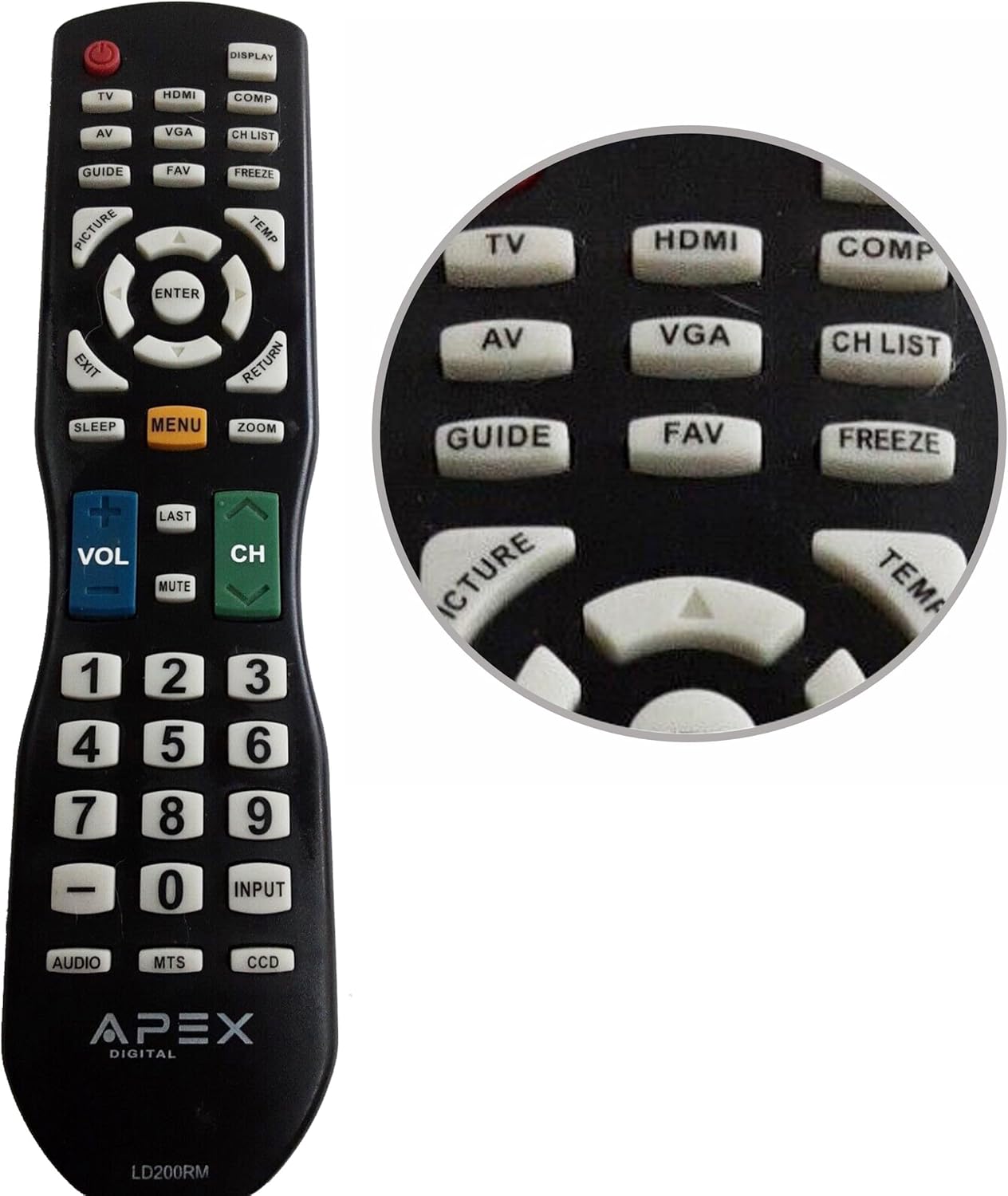
Figure 1: APEX LD200RM Remote Control Layout. This image displays the entire remote control, highlighting the arrangement of its various function buttons, including power, input selection, navigation, volume, channel, and numeric keypad.

Figure 2: Close-up of APEX LD200RM Remote Control Top Buttons. This image provides a detailed view of the upper section of the remote, focusing on buttons such as TV, HDMI, AV, VGA, COMP, CH LIST, DISPLAY, GUIDE, FAV, FREEZE, PICTURE, TEMP, MENU, ENTER, EXIT, RETURN, SLEEP, and ZOOM.
3.1 Power and Input Selection
- KUASA (Butang Merah): Menghidupkan atau mematikan televisyen.
- TV: Selects the TV tuner input.
- HDMI: Selects the HDMI input.
- DARI: Selects the Audio/Video input.
- VGA: Selects the VGA input.
- COMP: Selects the Component video input.
- DISPLAY: Shows on-screen display information.
3.2 Channel and Volume Control
- VOL (+/-): Menambah atau mengurangkan tahap kelantangan.
- CH (Atas/Bawah): Menukar saluran televisyen ke atas atau bawah.
- TERAKHIR: Berbalik kepada sebelumnya viewsaluran ed.
- MATI: Membisukan atau menyahredamkan audio televisyen.
- SENARAI CH: Memaparkan senarai saluran.
3.3 Menu dan Navigasi
- MENU: Opens the television's main menu.
- MASUK: Confirms a selection within the menu.
- Butang Anak Panah (Atas/Bawah/Kiri/Kanan): Navigates through menu options and adjusts settings.
- KELUAR: Keluar dari menu semasa atau paparan pada skrin.
- KEMBALI: Kembali ke menu atau skrin sebelumnya.
3.4 Numeric Keypad and Special Functions
- 0-9 (Numeric Buttons): Terus memasukkan nombor saluran.
- MASUKKAN: Berkitar melalui sumber input yang tersedia.
- PANDUAN: Displays the electronic program guide (if available).
- FAV: Mengakses saluran kegemaran.
- PERCUMA: Membekukan imej semasa pada skrin.
- GAMBAR: Melaraskan tetapan gambar.
- TEMP: (Function may vary by model, often related to picture temperature or a specific mode).
- TIDUR: Menetapkan pemasa tidur.
- ZOMAN: Melaraskan tahap zum skrin.
- AUDIO: Selects audio modes or tracks.
- MTS: Multi-channel Television Sound (stereo/SAP).
- DCC: Closed Captioning Display.
4. Penyelenggaraan
4.1 Penggantian Bateri
When the remote control's performance degrades or it stops responding, it is likely time to replace the batteries. Refer to Section 2.1 for detailed battery installation instructions. Always use fresh AA batteries.
4.2 Pembersihan
Untuk membersihkan alat kawalan jauh, gunakan kain lembut dan kering. Untuk kotoran degil, gunakan sedikit kainampen the cloth with water or a mild, non-abrasive cleaner. Avoid using harsh chemicals or abrasive materials, as these can damage the remote's surface or internal components.
4.3 Penyimpanan
Store the remote control in a cool, dry place away from direct sunlight and extreme temperatures. If the remote will not be used for an extended period, it is advisable to remove the batteries to prevent leakage and potential damage.
5. Penyelesaian masalah
- Remote control is not responding:
- Pastikan bateri dipasang dengan betul dengan polariti yang betul (+/-).
- Gantikan bateri lama dengan bateri AA baharu.
- Check for any obstructions between the remote control and the television's infrared sensor.
- Ensure you are within the effective range of the television's IR receiver.
- Some buttons are not working:
- This could indicate low battery power. Replace the batteries.
- Ensure the remote is clean and there is no debris lodged under the buttons.
- Verify that the button function is applicable to your specific TV model. Some functions may not be supported by all compatible TVs.
- Television is not turning on/off:
- Confirm the television is plugged into a working power outlet.
- Try using the power button directly on the television to rule out a TV issue.
6. Spesifikasi
| Ciri | Perincian |
|---|---|
| Nombor Model | LD200RM |
| Jenama | Puncak |
| Peranti Serasi | APEX LCD & LED Televisions |
| Sumber Kuasa | 2 x Bateri AA (tidak termasuk) |
| Dimensi Produk | 10 x 6 x 2 inci (anggaran) |
| Berat Barang | 3.2 auns (anggaran) |
| warna | Hitam |
| Ciri Khas | Reka bentuk ergonomik |
7. Maklumat Waranti
This APEX LD200RM remote control typically comes with a 30-day warranty from the date of purchase. This warranty covers manufacturing defects. For specific details regarding warranty claims, returns, or replacements, please refer to your purchase documentation or contact the seller directly.
8. Sokongan
If you encounter issues not covered in this manual or require further assistance, please contact the retailer or the manufacturer's customer support. When contacting support, please have your product model number (LD200RM) and your television model number readily available.


