1. Pengenalan
This manual provides essential information for the safe and efficient operation of your Hitachi CP-DX300 DLP Projector. Please read this manual thoroughly before using the projector and retain it for future reference. The Hitachi CP-DX300 is designed to deliver bright, clear, and detailed images for various applications, including business presentations and home entertainment.
3. Kandungan Pakej
Sahkan bahawa semua item yang disenaraikan di bawah disertakan dalam pakej anda:
- Projektor DLP Hitachi CP-DX300
- Kabel Kuasa
- Alat Kawalan Jauh
- Kabel HDMI
- VGA Cable (if included with specific models)
- Manual Pengguna (dokumen ini)
Note: Additional accessories may vary by region or retailer.
4. Produk Lebihview
The Hitachi CP-DX300 is a compact and powerful DLP projector designed for versatility. Below are key physical features and connection ports.
Depan View
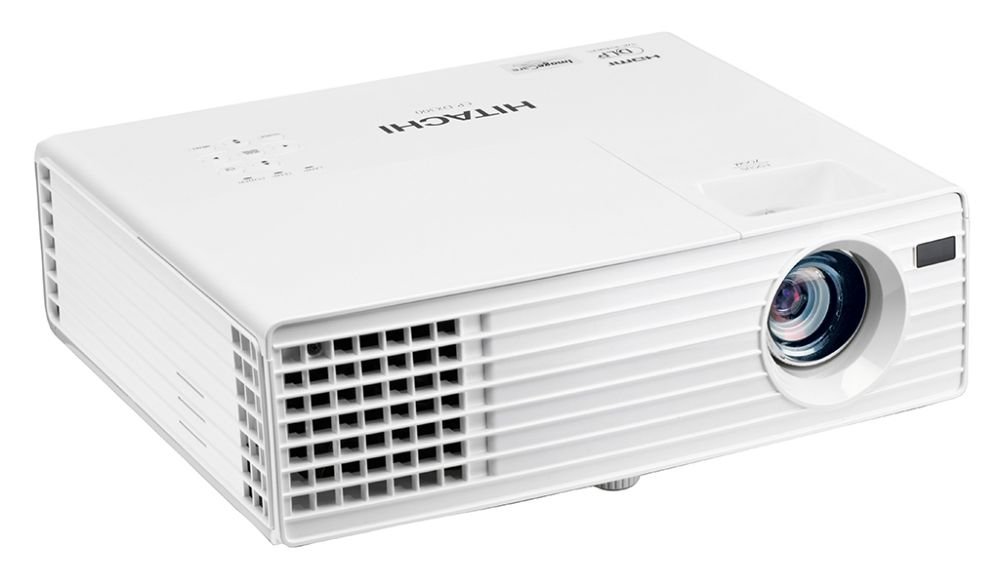
This image displays the front of the Hitachi CP-DX300 projector, highlighting the main projection lens and the front ventilation grille. The lens is centrally located, and the Hitachi brand logo is visible on the right side of the front panel.
sebelah View (Pelabuhan)

This image shows the side panel of the Hitachi CP-DX300 projector, detailing the various input and output ports. These include HDMI, VGA, S-Video, Composite Video, Component Video, and audio input/output jacks, providing comprehensive connectivity options.
Ciri-ciri Utama:
- Teknologi Unjuran: 0.55" single chip DLP
- Resolusi: XGA - 1024 x 768
- Output Cahaya: 3,000 ANSI lumens
- warna: 1.07 bilion warna
- Nisbah Aspek: Native 4:3 / 16:9 compatible
- Nisbah Kontras: 2500: 1
- Lamp kehidupan: Approximately 4,500 hours (standard mode), 6,000 hours (Eco mode)
- Output pembesar suara: 2W x 1
- Ketersambungan: HDMI x 1 (HDCP compliant), Computer Input (15-pin mini D-sub) x 2, Computer Monitor Output (15-pin mini D-sub) x 1, S-Video Mini DIN 4-pin x 1, Composite Video RCA jack x 1, Component Video (shared with computer inputs), Audio Input (3.5 mm stereo mini jack) x 1, Audio Output (3.5 mm stereo mini jack) x 1.
6. Arahan Operasi
6.1 Hidupkan/Mati Kuasa
- Hidupkan kuasa: Press the Power button on the projector or the remote control. The lamp will warm up, and the image will appear shortly.
- Matikan: Press the Power button again. A confirmation message may appear; press Power again to confirm shutdown. The projector will enter a cooling cycle before completely powering off.
6.2 Pelarasan Fokus dan Keystone
- Fokus: Putarkan gelang fokus pada kanta projektor sehingga imej kelihatan tajam dan jelas pada skrin.
- Pembetulan Keystone: Use the keystone adjustment feature (typically found in the projector's menu or via dedicated buttons on the remote) to correct trapezoidal distortion, ensuring a rectangular image. The CP-DX300 supports +/- 30 Degree vertical keystone correction.
6.3 Pemilihan Sumber
Press the "Source" button on the projector or remote control to cycle through available input sources (HDMI, VGA, S-Video, Composite, etc.) until your desired source is displayed.
6.4 Keluaran Audio
The projector has a built-in 2W speaker. For enhanced audio, connect external speakers or a sound system to the 3.5 mm stereo mini Audio Output jack.
6.5 3D Viewing
The Hitachi CP-DX300 is 3D capable. To enjoy 3D content, you will need compatible 3D glasses and a special graphic card (sold separately) connected to a 3D-enabled source device.
6.6 Wall Color Correction
This feature allows the projector to automatically adjust color output when projecting onto colored walls, ensuring accurate color reproduction without needing a white screen.
7. Penyelenggaraan
7.1 Membersihkan Projektor
- Luaran: Lap bahagian luar projektor dengan kain lembut dan kering. Jangan gunakan pembersih atau pelarut yang kasar.
- Kanta: Gently clean the lens with a lens cleaning cloth or lens paper. Avoid touching the lens directly with your fingers.
- Pengudaraan: Regularly check and clean the ventilation grilles to ensure proper airflow and prevent dust buildup.
7.2 Lamp Penggantian
Lamp door is conveniently located on top of the model for easy maintenance. Refer to the detailed instructions in the full user manual for safe lamp replacement procedures. Always use genuine Hitachi replacement lamps.
Dijangka Lamp kehidupan: Approximately 4,500 hours (standard mode), 6,000 hours (Eco mode).
7.3 Power Saving Standby Mode
The projector features a power-saving standby mode that reduces power consumption to less than 0.5W, contributing to energy efficiency.
7.4 Image Care Technology
Image Care is a lamp power control function that optimizes picture performance with maximum energy savings by decreasing penggunaan tenaga, meningkatkan nisbah kontras dan memanjangkan lamp life. This results in a lower total cost of ownership and decreased maintenance cost.
7.5 Intelligent Eco Mode
This mode automatically adjusts the lamp's brightness according to the screen's brightness level, further enhancing energy efficiency and lamp panjang umur.
8. Penyelesaian masalah
Jika anda menghadapi masalah dengan projektor anda, rujuk kepada masalah dan penyelesaian biasa berikut:
- Tiada gambar:
- Pastikan kabel kuasa disambungkan dengan kukuh dan projektor dihidupkan.
- Sahkan sumber input dipilih dengan betul dan peranti sumber aktif.
- Check the connection cable (HDMI, VGA) for damage or loose connections.
- Imej Kabur:
- Laraskan cincin fokus pada lensa.
- Pastikan permukaan projektor rata dan projektor stabil.
- Imej ialah Trapezoid:
- Gunakan ciri pembetulan keystone untuk melaraskan bentuk imej.
- Tiada Audio:
- Periksa tetapan kelantangan projektor.
- Ensure external audio devices are properly connected and powered on if used.
- Verify the audio source is playing.
- Amaran Terlalu Panas:
- Ensure ventilation grilles are not blocked.
- Clean any dust from the grilles.
- Kendalikan projektor di kawasan yang mempunyai pengudaraan yang baik.
For more complex issues, please contact Hitachi customer support.
10. Waranti & Sokongan
For warranty information and customer support, please refer to the documentation included with your product or visit the official Hitachi webtapak. Simpan resit pembelian anda untuk tuntutan waranti.
Note: Returns may be subject to specific terms and conditions, especially for brand new items, as indicated by the seller. Technical issues are typically covered.


