1. Pengenalan
This manual provides comprehensive instructions for the installation, operation, and maintenance of your Hertz HDP4 4-Channel 1000W Max D-Class Amplifier. Please read this manual thoroughly before attempting installation or operation to ensure proper function and safety.
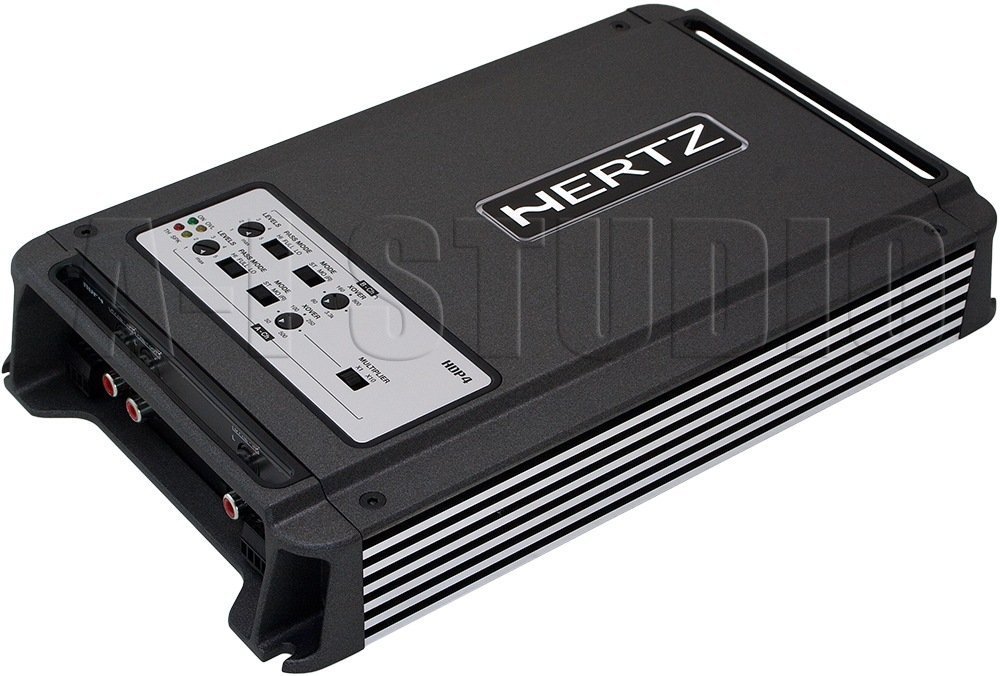
Rajah 1.1: Bersudut atas ke bawah view of the Hertz HDP4 amppenguat, pertunjukancasing hitam padatnya casing and control panel on the top surface. The Hertz logo is visible on the main body.
2. Maklumat Keselamatan
Sentiasa patuhi langkah keselamatan berikut:
- Disconnect the vehicle's battery before any installation or wiring.
- Pastikan semua pendawaian mempunyai penebat yang betul untuk mengelakkan litar pintas.
- Lekapkan amplifier securely in a well-ventilated area, away from moisture and direct heat.
- Gunakan pendawaian tolok yang sesuai untuk sambungan kuasa dan pembumian seperti yang dinyatakan dalam bahagian pemasangan.
- Rujuk pemasang profesional jika anda tidak pasti tentang mana-mana bahagian proses pemasangan.
3. Kandungan Pakej
Sahkan bahawa semua item terdapat dalam pakej:
- Hertz HDP4 AmpUnit penguat
- Perkakasan Pemasangan (skru, kurungan)
- Manual Pengguna (dokumen ini)
4. Persediaan dan Pemasangan
4.1 Memasang Amplebih hidup
Pilih lokasi yang sesuai untuk memasang amplifier. It should be a dry, well-ventilated area, protected from direct sunlight and excessive vibration. Ensure there is sufficient space around the amppenguat untuk peredaran udara.

Rajah 4.1: Atas view of the Hertz HDP4 amplifier, illustrating its compact design and potential mounting points. The amplifier features a textured black finish with the Hertz logo prominently displayed.
- Letakkan amplifier in the desired mounting location and mark the screw holes.
- Drill pilot holes if necessary, ensuring not to damage any vehicle components.
- Selamatkan amppengalir menggunakan skru pelekap yang disediakan.
4.2 Sambungan Pendawaian
Proper wiring is critical for performance and safety. Refer to the diagram below for power, ground, remote, and speaker connections.

Figure 4.2: Rear panel of the Hertz HDP4 amplifier, detailing the power input (BATT), ground (GND), remote turn-on (REM) terminals, and speaker output terminals (L/R mono for channels A and B). Two 40A fuses are also visible.
- Power (BATT): Connect a fused power cable (minimum 8 AWG recommended) directly from the vehicle's positive battery terminal to the BATT terminal on the amplebih hidup.
- Tanah (GND): Connect a ground cable of the same gauge as the power cable from the GND terminal to a clean, unpainted metal point on the vehicle chassis.
- Alat Kawalan Jauh (REM): Connect a remote turn-on wire from your head unit's remote output to the REM terminal.
- Keluaran Pembesar suara: Connect your speakers to the appropriate L (left) and R (right) terminals for each channel (A and B). Ensure correct polarity. The amplifier supports mono bridging for increased power output to a single speaker or subwoofer.
- Sekering: The amplifier is equipped with two 40A fuses. Replace only with fuses of the same type and rating.
4.3 Input Connections and Controls
The amplifier offers both RCA (low-level) and High-Level inputs, along with various crossover and gain controls.

Figure 4.3: Input and control panel of the Hertz HDP4 amplifier. This panel includes RCA pre-inputs (A PRE-IN, B PRE-IN), high-level inputs (A HI-IN, B HI-IN), and various adjustment knobs for levels, pass mode, and crossover settings. A switch for HI-IN AUTO TURN-ON is also present.
- RCA Pre-Inputs (A PRE-IN, B PRE-IN): Connect your head unit's RCA outputs to these inputs for low-level signal.
- High-Level Inputs (A HI-IN, B HI-IN): If your head unit does not have RCA outputs, connect speaker-level signals directly to these inputs. The amplifier features an auto turn-on function for high-level inputs.
- peringkat: Adjust the input sensitivity (gain) to match the output of your head unit. Start with the gain at minimum and slowly increase until desired volume is achieved without distortion.
- Mod Pas: Select the desired crossover mode (e.g., Full, HPF, LPF) for each channel pair.
- Crossover Frequency (XOVER): Adjust the frequency point for the selected crossover mode.
- Pengganda: Use this switch to multiply the crossover frequency setting by 1 or 10, depending on your system requirements.
5. Arahan Operasi
5.1 Kuasa Permulaan
- After all connections are made and verified, reconnect the vehicle's battery.
- Hidupkan unit kepala anda. amplifier should power on automatically (if remote wire is connected or HI-IN AUTO TURN-ON is active).
- Start with the head unit volume low and gradually increase it, listening for clear audio.
5.2 Adjusting Audio Settings
Perhalusi amplifier's settings for optimal sound quality:
- Gain Matching: Laraskan amplifier's gain controls (LEVELS) to match the output voltage of your head unit. This is crucial to prevent distortion.
- Tetapan Crossover: Set the crossover frequencies (XOVER) and pass modes (PASS MODE) according to the specifications of your speakers. For full-range speakers, a high-pass filter (HPF) is often used to protect them from low bass frequencies. For subwoofers, a low-pass filter (LPF) is used.
6. Penyelenggaraan
To ensure the longevity and optimal performance of your Hertz HDP4 amplifier, ikut garis panduan penyelenggaraan ini:
- Pembersihan: Bersihkan secara berkala ampLap bahagian luar penapis dengan kain yang lembut dan kering. Jangan gunakan bahan kimia yang keras atau pembersih yang kasar.
- Pengudaraan: Memastikan bahawa amplifier's cooling fins are free from dust and obstructions to maintain proper heat dissipation.
- Sambungan: Periksa semua sambungan pendawaian secara berkala untuk memastikan ia ketat dan berkarat. Sambungan yang longgar boleh menyebabkan prestasi atau kerosakan yang lemah.
- Sekering: If a fuse blows, replace it only with a fuse of the exact same type and rating (2 x 40A). Using an incorrect fuse can cause severe damage to the amplifier or vehicle electrical system.

Figure 6.1: Bottom panel of the Hertz HDP4 amplifier, displaying the serial number label and important caution notes regarding insulated screws. This area should be kept clean and free from obstructions.
7. Penyelesaian masalah
Jika anda mengalami masalah dengan anda amplifier, consult the following table before contacting support:
| Masalah | Kemungkinan Punca | Penyelesaian |
|---|---|---|
| Tiada Kuasa / Amppenyangga tidak dihidupkan | Fius putus, wayar kuasa/pembumian/alat kawalan jauh longgar, output alat kawalan jauh unit kepala rosak. | Check and replace fuses. Verify all power, ground, and remote connections are secure. Test remote wire for 12V signal. |
| Tiada Bunyi | Loose RCA/speaker wires, incorrect input selection, amplifier in protection mode, faulty speakers. | Check all signal and speaker connections. Ensure correct input mode is selected. Check for protection light. Test speakers. |
| Bunyi Herot | Gain set too high, incorrect crossover settings, poor quality audio source, damaged speakers. | Reduce gain. Adjust crossover settings. Test with a different audio source. Inspect speakers for damage. |
| Amplifier Terlalu Panas | Insufficient ventilation, impedance mismatch, prolonged high-power operation. | Pastikan aliran udara yang betul di sekitar amppengatur. Sahkan padanan impedans pembesar suara amplifier's capabilities. Reduce volume or operating time. |
8. Spesifikasi
Technical specifications for the Hertz HDP4 4-Channel 1000W Max D-Class Amplebih hidup:
- model: HDP4
- Jenama: HERTZ
- Jenis: 4-Channel D-Class Amplebih hidup
- Kuasa Maks: 1000W (as per product title, specific RMS not provided in data)
- Dimensi Produk (L x W x H): 11.18 x 6.73 x 1.83 inci
- Berat: 6.35 paun
- Voltage: 14.4 Volt (Beroperasi)
- Jenis Pemasangan: Lekapan Permukaan
- Sekering: 2 x 40A
- ASIN: B00AWBU1FQ
9. Maklumat Waranti
Hertz products are designed and manufactured to the highest quality standards. For specific warranty terms and conditions, please refer to the warranty card included with your product or visit the official Hertz webtapak. Simpan resit pembelian anda sebagai bukti pembelian untuk tuntutan waranti.
10. Sokongan
For technical assistance, troubleshooting beyond this manual, or warranty inquiries, please contact Hertz customer support through their official website or authorized dealer. Ensure you have your product model (HDP4) and serial number ready when contacting support.
Official Hertz Webtapak: www.hertzaudiovideo.com


