pengenalan
Thank you for choosing the Brondi Sydney DECT Phone. This manual provides comprehensive instructions for the proper setup, operation, and maintenance of your new cordless telephone. Please read this manual carefully before using the device to ensure optimal performance and longevity.
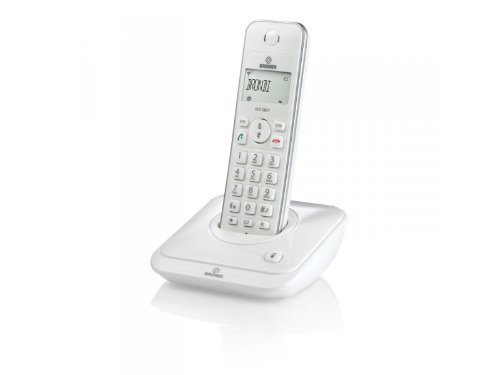
Figure 1: Brondi Sydney DECT Phone. This image shows the cordless handset resting on its charging base station.
1. Persediaan
1.1 Membongkar dan Komponen
Keluarkan semua item dari bungkusan dengan berhati-hati. Pastikan semua komponen ada:
- Brondi Sydney Handset
- Brondi Sydney Base Station
- Penyesuai Kuasa untuk Stesen Pangkalan
- Tali Talian Telefon
- Rechargeable Batteries (AAA, quantity 2) (Boleh dijual berasingan)
- Manual Pengguna (dokumen ini)
1.2 Pemasangan Bateri
Install the rechargeable batteries into the handset:
- Cari penutup petak bateri di belakang telefon bimbit.
- Luncurkan penutup ke bawah atau tekan selak untuk membukanya.
- Insert the two AAA rechargeable batteries, observing the correct polarity (+ and -) as indicated inside the compartment.
- Gantikan penutup petak bateri, pastikan ia terpasang dengan selamat pada tempatnya.
Figure 2: Battery installation. This image illustrates the correct way to insert batteries into the handset's battery compartment.
1.3 Base Station Connection
Connect the base station to power and the telephone line:
- Plug one end of the telephone line cord into the TEL LINE port on the base station.
- Plug the other end of the telephone line cord into your telephone wall jack.
- Connect the power adapter to the DC IN port on the base station.
- Palamkan penyesuai kuasa ke soket elektrik standard.
- Place the handset on the base station to charge. The charging indicator on the handset or base station should illuminate. Allow at least 12-15 hours for the initial charge.
Figure 3: Base station connections. This image shows the power adapter and telephone line cord connected to the base station ports.
1.4 Handset Registration (If Needed)
Your handset is usually pre-registered to the base station. If the handset displays "Unregistered" or similar, follow these steps:
- Di stesen pangkalan, tekan dan tahan butang PAGE/LOCATE button for approximately 5 seconds until the registration indicator light flashes.
- Pada telefon bimbit, navigasi ke MENU, kemudian pilih PENDAFTARAN or DAFTAR TELEFON BIMBIT.
- Enter the PIN (default is usually 0000 or 1234) dan tekan OK.
- The handset will display "Registering..." and then "Registered" upon successful completion.
2. Arahan Operasi
2.1 Membuat dan Menerima Panggilan
Untuk Membuat Panggilan:
- Tekan ke CAKAP or HIJAU butang.
- Dail nombor telefon yang dikehendaki.
- Tekan CAKAP again or wait for the call to connect.
Untuk Menerima Panggilan:
- Apabila telefon berdering, tekan butang CAKAP or HIJAU butang.
Untuk Menamatkan Panggilan:
- Tekan ke TAMAT or MERAH button, or place the handset back on the base station.
2.2 ID Pemanggil
If you subscribe to Caller ID service, the caller's number and name (if available) will be displayed on the handset screen before you answer the call. You can review panggilan lepas dalam log ID Pemanggil.
- To access the Caller ID log, press the LOG PANGGILAN or CID butang.
- Gunakan ATAS/BAWAH arrow keys to scroll through entries.
- To call back an entry, press the CAKAP button while the entry is displayed.
2.3 Phonebook (20 Entries)
Your Brondi Sydney phone can store up to 20 phonebook entries.
To Add an Entry:
- Tekan ke MENU butang.
- Pilih BUKU TELEFON, kemudian ADD NEW ENTRY.
- Enter the name using the alphanumeric keypad.
- Tekan OK.
- Masukkan nombor telefon.
- Tekan JIMAT or OK.
To Dial from Phonebook:
- Tekan ke BUKU TELEFON button or navigate via MENU.
- Gunakan ATAS/BAWAH arrow keys to find the desired entry.
- Tekan ke CAKAP butang untuk mendail.
2.4 Pelarasan Kelantangan
Semasa panggilan, tekan ATAS/BAWAH arrow keys on the handset to adjust the earpiece volume. To adjust the ringer volume, navigate to MENU > SETTINGS > RINGER VOLUME when the phone is idle.
3. Penyelenggaraan
3.1 Arahan Pembersihan
To keep your Brondi Sydney phone in good condition:
- Lap telefon bimbit dan stesen pangkalan dengan kain lembut,amp kain.
- Do not use harsh cleaning agents, abrasive cloths, or chemical solvents, as these can damage the surfaces.
- Ensure no liquid enters the openings of the device.
3.2 Penjagaan Bateri
- Always use the supplied rechargeable batteries. Using non-rechargeable batteries can damage the handset.
- For optimal battery life, place the handset on the base station when not in use.
- Jika telefon tidak akan digunakan untuk tempoh yang lama, tanggalkan bateri untuk mengelakkan kebocoran.
- Buang bateri lama secara bertanggungjawab mengikut peraturan tempatan.
3.3 Penyimpanan
Store the phone in a cool, dry place away from direct sunlight and extreme temperatures when not in use for long periods.
4. Penyelesaian masalah
If you encounter issues with your Brondi Sydney phone, refer to the table below for common problems and solutions.
| Masalah | Kemungkinan Punca | Penyelesaian |
|---|---|---|
| Tiada nada dail | Telephone line cord is disconnected. | Ensure the telephone line cord is securely plugged into the base station and the wall jack. |
| Tiada nada dail | Base station power is off. | Check that the power adapter is securely connected to the base station and a working electrical outlet. |
| Telefon bimbit memaparkan "Tidak Berdaftar" | Handset lost connection or was not registered. | Ikuti langkah pendaftaran telefon bimbit dalam Bahagian 1.4. |
| Kualiti bunyi kurang baik / Statik | Telefon bimbit terlalu jauh dari stesen pangkalan. | Bergerak lebih dekat ke stesen pangkalan. |
| Kualiti bunyi kurang baik / Statik | Gangguan daripada peranti elektronik lain. | Alihkan stesen pangkalan jauh dari peranti elektronik lain (cth., penghala Wi-Fi, ketuhar gelombang mikro). |
| Telefon bimbit tidak dicas | Handset not properly seated on the base. | Ensure the handset is correctly placed on the base station and the charging contacts are clean. |
| Telefon bimbit tidak dicas | Batteries are depleted or faulty. | Allow sufficient charging time (12-15 hours for initial charge). If issues persist, replace with new rechargeable AAA batteries. |
5. Spesifikasi
| Ciri | Perincian |
|---|---|
| Jenama | Brondi |
| Model | SIDNEY_BIANCO |
| taip | Telefon Tanpa Kord DECT |
| ID pemanggil | ya |
| Entri Buku Telefon | 20 |
| Tahun Model | 2012 |
| Dimensi (Pakej) | 18.2 x 14 x 7.2 cm |
| Berat (Pakej) | 479.99 g |
| Bateri Diperlukan | 2 x AAA Rechargeable (Not included in package, but required for operation) |
| ASIN | B009WRN180 |
6. Waranti dan Sokongan
6.1 Maklumat Waranti
Brondi products are covered by a limited warranty. Please refer to the warranty card included in your product packaging or visit the official Brondi webtapak untuk terma dan syarat jaminan terperinci. Simpan bukti pembelian anda untuk tuntutan waranti.
6.2 Sokongan Pelanggan
For technical assistance, troubleshooting beyond this manual, or service inquiries, please contact Brondi customer support. Contact details can typically be found on the Brondi official webtapak atau pada pembungkusan produk.
- Sokongan dalam talian: Visit the official Brondi webtapak.
- Sokongan Telefon: Refer to your product packaging or Brondi's webtapak untuk nombor hubungan serantau.