1. Pengenalan
This manual provides essential information for the safe and efficient operation of your Testo 0563 6352 ABS Compact Pro High Precision Thermohygrometer. Please read these instructions carefully before initial use and keep them for future reference. This instrument is designed for precise measurement of air moisture, material equilibrium moisture, and pressure dew point in compressed air systems.
2. Produk Lebihview
The Testo 635-2 is a versatile humidity/temperature measuring instrument equipped with readings memory, PC software, and a USB data transmission cable. It allows for comprehensive analysis and documentation of environmental conditions. The device supports up to three temperature or humidity probes, with data transmission capabilities including wireless radio operation.

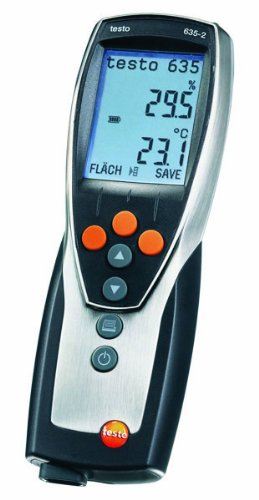
Rajah 2.1: Depan view of the Testo 0563 6352 Thermohygrometer, showing the display and control buttons. The device is designed for ergonomic handling and clear data presentation.
Ciri-ciri Utama:
- High-precision humidity and temperature measurement.
- Internal memory for up to 10,000 readings.
- PC software for data analysis, filing, and documentation.
- USB data transmission for seamless connectivity.
- Support for external probes, including radio probes for temperature and humidity.
- Selectable user profiles for intuitive operation.
- Direct display of material moisture based on settable characteristic curves.
3. Persediaan
3.1. Pemasangan Bateri
- Cari penutup petak bateri di bahagian belakang instrumen.
- Buka penutup.
- Insert the Alkali manganese, mignon, Type AA batteries, ensuring correct polarity.
- Tutup penutup petak bateri dengan selamat.
3.2. Software Installation and USB Connection
- Insert the provided PC software CD into your computer's optical drive or download the latest version from the official Testo webtapak.
- Follow the on-screen instructions to install the ComSoft software.
- Connect the instrument to your computer using the supplied USB data transmission cable.
- The software will detect the device, allowing for data transfer and configuration.
3.3. Sambungan Probe
The Testo 635-2 supports various probes for different measurement tasks. Up to three temperature or humidity probes can be connected simultaneously. For wireless operation, ensure radio probes are properly paired according to their individual instructions.
- Wired Probes: Connect probes to the designated ports on the instrument.
- Radio Probes: Ensure radio probes are within range and properly configured for wireless data transmission.
4. Arahan Operasi
4.1. Hidupkan/Mati Kuasa
- Untuk menghidupkan, tekan butang kuasa butang (
 ).
). - Untuk mematikan, tekan dan tahan kuasa butang sehingga paparan dimatikan.
Rajah 4.1: The Testo 0563 6352 Thermohygrometer in operation, displaying humidity (29.5%) and temperature (23.1°C) readings. The display also shows battery status and measurement mode.
4.2. Mod Pengukuran
The instrument offers various measurement modes accessible via the menu. Use the arrow buttons to navigate and the central button to confirm selections.
- Air Moisture: Standard mode for measuring ambient humidity and temperature.
- Material Equilibrium Moisture: Utilize special probes and pre-stored material characteristics (transferable from ComSoft) to directly display moisture content in various materials.
- Pressure Dew Point: For checking compressed air systems, precision probes up to -76°F Td are available.
- Wall Moisture Analysis: The instrument can immediately display the dew point difference between ambient air and the wall surface, aiding in the analysis of moisture on walls and ceilings.
4.3. Data Storage and Retrieval
The Testo 635-2 features an internal memory for up to 10,000 readings. Measurements can be stored as single readings or as part of a measurement series, organized by location.
- Storing Readings: Tekan ke JIMAT button (if available on the device or configured via user profile) to store the current reading.
- Retrieving Data: Connect the instrument to a PC via USB and use the ComSoft software to download, analyze, and export stored data.
4.4. Pengguna Profiles
The instrument allows for the creation of selectable user profiles. Pro inifiles enable the allocation of specific function buttons and menu guides to an application, facilitating intuitive operation for different tasks.
5. Penyelenggaraan
5.1. Pembersihan
Clean the instrument regularly with a damp cloth. Do not use abrasive cleaners or solvents. Ensure no moisture enters the probe connections or battery compartment.
5.2. Penggantian Bateri
When the battery indicator on the display shows low power, replace the batteries as described in Section 3.1. Use only Alkali manganese, mignon, Type AA batteries.
5.3. Penentukuran
For continued accuracy, regular calibration of the instrument and its probes is recommended. Refer to the calibration protocol provided with your device for recommended intervals and procedures. Contact Testo customer support or an authorized service center for professional calibration services.
6. Penyelesaian masalah
- Tiada Paparan: Periksa pemasangan bateri dan pastikan bateri dicas.
- Bacaan Tidak Tepat: Ensure probes are clean and properly connected. Consider recalibration if issues persist.
- Isu Pemindahan Data: Verify USB cable connection and ensure ComSoft software is correctly installed and updated.
- Radio Probe Connectivity: Check probe battery levels and ensure they are within range of the main instrument.
If you encounter persistent issues not covered here, please contact Testo customer support.
7. Spesifikasi
| Ciri | Perincian |
|---|---|
| Nombor Model | 0563 6352 |
| Memori Instrumen | Sehingga 10,000 bacaan |
| Kelas Perlindungan | IP54 |
| Suhu Penyimpanan | -22 hingga +158 °F (-30 hingga +70 °C) |
| Suhu Operasi | -4 hingga +122 °F (-20 hingga +50 °C) |
| Jenis Bateri | Alkali manganese, mignon, Type AA |
| Hayat Bateri | 200 hours (without radio operation) |
| Material/Housing | ABS/TPE/metal |
| Dimensi (L x W x H) | 8.66" x 2.91" x 1.09" (220 x 74 x 27.7 mm) |
| Pengeluar | Testo AG |
8. Maklumat Waranti
Testo products are manufactured to the highest quality standards. This product is covered by a manufacturer's warranty against defects in materials and workmanship. The specific terms and duration of your warranty may vary by region and purchase date. Please retain your proof of purchase. For detailed warranty information, refer to the documentation included with your product or visit the official Testo webtapak.
9. Sokongan
For technical assistance, service, or spare parts, please contact Testo customer support. You can find contact information on the official Testo website or through your local distributor. When contacting support, please have your instrument's model number (0563 6352) and serial number ready.
Sumber Dalam Talian: www.testo.com


