1. Pengenalan
Thank you for choosing the Severin KV 8023 S2 Superautomatic Coffee Machine. This appliance is designed to provide a premium coffee experience with ease, offering a variety of coffee specialties at the touch of a button. Featuring a high-quality ceramic grinder and intuitive controls, this machine ensures fresh, aromatic coffee every time. Please read this manual carefully before first use to ensure safe operation and optimal performance.

Imej 1.1: Depan view of the Severin KV 8023 S2 Superautomatic Coffee Machine. This image shows the sleek black design of the appliance, highlighting its compact form factor suitable for any kitchen countertop.
2. Arahan Keselamatan Penting
Always observe the following safety precautions when using electrical appliances to prevent electric shock, fire, injury, or damage.
- Baca semua arahan dengan teliti sebelum digunakan.
- Jangan rendam perkakas, kord, atau palam ke dalam air atau cecair lain.
- Jauhkan perkakas daripada kanak-kanak.
- Cabut plag dari saluran keluar apabila tidak digunakan dan sebelum membersihkan.
- Jangan kendalikan sebarang perkakas dengan kord atau palam yang rosak, atau selepas perkakas tidak berfungsi atau rosak dalam apa jua cara.
- Gunakan hanya aksesori yang disyorkan pengeluar.
- Jangan sentuh permukaan panas. Gunakan pemegang atau tombol.
- Pastikan voltage yang ditunjukkan pada perkakas sepadan dengan vol utama andatage.
- Jangan sekali-kali membuka perumah perkakas. Pembaikan hendaklah hanya dilakukan oleh kakitangan perkhidmatan yang diberi kuasa.
3. Persediaan dan Penggunaan Pertama
3.1 Membongkar
Carefully remove all packaging materials. Check that all parts are present and undamaged. Keep packaging for future transport or disposal.
3.2 Pembersihan Awal
- Lap bahagian luar mesin dengan iklanamp kain.
- Remove the water tank, coffee bean container lid, and drip tray. Wash them with warm soapy water, rinse thoroughly, and dry.
- Pasang semula semua bahagian.
3.3 Mengisi Tangki Air
Open the lid of the water tank and fill it with fresh, cold tap water up to the MAX mark. Close the lid securely.
3.4 Mengisi Bekas Kacang
Open the lid of the coffee bean container and fill it with whole coffee beans. Do not use ground coffee in this container. Close the lid to maintain freshness.
3.5 Powering On and Priming
- Palamkan kord kuasa ke salur keluar dinding yang sesuai.
- Press the power button. The machine will perform an initial rinse cycle. Place a cup under the coffee spout to collect the water.
- The display will guide you through any necessary priming steps, such as filling the water circuit.
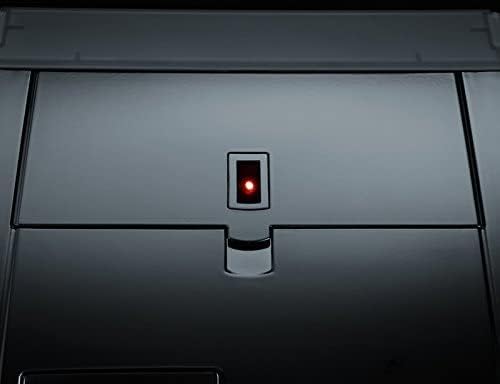
Image 3.1: Close-up of the power button with its red indicator light, located on the top surface of the coffee machine. This light indicates the machine's power status.
3.6 Adjusting Water Hardness
The machine allows for adjustable water hardness settings to optimize the water filter's performance (a filter is included). Refer to the display menu for instructions on how to measure and set your local water hardness level.
4. Arahan Operasi
The Severin KV 8023 S2 features an intuitive E-select button and a high-contrast graphic display for easy navigation.

Image 4.1: The control panel of the Severin KV 8023 S2, showing the multi-language graphic display and the E-select rotary knob for intuitive menu navigation. Several selection buttons are also visible below the display.
4.1 Making Coffee Specialties (One-Touch)
For Cappuccino, Latte Macchiato, or Latte:
- Ensure the milk system is connected and the milk container is filled.
- Place your cup under the coffee-milk spout.
- Select your desired drink from the display using the E-select button.
- Press the corresponding button to start brewing. The machine will automatically prepare your drink without requiring you to move the cup.
4.2 Adjusting Coffee Strength and Volume
You can customize your coffee strength (3 levels + 1 personal fit) and volume via the display menu. Use the E-select button to navigate to these settings and adjust according to your preference.
4.3 Adjusting Grind Level
The ceramic grinder offers 5 adjustable grind levels. To change the grind level, turn the knob inside the bean container. Adjust only when the grinder is operating to prevent damage.
4.4 Adjusting Coffee-Milk Spout Height
The coffee-milk spout can be adjusted in height from 80 mm to 135 mm to accommodate various cup sizes. Gently slide the spout up or down to the desired position.

Image 4.2: Close-up of the adjustable coffee-milk spout on the Severin KV 8023 S2, featuring the 'SEVERIN S2+' branding. This spout can be moved vertically to fit different cup sizes.
4.5 Programming Options
The machine offers various programming options, including individually adjustable on/off times and 5 temperature levels for your beverages. Access these settings through the main menu on the graphic display.
5. Penyelenggaraan dan Pembersihan
Pembersihan dan penyelenggaraan yang kerap adalah penting untuk jangka hayat dan prestasi optimum mesin kopi anda.
5.1 Automatic Cleaning Programs
The Severin KV 8023 S2 features automatic cleaning, rinsing, and descaling programs. The display will prompt you when these programs are due. Follow the on-screen instructions carefully.
5.2 Membersihkan Unit Brewing
The patented brewing unit is removable for easy cleaning. Follow these steps:
- Matikan dan cabut plag mesin.
- Open the service door and remove the brewing unit by pressing the release buttons.
- Rinse the brewing unit thoroughly under running lukewarm water. Do not use detergents.
- Biarkan ia kering sepenuhnya sebelum dimasukkan semula.
5.3 Cleaning the Coffee-Milk Spout
The coffee-milk spout is dishwasher-safe and removable. Regularly detach it and clean it to prevent milk residue buildup. The machine also has a 2-stage milk system rinse program that should be run after each milk-based beverage.
5.4 Emptying Drip Tray and Coffee Grounds Container
The machine will indicate when the drip tray and coffee grounds container need to be emptied. Remove, empty, rinse with water, and dry these components before returning them to the machine.
6. Penyelesaian masalah
Bahagian ini menangani isu biasa yang mungkin anda hadapi. Untuk masalah yang tidak disenaraikan di sini, sila hubungi sokongan pelanggan.
| Masalah | Kemungkinan Punca | Penyelesaian |
|---|---|---|
| Tiada kopi yang dikeluarkan. | Water tank empty, beans empty, brewing unit clogged. | Fill water tank/beans. Clean brewing unit. |
| Kopi terlalu lemah/kuat. | Incorrect grind level or coffee strength setting. | Adjust grind level (finer for stronger, coarser for weaker). Adjust coffee strength setting in menu. |
| Susu tidak berbuih dengan betul. | Milk system clogged, milk too warm, incorrect milk type. | Clean milk system/spout. Use cold, fresh milk. Ensure milk type is suitable for frothing. |
| Mesin memaparkan mesej ralat. | Isu dalaman khusus. | Refer to the display for the specific error code and consult the full manual or contact support. Try restarting the machine. |
7. Spesifikasi Teknikal
- Jenama: Severin
- Nombor Model: KV 8023
- warna: Hitam
- Dimensi Produk: 33.2 x 24.5 x 35.8 cm
- Berat Barang: 9.51 kg
- Kapasiti Tangki Air: 1.5 Liter
- Kuasa: 1500 Watt
- Voltage: 230 V
- Bahan: Keluli Tahan Karat
- Ciri Khas: Integrated filter, Ceramic grinder, One-Touch function
- Jenis pembuat kopi: Mesin Espresso
8. Waranti dan Sokongan
8.1 Maklumat Waranti
Your Severin KV 8023 S2 Superautomatic Coffee Machine comes with a manufacturer's warranty. Please refer to the warranty card included in your product packaging for detailed terms and conditions, including the warranty period and coverage. Keep your proof of purchase for any warranty claims.
8.2 Sokongan Pelanggan
Should you require assistance with your appliance, encounter issues not covered in this manual, or need spare parts, please contact Severin customer support. Contact details can typically be found on the official Severin webtapak atau dalam dokumentasi yang disediakan bersama produk anda.
For online support and further information, visit the Severin Brand Store.


