pengenalan
The AcuRite 01098R Weather Station provides accurate indoor and outdoor temperature and humidity readings, along with a 12 to 24-hour weather forecast. Featuring an Intelli-Time clock that automatically adjusts for Daylight Saving Time, this station offers essential environmental data for your home. The patented self-calibrating technology ensures the most accurate forecast for your specific location by utilizing data measured by the outdoor sensor.
Ciri-ciri Utama:
- Wireless all-weather outdoor sensor for precise environmental condition measurements.
- 12 to 24-hour weather forecast with icons for sunny, partly cloudy, cloudy, rain, snow, and rain/snow mix.
- Monitors indoor and outdoor temperature (Fahrenheit and Celsius) and humidity, including daily high and low records.
- Intelli-Time clock automatically adjusts for Daylight Saving Time.
- Display and outdoor sensor are completely wireless and designed for easy installation.
Panduan Persediaan
Follow these steps to set up your AcuRite 01098R Weather Station for optimal performance.
1. Buka Pembungkusan Komponen
Carefully remove all components from the packaging. You should have the main display unit, the wireless outdoor sensor, and the power adapter.

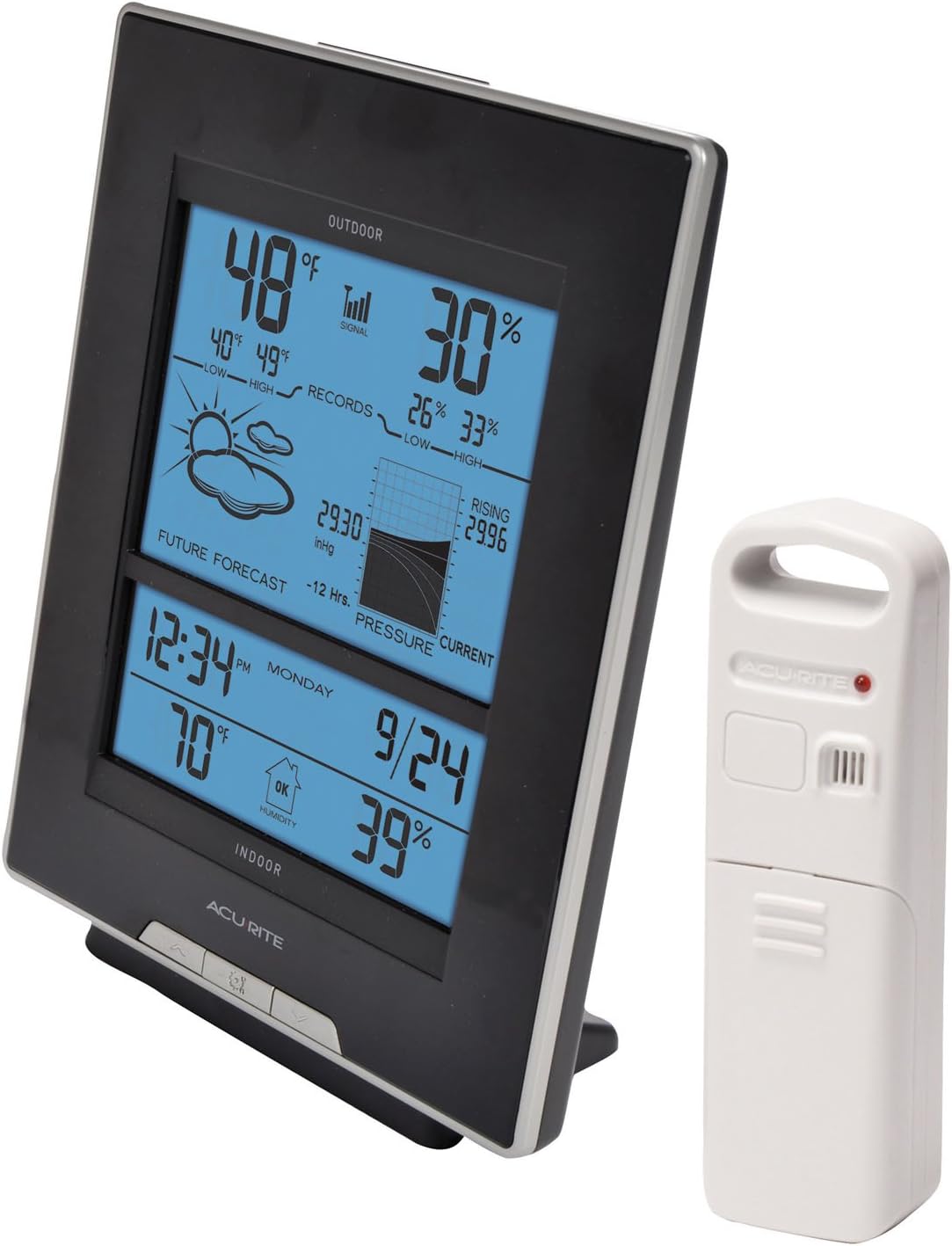
Image: AcuRite 01098R Weather Station display unit (left) and wireless outdoor sensor (right).
2. Pasang Bateri
- Penderia Luaran: Open the battery compartment on the wireless outdoor sensor. Insert 2 x AA alkaline or lithium batteries (not included). Ensure correct polarity (+/-). Close the battery compartment securely.
- Unit Paparan: Open the battery compartment on the back of the main display unit. Insert 3 x AA alkaline or lithium batteries (not included). These batteries provide backup power in case of an outage, preserving your settings. Ensure correct polarity (+/-). Close the battery compartment securely.
Imej: Belakang view of the AcuRite 01098R display unit, highlighting the battery compartment and control buttons.
3. Power the Display Unit
Plug the included power adapter into a standard electrical outlet and connect the other end to the power port on the back of the display unit. The display will illuminate and begin searching for the outdoor sensor signal.
4. Place the Outdoor Sensor
Choose a location for the outdoor sensor that is out of direct sunlight and direct weather elements (rain, snow). This ensures the most accurate temperature and humidity readings. The sensor features an integrated hanger for easy mounting on a nail or hook.

Image: The white wireless outdoor sensor is shown hanging from a tree branch, demonstrating ideal placement away from direct sunlight.
Allow a few minutes for the outdoor sensor and display unit to synchronize. Once connected, the outdoor temperature and humidity will appear on the display.
Arahan Operasi
The AcuRite 01098R Weather Station provides a wealth of information at a glance. Here's how to understand and interact with your display.
Paparan Lebihview
The vibrant, color display is divided into several sections:
- Keadaan Luar: Displays current outdoor temperature and humidity, along with daily high/low records.
- Ramalan cuaca: Shows a 12 to 24-hour forecast using intuitive icons (sunny, cloudy, rain, snow, etc.). This forecast is generated using self-calibrating technology based on your sensor's data.
- Tekanan Barometrik: Provides current barometric pressure readings and a 12-hour history chart.
- Keadaan Dalaman: Shows current indoor temperature and humidity, including daily high/low records and a humidity level icon (low, ideal, high).
- Masa & Tarikh: Features the Intelli-Time clock, which automatically updates for Daylight Saving Time, and the current date.
- Fasa Bulan: Memaparkan fasa semasa bulan.
Melaraskan Tetapan
Refer to the included instruction manual for detailed steps on adjusting specific settings such as time zone, units (Fahrenheit/Celsius), and display brightness. The display typically has buttons on the back or side for navigation and selection.
Penyelenggaraan
Proper maintenance ensures the longevity and accuracy of your AcuRite Weather Station.
- Penggantian Bateri: Replace batteries in both the display unit and the outdoor sensor annually, or when the low battery indicator appears on the display. Use high-quality alkaline or lithium batteries.
- Pembersihan: Clean the display unit and outdoor sensor with a soft, damp cloth. Do not use abrasive cleaners or solvents that may damage the surfaces.
- Peletakan Sensor: Periodically check the outdoor sensor's placement to ensure it remains protected from direct sunlight and heavy precipitation, which can affect readings.
Menyelesaikan masalah
If you encounter issues with your weather station, try these common troubleshooting steps:
- No Outdoor Sensor Signal:
- Ensure both the display unit and outdoor sensor have fresh batteries.
- Verify the outdoor sensor is within range (typically 100 feet or 30 meters) of the display unit.
- Relocate the outdoor sensor or display unit to minimize interference from large metal surfaces, thick walls, or electronic devices.
- Perform a hard reset by removing batteries from both units, waiting a few minutes, and then reinserting batteries into the outdoor sensor first, followed by the display unit.
- Bacaan Tidak Tepat:
- Ensure the outdoor sensor is not in direct sunlight or near heat sources (e.g., exhaust vents, windows).
- Allow 14 days for the self-calibrating forecasting to learn your local weather patterns for optimal accuracy.
- Intelli-Time Clock Issues:
- Ensure the display unit has battery backup installed to maintain time during power outages.
- Manually set the time zone if necessary.
Spesifikasi
| Jenama: | AcuRite |
| Nombor Model: | 01098R |
| Jenis Paparan: | LCD |
| Sumber Kuasa (Paparan): | AC Adapter (primary), 3 x AA batteries (backup) |
| Sumber Kuasa (Sensor): | 2 x bateri AA |
| Ketepatan Suhu: | ±1 °C |
| Julat Suhu Luaran: | Sehingga 120°F (49°C) |
| Teknologi Sensor: | Tanpa wayar |
| Product Dimensions (Display): | 8 x 3 x 7 inci |
| Berat Barang: | 1 paun |
| Bahan: | plastik |
Waranti dan Sokongan
The AcuRite 01098R Weather Station comes with a One-Year Limited Warranty. For product support, troubleshooting, or warranty claims, please contact AcuRite Customer Support.
Sokongan dalam talian: melawat www.AcuRite.com/support
Sokongan E-mel: sokongan@chaney-inst.com