pengenalan
This manual provides essential information for the safe installation, operation, and maintenance of the Leviton MS303 Motor Starter Switch. Please read these instructions thoroughly before installation and use to ensure proper function and to prevent electrical hazards.
Maklumat Keselamatan
AMARAN: Risiko Renjatan Elektrik atau Kebakaran.
- Pemasangan mesti dilakukan oleh juruelektrik bertauliah mengikut semua kod elektrik nasional dan tempatan.
- Disconnect power at the circuit breaker or fuse box before installing or servicing the switch.
- Gunakan hanya konduktor kuprum.
- Pastikan semua sambungan selamat dan terlindung dengan betul.
- Do not exceed the specified electrical ratings (30A, 600V, 3 Phase).
- This device is intended for controlling electric motors. Do not use for other applications unless specified.
Kandungan Pakej
- 1 x Leviton MS303 Motor Starter Switch
- Manual Arahan (dokumen ini)
Produk Selesaiview
The Leviton MS303 is a robust 30A, 600V, 3-phase motor starter switch designed for reliable control of electric motors. Its large toggle actuator allows for easy operation, even with gloved hands.
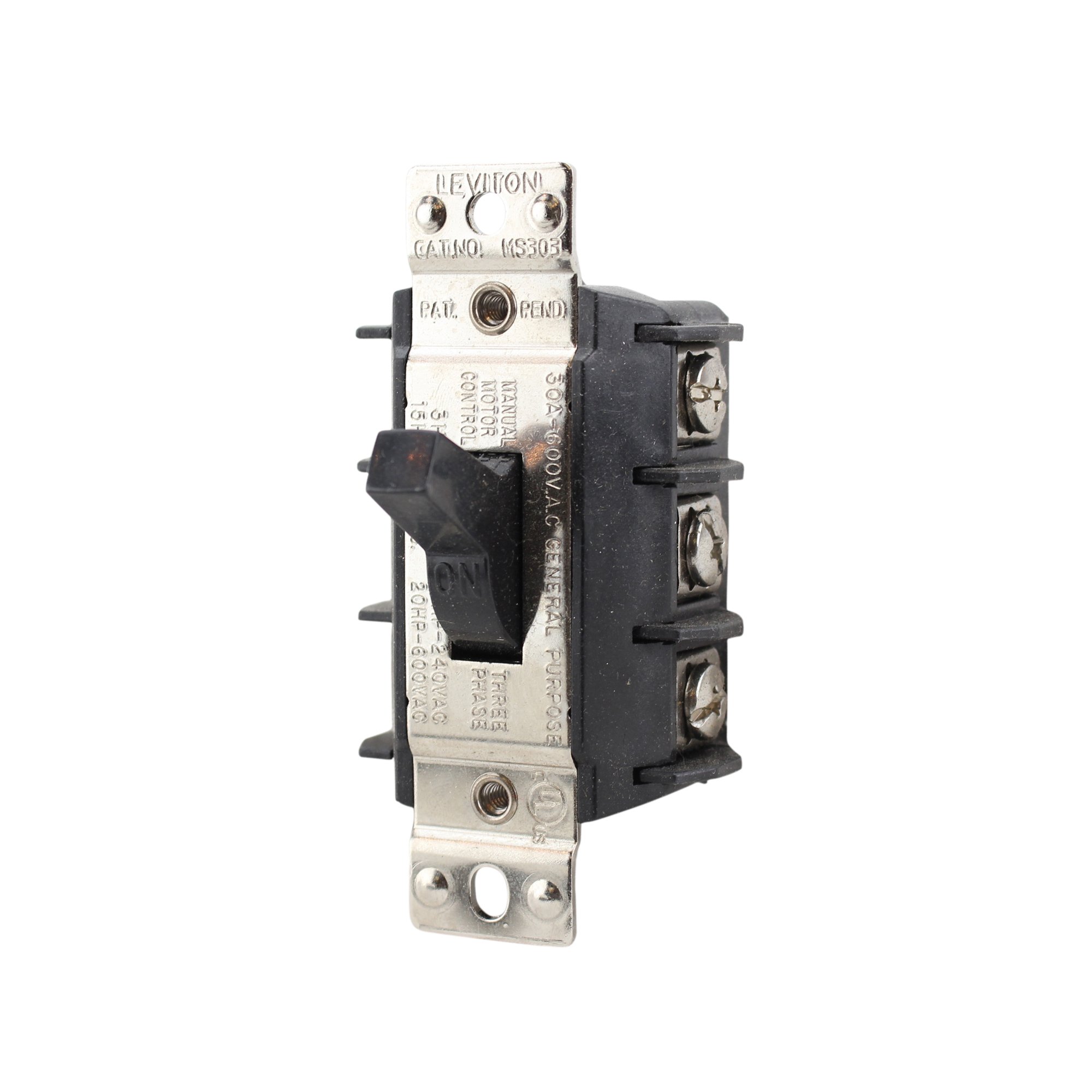
Figure 1: Leviton MS303 Motor Starter Switch. This image shows the front view of the black motor starter switch with its prominent toggle lever.
Ciri-ciri Utama:
- Penilaian Semasa: 30 Amps
- Vol Operasitage: 600 Voltan AC
- Fasa: 3 Fasa
- Jenis Penggerak: Togol
- Jenis Kenalan: Biasa Terbuka
- Jenis Penyambung: Terminal Skru
- warna: Hitam
Persediaan dan Pemasangan
PENTING: Ensure all power is disconnected at the main circuit breaker before proceeding with installation. Failure to do so can result in serious injury or death.
- Pemutusan Kuasa: Locate the circuit breaker or fuse controlling the motor circuit and turn it OFF. Verify power is off using a voltage penguji.
- Pemasangan: Securely mount the MS303 switch in a suitable electrical enclosure or junction box. Ensure the mounting surface is stable and the switch is easily accessible for operation.
- Sambungan Pendawaian:
- Identify the incoming power lines (L1, L2, L3 for 3-phase) and the motor load lines.
- Connect the incoming power lines to the designated input screw terminals on the switch.
- Connect the motor load lines to the designated output screw terminals on the switch.
- Ensure all wire insulation is stripped to the correct length and that wires are fully inserted into the screw terminals before tightening securely.
- Connect the ground wire to the appropriate ground terminal in the enclosure.
Refer to local electrical codes and the wiring diagram provided with your motor for specific connection details.
- Penutupan Kandang: Once all wiring is complete and verified, close and secure the electrical enclosure cover.
- Pemulihan Kuasa: Pulihkan kuasa pada pemutus litar.
Arahan Operasi
The Leviton MS303 Motor Starter Switch features a simple toggle mechanism for controlling the power supply to a connected motor.
- Untuk MENGHIDUPKAN: Push the toggle lever to the "ON" position. This will supply power to the connected motor.
- Untuk MATI: Push the toggle lever to the "OFF" position. This will disconnect power from the connected motor.
The large toggle is designed for easy manipulation, even when wearing work gloves.
Penyelenggaraan
The Leviton MS303 Motor Starter Switch is designed for long-term, reliable operation with minimal maintenance.
- Pemeriksaan Berkala: Annually, or as required by local codes, inspect the switch for any signs of physical damage, loose connections, or overheating.
- Pembersihan: Ensure power is OFF before cleaning. Use a dry, soft cloth to wipe the exterior of the switch. Do not use abrasive cleaners or solvents.
- Semakan Sambungan: If accessible and power is safely disconnected, periodically check that all screw terminal connections remain tight.
Menyelesaikan masalah
If the motor starter switch is not functioning as expected, consider the following common issues:
| Masalah | Kemungkinan Punca | Penyelesaian |
|---|---|---|
| Motor does not start when switch is ON. |
|
|
| Switch feels loose or damaged. | Physical damage or wear. | Replace the switch. Do not attempt to repair damaged electrical components. |
If issues persist after attempting these solutions, consult a qualified electrician.
Spesifikasi
| Jenama | Leviton |
| Nombor Model | MS303 |
| Penilaian Semasa | 30 Amps |
| Vol Operasitage | 600 Volt |
| fasa | 3 Fasa |
| Mod Operasi | Off, Toggle |
| Jenis Kenalan | Biasa Terbuka |
| Jenis Penyambung | Terminal Skru |
| Jenis Penggerak | Togol |
| warna | Hitam |
| Dimensi Item (L x W x H) | 2 x 2 x 4 inci |
| Berat Barang | 1 paun |
| UPC | 078477020326 |
Maklumat Waranti
For detailed warranty information regarding the Leviton MS303 Motor Starter Switch, please refer to the official Leviton website or contact Leviton customer service. Warranty terms and conditions may vary.
Sokongan Pelanggan
If you require further assistance, technical support, or have questions not covered in this manual, please visit the official Leviton website or contact their customer support department directly. Contact information can typically be found on the manufacturer's webtapak atau pembungkusan produk.


