pengenalan
Terima kasih kerana membeliasing the Technical Pro RX55URIBT Professional Audio Receiver. This receiver is designed to deliver high-quality audio performance with versatile connectivity options, including Bluetooth, USB, SD card, and traditional RCA inputs. It features a built-in 7-band equalizer for precise sound control and recording capabilities. Please read this manual thoroughly before operating the unit to ensure proper use and to maximize its performance.
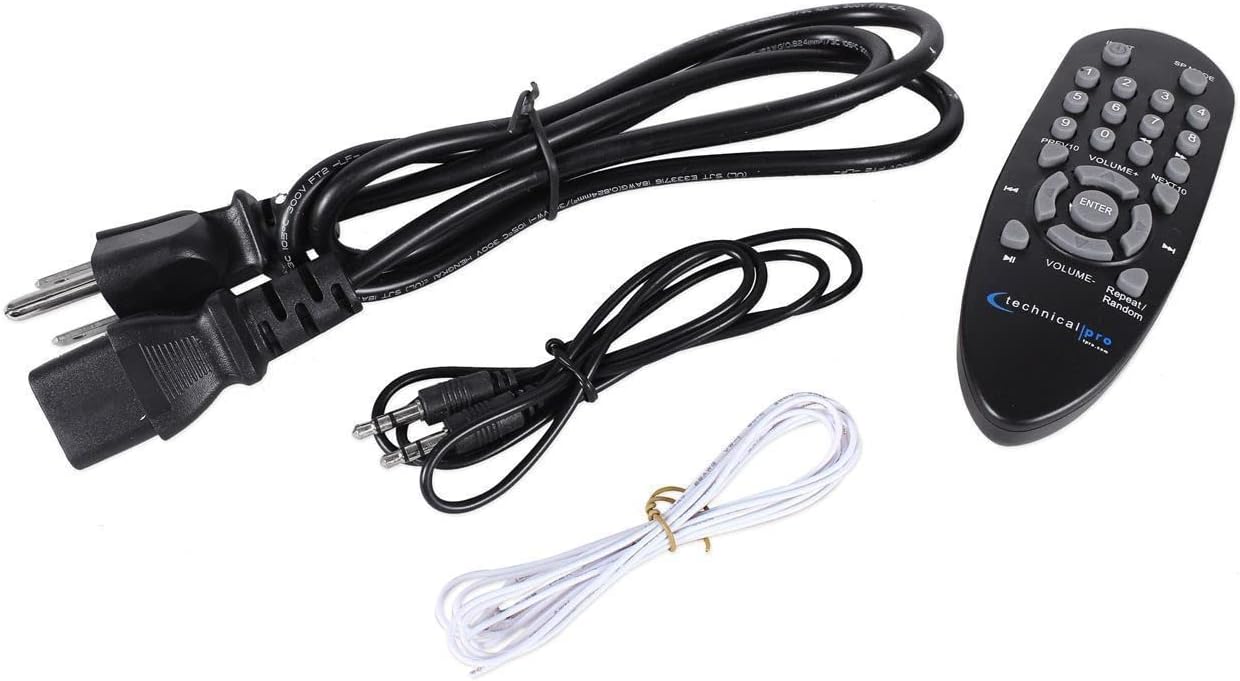
Kandungan Pakej
Selepas membongkar, sila pastikan semua item yang disenaraikan di bawah ada dan dalam keadaan baik:
- Technical Pro RX55URIBT Professional Audio Receiver
- Alat Kawalan Jauh
- Kabel Kuasa
- Kabel Audio RCA
- Wayar Antena FM
Produk Selesaiview
The RX55URIBT receiver features a comprehensive front panel for easy control and a rear panel for various audio connections.
Panel Depan

- Suis kuasa: Menghidupkan / mematikan unit.
- Digital Fluorescent Output Display: Shows audio source, ID3 tags, track and title information.
- Pemilih Input: Buttons for Tuner, DVD, AUX, MP3/SD/USB/Bluetooth, REC.
- Tombol Penalaan: For FM radio station selection.
- Kawalan Penyamaan: Dual 7-band equalizers for precise frequency adjustment (62Hz, 160Hz, 400Hz, 1kHz, 3kHz, 8kHz, 16kHz with ±12dB adjustment).
- Kawalan Kelantangan: Large rotary knob for master volume adjustment.
- Input Mikrofon: Dual 1/4" inputs with dedicated volume, echo, and tone controls.
- Kawalan Nada: Bass, Treble, and Balance knobs for fine-tuning audio output.
- Slot Kad USB/SD: For playing .mp3, .wav, .wma files and recording. Supports up to 32GB.
Panel Belakang
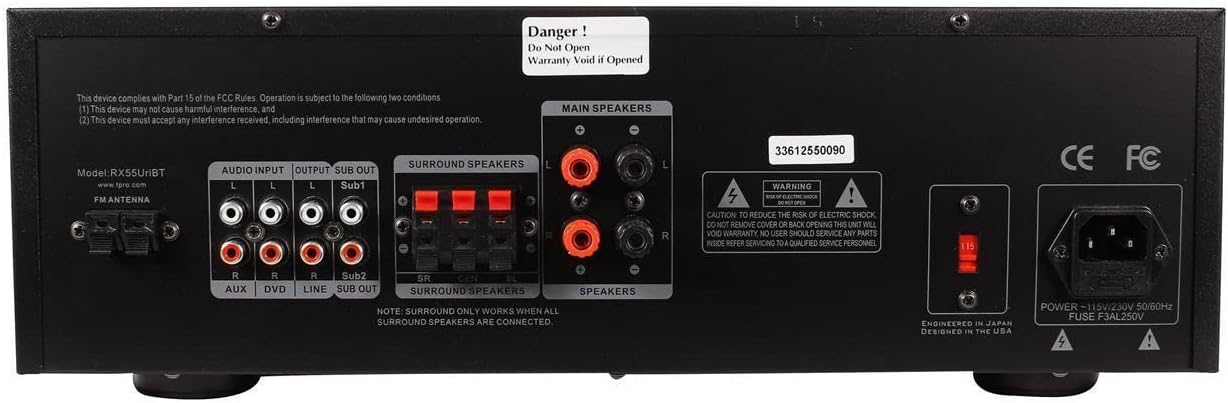
- Input Antena FM: Untuk menyambungkan antena FM yang disertakan.
- Input Audio RCA: Two sets of RCA inputs (AUX, DVD, LINE) for connecting external audio sources.
- Main Speaker Outputs: Banana binding posts for connecting two full-range speakers.
- Surround Speaker Outputs: Push button connectors for connecting up to three surround speakers.
- RCA Passive Line Output: For connecting to another ampalat penghidup atau rakaman.
- Mono RCA Subwoofer Outputs: Two outputs for direct connection to powered subwoofers.
- Input Kuasa: AC power cord connection (110/220V switchable).
Persediaan
Follow these steps to set up your Technical Pro RX55URIBT receiver.
- penempatan: Place the receiver on a stable, flat surface with adequate ventilation. Ensure there is enough space around the unit for heat dissipation.
- Sambungan Pembesar Suara:
- Connect your main speakers to the "MAIN SPEAKERS" banana binding posts on the rear panel. Ensure correct polarity (+ to + and - to -).
- If using surround sound, connect your surround speakers to the "SURROUND SPEAKERS" push button connectors. Note: Surround sound only works when all surround speakers are connected.
- For enhanced bass, connect powered subwoofers to the "SUB OUT" mono RCA outputs.
- Sambungan Sumber Audio:
- Connect external audio devices (e.g., CD player, DVD player audio, mixer) to the "AUDIO INPUT" RCA jacks (AUX, DVD, LINE).
- For MP3 players or other devices with a 1/8" output, use the 1/8" MP3 input on the front panel.
- Sambungan Antena: Connect the included FM antenna to the "FM ANTENNA" terminal on the rear panel for radio reception.
- Sambungan Kuasa: Pastikan voltage selector (if present) is set correctly for your region (110V or 220V). Connect the power cable to the receiver's power input and then to a suitable AC outlet.
Arahan Operasi
Operasi Asas
- Hidupkan/Mati Kuasa: Press the POWER switch on the front panel to turn the unit on or off.
- Pilih Sumber Input: Press the corresponding input selector button (TUNER, DVD, AUX, MP3/SD/USB/BLUETOOTH) on the front panel to choose your desired audio source.
- Laraskan Kelantangan: Rotate the large VOLUME knob to adjust the overall output volume.
- Kawalan Nada: Use the BASS, TREBLE, and BALANCE knobs to fine-tune the audio characteristics to your preference.
Main Semula USB/Kad SD
- Insert a USB flash drive or SD card (up to 32GB) into the respective slot on the front panel.
- Select the "MP3/SD/USB/BLUETOOTH" input source.
- The digital display will show track title, track number, and elapsed time.
- Use the playback controls (Play, Repeat, Random) on the unit or remote control to manage your audio files (.mp3, .wav, .wma).
Operasi Bluetooth
- Select the "MP3/SD/USB/BLUETOOTH" input source. The unit will enter Bluetooth pairing mode.
- Pada peranti anda yang didayakan Bluetooth (cth., telefon pintar, tablet), cari peranti Bluetooth yang tersedia.
- Select "RX55URIBT" from the list to pair. Once paired, you can stream audio wirelessly within a 30-foot range.
Penggunaan Mikrofon
- Connect up to two 1/4" microphones to the MIC1 and MIC2 inputs on the front panel.
- Adjust the "MIC VOL" knob to control the microphone volume.
- Use the "ECHO" and "MIC TONE" knobs to add effects and adjust the microphone's sound.
Fungsi Rakaman
The RX55URIBT can record audio from microphones, the FM tuner, or RCA inputs directly onto a connected USB flash drive or SD card.
- Ensure a USB flash drive or SD card with sufficient empty space is inserted.
- Select the desired input source you wish to record (e.g., TUNER, AUX, DVD, LINE, or use microphones).
- Press the "REC" button on the front panel to start recording. The unit records .wav files at 128 kbps / 44.1 KHz sampkadar ling.
- Press "REC" again to stop recording.
Pelarasan Penyamaan
The built-in dual 7-band equalizer allows for precise frequency adjustments to optimize sound for any environment.
- Adjust the sliders for each frequency band (62Hz, 160Hz, 400Hz, 1kHz, 3kHz, 8kHz, 16kHz) to boost or cut frequencies by up to ±12dB.
- Experiment with settings to achieve your desired sound profile.
Penyelenggaraan
Penyelenggaraan yang betul memastikan ketahanan dan prestasi optimum penerima anda.
- Pembersihan: Use a soft, dry cloth to clean the exterior of the unit. Do not use liquid cleaners or aerosols, as they may damage the finish or internal components.
- Pengudaraan: Ensure the ventilation openings on the top and sides of the unit are not blocked. Proper airflow prevents overheating.
- Storan: Jika menyimpan unit untuk tempoh yang lama, putuskan sambungannya daripada kuasa dan simpan di tempat yang sejuk dan kering jauh daripada cahaya matahari langsung dan suhu yang melampau.
- Kord Kuasa: Periksa kord kuasa secara berkala untuk sebarang kerosakan. Jika rosak, gantikannya dengan segera dengan kord yang diluluskan.
Menyelesaikan masalah
If you encounter issues with your RX55URIBT receiver, refer to the table below for common problems and solutions.
| Masalah | Kemungkinan Punca | Penyelesaian |
|---|---|---|
| Tiada kuasa | Power cord not connected; Power outlet not active; Unit fuse blown. | Ensure power cord is securely plugged in; Check power outlet with another device; Contact customer support for fuse replacement. |
| Tiada keluaran bunyi | Sumber input salah dipilih; Kelantangan terlalu rendah; Pembesar suara tidak disambungkan dengan betul; Fungsi bisu aktif. | Select the correct input source; Increase volume; Check speaker connections and polarity; Deactivate mute. |
| Bluetooth tidak bersambung | Device out of range; Bluetooth not enabled on source device; Interference. | Ensure device is within 30 feet; Enable Bluetooth on your device; Move away from other wireless devices. |
| Kad USB/SD tidak dimainkan | Tidak disokong file format; Card/drive not inserted correctly; Card/drive corrupted; Maximum size exceeded. | pastikan files are .mp3, .wav, or .wma; Reinsert card/drive; Try a different card/drive; Ensure size is 32GB or less. |
| Penerimaan radio yang lemah | Antena tidak disambungkan atau diletakkan dengan teruk; Isyarat lemah. | Connect FM antenna securely; Adjust antenna position for better reception. |
Spesifikasi
| Ciri | Perincian |
|---|---|
| Nombor Model | RX55URIBT |
| Output Kuasa Puncak | 1500 Watt |
| Input | RCA (2 audio sources), USB, SD Card, 1/8" (MP3) |
| Keluaran | Banana binding post (2 speakers), Push Button (3 surround speakers), RCA (Line Out), 2 Mono RCA (Subwoofer Out) |
| USB & SD Card Max Size | 32GB |
| Format Main Semula | .mp3, .wav, .wma |
| Format Rakaman | .wav (128 kbps / 44.1 KHz) |
| Versi Bluetooth | v2.0 with EDR (2.4GHz) |
| Julat Bluetooth | 30 kaki |
| Input Mikrofon | Dual 1/4" with volume, echo, and tone controls |
| Equalizer Points | 62Hz, 160Hz, 400Hz, 1kHz, 3kHz, 8kHz, 16kHz |
| Equalizer Adjustment Range | ±12dB |
| Respons Kekerapan | 20Hz-20KHz |
| Dimensi (L x W x H) | 17" x 10" x 5.1" |
| Berat badan | 10.0 paun |
| Voltage | 110/220V (Switchable) |
Waranti dan Sokongan
Technical Pro stands by its products. The RX55URIBT Professional Audio Receiver comes with a one-year warranty from the date of purchase. This warranty covers manufacturing defects and ensures the product functions as intended under normal use.
For warranty claims, technical support, or any inquiries regarding your product, please contact Technical Pro customer service. Refer to the official Technical Pro webtapak untuk maklumat hubungan terkini.
Penting: Do not attempt to open the unit. Opening the unit will void the warranty. Refer all servicing to qualified service personnel.


