pengenalan
The Intermatic TN111RM40 is a mechanical 24-hour timer designed for controlling lamps and small appliances. This timer allows for up to two ON and two OFF events per day, making it suitable for automating various electrical devices, including landscape lighting systems. It features a 2-prong polarized outlet and a manual override function. The timer is housed in a 3R enclosure, indicating its suitability for outdoor use.
This manual provides instructions for the safe and effective operation of your Intermatic TN111RM40 timer.
Maklumat Keselamatan
- Baca semua arahan sebelum digunakan.
- Jangan rendam dalam air.
- Ensure the timer is unplugged before making any adjustments or cleaning.
- Do not exceed the electrical ratings of the timer.
- This timer is designed for use with 2-prong polarized plugs only.
Produk Selesaiview
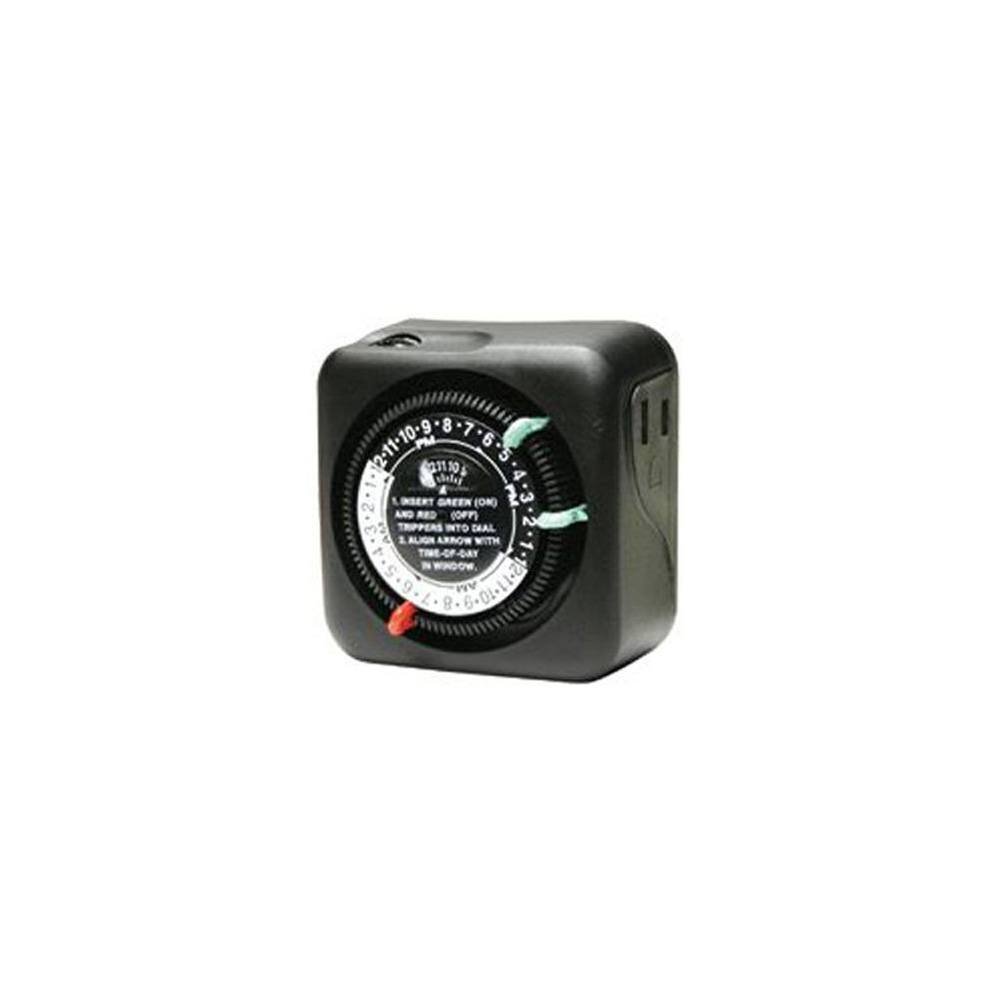
Rajah 1: Depan view of the Intermatic TN111RM40 timer, highlighting the 24-hour dial, green (ON) and red (OFF) trippers, and the time-of-day window. The image also shows the product dimensions: 3 inches deep, 4 inches wide, and 3 inches high.
The Intermatic TN111RM40 timer features a rotating 24-hour dial with markings for AM and PM. It includes removable trippers (pins) for setting ON and OFF times, a manual override switch, and a single 2-prong polarized outlet.
Persediaan
- Buka Pemasa: Carefully remove the timer from its packaging. Inspect for any damage.
- Kenal pasti Komponen: Locate the green (ON) trippers and red (OFF) trippers. These are small pins that insert into the dial.
- Tetapkan Masa Semasa:
- Rotate the entire dial clockwise until the current time aligns with the "TIME-OF-DAY" arrow in the window. Ensure to distinguish between AM and PM hours.
- Insert ON/OFF Trippers:
- Insert the green (ON) trippers into the dial at the desired times you want the connected appliance to turn ON.
- Insert the red (OFF) trippers into the dial at the desired times you want the connected appliance to turn OFF.
- The timer supports up to two ON and two OFF settings per 24-hour period.
- Plug in the Timer: Plug the timer into a standard 2-prong wall outlet.
- Sambung Perkakas: Palamkan lamp or small appliance into the 2-prong polarized outlet on the side of the timer. Ensure the appliance is switched to the ON position if it has its own power switch.
Arahan Operasi
Once set up, the timer will automatically turn your connected appliance ON and OFF according to the programmed times. The dial will continuously rotate clockwise, indicating the passage of time.
Manual Override
The Intermatic TN111RM40 includes a manual override feature. This allows you to temporarily turn the connected appliance ON or OFF without disturbing the programmed schedule.
- To manually turn the appliance ON or OFF, locate the manual override switch (often a small lever or button) on the timer.
- Toggle the switch to the desired position. The timer will resume its programmed schedule at the next ON or OFF event.
Penyelenggaraan
- Pembersihan: Disconnect the timer from the power outlet before cleaning. Wipe the exterior with a soft, damp kain. Jangan gunakan pembersih atau pelarut yang melelas.
- Storan: If storing the timer for an extended period, ensure it is clean and dry. Store in a cool, dry place away from direct sunlight.
- Pemeriksaan: Periodically inspect the timer and its cord for any signs of wear or damage. If damage is found, discontinue use and replace the unit.
Menyelesaikan masalah
| Masalah | Kemungkinan Punca | Penyelesaian |
|---|---|---|
| Appliance does not turn ON/OFF at programmed times. |
|
|
| Timer dial is not rotating. |
|
|
Spesifikasi
- model: TN111RM40
- Jenama: Intermatik
- Jenis: Pemasa Mekanikal 24 Jam
- tetapan: Up to 2 ON/OFF events per day
- Jenis Outlet: 2-Prong Polarized
- Lampiran: 3R (Suitable for outdoor use)
- warna: Hitam
- Bahan: plastik
- Dimensi Produk: 3" (Depth) x 4" (Width) x 3" (Height)
- Berat Barang: 5.3 auns
- UPC: 702811361973
Waranti dan Sokongan
Untuk maklumat jaminan atau sokongan teknikal, sila rujuk laman web rasmi Intermatic webtapak atau hubungi bahagian perkhidmatan pelanggan mereka. Simpan resit pembelian anda untuk tuntutan waranti.
Intermatic Customer Support: www.intermatic.com/support


