pengenalan
This user manual provides comprehensive instructions for the installation, operation, and maintenance of your RCA RTS736W 30-Inch Streaming Soundbar. Please read this manual thoroughly before using the product to ensure proper functionality and to prevent damage.
The RCA RTS736W is designed to enhance your home audio experience with its 3.0 channel sound and integrated Wi-Fi for streaming online content.
Ciri-ciri Utama
- Wi-Fi Built-In for streaming video content to a TV.
- 3.0 Channel Left/Center/Right audio configuration.
- HDMI 1080p Output for high-definition connectivity.
- Includes 1 Rear Analog Audio-in Jack and 1 Side Line-in Jack for various audio sources.
- Flexible placement options: includes table or wall mounting brackets.
Kandungan Pakej
Sahkan bahawa semua item terdapat dalam pakej:
- RCA RTS736W 30-Inch Streaming Soundbar
- Alat Kawalan Jauh
- Penyesuai Kuasa
- Table or Wall Mounting Brackets
- Manual Pengguna (dokumen ini)
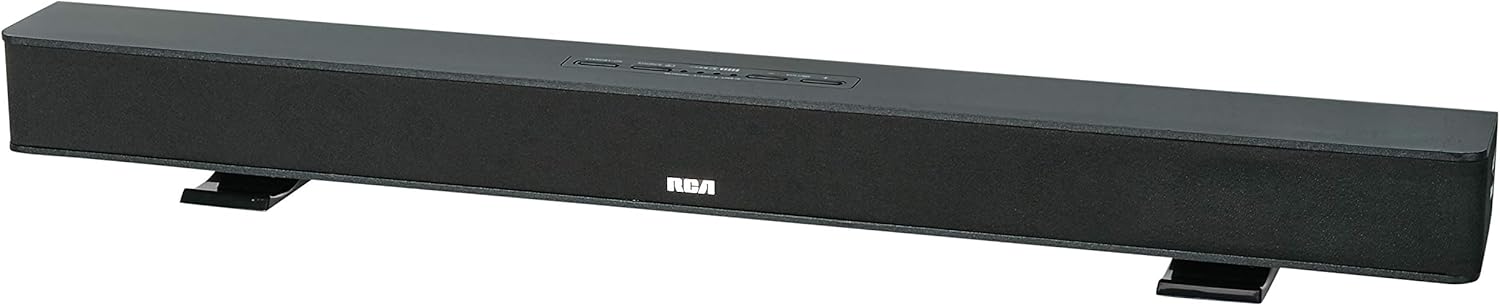
Image: The RCA RTS736W 30-Inch Streaming Soundbar, shown with its sleek black design and integrated controls.
Persediaan
1. Pilihan Penempatan
The soundbar offers flexible placement:
- Peletakan Atas Meja: Place the soundbar on a flat, stable surface in front of your television. Ensure there is adequate ventilation around the unit.
- Pemasangan Dinding: Use the included wall mounting brackets to secure the soundbar to a wall. Refer to the separate wall mounting template (if provided) for detailed instructions. Ensure the wall can support the weight of the soundbar.

Image: The RCA RTS736W soundbar positioned on a TV stand, demonstrating a typical home theater setup with various streaming service icons displayed on the television screen.
2. Menyambung kepada Kuasa
- Connect the power adapter to the DC IN 13.5V port on the back of the soundbar.
- Palamkan hujung satu lagi penyesuai kuasa ke dalam salur keluar dinding.
3. Sambungan Audio
Choose one of the following methods to connect the soundbar to your audio source:
- Output HDMI: Connect an HDMI cable from the HDMI OUT port on the soundbar to an HDMI input on your television. This connection supports 1080p video output from the soundbar's streaming functions.
- Analog Audio-in (AUX 1 / AUX 2): Use RCA audio cables to connect your TV or other audio devices to the AUX 1 or AUX 2 input jacks on the back of the soundbar. Match the red and white connectors.
- Side Line-in Jack: For portable devices like smartphones or tablets, connect a 3.5mm audio cable from your device's headphone jack to the Line-in jack located on the side of the soundbar.

Imej: Dari dekat view of the rear panel of the RCA RTS736W soundbar, highlighting the AUX 1, AUX 2, DC IN 13.5V, HDMI OUT, and VIDEO OUT ports for various connections.
4. Sambungan Rangkaian (Wi-Fi)
To utilize the streaming features, connect the soundbar to your home Wi-Fi network. This process is typically guided by on-screen prompts when the soundbar is first powered on and connected to a TV via HDMI.
- Ensure your TV is connected to the soundbar via HDMI and powered on.
- Ikut arahan pada skrin untuk memilih rangkaian Wi-Fi anda dan masukkan kata laluan.
Arahan Operasi
1. Hidupkan/Mati Kuasa
Tekan ke kuasa butang pada bar bunyi atau alat kawalan jauh untuk menghidupkan atau mematikan unit.
2. Pemilihan Input
Tekan ke Input button on the remote control or the soundbar to cycle through available audio sources: HDMI, AUX 1, AUX 2, Line-in, and Wi-Fi streaming.
3. Kawalan Kelantangan
Gunakan Jilid + dan Isipadu - buttons on the remote control or the soundbar to adjust the audio level.
Tekan ke bisu butang untuk menyenyapkan audio buat sementara waktu.
4. Penstriman Kandungan
Once connected to Wi-Fi and your TV via HDMI, you can access various streaming applications. Navigate using the directional buttons and OK butang pada alat kawalan jauh.
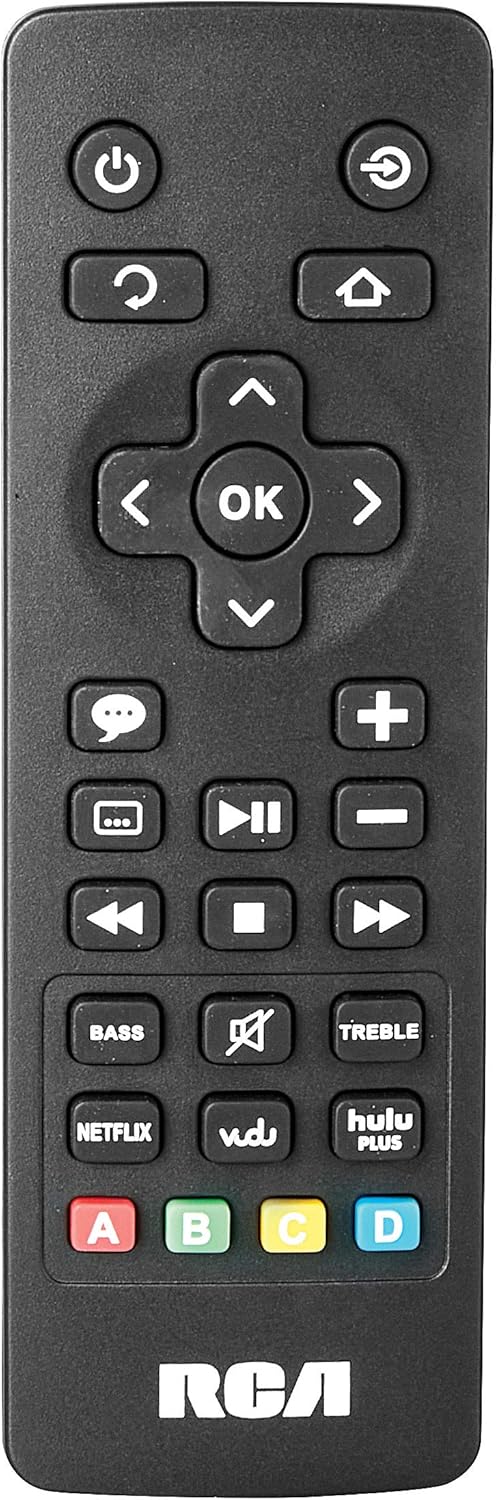
Image: The remote control for the RCA RTS736W soundbar, featuring dedicated buttons for power, volume, input selection, navigation, and direct access to streaming services like Netflix, Vudu, and Hulu Plus.
Dedicated buttons for services like Netflix, Vudu, and Hulu Plus may be available on the remote for direct access.
5. Pelarasan Audio
Gunakan BASS dan TREBLE buttons on the remote control to fine-tune the audio output to your preference.
Penyelenggaraan
- Pembersihan: Disconnect the soundbar from the power outlet before cleaning. Use a soft, dry cloth to wipe the exterior surfaces. Do not use liquid cleaners or abrasive materials.
- Pengudaraan: Ensure that the ventilation openings on the soundbar are not blocked. Proper airflow prevents overheating.
- Storan: Jika menyimpan bar bunyi untuk tempoh yang lama, putuskan sambungannya daripada kuasa dan simpannya di tempat yang sejuk dan kering jauh daripada cahaya matahari langsung dan suhu yang melampau.
Menyelesaikan masalah
Tiada Kuasa
- Check if the power adapter is securely connected to the soundbar and a working wall outlet.
- Pastikan soket kuasa aktif dengan mengujinya dengan peranti lain.
Tiada Bunyi
- Sahkan bahawa sumber input yang betul telah dipilih pada bar bunyi.
- Check all audio cable connections between the soundbar and your audio source (TV, etc.).
- Ensure the volume on both the soundbar and the connected audio source is turned up and not muted.
- If using HDMI, confirm that your TV's audio output settings are configured to send audio to the soundbar.
Streaming Issues (Buffering, Freezing)
- Check your Wi-Fi network connection. Ensure the signal strength is adequate.
- Restart your home router and modem.
- Restart the soundbar by unplugging it from the power outlet for a few minutes, then plugging it back in.
- Ensure your internet service is active and performing correctly.
Alat Kawalan Jauh Tidak Berfungsi
- Gantikan bateri dalam alat kawalan jauh.
- Pastikan tiada halangan antara alat kawalan jauh dan sensor bar bunyi.
- Halakan alat kawalan jauh terus pada bar bunyi.
Spesifikasi
| Nombor Model | RTS736W |
| Jenis Pembesar Suara | Bar bunyi |
| Saluran | 3.0 (Left/Center/Right) |
| Ketersambungan | HDMI, RCA, Wi-Fi |
| Teknologi Tanpa Wayar | Wi-Fi |
| Output HDMI | 1080p |
| Input Audio | 2x Analog Audio-in (RCA), 1x Side Line-in (3.5mm) |
| Saiz Pembesar Suara | 30 Inci |
| Kuasa Output Maksimum | 150 Watt |
| Impedans | 8 ohm |
| Sumber Kuasa | Elektrik Bertali |
| Dimensi Produk (L x W x H) | 33.5 x 6.5 x 5.5 inci |
| Berat Barang | 5.55 paun |
| Pengeluar | Alco Electronics Ltd. |
Maklumat Waranti
Specific warranty details for the RCA RTS736W Soundbar are typically provided with the product packaging or can be found on the official RCA webtapak. Sila simpan bukti pembelian anda untuk tuntutan waranti.
For warranty service, contact RCA customer support with your model number and purchase date.
Sokongan Pelanggan
For further assistance, technical support, or service inquiries, please refer to the contact information provided in your product's original documentation or visit the official RCA support webtapak.
Sumber Dalam Talian: Visit the RCA Store on Amazon
Dokumen Berkaitan - RTS736W
 |
Langkah Berjaga-jaga Keselamatan dan Panduan Bermula RCA Ultra HD Smart TV Langkah berjaga-jaga keselamatan yang komprehensif, arahan penting, senarai aksesori dan panduan permulaan untuk TV Pintar Ultra HD RCA, termasuk alat kawalan jauh dan maklumat bateri. |
 |
RCA RNSMU5836 58-inch 4K UHD Smart TV Instruction Manual Comprehensive instruction manual for the RCA RNSMU5836 58-inch 4K UHD Smart TV. Covers setup, connections, smart features, menu options, and troubleshooting for optimal user experience. |
 |
Manual Pengguna dan Panduan Persediaan RCA SBT17015B Soundbar Manual pengguna yang komprehensif untuk Soundbar RCA SBT17015B, perincian persediaan, sambungan, pasangan Bluetooth, pelarasan audio, langkah berjaga-jaga keselamatan dan maklumat waranti. |
 |
RCA RPJ135 Standard HD Projector with Roku Streaming Stick - User Manual Instruction manual for the RCA RPJ135 Standard HD Projector, including setup, operation, troubleshooting, and warranty information for the projector and integrated Roku Streaming Stick. |
 |
RCA RS32H2-EU 32-Inch LED HD LCD TV User Manual Comprehensive user manual for the RCA RS32H2-EU 32-Inch LED HD LCD TV, covering safety instructions, setup, operation, specifications, and troubleshooting. |
 |
Manual Pengguna RCA RENO Panduan pengguna yang komprehensif untuk telefon pintar RCA RENO, memperincikan persediaan, ciri, komunikasi, alatan, keselamatan dan penyelenggaraan untuk Android 10 (edisi Go). |