pengenalan
This user manual provides comprehensive instructions for the DISH Network 40.0 UHF 2G Remote, designed specifically for use with DISH Hopper and Joey Receivers. This remote offers reliable control over your entertainment system, utilizing a UHF signal for enhanced range and performance.
Persediaan
1. Pemasangan Bateri
The DISH Network 40.0 remote requires two (2) AA batteries for operation. Follow these steps to install them:
- Cari petak bateri di belakang alat kawalan jauh.
- Luncurkan penutup bateri ke bawah dan angkatnya.
- Masukkan dua bateri AA, pastikan terminal positif (+) dan negatif (-) sejajar dengan penunjuk di dalam petak.
- Gantikan penutup bateri dengan menggelongsorkannya semula ke tempatnya sehingga ia berbunyi dengan selamat.
2. Pairing the Remote with Your Receiver
The 40.0 remote operates using a UHF signal, which requires pairing with your Hopper or Joey receiver. This allows the remote to control the receiver without needing a direct line of sight.
- Ensure your Hopper or Joey receiver is powered on.
- Pada alat kawalan jauh, tekan butang INFO SISTEM butang (atau MENU then navigate to tetapan > Alat Kawalan Jauh > Pasangkan Alat Jauh).
- Follow the on-screen prompts to complete the pairing process. This typically involves pressing a specific button combination on the remote or confirming a code displayed on the screen.
- Once successfully paired, a confirmation message will appear on your TV screen.
For detailed pairing instructions specific to your receiver model, refer to your receiver's user manual or the DISH Network support webtapak.
Arahan Operasi
The DISH Network 40.0 remote provides intuitive control over your Hopper or Joey receiver. Below is an overview butang kekunci dan fungsinya.
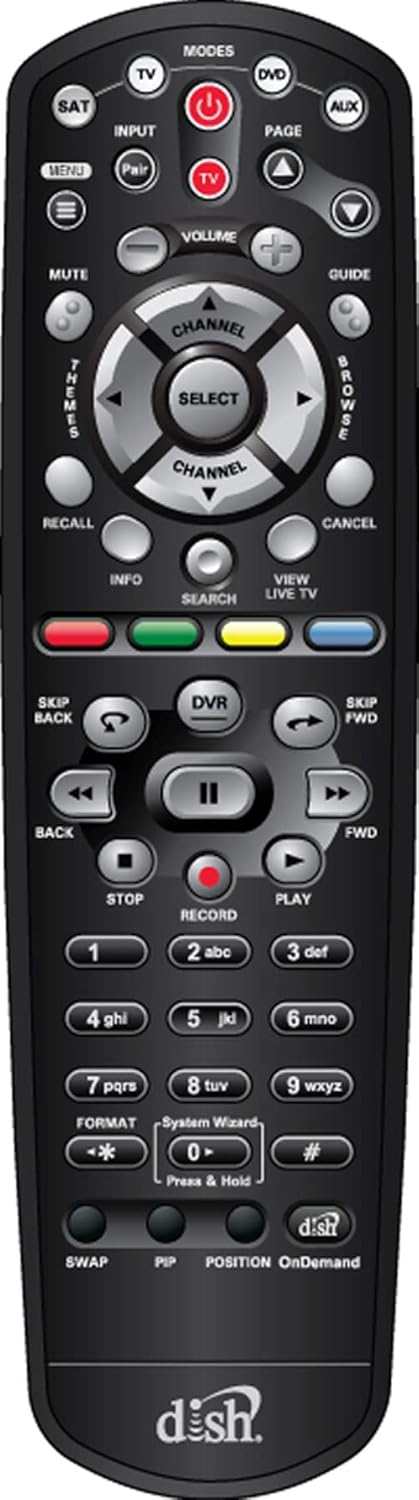
Rajah 1: Depan view of the DISH Network 40.0 UHF 2G Remote, showing all buttons and their layout.
Fungsi Butang Jauh
| Butang | Fungsi |
|---|---|
| KUASA | Menghidupkan/mematikan penerima dan TV. |
| MODES (TV, DVD, AUX, SAT) | Selects the device the remote controls. Ensure SAT mode is selected for receiver control. |
| INPUT | Menukar sumber input pada TV anda. |
| MENU | Accesses the main menu of the DISH receiver. |
| PANDUAN | Memaparkan panduan program. |
| JILID (+/-) | Melaraskan kelantangan TV. |
| CHANNEL (+/-) | Menukar saluran. |
| SELECT / Navigation Arrows | Menavigasi menu dan memilih pilihan. |
| DVR | Accesses your Digital Video Recorder (DVR) recordings. |
| PLAY, PAUSE, STOP, FWD, BACK, SKIP FWD, SKIP BACK | Mengawal main balik TV langsung dan kandungan yang dirakam. |
| REKOD | Memulakan rakaman program semasa. |
| INFO | Memaparkan maklumat program. |
| CARIAN | Opens the search function for programs and content. |
| VIEW TV LANGSUNG | Kembali ke televisyen secara langsung. |
| Butang Berwarna (Merah, Hijau, Kuning, Biru) | Functions vary depending on the on-screen menu or application. For Hopper 3, these buttons may offer enhanced features like one-click Closed Captioning (Green button). |
| Pad Kekunci Berangka (0-9) | Direct channel entry and text input. |
| SWAP | Switches between the current and previous channel. |
| PIP | Picture-in-Picture function (if supported by receiver/TV). |
| OnDemand | Mengakses kandungan Atas Permintaan. |
For specific programming of the TV, DVD, or AUX modes, refer to the programming instructions provided with your receiver or on the DISH Network support website. The remote may come with a label sheet for custom input programming, as shown in Figure 2.

Figure 2: DISH Network 40.0 UHF 2G Remote shown with an accompanying sheet of input labels, which can be used to customize the remote's functions for various devices.
Penyelenggaraan
To ensure the longevity and optimal performance of your DISH Network 40.0 remote, follow these maintenance guidelines:
- Pembersihan: Gunakan kain lembut dan kering untuk mengelap alat kawalan jauh. Untuk kotoran degil, sedikitampen kain dengan air atau pembersih yang lembut dan tidak melelas. Elakkan kelembapan berlebihan dan bahan kimia yang keras.
- Penggantian Bateri: Replace batteries when the remote's response becomes sluggish or if the indicator light (if present) signals low battery. Always replace both batteries at the same time with new ones of the same type (AA).
- Storan: Simpan alat kawalan jauh di tempat yang sejuk dan kering jauh dari cahaya matahari langsung, suhu yang melampau dan kelembapan yang tinggi.
- Elakkan Titisan: Lindungi alat kawalan jauh daripada kesan fizikal, kerana titisan boleh merosakkan komponen dalaman.
Menyelesaikan masalah
If you encounter issues with your DISH Network 40.0 remote, try the following solutions:
| Masalah | Kemungkinan Punca / Penyelesaian |
|---|---|
| Jauh tidak bertindak balas. |
|
| Remote controls TV but not receiver. |
|
| Remote controls receiver but not TV (e.g., volume, power). |
|
| Butang melekit atau tidak bertindak balas. |
|
If these steps do not resolve the issue, contact DISH Network customer support for further assistance.
Spesifikasi
| Ciri | Perincian |
|---|---|
| Nombor Model | EL-UDON-81457 (DISH Network 40.0) |
| Keserasian | DISH Hopper and Joey Receivers only |
| Jenis Komunikasi | UHF (Ultra High Frequency) 2G Signal |
| Sumber Kuasa | 2 x Bateri AA (diperlukan) |
| Dimensi (L x W x H) | 8.5 x 1.2 x 4.1 inci (anggaran) |
| Berat Barang | 4 ounces (approximate, without batteries) |
| warna | Hitam |
| Bilangan Maks Peranti yang Disokong | 4 (SAT, TV, DVD, AUX) |
Waranti dan Sokongan
Maklumat Waranti
This product is typically covered by a limited warranty provided by DISH Network or the retailer from whom it was purchased. Warranty terms and conditions may vary. Please retain your proof of purchase for warranty claims.
Note: The provided product information includes a legal disclaimer from a specific seller regarding returns. For official product warranty, please refer to DISH Network's official documentation.
Sokongan Pelanggan
For further assistance, technical support, or to inquire about replacement parts, please contact DISH Network customer service:
- DISH Network Official Webtapak: www.dish.com/support
- Sokongan Telefon: Refer to the DISH Network webtapak untuk nombor hubungan semasa.
When contacting support, please have your receiver model number and the remote's model number (EL-UDON-81457) readily available.


