pengenalan
This manual provides instructions for the setup, operation, maintenance, and troubleshooting of your ASUS VG23AH 23-inch 3D IPS LED Monitor. The VG23AH monitor features a 23-inch Full HD 1080p IPS panel with 3D capabilities, designed to deliver high-quality visuals and an immersive viewing experience. It includes ASUS All-in 3D Technology for converting 2D content to 3D via a dedicated button.
Persediaan
1. Membongkar Monitor
Carefully remove the monitor and all components from the packaging. Ensure all items listed in the packing contents are present. Retain the packaging for future transport or service needs.
2. Memasang Pendirian
- Letakkan panel monitor menghadap ke bawah di atas permukaan yang lembut dan bersih untuk mengelakkan calar.
- Attach the stand base to the stand neck. Secure it with the provided screw.
- Align the assembled stand with the mounting holes on the back of the monitor panel. Insert and tighten the screws to secure the stand to the monitor.

Imej: Depan view of the ASUS VG23AH monitor with its stand assembled.
3. Menyambung Kabel
Connect the necessary cables to the monitor and your computer or other devices. The monitor supports dual HDMI 1.4, single-link DVI, and D-sub inputs.
- Kabel kuasa: Sambungkan kabel kuasa ke input kuasa monitor dan kemudian ke alur keluar kuasa.
- Kabel Video: Pilih salah satu daripada sambungan berikut:
- HDMI: Connect an HDMI cable from your device to one of the HDMI ports on the monitor.
- DVI: Connect a DVI cable from your device to the DVI port on the monitor.
- Sub-D (VGA): Connect a D-sub cable from your device to the D-sub port on the monitor.
- Kabel Audio (Pilihan): If using D-sub or DVI for video and wish to use the monitor's speakers, connect an audio cable from your device's audio output to the monitor's audio input. HDMI connections transmit audio digitally.

Imej: Belakang view of the ASUS VG23AH monitor, highlighting the power, HDMI, DVI, D-sub, and audio input ports.
4. Kuasa Awal Hidup
After connecting all cables, press the power button on the monitor. Ensure your connected device is also powered on. The monitor should automatically detect the input signal. If not, use the OSD (On-Screen Display) menu to manually select the input source.
Mengendalikan Monitor
1. Menu Paparan Pada Skrin (OSD).
The OSD menu allows you to adjust various monitor settings. Use the buttons located on the front or bottom bezel of the monitor to navigate the menu.
- Butang Menu: Membuka menu OSD.
- Butang Navigasi: Digunakan untuk bergerak melalui pilihan menu dan melaraskan nilai.
- Butang Pilih/Masuk: Mengesahkan pilihan atau memasuki sub-menu.
- Butang Keluar: Keluar dari menu semasa atau OSD.
2. Display Modes and 3D Functionality
The VG23AH supports both 2D and 3D display modes. The monitor utilizes passive 3D technology.
- Mod 2D: Standard display for everyday computing, gaming, and video viewing.
- Mod 3D: Untuk viewing stereoscopic 3D content.
- Penukaran 2D kepada 3D: The monitor features a dedicated 3D button on the front bezel. Pressing this button instantly converts 2D content to simulated 3D. The effectiveness of this conversion may vary depending on the source content.
- 3D Glasses: Passive 3D glasses are required to experience the 3D effect.
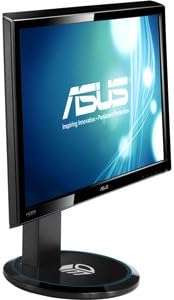
Imej: Sisi view of the ASUS VG23AH monitor, illustrating its design and the location of control buttons on the bezel.
3. Ciri Audio
The monitor includes built-in 3W stereo speakers. Audio can be received via HDMI (digital) or through the 3.5mm audio input jack (analog).
Penyelenggaraan
1. Membersihkan Monitor
- Sentiasa matikan monitor dan cabut palam kuasa sebelum membersihkan.
- Gunakan kain lembut dan tidak berbulu sedikit dampdisapu dengan air atau pembersih skrin yang lembut dan tidak melelas.
- Jangan sembur pembersih terus ke skrin. Sapukan pada kain terlebih dahulu.
- Elakkan menggunakan bahan kimia, pelarut atau bahan kasar yang keras, kerana ini boleh merosakkan skrin atauasing.
2. Penjagaan Am
- Jauhkan monitor daripada cahaya matahari langsung, haba berlebihan dan kelembapan.
- Pastikan pengudaraan yang mencukupi di sekeliling monitor untuk mengelakkan terlalu panas.
- Elakkan meletakkan objek berat pada monitor atau kabelnya.
- If moving the monitor, disassemble the stand and pack it in its original packaging for protection.
Menyelesaikan masalah
Jika anda menghadapi masalah dengan monitor anda, rujuk kepada masalah dan penyelesaian biasa berikut:
| Masalah | Penyelesaian yang Mungkin |
|---|---|
| Tiada gambar di skrin |
|
| Imej kabur atau herot |
|
| 3D effect is not working or appears incorrect |
|
| Tiada audio daripada pembesar suara |
|
Spesifikasi
Key technical specifications for the ASUS VG23AH monitor:
| Ciri | Spesifikasi |
|---|---|
| Saiz Skrin | 23 Inci |
| Jenis Panel | LED IPS |
| Resolusi Asli | 1920 x 1080 (HD Penuh 1080p) |
| Nisbah Aspek | 1.33:1 |
| Viewsudut | 178° Ultra lebar |
| Teknologi 3D | Passive 3D, ASUS All-in 3D Technology |
| Ketersambungan | Dual HDMI 1.4, Single-link DVI, D-sub |
| Pembesar Suara Terbina dalam | Pembesar Suara Stereo 3W |
| Dimensi Produk (LxWxH) | 24.61 x 9.14 x 19.02 inci |
| Berat Barang | 13 paun |
| Pengeluar | ASUS Computer International Direct |
Maklumat Waranti
ASUS products are manufactured to the highest quality standards. For detailed warranty terms and conditions, please refer to the warranty card included with your product or visit the official ASUS support website. Keep your proof of purchase for warranty service.
Sokongan
For further assistance, technical support, or service inquiries, please visit the official ASUS support website or contact ASUS customer service. You can find contact information and frequently asked questions on the ASUS support portal.
Sokongan ASUS Webtapak: www.asus.com/support/


