pengenalan
This manual provides essential instructions for the setup, operation, maintenance, and troubleshooting of your RCA RE20QP29 Remote Control. This remote is designed as a direct replacement for specific RCA television models.
Produk Selesaiview
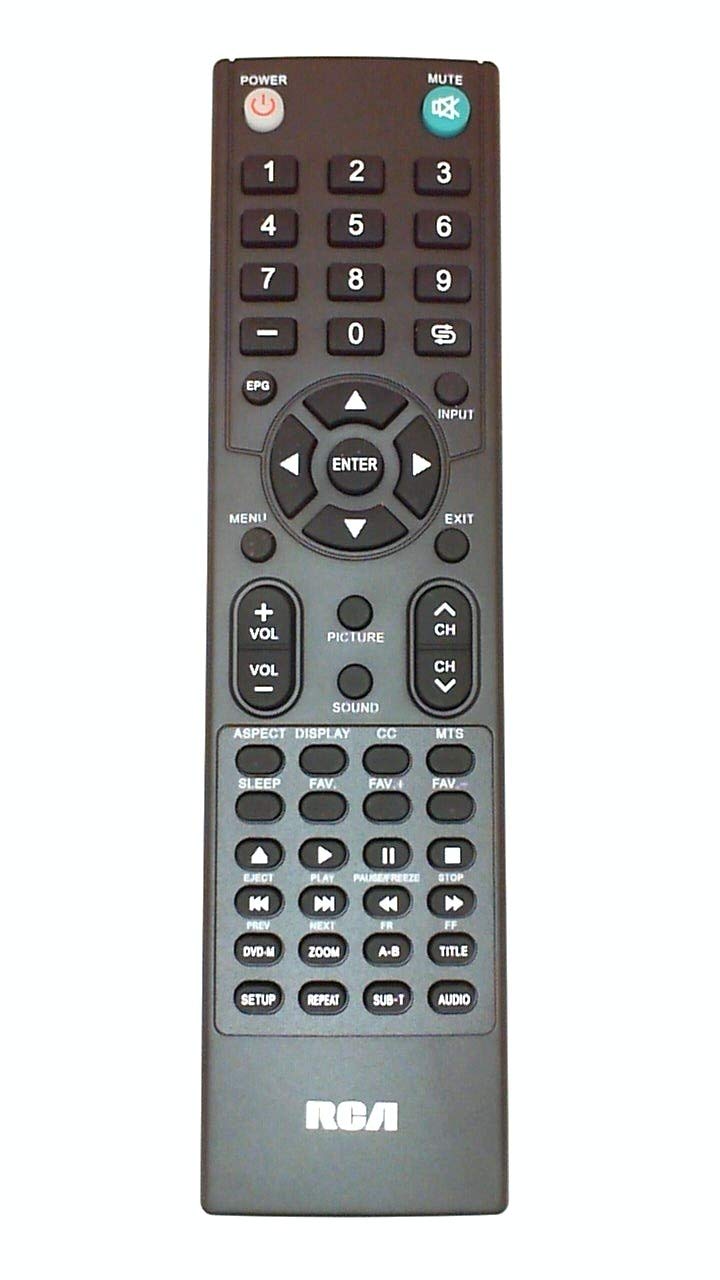
Image of the RCA RE20QP29 remote control, showing its general layout and buttons.
The RCA RE20QP29 is an infrared remote control featuring a button control interface. It is designed to be an ergonomic replacement or spare for compatible RCA television models.
Keserasian
The RE20QP29 remote control is compatible with the following RCA television models:
- RCA 19LA30RQ
- RCA 22LA30RQ
- RCA 22LA45RQ
- RCA 22LA45RQD
- RCA RXV6774
This remote may also be a substitute for part number OARC04G. To ensure compatibility, always verify the part number RE20QP29 matches your original remote or the required part for your television model.
Persediaan
1. Pemasangan Bateri
- Cari petak bateri di belakang alat kawalan jauh.
- Luncurkan penutup petak bateri ke bawah atau mengikut arah yang ditunjukkan oleh anak panah untuk membukanya.
- Masukkan dua bateri AAA baharu (tidak disertakan), pastikan terminal positif (+) dan negatif (-) sejajar dengan betul dengan tanda di dalam petak.
- Gantikan penutup petak bateri, luncurkannya semula ke tempatnya sehingga ia berbunyi dengan selamat.
2. Penggunaan Awal
The RCA RE20QP29 remote control is designed for immediate use with compatible RCA television models. No programming or pairing is typically required. Once batteries are installed, point the remote at your television and press the Power button to test functionality.
Arahan Operasi
The remote control features standard television control buttons. While the exact layout may vary slightly, common functions include:
- Kuasa: Menghidupkan atau mematikan televisyen.
- Saluran Atas/Bawah: Menukar saluran televisyen.
- Kelantangan Naik/Turun: Melaraskan kelantangan audio.
- Redam: Menyenyapkan audio televisyen.
- Input/Sumber: Selects different video input sources (e.g., HDMI, AV).
- Menu: Accesses the television's on-screen menu.
- Navigation Buttons (Arrow Keys, OK/Enter): Used to navigate through menus and confirm selections.
- Pad Nombor: Terus memasukkan nombor saluran.
For specific button functions and their corresponding actions, refer to your television's user manual.
Penyelenggaraan
Pembersihan
Untuk membersihkan alat kawalan jauh, gunakan kain lembut dan kering. Untuk kotoran degil, ringankan dampen the cloth with water or a mild, non-abrasive cleaner. Avoid using harsh chemicals, solvents, or abrasive materials, as these can damage the remote's surface or internal components.
Penggantian Bateri
Replace batteries when the remote's response becomes sluggish or stops working. Always replace both batteries at the same time with new ones of the same type (AAA). Do not mix old and new batteries, or different types of batteries, as this can lead to leakage or damage.
Penyimpanan
If the remote control will not be used for an extended period, remove the batteries to prevent potential leakage and damage. Store the remote in a cool, dry place away from direct sunlight and extreme temperatures.
Menyelesaikan masalah
- Jauh tidak bertindak balas:
- Periksa sama ada bateri dimasukkan dengan betul dengan polariti yang betul.
- Gantikan bateri lama dengan yang baru.
- Ensure there is a clear line of sight between the remote's infrared emitter and the television's IR receiver. Obstructions can block the signal.
- Bergerak lebih dekat ke televisyen.
- Beberapa butang tidak berfungsi:
- This could indicate a specific button malfunction or a compatibility issue with that particular function on your TV.
- Ensure the remote is clean and there is no debris under the buttons.
- Kerja jarak jauh berfungsi secara berselang-seli:
- Weak batteries are a common cause. Replace them.
- Ensure no strong light sources (like direct sunlight or fluorescent lights) are interfering with the IR signal.
Jika langkah penyelesaian masalah tidak menyelesaikan isu, hubungi sokongan pelanggan untuk mendapatkan bantuan lanjut.
Spesifikasi
| Ciri | Perincian |
|---|---|
| Nombor Model | RE20QP29 |
| Jenama | RCA |
| Teknologi Ketersambungan | Inframerah |
| Jenis Pengawal | Kawalan Butang |
| Ciri Khas | Ergonomik |
| Berat Barang | Kira-kira 1.5 paun (0.68 kg) |
| Sumber Kuasa | 2 x Bateri AAA (tidak termasuk) |
Maklumat Waranti
This RCA RE20QP29 Remote Control comes with a 180-day warranty from the date of purchase. This warranty covers defects in materials and workmanship under normal use. Please retain your proof of purchase for warranty claims. The warranty does not cover damage caused by misuse, accidents, unauthorized repairs, or normal wear and tear.
Sokongan Pelanggan
For further assistance, technical support, or warranty inquiries, please contact the seller or RCA customer service. Provide your product model number (RE20QP29) and details of your issue for efficient support.


