1. Pengenalan
The Aputure Amaran AHL-N60 LED Ring Flash is a versatile lighting accessory designed for macro photography and other close-up applications. It provides consistent, uniform illumination, offering both continuous light and flash modes. This manual details the proper setup, operation, maintenance, and troubleshooting for your AHL-N60 unit, ensuring optimal performance and longevity.
2. Maklumat Keselamatan
- Do not look directly into the LED lights when they are active, as this may cause eye strain or damage.
- Keep the device away from water and other liquids to prevent electric shock or malfunction.
- Do not attempt to disassemble or modify the unit. Repairs should only be performed by authorized service personnel.
- Ensure proper battery installation and use only recommended battery types. Remove batteries during extended periods of non-use.
- Jauhkan daripada kanak-kanak.
3. Kandungan Pakej
Sahkan bahawa semua item terdapat dalam pakej anda:
- Amaran AHL-N60 LED Ring Flash Unit
- Unit Pengawal
- Set of Lens Adapter Rings (various sizes)

Figure 3.1: Complete Aputure Amaran AHL-N60 LED Ring Flash kit, including the ring light, controller, and adapter rings.
4. Produk Lebihview
The AHL-N60 consists of an LED ring light, a control unit, and various lens adapter rings for compatibility with different camera lenses.
4.1 Komponen
- Lampu Cincin LED: Houses the LED array for illumination. Attaches to the lens via an adapter ring.
- Unit Pengawal: Connects to the camera's hot shoe and the LED ring light. Contains controls for power, mode selection, and brightness adjustment.
- Cincin Penyesuai: Thread onto your camera lens, allowing the LED ring light to be securely mounted.
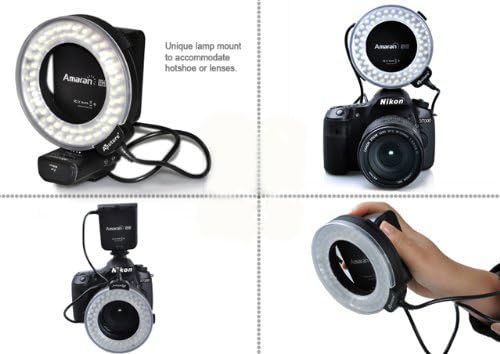
Figure 4.1: Various mounting options for the Amaran AHL-N60, showcasing fleksibilitinya.
4.2 Controls on the Controller Unit
- Butang Kuasa: Menghidupkan atau mematikan unit.
- Butang Mod: Cycles through different lighting modes (e.g., full, left side, right side, flash).
- Brightness Dial: Adjusts the intensity of the LED light.
- Flash/Continuous Switch: Toggles between continuous illumination and flash mode.
5. Persediaan
5.1 Pemasangan Bateri
The controller unit requires batteries for operation. Open the battery compartment on the controller unit and insert the specified number and type of batteries, ensuring correct polarity. Close the compartment securely.
5.2 Pemasangan pada Kamera
- Select the appropriate adapter ring that matches the filter thread size of your camera lens.
- Skrukan cincin penyesuai yang dipilih pada ulir penapis hadapan kanta kamera anda.
- Slide the LED ring light onto the adapter ring until it clicks into place or is securely fastened.
- Attach the controller unit to your camera's hot shoe and tighten the locking mechanism.
- Connect the cable from the LED ring light to the designated port on the controller unit.

Figure 5.1: The Amaran AHL-N60 LED Ring Flash correctly mounted on a DSLR camera.
6. Mod Operasi
The Amaran AHL-N60 offers multiple lighting modes to suit various photographic needs.
- Hidupkan/Mati Kuasa: Press the Power button on the controller unit to turn the device on or off.
- Continuous Light Mode: Set the Flash/Continuous switch to the 'Continuous' position. The LEDs will remain lit.
- Mod Denyar: Set the Flash/Continuous switch to the 'Flash' position. The LEDs will only illuminate when the camera's shutter is triggered.
- Pelarasan Kecerahan: Rotate the Brightness Dial to increase or decrease the light intensity.
- Mod Pencahayaan: Press the Mode button to cycle through the available lighting patterns:
- Kecerahan Penuh: All LEDs illuminate evenly.
- Left Side Only: Only the LEDs on the left half of the ring illuminate.
- Right Side Only: Only the LEDs on the right half of the ring illuminate.

Figure 6.1: Visual comparison of a subject photographed without and with the Amaran AHL-N60 ring flash, highlighting its effect.
7. Penyelenggaraan
- Pembersihan: Use a soft, dry cloth to clean the exterior of the unit. For stubborn dirt, a slightly damp kain boleh digunakan, diikuti dengan pengeringan segera. Jangan gunakan bahan kimia yang keras atau pembersih yang kasar.
- Storan: Store the AHL-N60 in a cool, dry place, away from direct sunlight and extreme temperatures. If storing for an extended period, remove the batteries from the controller unit.
- Penjagaan Bateri: Replace batteries when performance diminishes. Dispose of used batteries responsibly according to local regulations.
8. Penyelesaian masalah
- Unit tidak menghidupkan:
- Check if batteries are correctly installed and fully charged.
- Pastikan butang kuasa ditekan dengan kuat.
- LEDs are dim or uneven:
- Adjust the brightness dial.
- Gantikan bateri jika ia rendah.
- Ensure the ring light is securely connected to the controller unit.
- Flash mode not working:
- Verify the Flash/Continuous switch is set to 'Flash'.
- Ensure the controller unit is properly seated in the camera's hot shoe and making good contact.
- Semak tetapan kamera untuk memastikan denyar luaran diaktifkan.
If problems persist, contact Aputure customer support for further assistance.
9. Spesifikasi
| Ciri | Spesifikasi |
|---|---|
| Jenama | Aputure |
| Nombor Model | AHL-C60 (also known as AHL-N60 series) |
| Dimensi Produk | 21.01 x 5.99 x 10.01 cm |
| Berat Barang | 421.84 g |
| Jenis Lampu Kilat Kamera | Makro |
| Kelajuan Penyegerakan Denyar | 1/20000 Saat |
| Teknologi Komunikasi Tanpa Wayar | Optical Pulse |
| Tarikh Tersedia Pertama | 27 Jun 2014 |
10. Waranti dan Sokongan
Warranty information for the Aputure Amaran AHL-N60 LED Ring Flash is typically provided with the product packaging at the time of purchase. Please refer to the documentation included with your unit for specific warranty terms and conditions.
For technical support, service, or inquiries regarding your product, please contact Aputure customer service. You can usually find contact information on the official Aputure webtapak atau melalui peruncit produk anda.


