1. Pengenalan
Thank you for choosing the SCS Sentinel SAL0005 ControlAlarm Wireless Infrared Motion Detector Alarm Kit. This device is designed to enhance the security of your home or workplace by detecting unauthorized movement within its monitored area. It utilizes infrared technology to sense presence and triggers a powerful audible alarm. This manual provides essential information for the proper installation, operation, and maintenance of your alarm system.
2. Kandungan Pakej
Sila sahkan bahawa semua komponen terdapat dalam pakej:
- 1 x SCS Sentinel ControlAlarm Motion Detector
- 2 x Alat Kawalan Jauh
- 1 x Manual Pengguna
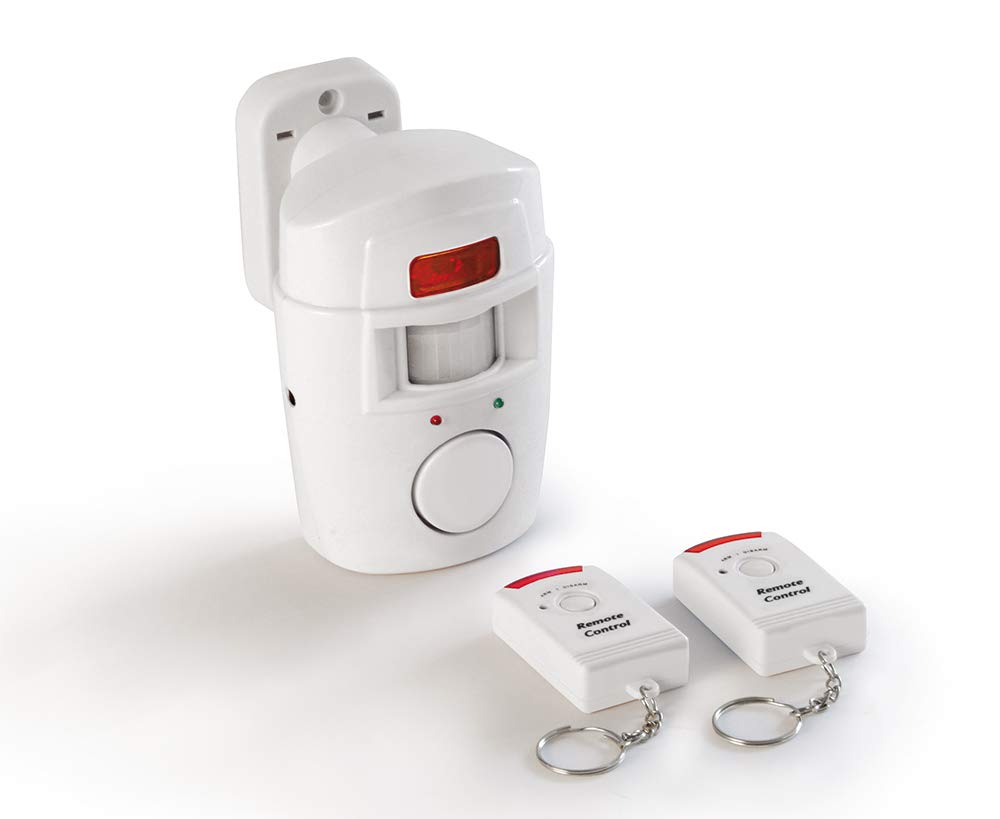
Image: The main motion detector unit and one of the remote controls are shown. The detector is a white, rectangular device with a sensor window, and the remote is a compact, grey unit with buttons.
3. Maklumat Keselamatan
- Peranti ini bertujuan untuk kegunaan dalaman sahaja.
- Jangan dedahkan peranti kepada air, lembapan atau suhu yang melampau.
- Jauhkan peranti dan komponennya daripada kanak-kanak.
- Ensure correct battery polarity during installation. Improper battery installation can damage the device.
- Replace all batteries at the same time with new ones of the same type.
- Buang bateri terpakai mengikut peraturan tempatan.
- This alarm system is a deterrent and should not be considered a substitute for comprehensive security measures.
4. Persediaan
4.1. Pemasangan Bateri
The motion detector requires 12V Alkaline batteries (type 10A, included). The remote controls also come with pre-installed batteries.
- Locate the battery compartment cover on the back of the motion detector.
- Luncurkan atau buka klip penutup untuk membukanya.
- Insert the 12V Alkaline batteries, ensuring correct polarity (+ and - terminals match the markings inside the compartment).
- Tutup penutup petak bateri dengan selamat.
Nota: The device can also be powered by an optional external power adapter (not supplied). If using an adapter, ensure it matches the specified voltage dan keperluan semasa.
4.2. Mounting the Motion Detector
Choose a suitable location for the motion detector to ensure optimal coverage and prevent false alarms.
- lokasi: Mount the detector on a wall in an area where intruders are likely to pass. The detector has a 110° detection angle and a range of up to 8 meters.
- Ketinggian: Install the detector at a height of approximately 2 to 2.5 meters (6.5 to 8 feet) from the floor for best performance.
- Elakkan: Do not point the detector directly at windows, heat sources (e.g., radiators, air vents), or areas with significant air currents (e.g., near fans, open doors) as these can cause false alarms. Avoid direct sunlight on the sensor.
- Pemasangan: Use appropriate screws and wall plugs (not included) to securely fix the detector to the wall. Ensure it is stable and cannot be easily dislodged.
5. Arahan Operasi
5.1. Arming the System
To arm the motion detector:
- Ensure the area to be monitored is clear of any movement.
- Tekan ke LENGAN button (often represented by a locked padlock or 'ON' symbol) on one of the remote controls.
- The detector will typically emit a short beep or flash an indicator light to confirm it is armed. There may be a short delay (e.g., 10-15 seconds) before the system is fully active, allowing you to exit the monitored area.
5.2. Melucutkan Senjata Sistem
To disarm the motion detector:
- Tekan ke HILANGKAN button (often represented by an unlocked padlock or 'OFF' symbol) on one of the remote controls.
- The detector will typically emit a confirmation sound or light to indicate it is disarmed.
5.3. Detection and Alarm
When the system is armed and the infrared sensor detects movement within its 110° field of view and up to 8-meter range, the integrated siren will activate. The siren will sound for a predetermined duration (e.g., 30-60 seconds) and then reset, ready to detect further movement. To stop the alarm, disarm the system using the remote control.
6. Penyelenggaraan
6.1. Penggantian Bateri
When the batteries in the motion detector are low, the device may indicate this with a specific sound or light pattern (refer to specific device behavior if applicable). Replace batteries promptly to ensure continuous operation.
- Disarm the system before replacing batteries.
- Buka petak bateri seperti yang diterangkan dalam Bahagian 4.1.
- Remove the old batteries and insert new 12V Alkaline batteries (type 10A), observing correct polarity.
- Tutup petak bateri dengan selamat.
- Test the system by arming and disarming it.
6.2. Pembersihan
To maintain optimal performance, periodically clean the exterior of the motion detector.
- Gunakan kain lembut dan kering untuk mengelap permukaan peranti.
- Do not use abrasive cleaners, solvents, or harsh chemicals, as these can damage the plastic casing or the sensor lens.
- Ensure the sensor lens is free from dust or obstructions.
7. Penyelesaian masalah
| Masalah | Kemungkinan Punca | Penyelesaian |
|---|---|---|
| Alarm does not arm/disarm | Remote control batteries low/dead; Out of range; Detector batteries low/dead. | Replace remote control batteries; Move closer to the detector; Replace detector batteries. |
| Penggera palsu | Detector pointed at heat sources, windows, or areas with air currents; Pets in detection zone. | Adjust detector's position/angle; Ensure no heat sources or air currents interfere; Consider pet-immune detectors if pets are an issue. |
| No detection when armed | Detector batteries low/dead; Obstruction in sensor's line of sight; Incorrect mounting height. | Replace detector batteries; Clear any obstructions; Adjust mounting height as per Section 4.2. |
| Siren not sounding | Detector not armed; Detector batteries low/dead; Siren malfunction. | Ensure system is armed; Replace detector batteries; Contact customer support if issue persists. |
8. Spesifikasi
- model: SAL0005 (DMA 9880 W)
- Jenama: SCS Sentinel
- Kaedah Pengesanan: Inframerah Pasif (PIR)
- Sudut Pengesanan: 110°
- Julat Pengesanan: Sehingga 8 meter
- Power Source (Detector): 12V Alkaline battery (Type 10A, included), optional external power adapter (not included)
- Dimensi (Pengesan): Kira-kira 32.5 x 16 x 4 cm (L x W x H)
- Weight (Detector): Lebih kurang 200 gram
- Pemasangan: Lekap di dinding
- Komponen Termasuk: 1 Motion Detector, 2 Remote Controls
- Penggunaan yang Disyorkan: Residential and commercial security
9. Waranti dan Sokongan
For warranty information, please refer to the terms and conditions provided at the point of purchase or visit the official SCS Sentinel website. If you encounter any issues or require technical assistance that is not covered in this manual, please contact SCS Sentinel customer support. Keep your purchase receipt as proof of purchase for warranty claims.
SCS Sentinel Contact Information: Please refer to the packaging or the official SCS Sentinel webtapak untuk mendapatkan butiran hubungan yang paling terkini.