Produk Selesaiview
The SureCall Indoor Panel Antenna is a compact directional antenna designed to enhance cellular signal within indoor environments. It supports 2G, 3G, 4G, and WLAN systems across cellular, PCS, AWS, and LTE frequencies (698 - 2700 MHz). This high-gain antenna is optimized for broadcasting indoor signal over a wide area, featuring a 120° horizontal beamwidth for effective coverage.
Ciri-ciri Utama:
- Indoor directional panel antenna
- N-female connector (50 ohm)
- 7 dBi / 10 dBi gain
- Wide band 2G, 3G & 4G LTE (698 - 2700 MHz) compatibility
- Connects to booster with SC-400 cable (sold separately)
Kandungan Pakej
Pakej termasuk item berikut:
- Wide Band Directional 50 Ohm Wall-Mount Indoor Panel Antenna with N-Female Connector
- Kit pemasangan
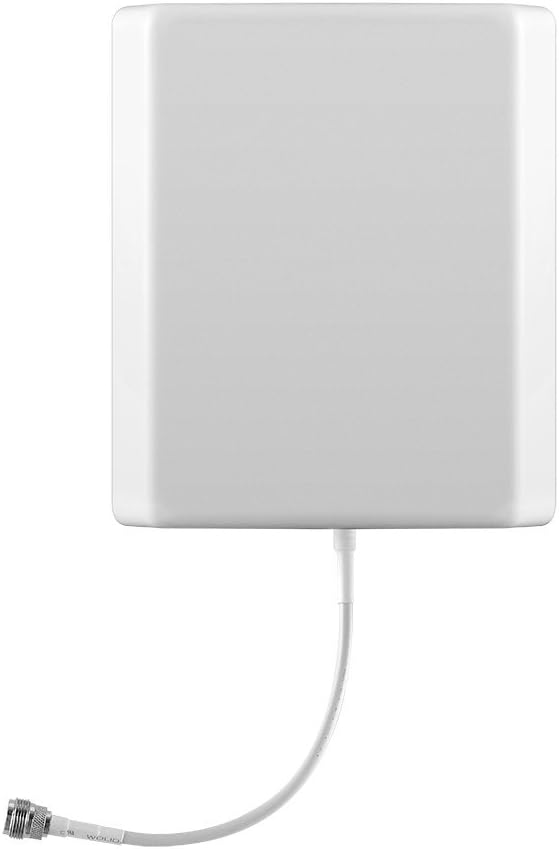
Rajah 1: Depan view of the SureCall Wide Band Directional Internal Wall Mount Panel Antenna. This image displays the antenna's compact white rectangular design with the N-female connector cable visible at the bottom, ready for connection to a booster.
Persediaan dan Pemasangan
This antenna is designed for indoor wall-mount installation. For optimal performance, consider the following guidelines:
- Pemilihan Lokasi: Choose a central location within the area where signal improvement is desired. The antenna transmits and receives signal with a 120° beamwidth, so orient it to cover the primary area. Avoid placing it near large metal objects or other electronic devices that could interfere with the signal.
- Pemasangan: Use the included mounting kit to securely attach the antenna to a wall. Ensure the mounting surface is stable and can support the antenna's weight (approximately 13.6 ounces).
- Sambungan Kabel: Connect the N-female connector of the antenna to your cell phone signal booster using an SC-400 cable (sold separately). Ensure the connection is tight and secure to prevent signal loss.
- Orientasi: While the antenna is directional, its primary function is to broadcast signal indoors. Some users have found success by orienting it towards the general direction of the cellular tower, even for an indoor antenna, to maximize signal capture from the booster. However, its main purpose is to distribute the boosted signal effectively within your home.

Figure 2: SureCall Panel Antenna mounted on an interior wall. This image demonstrates a typical installation scenario, showing the antenna discreetly placed on a wall, ready to distribute enhanced cellular signal.
Prinsip Operasi
The SureCall Wide Band Directional Internal Wall Mount Panel Antenna operates as part of a complete cell phone signal booster system. It receives the amplified cellular signal from your booster and broadcasts it wirelessly throughout your indoor space. Conversely, it captures cellular signals from your mobile devices and sends them back to the booster for re-transmission to the cellular network.
For optimal performance, ensure your signal booster system is properly installed and powered on. The antenna's directional nature means it will provide the strongest signal within its 120° beamwidth, gradually decreasing signal strength outside this primary coverage area.
Penyelenggaraan
The SureCall Panel Antenna requires minimal maintenance. Follow these guidelines to ensure its longevity and continued performance:
- Pembersihan: Periodically wipe the antenna's exterior with a soft, dry cloth to remove dust and debris. Do not use harsh chemicals or abrasive cleaners.
- Semakan Sambungan: Occasionally inspect the N-female connector and cable for any signs of wear or loose connections. A secure connection is crucial for maintaining signal integrity.
- Keadaan Persekitaran: This antenna is designed for indoor use. Avoid exposing it to extreme temperatures, high humidity, or direct water contact.
Menyelesaikan masalah
If you experience issues with your SureCall Panel Antenna or overall signal booster system, consider the following troubleshooting steps:
| Masalah | Kemungkinan Punca | Penyelesaian |
|---|---|---|
| No signal improvement or weak signal. | Loose cable connection, incorrect antenna orientation, booster malfunction, insufficient outdoor signal. | Ensure all cable connections are secure. Adjust the antenna's orientation to cover the desired area. Verify your signal booster is powered on and functioning correctly. Check the strength of the outdoor signal received by your external antenna. |
| Signal is strong in one area but weak elsewhere. | Antenna not optimally placed or oriented for full coverage. | Relocate the antenna to a more central position or adjust its angle to better distribute the signal. Consider adding additional indoor antennas for larger or multi-level homes if supported by your booster system. |
| Interference with other wireless devices. | Antenna too close to other electronic equipment. | Move the antenna away from Wi-Fi routers, cordless phones, or other wireless devices. |
For further assistance, please refer to your SureCall signal booster's user manual or contact SureCall customer support.
Spesifikasi
| Nombor Model | SC-248W |
| Dimensi Produk | 11.5 x 2.25 x 7.5 inci |
| Berat Barang | 13.6 auns |
| Julat Kekerapan | 698 - 2700 MHz (2G, 3G, 4G LTE, WLAN) |
| Keuntungan | 7 dBi / 10 dBi |
| Impedans | 50 Ohm |
| Jenis Penyambung | N-Perempuan |
| Lebar Rasuk | 120° Mendatar |
| warna | putih |
| Pengeluar | Panggilan Pasti |
| UPC | 896831002845 |
Waranti dan Sokongan
SureCall products are designed for reliability and performance. For specific warranty details regarding your SureCall Wide Band Directional Internal Wall Mount Panel Antenna, please refer to the warranty information provided with your complete signal booster system or visit the official SureCall webtapak.
Sokongan Pelanggan:
For technical assistance, installation questions, or troubleshooting, please contact SureCall customer support. Their team can provide expert guidance to ensure your system operates effectively.
Nota: This antenna is an accessory component of a larger signal booster system. Its functionality is dependent on proper integration with a compatible SureCall booster and outdoor antenna.


