pengenalan
Welcome to your new Memorex ML310 Portable Speaker Case. This manual provides essential information for setting up, operating, and maintaining your device, ensuring you get the best audio experience while protecting your music player or smartphone.
Produk Selesaiview
The Memorex ML310 is a portable speaker solution designed to protect your music player or smartphone while delivering quality stereo sound. Its robust design makes it ideal for on-the-go use, providing both audio playback and device protection.
Ciri-ciri Utama
- Integrated speaker case compatible with iPhone, iPod, and Android devices.
- Shock-resistant exterior material and soft interior lining for enhanced device protection.
- High-quality stereo sound output for an immersive listening experience.
- Convenient external control buttons for easy volume adjustment.
- Battery-powered for ultimate portability (requires 4 AAA batteries).
Imej Produk
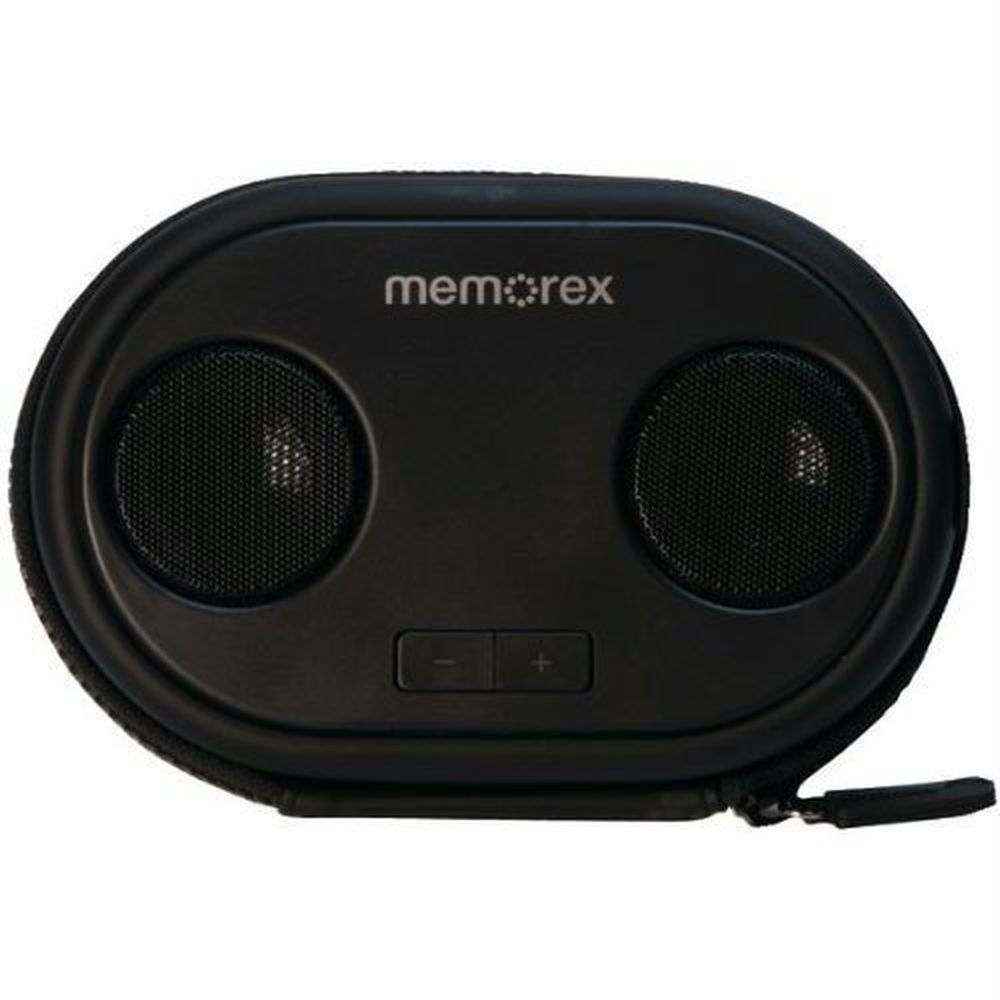
This image displays the Memorex ML310 Portable Speaker Case. It features two circular speaker grilles on the front, with "memorex" branding above them. Below the speakers, there are two rectangular buttons for volume control, marked with '-' and '+'. The case itself is black, with a zippered closure visible around the edge.
Kandungan Pakej
Sila semak pakej untuk item berikut:
- Memorex ML310 Portable Speaker Case
- Built-in 3.5mm audio cable
- Manual Pengguna (dokumen ini)
Persediaan
Pemasangan Bateri
The Memorex ML310 requires 4 AAA batteries for operation. Ensure you have fresh batteries available.
- Cari petak bateri pada peranti.
- Buka penutup petak bateri.
- Masukkan 4 bateri AAA, pastikan kekutuban (+ dan -) yang betul seperti yang ditunjukkan di dalam petak.
- Tutup penutup petak bateri dengan selamat.
Important Note: Some AAA batteries with shorter positive terminals may not make proper contact. If the unit does not power on, try different brand batteries with standard-sized positive terminals.
Menyambungkan Peranti Anda
The speaker case features a built-in 3.5mm audio cable for easy connection to your media device.
- Open the main compartment of the speaker case.
- Place your smartphone or music player inside the protective interior.
- Connect the built-in 3.5mm audio cable from the speaker case to the headphone jack of your device.
- Securely close the zipper of the case to protect your device.
Arahan Operasi
Menghidupkan/Mematikan
The unit powers on automatically when a connected device is playing audio and batteries are installed. There is no dedicated power button.
Kawalan Kelantangan
Use the external '+' and '-' buttons located on the front of the speaker case to adjust the volume.
- Tekan butang '+' untuk meningkatkan kelantangan.
- Tekan butang '-' untuk mengurangkan kelantangan.
You may also need to adjust the volume directly on your connected smartphone or music player for optimal sound levels.
Memainkan Audio
Once your device is connected and the speaker case is powered, simply start playing audio from your device (e.g., music, podcasts, videos). The sound will be routed through the Memorex ML310 speakers.
Penyelenggaraan
Pembersihan
To clean the exterior of the speaker case, use a soft, dry cloth. Do not use liquid cleaners, solvents, or abrasive materials, as these may damage the finish.
Penyimpanan
When not in use for extended periods, remove the batteries to prevent leakage and potential damage to the device. Store the speaker case in a cool, dry place away from direct sunlight and extreme temperatures.
Menyelesaikan masalah
| Masalah | Kemungkinan Punca | Penyelesaian |
|---|---|---|
| Tiada bunyi | Bateri mati atau tidak dipasang dengan betul. | Replace batteries with new AAA batteries, ensuring correct polarity. Try a different brand of AAA batteries if the positive terminal seems too short. |
| Tiada bunyi | Audio cable not fully connected. | Ensure the 3.5mm audio cable is securely plugged into your device's headphone jack. |
| Tiada bunyi | Kelantangan peranti terlalu rendah atau diredamkan. | Increase the volume on your connected smartphone or music player. |
| Bunyi herot | Volume is too high on either the speaker case or the connected device. | Reduce the volume on both the speaker case and your connected device until distortion is eliminated. |
| External volume buttons unresponsive | Buttons may be stuck or damaged. | Gently press the buttons to ensure they are not stuck. If the issue persists, contact customer support. |
Jika anda menghadapi masalah yang tidak disenaraikan di sini, sila rujuk bahagian sokongan untuk bantuan lanjut.
Spesifikasi
| Ciri | Perincian |
|---|---|
| Model | ML310BK |
| Jenis Pembesar Suara | Pembesar Suara Stereo Mudah Alih |
| Mod Keluaran Audio | Stereo |
| Konfigurasi Saluran | 2.0 |
| Ketersambungan | Berwayar (bicu audio 3.5mm) |
| Sumber Kuasa | 4 x Bateri AAA (tidak termasuk) |
| Peranti Serasi | Smartphones, MP3 Players (iPhone, iPod, Android devices) |
| Jenis Kawalan | Button (Volume +/-) |
| warna | Hitam |
| Dimensi (L x W x H) | 5.72 x 16.51 x 10.8 cm (2.25 x 6.5 x 4.25 inci) |
| Berat badan | 330 g (0.73 paun) |
| Pengeluar | Imation Enterprises Corp |
Spesifikasi tertakluk kepada perubahan tanpa notis.
Maklumat Keselamatan
- Do not expose the device to water or excessive moisture. It is not waterproof.
- Do not disassemble or attempt to repair the device yourself. This will void the warranty and may cause damage.
- Jauhkan bateri daripada kanak-kanak.
- Buang bateri terpakai dengan betul mengikut peraturan tempatan.
- Avoid extreme temperatures and direct sunlight, which can damage the device and batteries.
- Do not block the speaker grilles during operation to ensure optimal sound quality and prevent overheating.
Waranti dan Sokongan
For warranty information and technical support, please refer to the documentation included with your original purchase or visit the official Memorex webtapak. Simpan bukti pembelian anda untuk sebarang tuntutan waranti.


