pengenalan
The AKG PZM11 is a professional boundary layer microphone specifically designed for security and surveillance applications. It is characterized by a consistent pickup pattern, ensuring clear audio capture from any direction around the microphone. The microphone's design incorporates features to enhance speech clarity and effectively reduce environmental noise.
Ciri-ciri Utama:
- Hemispherical Polar Pattern: Provides clear, intelligible pickup of speech from a wide area.
- Low-Frequency Rolloff: Effectively reduces the pickup of heating, ventilation, or air-conditioning (HVAC) rumble and other low-frequency environmental noise.
- Sambungan Terminal Skru: Offers secure and reliable wiring without the need for additional connectors.
- High-Frequency Response Boost: Slightly enhances the high-frequency range to aid in overall clarity and articulation of sound.
Arahan Persediaan
Membongkar
Carefully remove the microphone from its packaging. Verify that all components, including the microphone unit, are present and undamaged.
Melekap
The PZM11 is a flush-mount microphone, designed for installation into a flat surface such as a table, wall, or ceiling. For proper installation, ensure the cutout dimensions match the microphone's specifications.

Image: AKG PZM11 microphone, illustrating its flush-mount design.
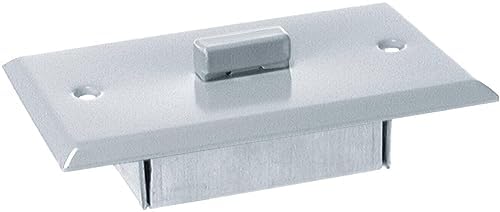
Image: AKG PZM11 dimensions for installation planning.
Pendawaian dan Sambungan
The PZM11 utilizes screw terminals for audio signal connection. It requires 12-48V phantom power from the connected audio device.
- Identify the positive, negative, and ground terminals on the microphone's connection plate.
- Carefully strip a small amount of insulation (approximately 5mm) from the audio cable wires.
- Securely connect the stripped wires to their corresponding screw terminals. Ensure a firm connection to prevent signal loss or interference.
- Before connecting the microphone, ensure the audio input device (e.g., mixer, amplifier) is powered off.
- Once connected, power on the audio input device and activate the phantom power supply.
Arahan Operasi
Menghidupkan
The PZM11 microphone does not have an independent power switch. It is powered by 12-48V phantom power supplied by your connected audio device (mixer, preamplifier, or audio interface). Ensure phantom power is enabled on the input channel to which the microphone is connected.
Pertimbangan Penempatan
Given its hemispherical polar pattern, the PZM11 captures sound consistently from all directions above its mounting surface. Optimal placement is crucial for effective audio capture and depends on the specific application:
- Bilik Persidangan: For capturing speech from multiple participants, mount the microphone centrally on a conference table.
- Keselamatan dan Pengawasan: Install in a ceiling or wall location where discreet, wide-area audio monitoring is required.
- Stage Aplikasi: Can be positioned on a stage floor to pick up instruments or vocals from a broad performance area.
Pelarasan Tahap Audio
Adjust the input gain on your mixer or audio interface to achieve the desired audio level. It is important to monitor the audio signal to prevent clipping or distortion, which can degrade sound quality.
Penyelenggaraan dan Penjagaan
Pembersihan
To clean the microphone, gently wipe the surface with a soft, dry, lint-free cloth. Avoid using liquid cleaners, solvents, or abrasive materials, as these can damage the microphone's finish or internal electronic components.
Penyimpanan
When not in use, store the microphone in a clean, dry environment, away from direct sunlight, extreme temperatures, and high humidity. Protect it from physical impact or excessive vibration.
Pemeriksaan
Periodically inspect the screw terminals and wiring for any signs of wear, corrosion, or damage. Ensure all connections remain secure and tight to maintain optimal performance.
Panduan Penyelesaian Masalah
| Masalah | Kemungkinan Punca | Penyelesaian |
|---|---|---|
| Tiada Keluaran Bunyi | No phantom power supplied. | Ensure your mixer or preamplifier is providing 12-48V phantom power and that it is activated for the connected channel. |
| Tiada Keluaran Bunyi | Incorrect or loose wiring. | Check the screw terminal connections for proper polarity and secure contact. Re-wire if necessary. |
| Kelantangan Rendah / Isyarat Lemah | Insufficient input gain. | Increase the input gain on your mixer or preamplebih hidup. |
| Bunyi Herot | Input gain set too high. | Kurangkan penguatan input pada pengadun atau pra-pendengaran andaamppengalir untuk mengelakkan keratan. |
| Excessive Background Noise (e.g., HVAC rumble) | Microphone picking up unwanted low-frequency noise. | The PZM11 has a built-in low-frequency rolloff. Ensure proper placement away from direct noise sources. If available, activate additional low-cut filters on your mixer or audio interface. |
Spesifikasi Teknikal
| Ciri | Perincian |
|---|---|
| Nama Model | PZM11 |
| Nombor Model Item | 3326H00010 |
| Jenama | AKG |
| Faktor Bentuk Mikrofon | Sempadan |
| Corak Kutub | Hemisfera |
| Sumber Kuasa | Corded Electric (12-48V Phantom Power) |
| Teknologi Ketersambungan | Terminal Skru |
| Jenis Penyambung | skru |
| Nisbah Isyarat-ke-Bunyi | 78 dB |
| Berat Barang | 71 Gram (2.5 auns) |
| Dimensi Produk (L x W x H) | 9.6 x 4.8 x 2.8 inci |
| Komponen yang Disertakan | Mikrofon |
| Penggunaan yang Disyorkan | Security, Surveillance, Conference, Live Performance |
Waranti dan Sokongan
Maklumat Waranti
For specific warranty details regarding your AKG PZM11 microphone, please refer to the documentation included with your purchase. Standard warranties typically cover manufacturing defects for a specified period from the date of purchase. Retain your proof of purchase for warranty claims.
Sokongan Pelanggan
If you encounter issues not covered in this manual or require further technical assistance, please contact AKG customer support. Contact information can usually be found on the official AKG webtapak atau dalam pembungkusan produk anda.
Online resources, FAQs, and additional product information may also be available on the Kedai AKG di Amazon or the official AKG webtapak.


