1. Pengenalan
This manual provides comprehensive instructions for the setup, operation, and maintenance of your Geemarc CL100 Amplified Big Button Corded Phone. Please read this manual carefully to ensure proper use and to maximize the benefits of your new telephone.
The Geemarc CL100 is designed for ease of use, featuring large buttons, adjustable amplification, and visual indicators, making it suitable for individuals with hearing or visual impairments. This telephone is line-powered and does not require an external power source.
Nota Penting: This telephone does not include a built-in answering machine, speakerphone, caller display, talking caller ID, talking keypad, or voice assist functionality.
2. Produk Lebihview
2.1 Kandungan Pakej
- Geemarc CL100 Corded Telephone Base
- Telefon bimbit
- Kord Handset Bergelung
- Tali Talian Telefon
- Manual Pengguna (dokumen ini)
2.2 Telephone Layout
Familiarize yourself with the key components and controls of your Geemarc CL100 phone.

Rajah 1: Atas ke bawah view of the Geemarc CL100 phone, illustrating the large numeric keypad, function buttons, and memory slots.
- Telefon bimbit: For speaking and listening during calls.
- Papan kekunci angka: Large, easy-to-read buttons for dialing numbers.
- P1, P2, P3 Buttons: Priority memory buttons for frequently called numbers.
- Butang M1-M9: One-touch memory buttons for storing additional numbers.
- Butang Dail Semula: Mendail nombor terakhir yang dipanggil.
- Butang Denyar: Used for network services (e.g., call waiting).
- Butang Kedai: Used for programming memory numbers.
- Butang Bisukan: Temporarily mutes your microphone during a call.
- Tone Control Switch: Adjusts the audio tone for clearer conversations.
- Suis Kawalan Kelantangan: Adjusts the receiving volume during a call.
- Visual Ringer Indicator: Flashes when an incoming call is received.
- Memory Index Card: Pull-out card for noting stored memory numbers.

Rajah 2: sebelah view of the phone, illustrating the ringer ON/OFF switch and the telephone line connection port.
3. Persediaan
3.1 Menyambungkan Telefon
- Sambungkan Handset: Plug one end of the coiled handset cord into the handset and the other end into the handset jack on the side of the telephone base.
- Sambungkan Talian Telefon: Plug one end of the telephone line cord into the jack labeled with a telephone icon on the back or side of the phone base. Plug the other end into your wall telephone jack.
- Sumber Kuasa: The Geemarc CL100 is powered by the telephone line and does not require an external power adapter.
- Ringer Switch: Ensure the ringer switch (located on the side) is set to "Low" or "High" for audible ringing.
3.2 Pemeriksaan Awal
- Lift the handset and listen for a dial tone. If no dial tone is present, check all connections.
- Make a test call to ensure proper functionality.
4. Arahan Operasi
4.1 Membuat Panggilan
- Angkat telefon bimbit.
- Tunggu nada dail.
- Dial the required number using the numeric keypad.
- Upon completion of the call, carefully replace the handset in the cradle to disconnect.
4.2 Menjawab Panggilan
When an incoming call is received, the phone will ring and the visual indicator will flash.
- Angkat telefon bimbit untuk menjawab panggilan.
- Upon completion of the call, carefully replace the handset in the cradle.
4.3 Dail Semula Nombor Terakhir
- Angkat telefon bimbit.
- Tunggu nada dail.
- Tekan ke Panggil semula button. The previously dialed number will be automatically redialed.
- Note: This function does not apply to numbers dialed from memory buttons.
4.4 Fungsi Redam
The Mute button allows you to speak privately without your caller overhearing.
- Semasa panggilan, tekan bisu button. You will still hear the caller, but they will not hear you.
- Tekan ke bisu button again to resume normal conversation.
4.5 Storing Telephone Numbers (Memory Dialing)
Your telephone can store 12 direct memory numbers: 3 priority numbers (P1, P2, P3) and 9 standard memory numbers (M1-M9). Priority memories can store up to 24 digits, and M1-M9 can store up to 32 digits.
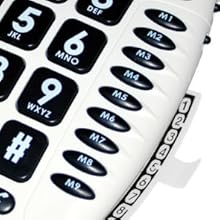
Rajah 3: Detail of the memory buttons (M1-M9) and the integrated memory index card.
- Angkat telefon bimbit.
- Tekan ke Kedai butang.
- Dail nombor telefon yang ingin anda simpan.
- Tekan ke Kedai butang lagi.
- Press the desired memory button (P1, P2, P3, or M1-M9) where you want to save the number.
- Gantikan telefon bimbit.
- Note: Use the index card located under the base to record your stored numbers for easy reference. Stored memories are protected even if the phone line is unplugged.
4.6 Dialing Stored Numbers
- Angkat telefon bimbit.
- Tunggu nada dail.
- Press the appropriate memory button (P1, P2, P3, or M1-M9). The stored number will be dialed automatically.
4.7 Recall (R), * & # Buttons
These buttons are used in conjunction with new services provided on digital exchanges. For specific details on their use, please contact your network operator.
4.8 Hearing Aid Compatibility
If you are using this telephone with a hearing aid, set your hearing aid to the "T" (Telecoil) setting for optimal audio quality.
5. Penyelenggaraan
- Pembersihan: Bersihkan telefon dengan kain lembut,amp kain. Jangan gunakan pembersih atau pelarut yang melelas.
- Storan: Simpan telefon di tempat yang sejuk dan kering, jauh daripada cahaya matahari langsung dan suhu yang melampau.
- Elakkan Cecair: Do not expose the telephone to water or other liquids.
- Penjagaan Kord: Ensure the handset and line cords are not tangled or pinched to prevent damage.
6. Penyelesaian masalah
| Masalah | Kemungkinan Punca | Penyelesaian |
|---|---|---|
| Tiada nada dail | Kord talian telefon tidak disambungkan dengan betul. | Check that both ends of the telephone line cord are securely plugged in. |
| Tidak dapat mendengar pemanggil / Pemanggil tidak dapat mendengar saya | Volume settings are too low or Mute is active. | Adjust the Volume control. Ensure the Mute button is not pressed. |
| Telefon tidak berbunyi | Ringer switch is set to "Off". | Set the ringer switch (on the side) to "Low" or "High". |
| Stored memory numbers are lost | This phone protects stored memories even if the phone line is unplugged. If numbers are lost, they may not have been stored correctly. | Re-store the numbers following the instructions in Section 4.5. |
| Difficulty dialing quickly | Some older phone systems may require a slower dialing pace. | Try dialing at a slightly slower pace. Consider using the memory dial function for frequently called numbers. |
7. Spesifikasi
- model: Geemarc CL100
- Jenis: Telefon Berkabel
- Amppemberitahuan: Up to 30 dB receiving volume
- Kelantangan Dering: Adjustable up to 85 dB
- Ingatan: 3 Priority (P1-P3), 9 One-touch (M1-M9)
- Sumber Kuasa: Line-powered (no external adapter required)
- Serasi Alat Pendengaran: Yes (T-coil setting)
- Dimensi: Kira-kira 7.5 x 8 x 3 inci (19 x 20.3 x 7.6 cm)
- Berat: Kira-kira 2.25 paun (1.02 kg)
- warna: putih
8. Waranti dan Sokongan
8.1 Maklumat Waranti
For information regarding the warranty period and terms for your Geemarc CL100 telephone, please refer to the warranty card included with your purchase or visit the official Geemarc webtapak. Simpan bukti pembelian anda untuk tuntutan waranti.
8.2 Sokongan Pelanggan
If you encounter any issues not covered in the troubleshooting section or require further assistance, please contact Geemarc customer support. Contact details can typically be found on the Geemarc webtapak atau pada pembungkusan produk.
Untuk sumber dalam talian, sila layari: www.geemarc.com


