1. Pengenalan
The ECS Elitegroup A55F-M2 motherboard is designed to integrate AMD FM1 APU processors with the AMD A55 chipset, offering a balanced performance solution. This motherboard supports excellent graphics capabilities, including DirectX 11, and can utilize AMD Dual Graphics technology to combine APU and select Radeon discrete graphics cards for enhanced visual output. Key features include Dual-Channel DDR3 memory support up to 16GB, UVD3.0, SATA 3Gb/s, and USB 2.0 connectivity. This manual provides essential information for the proper installation, configuration, and maintenance of your A55F-M2 motherboard.
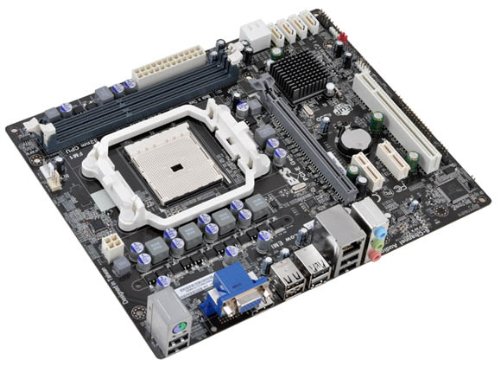
Rajah 1: ECS Elitegroup A55F-M2 Motherboard. This image displays the overall layout of the motherboard, including the CPU socket, RAM slots, PCIe slots, and various connectors.
2. Ciri-ciri Utama
- Supports AMD FM1 socket for AMD A series, E Series, Athlon Quad-core, Athlon Dual-core, and Sempron Dual-core processors.
- Features ESD protection design to prevent damage and extend product lifespan.
- Includes ECS Intelligent EZ Utility suite: eBLU, eDLU, eOC, eSF for system management.
- Supports AMD Dual Graphics technology for enhanced visual performance.
- Equipped with solid capacitors for improved VRM stability and longevity.
- Expansion slots include 1 x PCIe x16 and 1 x PCIe x1.
- Compatible with Microsoft Windows 8, Windows 7, Windows Vista, and Windows XP (32-bit and 64-bit versions).
3. Persediaan dan Pemasangan
Follow these steps for proper installation of the motherboard and its components:
- Sediakan Kes: Ensure your computer case is compatible with Micro ATX motherboards. Install the I/O shield into the case's rear opening.
- Pasang CPU:
- Buka tuil soket CPU.
- Selaraskan CPU dengan soket dengan berhati-hati, pastikan tanda segi tiga pada CPU sepadan dengan tanda pada soket.
- Perlahan-lahan letakkan CPU ke dalam soket tanpa memaksanya.
- Tutup tuil soket untuk mengunci CPU.
- Apply a thin layer of thermal paste to the CPU's surface.
- Pasang penyejuk CPU mengikut arahan pengeluarnya.
- Pasang Modul RAM:
- Buka klip pada kedua-dua hujung slot DIMM.
- Jajarkan modul RAM dengan slot, pastikan takuk pada modul sepadan dengan kunci dalam slot.
- Tekan ke bawah dengan kuat pada kedua-dua hujung modul RAM sehingga klip terpasang pada tempatnya.
- Pasang Papan Induk:
- Place the motherboard into the case, aligning the screw holes with the standoffs.
- Selamatkan papan induk dengan skru. Jangan terlalu ketat.
- Sambungkan Bekalan Kuasa:
- Connect the 24-pin ATX power connector from the power supply to the motherboard.
- Connect the 4-pin or 8-pin ATX 12V power connector (CPU power) to the motherboard.
- Sambungkan Peranti Storan: Connect SATA data cables from your storage drives (HDD/SSD) to the SATA ports on the motherboard. Connect power cables from the power supply to the drives.
- Sambungkan Kabel Panel Depan: Connect the power button, reset button, HDD LED, power LED, and USB/audio headers from the case to the corresponding pins on the motherboard. Refer to the motherboard's silkscreen labels for correct orientation.
- Install Expansion Cards (Optional): If using a discrete graphics card or other PCIe cards, insert them into the appropriate PCIe slots and secure them with the case's retention mechanism.
4. Sokongan Sistem Pengendalian
The ECS Elitegroup A55F-M2 motherboard supports a range of Microsoft Windows operating systems:
- Windows XP (32-bit dan 64-bit)
- Windows Vista (32-bit and 64-bit)
- Windows 7 (32-bit dan 64-bit)
- Windows 8 (32-bit dan 64-bit)
Ensure you install the correct drivers for your operating system after installation for optimal performance and functionality.
5. Spesifikasi Teknikal
| Ciri | Perincian |
|---|---|
| Soket CPU | Socket FM1 |
| Pemproses yang Serasi | AMD A-Series, AMD Athlon, AMD Sempron (FM1) |
| Chipset | AMD A55 (Hudson D2) |
| Jenis Memori | DDR3 SDRAM |
| Kelajuan Memori | Sehingga 1800 MHz |
| Kapasiti RAM Maksimum | 32 GB |
| Pemproses bersama Grafik | Integrated AMD Graphics (APU dependent) |
| Slot Pengembangan | 1 x PCIe x16, 1 x PCIe x1 |
| Port USB 2.0 | 8 (via headers and rear panel) |
| Antaramuka Penyimpanan | SATA 3Gb/s |
| Faktor Bentuk | ATX mikro |
| Dimensi (LxWxH) | 10.5 x 9 x 2 inci |
| Berat Barang | 1.7 paun |
6. Penyelesaian masalah
Bahagian ini menyediakan penyelesaian kepada isu biasa yang mungkin anda hadapi.
- Tiada Kuasa:
- Ensure the power supply is connected correctly to the motherboard (24-pin ATX and 4/8-pin CPU power).
- Pastikan suis bekalan kuasa berada dalam kedudukan 'ON'.
- Periksa sambungan butang kuasa panel hadapan ke papan induk.
- Uji dengan bekalan kuasa yang berbeza jika boleh.
- Tiada Paparan:
- Ensure the monitor is connected to the correct video output (onboard or discrete graphics card).
- Reseat the RAM modules. Try booting with only one RAM module.
- Letakkan semula kad grafik (jika berkenaan).
- Clear CMOS by removing the CMOS battery for 5-10 minutes or using the clear CMOS jumper.
- Ketidakstabilan/Ranap Sistem:
- Periksa suhu CPU dan GPU. Kepanasan berlebihan boleh menyebabkan ketidakstabilan.
- Pastikan semua pemandu dikemas kini.
- Jalankan alat diagnostik memori untuk memeriksa RAM yang rosak.
- Sahkan bekalan kuasa mencukupi untuk semua komponen.
- Peripheral Devices Not Detected:
- Ensure devices are properly connected to the correct ports (USB, SATA).
- Semak pengurus peranti dalam sistem pengendalian anda untuk masalah pemacu.
- Cuba sambungkan peranti ke port yang berbeza.
7. Penyelenggaraan
Proper maintenance can extend the lifespan and ensure optimal performance of your motherboard.
- Penyingkiran habuk: Regularly clean dust from inside your computer case, especially from CPU heatsinks, GPU fans, and case fans. Use compressed air for this purpose. Ensure the system is powered off and unplugged before cleaning.
- Pengurusan Kabel: Ensure cables are neatly routed to improve airflow and prevent obstruction of components.
- Kemas Kini Pemandu: Keep your motherboard drivers (chipset, audio, network) and graphics drivers updated to ensure compatibility and performance. Visit the ECS Elitegroup webtapak untuk pemandu terkini.
- Kemas Kini BIOS/UEFI: Periodically check for BIOS/UEFI updates from the manufacturer's website. Updates can improve stability, add support for new hardware, or fix bugs. Follow the update instructions carefully.
- Kawalan Alam Sekitar: Operate the computer in a well-ventilated area, away from direct sunlight, excessive heat, or humidity.
8. Waranti dan Sokongan
For specific warranty terms and conditions, please refer to the warranty card included with your product or visit the official ECS Elitegroup webtapak. Perlindungan waranti biasanya termasuk kecacatan pada bahan dan mutu kerja di bawah penggunaan biasa.
For technical support, driver downloads, and further assistance, please visit the ECS Elitegroup support page. Have your product model number (A55F-M2) and serial number ready when contacting support.
rasmi Webtapak: https://www.ecs.com.tw/


