pengenalan
Welcome to the user manual for your Waring Pro WPM10 Professional Popcorn Maker. This appliance is designed to provide a convenient and efficient way to prepare fresh popcorn. Please read these instructions carefully before first use to ensure safe operation and optimal performance.
Perlindungan Penting
Apabila menggunakan peralatan elektrik, langkah berjaga-jaga keselamatan asas hendaklah sentiasa diikuti untuk mengurangkan risiko kebakaran, kejutan elektrik dan/atau kecederaan kepada orang, termasuk yang berikut:
- Baca semua arahan.
- Jangan sentuh permukaan panas. Gunakan pemegang atau tombol.
- Untuk melindungi daripada bahaya elektrik, jangan rendamkan kord, palam atau perkakas di dalam air atau cecair lain.
- Pengawasan rapi diperlukan apabila sebarang perkakas digunakan oleh atau berhampiran kanak-kanak.
- Cabut plag dari soket apabila tidak digunakan dan sebelum membersihkan. Biarkan sejuk sebelum memakai atau menanggalkan bahagian.
- Jangan kendalikan sebarang perkakas dengan kord atau palam yang rosak, atau selepas perkakas tidak berfungsi atau rosak dalam apa jua cara.
- Penggunaan lampiran aksesori yang tidak disyorkan oleh pengilang perkakas boleh menyebabkan kecederaan.
- Jangan gunakan di luar rumah.
- Jangan biarkan kord tergantung di tepi meja atau kaunter, atau menyentuh permukaan panas.
- Jangan letakkan pada atau berhampiran gas panas atau penunu elektrik, atau dalam ketuhar yang dipanaskan.
- Berhati-hati yang melampau mesti digunakan apabila menggerakkan perkakas yang mengandungi minyak panas atau cecair panas lain.
- Sentiasa pasangkan plag pada perkakas terlebih dahulu, kemudian pasangkan kord ke dalam salur keluar dinding. Untuk memutuskan sambungan, matikan mana-mana kawalan kepada "mati", kemudian tanggalkan palam dari alur keluar dinding.
- Jangan gunakan perkakas untuk kegunaan selain daripada yang dimaksudkan.
- Ensure the lid is properly secured during operation.
- Elakkan sentuhan dengan bahagian yang bergerak.
SIMPAN ARAHAN INI
Produk Selesaiview
The Waring Pro WPM10 Professional Popcorn Maker consists of several key components designed for optimal popcorn preparation.
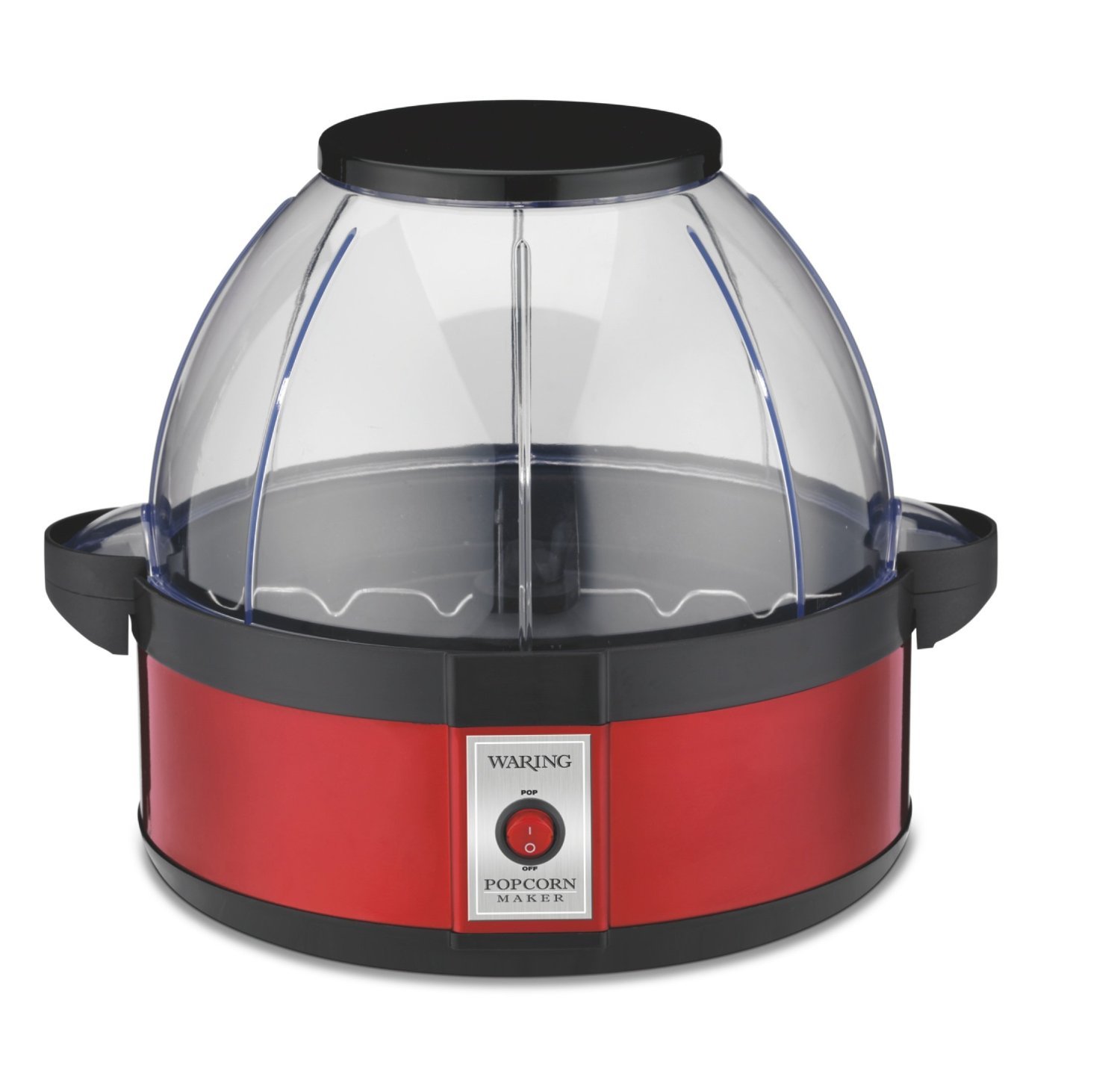
Image: The Waring Pro WPM10 Professional Popcorn Maker, showcasing its red base, clear dome lid, and stirring mechanism.
Komponen Utama:
- Unit Asas: Contains the heating element and motor for the stirring arm.
- Popping Plate: Non-stick surface where kernels are popped.
- Stirring Arm: Rotates to ensure even heating and efficient popping of kernels.
- Dome Lid/Serving Bowl: A clear plastic lid that covers the popping plate during operation and can be inverted to serve as a popcorn bowl.
- Lubang Pengudaraan: Located on the lid to release steam and keep popcorn dry.
Persediaan
- Bongkar: Keluarkan semua bahan dan komponen pembungkusan dengan berhati-hati dari kotak.
- Bersih: Before first use, wipe the popping plate and stirring arm with a damp cloth. Wash the dome lid/serving bowl in warm, soapy water, then rinse and dry thoroughly.
- Berhimpun: Place the popping plate onto the base unit, ensuring it is securely seated. Attach the stirring arm to the center post of the popping plate. Place the dome lid securely on top of the popping plate.
- penempatan: Position the popcorn maker on a stable, flat, heat-resistant surface, away from flammable materials. Ensure there is adequate ventilation around the unit.
- Sambungan Kuasa: Palamkan kord kuasa ke soket elektrik standard.
Arahan Operasi
Follow these steps to make delicious popcorn with your Waring Pro WPM10.
- Sediakan Bahan: Measure the desired amount of popcorn kernels (up to 20 cups capacity). For best results, use fresh, high-quality popcorn kernels.
- Menambah minyak: Add a small amount of cooking oil (e.g., vegetable oil, coconut oil) to the popping plate. The stirring arm allows for efficient popping with less oil.
- Tambah Kernel: Distribute the popcorn kernels evenly over the popping plate.
- Tudung Selamat: Place the dome lid firmly onto the popping plate.
- Mula Memunculkan: Plug the unit into an electrical outlet and turn the power switch ON. The halogen heater will begin to heat, and the stirring arm will rotate.
- Monitor Popping: Popcorn will begin to pop within a few minutes. The stirring arm will continue to move the kernels for even popping.
- Finish Popping: Once the popping slows to approximately 2-3 seconds between pops, turn the power switch OFF and unplug the unit immediately. This prevents burning.
- Hidangkan: Carefully remove the dome lid using the handles. Invert the lid and use it as a serving bowl. Be cautious as the unit and popcorn will be hot.
- musim: Season popcorn to taste with salt, butter, or other desired toppings.
Awas: The popping plate and base unit will be hot after use. Allow the unit to cool completely before cleaning or handling.
Pembersihan dan Penyelenggaraan
Regular cleaning ensures the longevity and optimal performance of your popcorn maker.
- Cabut dan Sejukkan: Sentiasa cabut plag perkakas dari salur keluar elektrik dan biarkan ia sejuk sepenuhnya sebelum dibersihkan.
- Remove Popping Plate: Detach the popping plate from the base unit.
- Clean Popping Plate and Stirring Arm: Wipe the non-stick popping plate and stirring arm with a damp cloth. For stubborn residue, use a soft sponge with warm, soapy water. Avoid abrasive cleaners or scouring pads that could damage the non-stick coating.
- Clean Dome Lid/Serving Bowl: Wash the dome lid/serving bowl in warm, soapy water. It can also be placed on the top rack of a dishwasher. Rinse thoroughly and dry.
- Unit Pangkalan Bersih: Lap bahagian luar unit asas dengan iklanamp cloth. Never immerse the base unit, cord, or plug in water or any other liquid.
- Storan: Ensure all parts are clean and dry before storing. Store the popcorn maker in a cool, dry place.
Amaran: Do not use metal scouring pads or abrasive cleaners on any part of the popcorn maker, as they may scratch or damage surfaces.
Menyelesaikan masalah
| Masalah | Kemungkinan Punca | Penyelesaian |
|---|---|---|
| Popcorn not popping or popping poorly. | Unit not plugged in; power switch off; insufficient oil; old kernels. | Ensure unit is plugged in and power switch is ON. Use recommended amount of oil. Use fresh popcorn kernels. |
| Popcorn is burning. | Unit left on too long after popping stops. | Turn off and unplug the unit immediately once popping slows significantly (2-3 seconds between pops). |
| Stirring arm not rotating. | Stirring arm not properly attached; obstruction. | Ensure stirring arm is correctly seated on the center post. Check for any obstructions and remove them. |
| Tudung tidak dipasang dengan selamat. | Lid not aligned correctly. | Ensure the lid is properly aligned with the popping plate and seated firmly. |
| Excessive unpopped kernels. | Old kernels; insufficient oil; too many kernels. | Use fresh kernels. Ensure proper oil amount. Do not exceed maximum kernel capacity. |
| Popcorn is soggy. | Steam trapped in the lid. | The unit has large vents for steam release. Ensure these are not blocked. Remove popcorn promptly after popping. |
| Oil leakage under the black lid. | Excessive oil used; improper cleaning. | Use only recommended amounts of oil. Clean thoroughly after each use, especially around the popping plate and base connection. |
| Bowl cracking. | Tekanan atau kesan fizikal. | Handle the dome lid/serving bowl with care, especially where handles connect. Avoid dropping or applying excessive pressure. |
| Top raises up when 3/4 full. | Normal operation with large batches. | Gently hold down one of the tabs at the bottom of the dome if this occurs, especially during the final seconds of popping. |
Spesifikasi
- Jenama: Waring
- model: WPM10
- warna: merah
- kapasiti: Up to 20 Cups (popped popcorn)
- Bahan: Aluminum (popping plate), Plastic (lid/bowl)
- Dimensi: 11.75 x 11.75 x 11.5 inci (L x P x H)
- Berat: 4.9 paun
- Kuasa: Elektrik
- Ciri Khas: Portable, Halogen heater with built-in stirrer system
Waranti dan Sokongan
For warranty information, product registration, or technical support, please refer to the official Waring webtapak atau hubungi bahagian perkhidmatan pelanggan mereka. Simpan resit pembelian anda sebagai bukti pembelian untuk tuntutan waranti.
Waring Customer Service: Untuk bantuan, sila layari Waring Commercial Products Support atau rujuk maklumat hubungan yang diberikan dalam pembungkusan produk anda.
Pendaftaran Produk: Registering your product helps Waring provide you with the most up-to-date product information and support.


