1. Pengenalan
This manual provides instructions for the proper installation and maintenance of Eureka CN-3 Canister Vacuum Bags, Series 6820. These bags are designed for efficient dust and debris collection, ensuring optimal performance of your compatible Eureka or General Electric canister vacuum cleaner. Regular replacement of vacuum bags is essential for maintaining suction power and air quality.

Image 1.1: Eureka CN-3 Canister Vacuum Bags, showing both the retail packaging and an individual bag.
2. Maklumat Keselamatan
- Always unplug the vacuum cleaner from the electrical outlet before attempting to change the vacuum bag or perform any maintenance.
- Ensure the vacuum cleaner is turned off and completely cool before handling internal components.
- Do not reuse disposable vacuum bags. Used bags may contain allergens and fine dust particles.
- Keep new vacuum bags in their original packaging until ready for use to prevent damage or contamination.
3. Installation (Replacing the Vacuum Bag)
Follow these steps to correctly install a new Eureka CN-3 vacuum bag:
- Prepare the Vacuum Cleaner: Unplug the vacuum cleaner from the power outlet. Locate the bag compartment door, typically on the front or top of the canister unit. Open the compartment door according to your vacuum cleaner's specific design.
- Remove the Old Bag: Carefully remove the full vacuum bag from its holder. Most bags have a collar that slides onto a nozzle. Some bags may have a sealing flap to prevent dust from escaping. Dispose of the old bag in a sealed trash receptacle.
- Inspect the Bag Compartment: Check the bag compartment for any debris or obstructions. Clean if necessary. Ensure the bag holder mechanism is clear and undamaged.
- Install the New Bag: Take a new Eureka CN-3 bag from its packaging. Locate the cardboard collar on the bag. This collar is designed to fit securely onto the vacuum cleaner's bag nozzle.
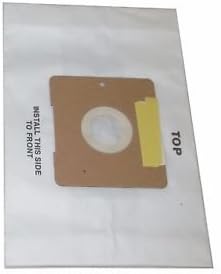
Image 3.1: An individual Eureka CN-3 vacuum bag, highlighting the cardboard collar and the "INSTALL THIS SIDE TO FRONT" instruction.
Slide the bag's cardboard collar firmly onto the nozzle until it is securely seated. Ensure the bag is fully unfolded inside the compartment and not obstructing the door closure. The bag often has an indicator like "INSTALL THIS SIDE TO FRONT" to guide correct orientation.
- Tutup Petak: Gently close the bag compartment door. Ensure it latches securely. Do not force the door if it does not close easily, as the bag might be improperly seated. Re-open and adjust the bag if needed.
- Sambung Operasi: Plug the vacuum cleaner back into the electrical outlet. The vacuum is now ready for use with the new bag.
4. Pengendalian dan Penyelenggaraan
4.1 When to Replace the Bag
Replace the vacuum bag when:
- The "Bag Full" indicator on your vacuum cleaner illuminates or shows full.
- Suction power noticeably decreases, even if the bag indicator is not yet full (this can happen with very fine dust).
- The bag appears visibly full when you open the compartment.
- A noticeable odor emanates from the vacuum cleaner during operation.
Regularly checking the bag's fullness and replacing it promptly will help maintain your vacuum cleaner's efficiency and extend its lifespan.
5. Penyelesaian masalah
5.1 Kuasa Sedutan Berkurangan
- Bag Full: The most common cause. Replace the vacuum bag as described in Section 3.
- Bag Improperly Installed: Ensure the bag's cardboard collar is securely seated on the nozzle and the bag is fully unfolded.
- Hose or Nozzle Clog: Check the vacuum hose, attachments, and floor nozzle for any blockages. Clear any obstructions.
- Filter Blockage: Some vacuum cleaners have additional filters (e.g., motor filter, exhaust filter). Consult your vacuum cleaner's manual for filter cleaning or replacement instructions.
5.2 Dust Leaking from Vacuum
- Bag Not Sealed: Ensure the bag is correctly installed and its collar forms a tight seal around the nozzle.
- Damaged Bag: Inspect the new bag for any tears or holes before installation.
- Compartment Door Not Closed: Ensure the bag compartment door is fully closed and latched.
6. Spesifikasi
| Ciri | Perincian |
|---|---|
| Jenama | Eureka |
| Nombor Model | 62295 |
| Peranti Serasi | Eureka Series 6820, General Electric Vacuum Cleaners |
| bahan | kertas |
| warna | putih |
| Bilangan Item | 3 Bags per pack |
| Berat Barang | 3.2 auns (setiap pek) |
| Dimensi Pakej | 9.2 x 6 x 1.1 inci |
7. Waranti dan Sokongan
For specific warranty information regarding Eureka vacuum bags, please refer to the packaging or contact Eureka customer support directly. As these are consumable items, warranty coverage typically applies to manufacturing defects only.
For further assistance or inquiries, please visit the official Eureka website or contact their customer service department. Always refer to your specific vacuum cleaner's instruction manual for detailed maintenance and operational guidelines.
Eureka Official Webtapak: www.eureka.com


