1. Pengenalan
Terima kasih kerana membeliasing the Bigben EPOK TD79 Turntable. This manual provides essential information for the safe and efficient operation of your new device. Please read it thoroughly before use and retain it for future reference.
2. Arahan Keselamatan Penting
- Baca semua arahan sebelum mengendalikan perkakas.
- Simpan manual di tempat yang selamat untuk rujukan di masa hadapan.
- Jangan dedahkan unit kepada hujan atau lembapan untuk mengelakkan kebakaran atau kejutan elektrik.
- Pastikan pengudaraan yang betul dan jangan menghalang sebarang bukaan pengudaraan.
- Gunakan hanya lampiran/aksesori yang ditentukan oleh pengilang.
- Cabut plag perkakas semasa ribut petir atau apabila tidak digunakan untuk jangka masa yang lama.
- Rujuk semua servis kepada kakitangan perkhidmatan yang berkelayakan.
3. Persediaan
Follow these steps to set up your EPOK TD79 Turntable:
- Membongkar: Carefully remove the turntable from its packaging. Retain all packaging materials for possible future transport or storage.
- penempatan: Letakkan unit di atas permukaan yang stabil dan rata, jauh daripada cahaya matahari langsung, sumber haba dan habuk atau getaran yang berlebihan.
- Kuasa Penyambung: Connect the power adapter to the DC input on the rear of the unit, then plug it into a suitable wall outlet.
- Fon Kepala Menyambung: For private listening, plug your headphones into the headphone jack located on the unit.
- Kesambungan USB: The unit features a USB port for connecting to a computer for digital recording or for playing media from a USB drive.
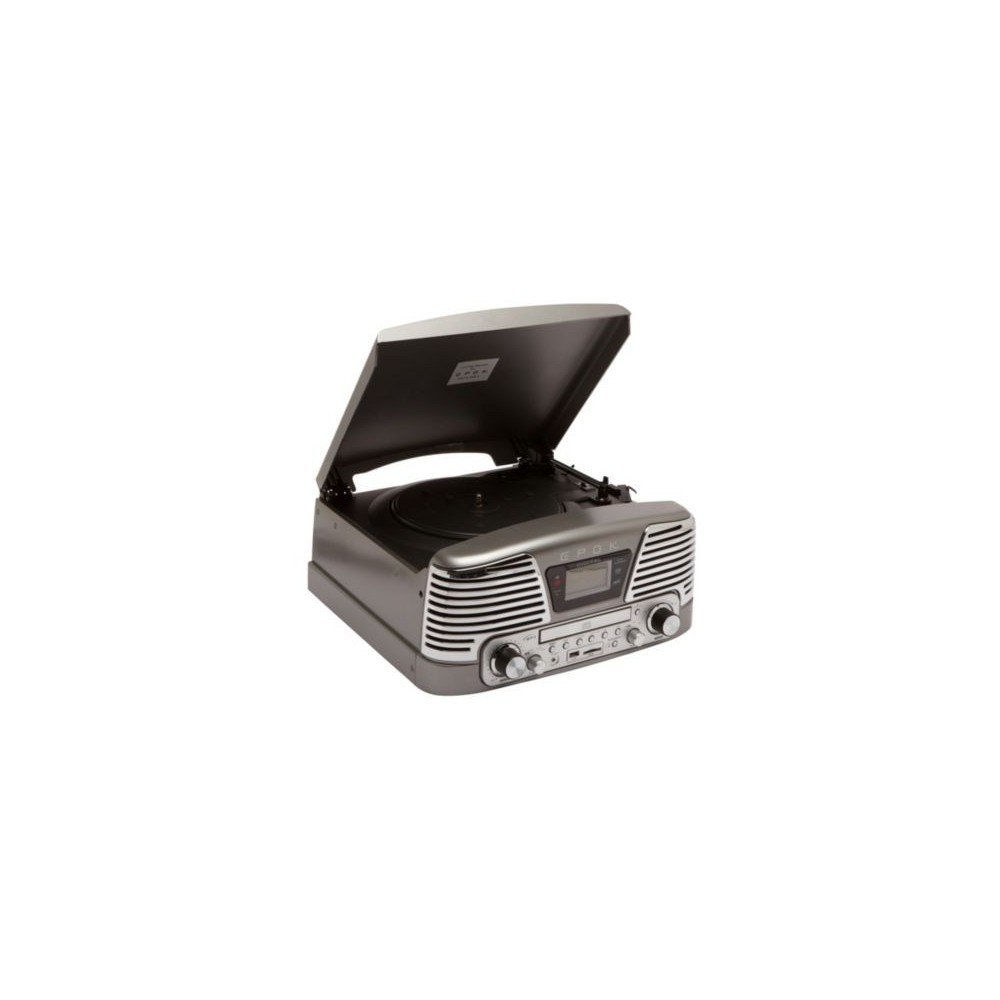
4. Arahan Operasi
This section details how to use the various functions of your TD79 Turntable.
- Memainkan Rekod Vinil:
- Letakkan rekod vinil di atas pinggan.
- Select the appropriate speed (33 or 45 RPM) using the speed selector switch.
- Carefully lift the tone arm and position the stylus over the desired track.
- Lower the tone arm gently onto the record.
- Pada akhir rakaman, lengan nada akan kembali ke kedudukan rehatnya secara automatik.
- Menggunakan Pemain CD:
- Open the CD tray and insert a CD with the label side facing up.
- Close the CD tray. The unit will automatically detect and begin playing the CD.
- Use the Play/Pause, Stop, Skip Forward, and Skip Back buttons to control playback.
- Main semula USB/Kad SD:
- Insert a USB flash drive or SD card into the respective slot.
- Select the USB or SD mode using the function selector.
- The unit will automatically scan and play compatible audio files.
- Use the playback controls to navigate through tracks.
- Recording Vinyl to USB/SD:
- Ensure a USB drive or SD card is inserted.
- Mula memainkan rekod vinil.
- Press the 'Record' button (refer to the unit's control panel for exact button). The recording indicator will illuminate.
- Press 'Record' again to stop recording. The audio will be saved to the USB drive or SD card.
5. Penyelenggaraan
Proper maintenance ensures the longevity and optimal performance of your turntable.
- Membersihkan Unit: Lap bahagian luar unit dengan kain lembut dan kering. Jangan gunakan pembersih atau pelarut yang melelas.
- Penjagaan Stylus: Gently clean the stylus regularly with a soft brush designed for stylus cleaning, brushing from back to front. Avoid touching the stylus with your fingers.
- Penjagaan Rekod: Pastikan rekod anda bersih dan bebas daripada habuk. Simpannya secara menegak di dalam sarungnya untuk mengelakkan ia melengkung.
6. Penyelesaian masalah
If you encounter issues with your EPOK TD79, consult the table below for common problems and solutions.
| Masalah | Kemungkinan Punca | Penyelesaian |
|---|---|---|
| Tiada kuasa | Kord kuasa tidak disambungkan; soket tidak aktif. | Pastikan kord kuasa dipasang dengan kukuh; uji soket dengan peranti lain. |
| Tiada bunyi | Volume too low; headphones connected; function mode incorrect. | Increase volume; disconnect headphones; select correct function mode (Phono, CD, USB/SD). |
| CD skipping | CD is dirty or scratched; unit is unstable. | Clean CD with a soft cloth; place unit on a stable surface. |
| Poor vinyl sound quality | Stylus is dirty or worn; record is dirty or damaged. | Clean or replace stylus; clean record. |
| Isu main balik USB/SD | Tidak serasi file format; corrupted media. | pastikan files are in a compatible format (e.g., MP3); try a different USB/SD card. |
7. Spesifikasi
Technical details for the EPOK TD79 Turntable:
| Ciri | Perincian |
|---|---|
| Jenama | Bigben |
| Pengeluar | Epok |
| Nombor Model | TD79GM |
| Teknologi Ketersambungan | USB |
| Jumlah Port USB | 1 |
| Peranti Serasi | Fon kepala |
| Dimensi Produk (L x W x H) | 38.5 x 37 x 18.5 cm |
| Berat Barang | 7 Kilogram |
| Komponen yang Disertakan | Pemain CD |
| Jenis Motor | Motor DC |
| Format Isyarat | digital |
8. Maklumat Waranti
The EPOK TD79 Turntable comes with a Waranti 1 tahun from the date of purchase. This warranty covers manufacturing defects under normal use. Please retain your proof of purchase for warranty claims. The warranty does not cover damage caused by misuse, accidents, unauthorized modifications, or normal wear and tear.
9. Sokongan Pelanggan
For further assistance, technical support, or warranty inquiries, please contact Bigben customer service. Refer to the Bigben official webtapak atau pembungkusan produk untuk maklumat hubungan terkini.
Sokongan dalam talian: Visit the official Bigben webtapak untuk Soalan Lazim dan sumber sokongan.
Sokongan E-mel: [Insert Manufacturer's Support Email Here, if available]
Sokongan Telefon: [Insert Manufacturer's Support Phone Number Here, if available]


