1. Pengenalan
The Onkyo SBX-300 iOnly BASS Dock Music System is designed to provide high-quality audio playback for your iPod, iPhone, or iPad devices. This system features digital amplifier circuitry, full-range bass-reflex speakers, and advanced bass control functions to enhance your listening experience. This manual provides essential information for the proper setup, operation, and maintenance of your SBX-300 unit.
Video 1: Onkyo Brand Overview. Video ini memberikan gambaran umumview of the Onkyo brand's commitment to sound quality for home and life. While not specific to the SBX-300, it illustrates the brand's focus on audio excellence.
2. Maklumat Keselamatan Penting
- Baca semua arahan dengan teliti sebelum mengendalikan unit ini.
- Simpan manual ini untuk rujukan masa hadapan.
- Jangan dedahkan unit kepada hujan atau lembapan untuk mengelakkan kebakaran atau kejutan elektrik.
- Pastikan pengudaraan yang betul. Jangan sekat bukaan pengudaraan.
- Gunakan hanya lampiran/aksesori yang ditentukan oleh pengilang.
- Cabut palam unit semasa ribut petir atau apabila tidak digunakan untuk tempoh yang lama.
- Rujuk semua servis kepada kakitangan perkhidmatan yang berkelayakan.
3. Panduan Persediaan
3.1 Kandungan Pakej
Sahkan bahawa pakej anda mengandungi item berikut:
- Onkyo SBX-300 iOnly BASS Dock Music System
- Penyesuai Kuasa AC
- Remote Control (RC-832S)
- Manual Arahan (dokumen ini)
3.2 Kuasa Penyambung
- Connect the AC power adapter cable to the DC IN jack on the rear of the SBX-300 unit.
- Palamkan penyesuai kuasa AC ke soket dinding standard.
- Unit akan memasuki mod siap sedia.
3.3 Meletakkan Unit
Place the SBX-300 on a stable, flat surface. Ensure there is adequate space around the unit for proper ventilation, especially at the rear where the reflex woofer ducts are located.
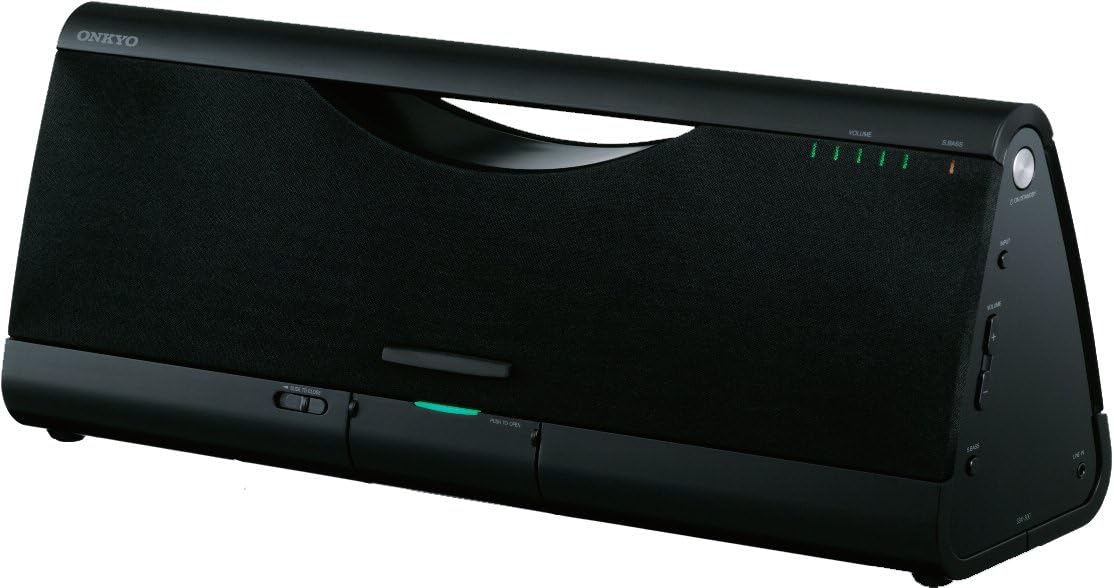
Imej 1: Depan view of the Onkyo SBX-300. This image displays the front of the SBX-300 unit, showing the speaker grille, volume indicators, and the dock area.
3.4 Docking an iPod/iPhone/iPad
The SBX-300 features a dust-free digital dock for compatible Apple devices. To dock your device:
- Gently press the "PUSH TO OPEN" button located on the front panel to reveal the dock connector.
- Carefully align your iPod, iPhone, or iPad with the 30-pin connector in the dock.
- Gently push your device down onto the connector until it is securely seated.
- The device will begin charging and can be used for audio playback.
Model yang Serasi: iPod touch (1st, 2nd, 3rd, and 4th Generation), iPod classic, iPod nano (2nd, 3rd, 4th, 5th, and 6th Generation), iPhone 4, iPhone 3GS, iPhone 3G, iPhone, iPad 2, iPad.
3.5 Connecting External Audio Devices (AUX Input)
To connect other audio devices:
- Locate the AUX IN jack on the rear of the SBX-300 unit.
- Connect an audio cable (not supplied) from your external audio device's headphone output or line output to the AUX IN jack.
- Select the AUX input source on the SBX-300 (refer to Section 4.3).
4. Arahan Operasi
4.1 Menghidupkan/Mematikan
- To turn on the unit: Press the KUASA butang pada unit atau alat kawalan jauh.
- To turn off the unit (standby): Press the KUASA butang lagi.
4.2 Kawalan Kelantangan
- On the unit: Rotate the JILID tombol mengikut arah jam untuk meningkatkan kelantangan, lawan arah jam untuk mengurangkan.
- Pada alat kawalan jauh: Tekan butang JILID + or JILID - butang.
- To mute: Press the PEMAKAIAN button on the remote control. Press again to unmute.
4.3 Pemilihan Sumber
Tekan ke INPUT button on the remote control to cycle through available input sources (Dock, AUX).
4.4 Fungsi Super Bass
The Super Bass function enhances low-frequency sound. Press the S.BASS button on the remote control to activate or deactivate this feature.
4.5 Active Bass Control
Active Bass Control ensures perfectly balanced bass at low volume levels. This feature is automatically managed by the unit to optimize bass response.
4.6 Menggunakan Alat Kawalan Jauh
The supplied remote control (RC-832S) allows convenient operation of the SBX-300 from a distance. Ensure the remote control has a working battery and is pointed towards the unit's front panel.

Image 2: Onkyo RC-832S Remote Control. This image shows the layout of the remote control, including buttons for power, input selection, menu navigation, volume, and bass control.
Refer to the button labels on the remote for specific functions such as Play/Pause, Skip Track, Menu, and Enter, which control your docked Apple device.
5. Penyelenggaraan
5.1 Membersihkan Unit
- Before cleaning, unplug the power cord from the wall outlet.
- Use a soft, dry cloth to wipe the exterior surfaces of the unit.
- Do not use abrasive cloths, waxes, polishes, or chemical cleaning agents, as these may damage the finish.
5.2 Dust-Free Digital Dock Care
The dock connector is designed to be dust-free when closed. If dust or debris accumulates around the connector when open, use a soft, dry brush or compressed air to gently clean the area. Avoid touching the connector pins directly.
6. Penyelesaian masalah
If you experience issues with your SBX-300, refer to the following common problems and solutions:
| Masalah | Kemungkinan Punca | Penyelesaian |
|---|---|---|
| Tiada kuasa | Kord kuasa tidak disambungkan; Saluran keluar dinding tidak aktif | Ensure power cord is securely connected. Test the wall outlet with another device. |
| Tiada bunyi | Volume too low; Mute activated; Incorrect input source; Device not docked properly | Increase volume. Deactivate mute. Select correct input source (Dock/AUX). Re-dock your Apple device. |
| Bunyi herot | Volume too high; Audio source issue; Device not seated correctly | Lower the volume. Check the audio source for distortion. Re-dock your Apple device. |
| iPod/iPhone/iPad not charging or recognized | Device not properly docked; Incompatible device; Dock connector dirty | Ensure device is firmly seated in the dock. Verify device compatibility. Clean the dock connector if necessary. |
| Alat kawalan jauh tidak berfungsi | Battery depleted; Obstruction between remote and unit; Remote not pointed correctly | Replace the remote control battery. Remove any obstructions. Point the remote directly at the unit's front panel. |
7. Spesifikasi
- model: SBX-300
- Penceramah: 4 1/8" (10.5 cm) Full-Range Bass-Reflex Speakers
- Amplebih hidup: digital Amplifier Circuitry
- Peningkatan Bass: Super Bass Function, Active Bass Control
- Input: iPod/iPhone/iPad Digital Audio Connection, AUX IN (3.5mm stereo mini-jack)
- Bekalan Kuasa: AC 100-240V, 50/60Hz (via AC adapter)
- Dimensi (W x H x D): 17.69 x 5.19 x 6.94 inci (44.9 x 13.2 x 17.6 cm)
- Berat: 7.7 paun (3.5 kg)
- Peranti Serasi: iPod touch (1st, 2nd, 3rd, 4th Gen), iPod classic, iPod nano (2nd, 3rd, 4th, 5th, 6th Gen), iPhone, iPhone 3G, iPhone 3GS, iPhone 4, iPad, iPad 2.
8. Waranti dan Sokongan
8.1 Waranti Terhad
Onkyo products are manufactured to high quality standards and are backed by a limited warranty. The specific terms and duration of your warranty may vary by region and purchase date. Please retain your proof of purchase for warranty claims. For detailed warranty information, refer to the warranty card included with your product or visit the official Onkyo webtapak.
8.2 Sokongan Pelanggan
For technical assistance, service, or inquiries regarding your Onkyo SBX-300, please contact Onkyo customer support. Contact information can typically be found on the official Onkyo webtapak atau dalam dokumentasi yang disediakan bersama produk anda.
Sokongan dalam talian: Visit the official Onkyo webtapak untuk Soalan Lazim, artikel sokongan dan borang hubungan.
Sokongan Telefon: Refer to your regional Onkyo webtapak untuk nombor telefon perkhidmatan pelanggan tempatan.