1. Pengenalan
This manual provides essential information for the proper installation, operation, and maintenance of your HEWLETT-PACKARD 8GB DDR3 1333MHZ PC3-10600 ECC Registered DIMM Memory Module (P/N: 500205-571). This memory module is designed for use in compatible server systems to enhance performance and reliability. Please read this manual thoroughly before installation and retain it for future reference.
2. Maklumat Keselamatan
Always observe the following safety precautions to prevent damage to the memory module, the host system, and to ensure personal safety:
- Perlindungan Nyahcas Elektrostatik (ESD): Memory modules are sensitive to static electricity. Always wear an anti-static wrist strap or frequently touch a grounded metal object before handling the module.
- Matikan: Ensure the host system is completely powered off and disconnected from the power source before installing or removing the memory module.
- Tangani dengan Berhati-hati: Hold the memory module by its edges. Avoid touching the gold connector pins or the integrated circuits (ICs) on the module.
- Keserasian: Verify that your server system supports DDR3 ECC Registered DIMMs and the specified capacity and speed before installation.
3. Produk Lebihview
The HEWLETT-PACKARD 8GB DDR3 1333MHZ PC3-10600 ECC Registered DIMM is a high-performance memory solution designed for server environments. It features Error-Correcting Code (ECC) for data integrity and is a Registered (Buffered) module, which enhances stability in systems with a large number of memory modules. This module operates at a speed of 1333MHz (PC3-10600) and has a 240-pin form factor.
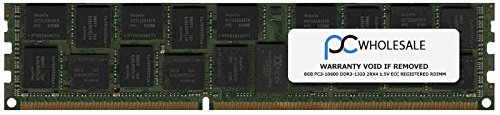
Rajah 1: HEWLETT-PACKARD 8GB DDR3 ECC Registered DIMM Memory Module. This image shows the general appearance of the memory module, highlighting its form factor and integrated circuits.
4. Persediaan dan Pemasangan
Follow these steps carefully to install the memory module into your compatible server system:
- Sediakan Sistem:
- Shut down the server completely.
- Disconnect the power cord and any other cables connected to the server.
- Buka casis pelayan mengikut arahan pengilang.
- Wear an anti-static wrist strap and connect it to a grounded metal part of the server chassis.
- Cari Slot DIMM: Identify the available DIMM slots on the server motherboard. Consult your server's documentation for the correct slot population order, especially if installing multiple modules.
- Buka Klip Pengekalan: Gently push the retention clips at both ends of the DIMM slot outwards to open them.
- Masukkan Modul Memori: Align the memory module with the DIMM slot, ensuring the notch on the module matches the key in the slot. This prevents incorrect insertion.
- Seat the Module: Apply even pressure to both ends of the memory module until it clicks into place and the retention clips automatically snap shut. Do not force the module; if it does not seat easily, recheck alignment.
- Sahkan Pemasangan: Visually inspect the module to ensure it is fully seated and the retention clips are securely closed.
- Tutup dan Hidupkan: Close the server chassis, reconnect all cables, and power on the system. The system BIOS should automatically detect the new memory.
5. Beroperasi
Once installed, the HEWLETT-PACKARD 8GB DDR3 1333MHZ PC3-10600 ECC Registered DIMM operates automatically within a compatible server system. No specific user interaction is typically required for its operation. The server's BIOS and operating system will manage the memory resources. Ensure your server's BIOS is updated to the latest version to ensure optimal compatibility and performance with new memory modules.
6. Penyelenggaraan
Memory modules generally require minimal maintenance. Follow these guidelines for optimal longevity:
- Kebersihan: Keep the server environment clean and dust-free. Dust accumulation can impede airflow and lead to overheating.
- Pengendalian: When handling the module, always use ESD precautions and hold it by the edges.
- Storan: If storing the module, keep it in an anti-static bag in a cool, dry place away from direct sunlight and extreme temperatures.
- Pemeriksaan: Periodically inspect the module and its slot for any signs of damage or corrosion, especially during other system maintenance.
7. Penyelesaian masalah
Jika anda menghadapi masalah selepas memasang modul memori, pertimbangkan langkah penyelesaian masalah berikut:
- Sistem Tidak Boot/Tiada Paparan:
- Ensure the memory module is fully seated in its slot and the retention clips are closed.
- Verify that the module is installed in the correct slot according to your server's motherboard manual.
- Cuba pasang semula modul.
- If multiple modules are installed, try booting with only one module at a time to identify a potentially faulty module.
- Incorrect Memory Detected:
- Check the server's BIOS/UEFI settings to confirm the detected memory amount.
- Ensure your server's motherboard and CPU support the total amount of RAM installed.
- Update the server's BIOS/UEFI to the latest version, as this often improves memory compatibility.
- Ketidakstabilan/Ranap Sistem:
- Run a memory diagnostic tool (e.g., MemTest86) to check for errors.
- Ensure the server's cooling system is functioning correctly to prevent overheating.
If problems persist, consult your server's documentation or contact HEWLETT-PACKARD technical support.
8. Spesifikasi
| Ciri | Spesifikasi |
|---|---|
| Nombor Bahagian | 500205-571 |
| Jenama | HEWLETT PACKARD |
| Saiz Memori | 8 GB |
| Teknologi Memori | DDR3 |
| Kelajuan Memori | 1333 MHz |
| PC Standard | PC3-10600 |
| Kiraan Pin | 240-pin |
| Pembetulan Ralat | ECC (Error-Correcting Code) |
| Penimbalan | Registered (Buffered) |
| Peranti Serasi | pelayan |
9. Waranti dan Sokongan
This HEWLETT-PACKARD memory module is covered by the manufacturer's standard warranty. For specific warranty terms and conditions, please refer to the documentation provided with your purchase or visit the official HEWLETT-PACKARD website. For technical assistance, troubleshooting, or warranty claims, please contact HEWLETT-PACKARD customer support through their official channels.
HEWLETT-PACKARD Official Webtapak: www.hp.com


