1. Produk Lebihview
The POLY Plantronics CS540/A is a wireless DECT monaural headset designed for clear communication in professional environments. This convertible headset offers multiple wearing styles to suit individual preferences, providing comfort and flexibility for extended use. It features a lightweight design and intuitive call controls.
Ciri-ciri Utama:
- Wireless DECT connectivity for extended range and security.
- Convertible design for multiple wearing styles (ear hook, headband).
- Lightweight construction for all-day comfort.
- Intuitive call control buttons on the headset.
- Noise-canceling microphone for clear voice transmission.
Apa yang ada di dalam Kotak:
- CS540/A Wireless Headset
- Stesen Pangkalan
- Ear hook and Headband wearing styles
- Penyesuai Kuasa
- Telephone Interface Cable
- Lithium Polymer Battery (pre-installed or separate)

Image 1.1: The Plantronics CS540/A wireless headset docked in its base station.
2. Panduan Persediaan
2.1 Mengecas Alat Dengar
- Sambungkan penyesuai kuasa ke stesen pangkalan dan pasangkannya ke salur keluar kuasa.
- Place the headset into the charging cradle of the base station. The charge indicator light on the headset will illuminate to confirm charging.
- Allow approximately 3 hours for a full charge. A fully charged headset provides up to 6 hours of talk time.
2.2 Connecting to a Desk Phone
The CS540/A connects to most standard desk phones. Refer to your phone's user manual for specific port locations.
- Disconnect the handset coil cord from the base of the desk phone.
- Connect the telephone interface cable from the CS540/A base station to the handset port on the desk phone.
- Connect the desk phone's handset coil cord to the handset port on the CS540/A base station.
- Ensure the compatibility switch on the CS540/A base station is set to the correct position for your desk phone. Test by making a call and adjusting if necessary.
2.3 Memakai Alat dengar
The CS540/A offers convertible wearing styles. Choose the one that provides the most comfort and stability.
- Cangkuk Telinga: Attach the ear hook to the headset. Gently place the ear hook over your ear, positioning the speaker comfortably against your ear and the microphone near your mouth.
- ikat kepala: Attach the headband to the headset. Adjust the headband for a secure yet comfortable fit, ensuring the speaker rests on your ear and the microphone is positioned for optimal voice pickup.
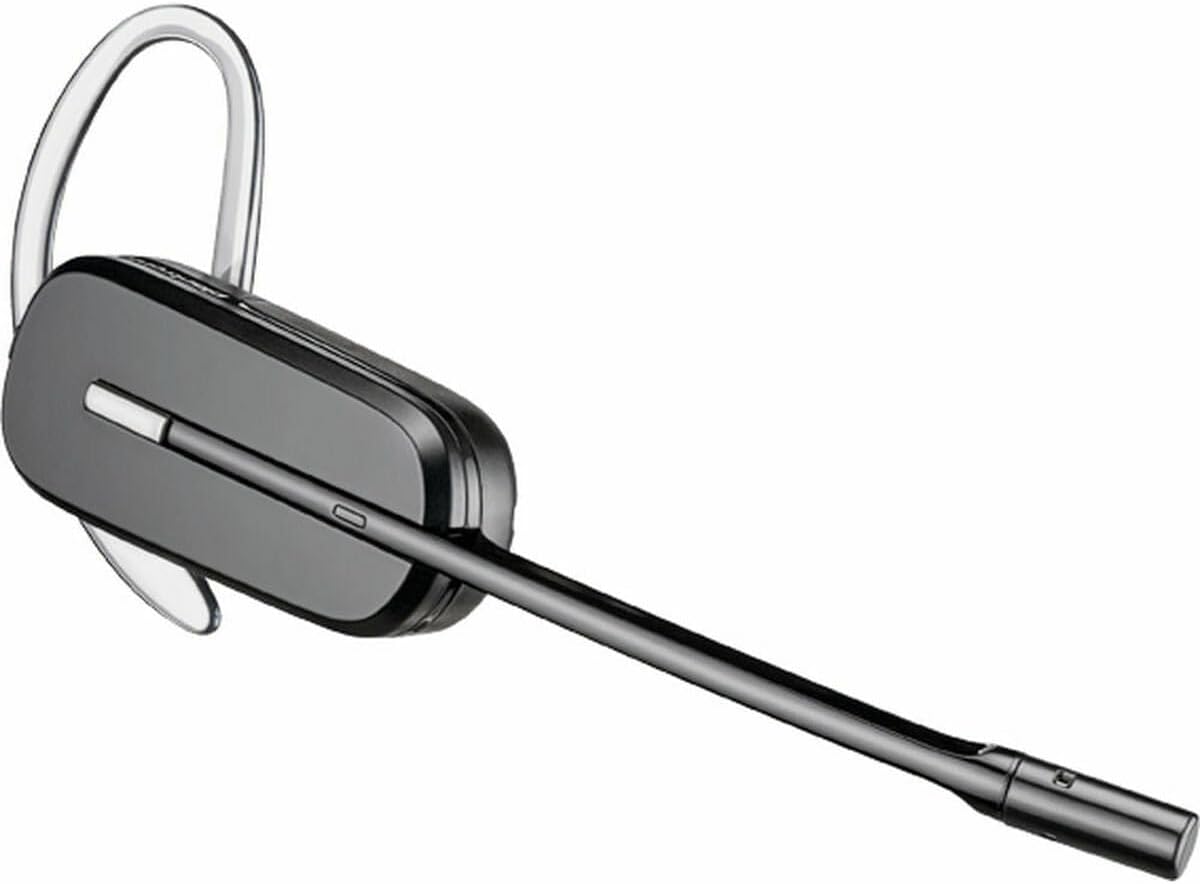
Image 2.1: The CS540/A headset configured with an ear hook.

Image 2.2: The CS540/A headset configured with a headband.
3. Arahan Operasi
3.1 Membuat dan Menjawab Panggilan
- Untuk Menjawab Panggilan: Tekan butang Kawalan Panggilan pada set kepala.
- Untuk Menamatkan Panggilan: Press the Call Control button again.
- Untuk Membuat Panggilan:
- Ensure the headset is powered on and connected to the base.
- Tekan butang Kawalan Panggilan pada set kepala.
- Dial the number on your desk phone.
3.2 Kawalan Kelantangan
Use the volume rocker switch on the headset to adjust the listening volume.
- Tekan ke + side to increase volume.
- Tekan ke - side to decrease volume.
3.3 Fungsi Redam
To mute the microphone during a call, press the Mute button on the headset. Press it again to unmute.

Image 3.1: A user wearing the Plantronics CS540/A headset during a call.
4. Penyelenggaraan
4.1 Cleaning the Headset
Pembersihan berkala membantu mengekalkan prestasi dan kebersihan alat dengar.
- Wipe the headset and base station with a soft, dry, anti-static cloth.
- Jangan gunakan bahan kimia atau pembersih kasar.
- Elakkan kelembapan dalam bukaan.
4.2 Penjagaan Bateri
The headset uses a Lithium Polymer battery. To maximize battery life:
- Cas set kepala sepenuhnya sebelum penggunaan pertama.
- Elakkan suhu yang melampau.
- If the headset will not be used for an extended period, charge it periodically.
- The battery is replaceable; contact support for replacement options if needed.
5. Penyelesaian masalah
If you encounter issues with your CS540/A headset, try the following solutions:
5.1 No Dial Tone or Audio
- Pastikan alat dengar dicas sepenuhnya dan dihidupkan.
- Verify all cables are securely connected between the base station and the desk phone.
- Check the compatibility switch on the base station. Adjust it to different positions until a dial tone is heard.
- Confirm the desk phone's handset is properly seated or lifted (if not using an electronic hookswitch).
5.2 Kualiti Audio Lemah
- Adjust the listening volume on the headset.
- Ensure the microphone is positioned correctly, approximately two finger-widths from your mouth.
- Check for interference from other wireless devices. Move the base station away from other electronics.
- If using a desk phone, adjust the transmit and receive volume controls on the base station (if available).
5.3 Headset Not Pairing with Base
- Pastikan kedua-dua alat dengar dan tapak dihidupkan.
- Place the headset in the charging cradle. The charge indicator should light up.
- If pairing is lost, refer to the full Plantronics CS540/A user guide for re-pairing instructions, which typically involves pressing a pairing button on the base and headset.
6. Spesifikasi
| Ciri | Perincian |
|---|---|
| Nama Model | CS540A |
| Nombor Model Item | 84693-02 |
| Jenama | POLY (formerly Plantronics) |
| Teknologi Ketersambungan | Tanpa Wayar (DECT) |
| Teknologi Komunikasi Tanpa Wayar | DECT 6.0 (1920-1930 MHz) |
| Gaya Memakai | Convertible (Ear Hook, Headband) |
| Hayat Bateri (Masa Berbual) | Sehingga 6 Jam |
| Masa Mengecas | Lebih kurang 3 Jam |
| Mikrofon | Bunyi-Membatalkan |
| Jenis Kawalan | Call Control, Volume, Mute |
| Berat Barang | 0.7 Ounces (headset only) |
| Dimensi Produk | 8.07 x 5.51 x 4.53 inches (packaging/base) |
| bahan | plastik |
| Sumber Kuasa | AC Adapter (for base station) |
7. Waranti dan Sokongan
7.1 Waranti Terhad
This product is covered by a limited warranty provided by POLY. The warranty typically covers manufacturing defects for a specified period from the date of purchase. Please retain your proof of purchase for warranty claims. For specific warranty terms and conditions, refer to the official POLY webtapak atau kad jaminan yang disertakan dengan produk anda.
7.2 Sokongan Pelanggan
For further assistance, technical support, or to inquire about replacement parts, please visit the official POLY support website or contact their customer service. You can often find detailed FAQs, troubleshooting guides, and contact information on their webtapak.
Official POLY Webtapak: www.poly.com


