1. Pengenalan dan Lebihview
This manual provides essential information for the proper setup, operation, and maintenance of your ViewSonic VA2231WM-LED 22-inch widescreen LED monitor. Please read these instructions carefully before using your monitor.

Rajah 1.1: Depan view daripada ViewSonic VA2231WM-LED monitor displaying an environmental message.
Ciri-ciri Utama:
- 22-inch (21.5-inch viewable) Full HD 1080p widescreen display.
- Mercury-free LED backlight for energy efficiency.
- 10,000,000:1 Dynamic Contrast Ratio for enhanced image depth.
- Automatic Aspect Ratio Adjustment to prevent image stretching.
- Integrated stereo speakers for multimedia audio.
- DVI and VGA input options for versatile connectivity.
- VESA mountable (100mm x 100mm) for flexible installation.
- Eco-mode function for up to 35% energy savings.
- ENERGY STAR 5.0 and EPEAT Silver certified.
2. Arahan Persediaan
2.1 Membongkar Monitor
Carefully remove the monitor and all components from the packaging. Ensure all items listed in the packing list are present. Retain the original packaging for future transport or service needs.

Rajah 2.1: Sisi view of the monitor, showcasing its slim design.
2.2 Memasang Stand
- Letakkan monitor menghadap ke bawah pada permukaan yang lembut dan bersih untuk mengelakkan calar.
- Align the stand base with the monitor's neck and secure it according to the diagram provided in the quick start guide (not included in this document).
- Ensure the stand is firmly attached before placing the monitor upright.
2.3 Menyambung Kabel
Sambungkan kabel yang diperlukan ke port yang sepadan di belakang monitor dan komputer anda.

Figure 2.2: Rear panel connections including power input, audio input, DVI, and VGA ports.
- Kabel kuasa: Sambungkan kabel kuasa ke input kuasa monitor dan kemudian ke salur keluar elektrik yang dibumikan.
- Video Cable (DVI or VGA):
- For digital signal, connect a DVI cable from your computer's DVI output to the monitor's DVI input.
- For analog signal, connect a VGA cable from your computer's VGA output to the monitor's VGA input.
- Kabel Audio: If using the integrated speakers, connect an audio cable from your computer's audio output to the monitor's audio input.
2.4 Pemasangan VESA
The VA2231WM-LED monitor is VESA compliant (100mm x 100mm), allowing for alternative mounting solutions such as wall mounts or monitor arms.
- Ensure the monitor is powered off and disconnected from all cables.
- Carefully detach the original stand by unscrewing the four screws located on the back of the monitor.
- Attach your VESA-compatible mount using the appropriate screws (typically M4 x 10mm, not included).
- Follow the instructions provided with your VESA mounting kit for secure installation.
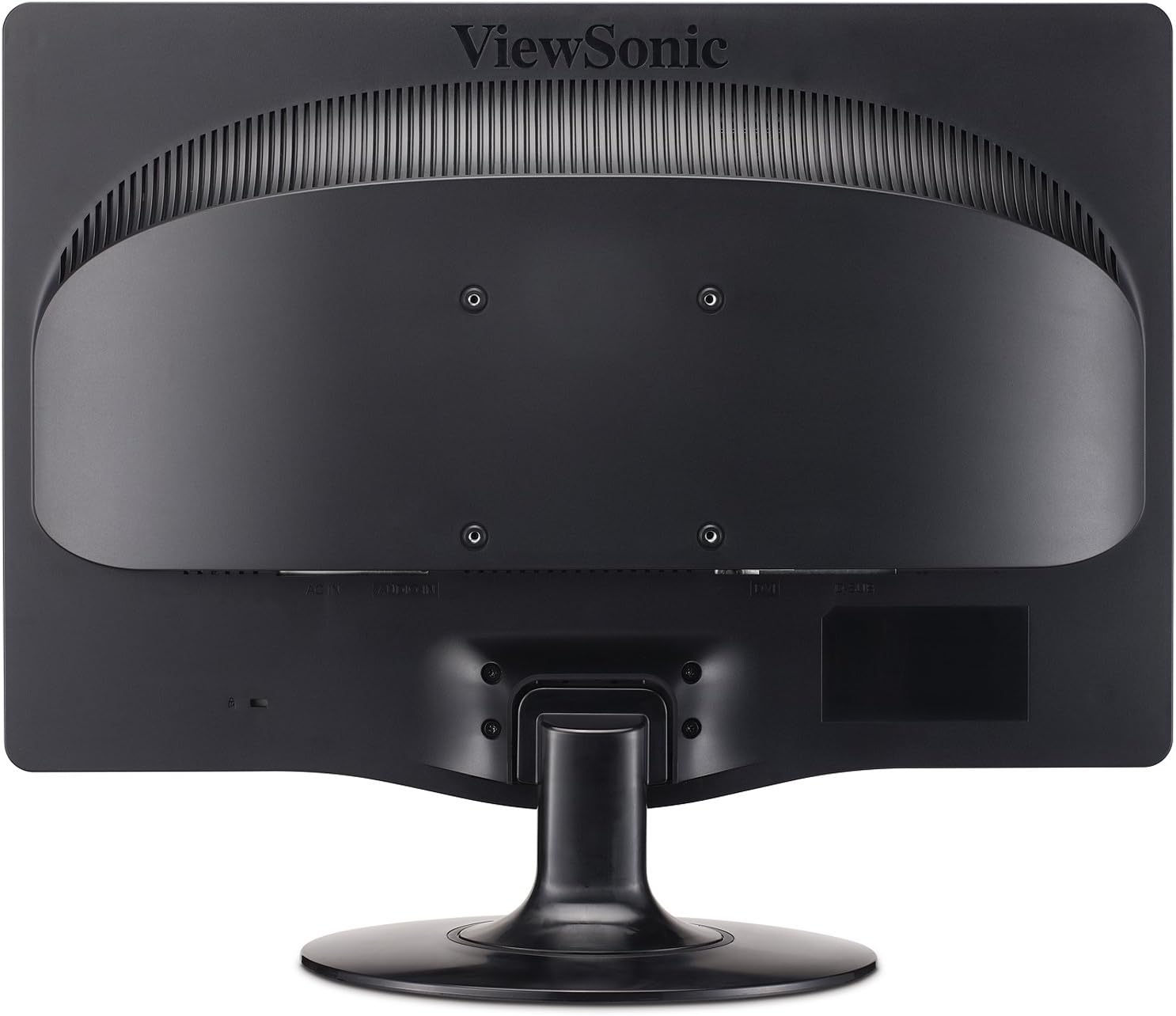
Rajah 2.3: Belakang view highlighting the 100mm x 100mm VESA mounting pattern.
3. Arahan Operasi
3.1 Menghidupkan/Mematikan
- Press the power button located on the front bezel of the monitor to turn it on or off.
- Lampu penunjuk kuasa akan menyala apabila monitor dihidupkan.
3.2 Menu Paparan Pada Skrin (OSD).
The OSD menu allows you to adjust various display settings. Use the control buttons located on the front bezel to navigate and select options.
- Butang Menu: Membuka menu OSD.
- Anak panah atas/bawah: Navigasi melalui pilihan menu.
- Pilih Butang: Mengesahkan pilihan atau memasuki sub-menu.
- Butang Keluar: Keluar dari menu semasa atau OSD.
3.3 Melaraskan Tetapan Paparan
- Kecerahan/Kontras: Adjust these settings to optimize image visibility for your environment.
- Mod eko: Select "Optimize" or "Conserve" to reduce power consumption and prolong lamp life. This can save up to 35% energy.
- Nisbah Aspek: The monitor features automatic aspect ratio adjustment. For 4:3 input signals, the image will be centered with sidebars, preventing stretching.
- Pilihan Input: Manually switch between DVI and VGA inputs if auto-detection does not select the correct source.
- Audio: Adjust the volume for the integrated stereo speakers.
4. Penyelenggaraan
4.1 Membersihkan Monitor
- Sentiasa matikan monitor dan cabut palam kuasa sebelum membersihkan.
- Gunakan kain lembut yang tidak berbulu dampdisapu dengan air atau pembersih skrin yang lembut dan tidak melelas.
- Jangan sembur pembersih terus ke skrin. Sapukan pada kain terlebih dahulu.
- Avoid using benzene, thinner, ammonia-based cleaners, or abrasive cleaning agents, as these can damage the display surface.
4.2 Penjagaan Am
- Keep the monitor away from direct sunlight, excessive heat, or humidity.
- Pastikan pengudaraan yang mencukupi di sekeliling monitor untuk mengelakkan terlalu panas.
- Elakkan meletakkan objek berat pada monitor atau kabelnya.
- Do not attempt to disassemble the monitor; refer all servicing to qualified personnel.
5. Penyelesaian masalah
If you encounter issues with your monitor, refer to the following common troubleshooting steps.
| Masalah | Kemungkinan Punca | Penyelesaian |
|---|---|---|
| Tiada Kuasa | Power cable not connected; power outlet not active; monitor power button off. | Ensure power cable is securely connected. Check power outlet with another device. Press the monitor's power button. |
| Tiada Isyarat | Video cable not connected; incorrect input source selected; computer not powered on. | Verify video cable (DVI/VGA) is securely connected to both monitor and computer. Use OSD to select correct input source. Ensure computer is powered on and outputting video. |
| Imej kabur atau herot | Incorrect resolution; loose video cable; OSD settings incorrect. | Set computer's display resolution to 1920x1080. Check video cable connection. Adjust OSD settings like 'Auto Adjust' (for VGA) or 'Phase/Clock'. |
| Dead Pixels | Manufacturing characteristic of LCD panels. | Rujuk kepada ViewSonic's pixel performance policy for warranty coverage regarding dead pixels. |
6. Spesifikasi
| Ciri | Perincian |
|---|---|
| Nombor Model | VA2231WM-LED |
| Saiz Skrin | 22 Inci (21.5" viewmampu) |
| Resolusi | 1920 x 1080 (HD Penuh 1080p) |
| Nisbah Aspek | 16:9 |
| Jenis Panel | LCD Lampu Belakang LED |
| Nisbah Kontras Dinamik | 10,000,000:1 |
| Masa Tindak Balas | 5ms (biasa) |
| Ketersambungan | 1x DVI, 1x VGA |
| Audio | Integrated Stereo Speakers, Audio In |
| VESA Mount Serasi | 100mm x 100mm |
| Dimensi (LxWxH) | 7.7 x 20.2 x 15.3 inci (dengan dirian) |
| Berat badan | 8.6 paun (dengan pendirian) |
| Penggunaan Kuasa | Eco-mode for reduced consumption |
| Pensijilan | ENERGY STAR 5.0, EPEAT Silver |
7. Waranti dan Sokongan
7.1 Waranti Terhad
The ViewSonic VA2231WM-LED monitor is backed by a Waranti terhad 3 tahun. Waranti ini melindungi kecacatan pada bahan dan mutu kerja di bawah penggunaan biasa. Sila simpan bukti pembelian anda untuk tuntutan waranti.
7.2 Pixel Performance Policy
ViewSonic is committed to using high-grade panels and offers an industry-leading pixel performance policy. For detailed information regarding acceptable pixel anomalies and warranty coverage, please refer to the official ViewSonic webtapak atau hubungi sokongan pelanggan.
7.3 Sokongan Pelanggan
For technical assistance, warranty service, or further information, please visit the official ViewSonic website or contact their customer support department. Contact details can typically be found on the ViewSonic webtapak atau dalam dokumentasi asal produk.


