1. Pengenalan
Thank you for choosing the Philips AJB3552/12 DAB+ FM Clock Radio. This manual provides essential information for setting up, operating, and maintaining your device. Please read it carefully to ensure optimal performance and safe use of your clock radio.
Key features of your Philips AJB3552/12 include:
- DAB+ (Digital Audio Broadcasting) for clear, noise-free radio reception.
- FM tuner for traditional radio stations.
- Dynamic Bass Boost for enhanced low-frequency sound.
- Integrated alarm with multiple wake-up options.
- Light sensor for automatic display brightness adjustment.
- Backlit LCD display for easy readability.
2. Maklumat Keselamatan
Please observe the following safety precautions to prevent electric shock, fire, or damage to the device:
- Jangan dedahkan peranti kepada hujan atau lembapan.
- Jangan letakkan objek yang berisi cecair, seperti pasu, pada peranti.
- Pastikan pengudaraan yang mencukupi. Jangan sekat bukaan pengudaraan.
- Lindungi kord kuasa daripada berjalan atau tersepit.
- Hanya gunakan lampiran/aksesori yang ditentukan oleh pengilang.
- Cabut plag peranti semasa ribut petir atau apabila tidak digunakan untuk tempoh yang lama.
- Rujuk semua servis kepada kakitangan perkhidmatan yang berkelayakan.
3. Kandungan Pakej
Sahkan bahawa pakej anda mengandungi item berikut:
- Philips AJB3552/12 Clock Radio
- Manual Pengguna (dokumen ini)
- Panduan Mula Pantas
- Unit Bekalan Kuasa
- Sijil Waranti
4. Produk Lebihview
Familiarize yourself with the components of your Philips AJB3552/12 Clock Radio.
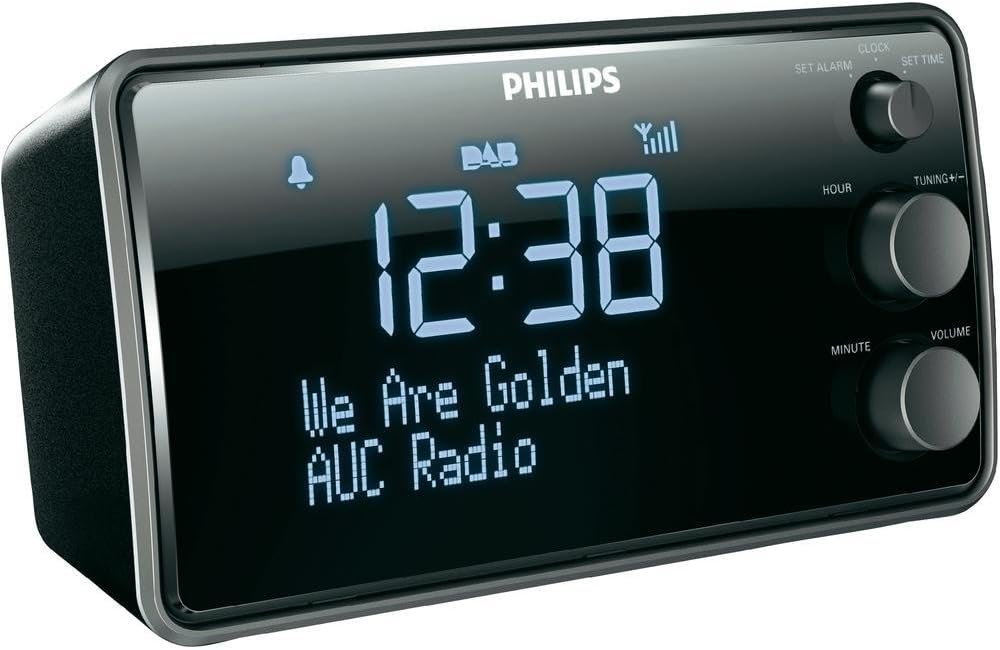
Imej 1: Depan view of the Philips AJB3552/12 Clock Radio, showing the digital display, Philips logo, and control knobs for setting time, tuning, and volume.
Panel Depan
- paparan: Shows time, radio station information, and alarm status.
- SET ALARM knob: Digunakan untuk menetapkan masa penggera.
- SET TIME knob: Digunakan untuk menetapkan masa semasa.
- HOUR button: Melaraskan jam.
- MINUTE button: Melaraskan minit.
- TUNING +/- knob: For tuning radio frequencies or navigating menus.
- Tombol VOLUME: Melaraskan tahap output audio.
Panel Belakang
- Input Kuasa: Menyambung kepada penyesuai kuasa yang disediakan.
- Antena FM/DAB: For radio signal reception.
5. Persediaan
5.1 Kuasa Penyambung
- Uncoil the FM/DAB antenna fully for optimal reception.
- Connect the power adapter to the DC IN socket on the rear of the clock radio.
- Palamkan penyesuai kuasa ke salur keluar dinding.
5.2 Initial Power On and Time Synchronization
Upon first connection, the clock radio will automatically attempt to synchronize the time via DAB+ signal. This process may take a few minutes.

Imej 2: The Philips AJB3552/12 Clock Radio positioned on a wooden bedside table next to a bed, illustrating a typical usage scenario.
5.3 Manual Time Setting (if automatic synchronization fails)
- Tekan dan tahan butang TETAPKAN MASA knob until the hour digits flash.
- Putar JAM butang untuk melaraskan jam. Tekan JAM untuk mengesahkan.
- Putar MINIT button to adjust the minute. Press MINIT untuk mengesahkan.
- Masa kini telah ditetapkan.
6. Arahan Operasi
6.1 Hidupkan/Mati Kuasa
- To turn on the clock radio, press the KUASA button (usually integrated with the VOLUME knob).
- To turn off the clock radio, press the KUASA button again. The display will show the current time.
6.2 Operasi Radio
6.2.1 Radio DAB+
- Tekan ke MODE button (if available, or cycle through modes using the power button) to select DAB+ mode.
- The radio will automatically scan for available DAB+ stations. This may take a few moments.
- Once scanning is complete, rotate the PENALAAN +/- knob to browse through the available stations.
- Tekan ke PENALAAN +/- tombol untuk memilih stesen.
- To store a preset, press and hold a preset number button (if available) until the display confirms.
6.2.2 Radio FM
- Tekan ke MODE butang untuk memilih mod FM.
- Putar PENALAAN +/- tombol untuk menala frekuensi secara manual.
- Untuk mengimbas secara automatik untuk stesen yang tersedia seterusnya, tekan dan tahan butang PENALAAN +/- tombol.
- To store a preset, press and hold a preset number button (if available) until the display confirms.
6.2.3 Dynamic Bass Boost
The Dynamic Bass Boost feature enhances low-frequency sounds for a richer audio experience. To activate or deactivate, press the DBB button (if available, or check menu options).
6.3 Tetapan Penggera
The Philips AJB3552/12 allows you to set an alarm to wake up to your preferred radio station or a buzzer.
- Tekan dan tahan butang TETAPKAN PENGGERA knob until the alarm time digits flash.
- Putar JAM button to set the alarm hour. Press JAM untuk mengesahkan.
- Putar MINIT button to set the alarm minute. Press MINIT untuk mengesahkan.
- Select the alarm source: Rotate the PENALAAN +/- knob to choose between Radio or Buzzer. Press the knob to confirm.
- Select the alarm frequency: Rotate the PENALAAN +/- knob to choose between Setiap hari, hari minggu (Mon-Fri), or Hujung minggu (Sat-Sun). Press the knob to confirm.
- Untuk mengaktifkan/menyahaktifkan penggera, tekan butang ALARM ON / OFF button (often located on top or integrated with the SET ALARM knob). An alarm icon will appear on the display when active.
6.3.1 Fungsi Tunda
Apabila penggera berbunyi, tekan MENGEJUTKAN button (usually a large button on top) to temporarily silence the alarm. The alarm will sound again after a few minutes (default snooze time is typically 9 minutes).
6.3.2 Pemasa Tidur
Pemasa tidur membolehkan anda tertidur dengan radio, yang akan dimatikan secara automatik selepas tempoh yang ditetapkan. Tekan ke TIDUR button repeatedly to cycle through available sleep times (e.g., 120, 90, 60, 30, 15 minutes, or OFF).
6.4 Tetapan Paparan
The clock radio features a light sensor that automatically adjusts the display brightness based on ambient light conditions. If manual adjustment is desired, consult the full user manual for specific steps, as this may vary.
7. Penyelenggaraan
7.1 Pembersihan
To clean the unit, use a soft, dry cloth. Do not use abrasive cleaners, alcohol, or benzene, as these can damage the surface. Ensure the device is unplugged before cleaning.
7.2 Maklumat Bateri
The device requires 1 Lithium-ion battery for backup purposes (e.g., to retain time settings during a power outage). This battery is typically pre-installed and not user-replaceable. If the time is consistently lost after power interruptions, professional servicing may be required.
8. Penyelesaian masalah
If you encounter issues with your clock radio, refer to the following common problems and solutions:
| Masalah | Kemungkinan Punca | Penyelesaian |
|---|---|---|
| Tiada kuasa | Kord kuasa tidak disambungkan dengan betul. | Pastikan kord kuasa dipasang dengan selamat ke dalam unit dan alur keluar dinding. |
| Penerimaan radio yang lemah (DAB+/FM) | Antenna not fully extended or positioned incorrectly. Interference from other electronic devices. | Fully extend and adjust the antenna. Move the unit away from other electronic devices. Try repositioning the unit. |
| Penggera tidak berbunyi | Alarm not activated. Alarm volume too low. | Ensure the alarm is set and activated (alarm icon visible). Increase the alarm volume. |
| Display too bright/dim | Automatic light sensor adjustment. | The light sensor adjusts brightness automatically. If manual override is desired, refer to the full user manual. |
9. Spesifikasi
Detailed technical specifications for the Philips AJB3552/12 Clock Radio:

Imej 3: Atas ke bawah view of the Philips AJB3552/12 Clock Radio, indicating its dimensions: 9.2 cm depth and 6.3 cm height.
| Ciri | Spesifikasi |
|---|---|
| Jenama | Philips |
| Nombor Model | AJB3552/12 |
| Pengeluar | Penglihatan TP |
| Dimensi Produk | 17.2 x 6.3 x 9.2 cm (P x H x D) |
| Berat badan | 658 g |
| warna | Hitam |
| Jenis Paparan | digital |
| Ciri Khas | Integrated clock, Built-in speakers, Volume control, DAB+, Dynamic Bass Boost, Light sensor |
| Sumber Kuasa | Battery (backup) / AC Power |
| Jenis Bilik | Bilik tidur |
| Faktor Bentuk | Prisma segi empat tepat |
| Persekitaran Penggunaan | Dalaman |
| Bateri Diperlukan | 1 Lithium ion battery (for backup) |
10. Waranti dan Sokongan
For warranty information and customer support, please refer to the warranty certificate included in your package or visit the official Philips support webtapak. Simpan bukti pembelian anda untuk tuntutan waranti.


