pengenalan
This manual provides essential instructions for the safe and efficient operation, installation, and maintenance of your Sharp R-25AM microwave oven. Please read this manual thoroughly before using the appliance and retain it for future reference. Proper use will ensure optimal performance and extend the lifespan of your microwave oven.
Arahan Keselamatan Penting
Apabila menggunakan peralatan elektrik, langkah berjaga-jaga keselamatan asas harus dipatuhi, termasuk yang berikut:
- Baca semua arahan sebelum menggunakan perkakas.
- Jangan cuba mengendalikan ketuhar ini dengan pintu terbuka kerana ini boleh mengakibatkan pendedahan berbahaya kepada tenaga gelombang mikro.
- Jangan letakkan sebarang objek di antara muka hadapan ketuhar dan pintu atau biarkan tanah atau sisa yang lebih bersih terkumpul pada permukaan pengedap.
- Jangan kendalikan ketuhar jika ia rosak. Adalah penting bahawa pintu ketuhar ditutup dengan betul dan tiada kerosakan pada pintu, engsel atau pengedap.
- Hanya kakitangan perkhidmatan yang berkelayakan harus melaraskan atau membaiki perkakas ini.
- Pastikan perkakas dibumikan dengan betul.
- Jangan panaskan cecair atau makanan lain dalam bekas bertutup kerana ia boleh meletup.
- Sentiasa gunakan alat memasak yang selamat dari gelombang mikro.
Produk Selesaiview
Familiarize yourself with the components of your Sharp R-25AM microwave oven.
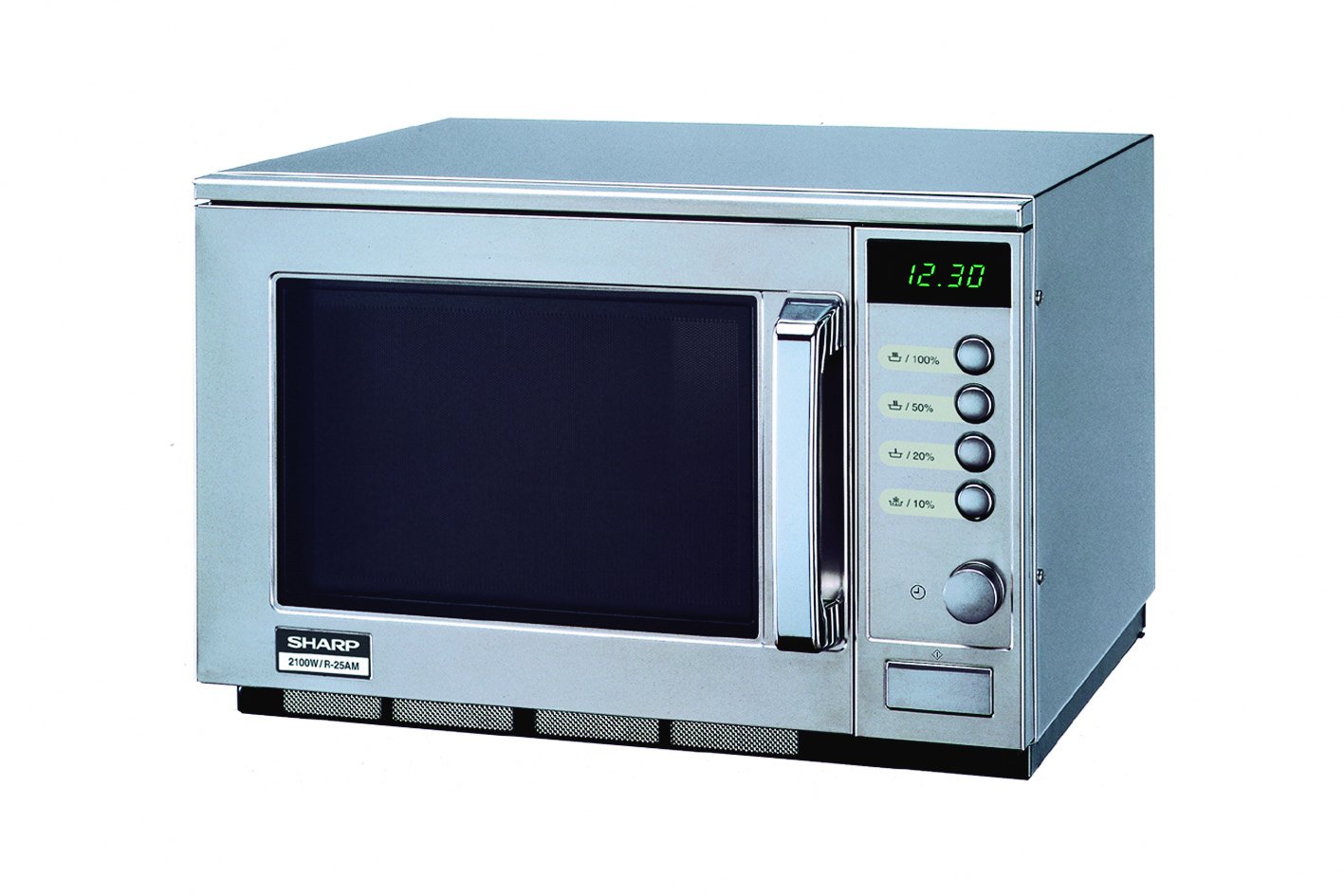
This image displays the front of the Sharp R-25AM microwave oven. It features a stainless steel finish, a dark glass door with a chrome handle, and a control panel on the right. The control panel includes a digital time display (showing '12.30'), four power level buttons (100%, 50%, 20%, 10%), and a rotary dial for setting time or weight. The model number '2100W/R-25AM' is visible on the lower left of the unit.
- Rongga Ketuhar: Ruang dalaman tempat makanan diletakkan untuk memasak.
- Meja putar kaca: Memusingkan makanan untuk memasak secara sekata.
- Perhimpunan Pintu: Includes the door, latch, and viewtetingkap masuk.
- Panel Kawalan: Contains the digital display, power level buttons, and rotary dial for setting cooking time and functions.
- Pemegang pintu: Digunakan untuk membuka dan menutup pintu ketuhar.
Persediaan dan Pemasangan
- Membongkar: Remove all packaging materials from inside and outside the oven. Check for any damage. Do not remove the waveguide cover.
- penempatan:
- Place the oven on a flat, stable surface strong enough to hold the oven and the food being cooked.
- Pastikan pengudaraan yang mencukupi. Tinggalkan jarak minimum 10 cm (4 inci) di bahagian belakang, 20 cm (8 inci) di bahagian atas, dan 5 cm (2 inci) di kedua-dua belah.
- Jangan sekat sebarang bukaan pengudaraan.
- Jauhkan ketuhar daripada sumber haba dan medan magnet yang kuat.
- Sambungan Elektrik:
- Plug the power cord into a properly grounded electrical outlet (230V, 50Hz, 16A).
- Jangan gunakan kord sambungan atau penyesuai.
Arahan Operasi
Menetapkan Jam
- Ensure the oven is plugged in. The display will show '0:00' or the current time if previously set.
- Tekan ke jam button (often indicated by a clock icon next to the rotary dial).
- Turn the rotary dial to set the hour. Press the jam butang lagi.
- Turn the rotary dial to set the minutes. Press the jam button one more time to confirm.
Memasak Microwave
- Tempat Makanan: Put food in a microwave-safe container on the glass turntable. Close the oven door securely.
- Pilih Tahap Kuasa: Press one of the power level buttons (100%, 50%, 20%, 10%) to choose the desired cooking intensity. For example, press '100%' for full power (2100W).
- Tetapkan Masa Memasak: Turn the rotary dial to set the desired cooking time. The display will show the time counting down.
- Mula Memasak: The oven will start automatically after setting the time. Some models may require pressing a separate 'Start' button.
- Tamat Memasak: The oven will beep when cooking is complete. Open the door and carefully remove the food.
Menyahbeku
Fungsi nyahbeku membolehkan anda mencairkan makanan beku dengan cekap.
- Letakkan makanan sejuk beku di atas meja putar.
- Tekan ke Pencairan button (if available, or use a lower power setting like 20% or 50%).
- Turn the rotary dial to set the defrost time or weight, depending on the model's features.
- The oven will begin defrosting. It may be necessary to turn the food over halfway through the defrosting process for even thawing.
Penyelenggaraan dan Pembersihan
Regular cleaning and maintenance will ensure your microwave oven operates effectively and safely.
- Membersihkan Bahagian Dalaman:
- Selepas setiap penggunaan, lap bahagian dalam dengan iklanamp kain untuk menghilangkan percikan makanan.
- For stubborn stains, place a bowl of water with lemon juice inside and microwave for 2-3 minutes. The steam will loosen the grime, making it easier to wipe clean.
- Jangan gunakan pembersih yang melelas atau pad penyental.
- Membersihkan Bahagian Luar:
- Lap permukaan luar dengan lembut, damp kain.
- Untuk permukaan keluli tahan karat, gunakan pembersih keluli tahan karat khusus untuk mengekalkan kemasannya.
- Membersihkan Meja Putar: The glass turntable and roller ring can be removed and washed in warm, soapy water or in a dishwasher. Ensure they are completely dry before placing them back in the oven.
- Pengedap Pintu: Bersihkan pengedap pintu dan bahagian bersebelahan dengan kerap menggunakan iklanamp cloth to ensure proper sealing and prevent microwave leakage.
Menyelesaikan masalah
Sebelum menghubungi perkhidmatan pelanggan, sila rujuk isu dan penyelesaian biasa berikut:
| Masalah | Kemungkinan Punca | Penyelesaian |
|---|---|---|
| Oven tidak bermula. | Power cord not plugged in; door not closed properly; fuse blown or circuit breaker tripped. | Ensure plug is firmly in outlet; close door securely; check household fuse or reset circuit breaker. |
| Makanan tidak dipanaskan. | Door not closed properly; incorrect cooking time or power level set. | Ensure door is closed; verify cooking time and power level settings. |
| Cahaya tidak berfungsi. | Mentol memerlukan penggantian. | Hubungi kakitangan perkhidmatan yang berkelayakan untuk penggantian mentol. |
| Meja putar tidak berputar. | Turntable not properly placed; debris under turntable. | Ensure turntable and roller ring are correctly positioned; clean any debris. |
Spesifikasi
Key technical specifications for the Sharp R-25AM microwave oven:
- model: R-25AM
- Jenama: tajam
- kapasiti: 20 Liter
- Output Kuasa: 2100 Watt
- Voltage: 230 Volt
- Kekerapan: 50 Hz
- Jenis Pemasangan: Atas meja
- Bahan: Keluli Tahan Karat
- Dimensi Produk (L x W x H): 470 x 510 x 335 mm (lebih kurang 18.5 x 20.1 x 13.2 inci)
- Berat: 33.12 kg (kira-kira 73 paun)
- Jenis Kawalan: Button, Rotary Dial
Waranti dan Sokongan
For warranty information, please refer to the warranty card included with your purchase or visit the official Sharp website. For technical support or service inquiries, please contact Sharp customer service directly. Keep your purchase receipt as proof of purchase for warranty claims.
Nota: Ketersediaan alat ganti tidak tersedia pada masa ini seperti yang tertera pada maklumat produk.


