pengenalan
This manual provides detailed instructions for the installation, operation, and maintenance of your GIGABYTE GA-990FXA-UD3 motherboard. Please read this manual thoroughly before proceeding with installation or use to ensure proper functionality and safety.
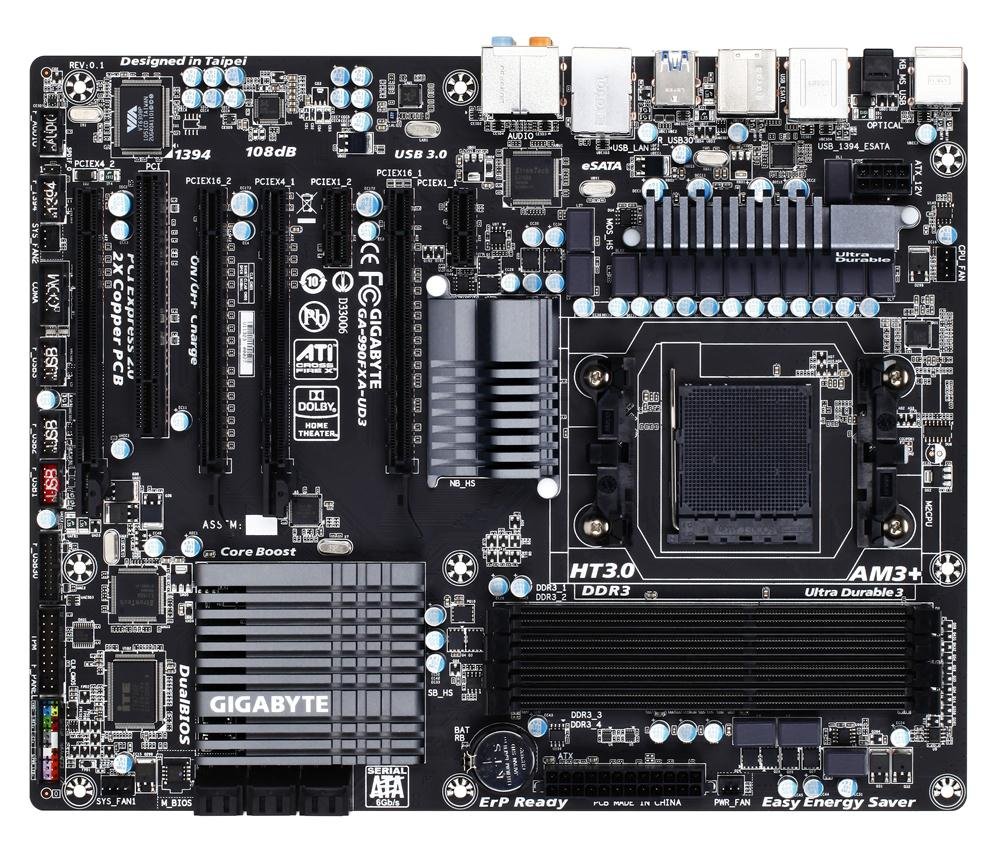
Image showing the GIGABYTE GA-990FXA-UD3 motherboard with its black and gray color scheme, highlighting the CPU socket, DIMM slots, and PCIe slots.
Produk Selesaiview
The GIGABYTE GA-990FXA-UD3 is an ATX motherboard designed for AMD AM3+ and AM3 processors. It features the AMD 990FX and SB950 chipsets, offering robust performance and extensive connectivity options for building a high-performance personal computer.
Ciri-ciri Utama:
- Supports AMD AM3+ FX/AM3 Phenom II series processors.
- Advanced 8+2 phase CPU VRM power design for high-TDP CPU support.
- Multiple PCI-E 2.0 interfaces for 2-way AMD CrossFireX and NVIDIA SLI multi-graphics support.
- AMD SB950 provides 6 native SATA 6Gb/s ports with RAID 0, 1, 5, 10 support.
- Integrated USB 3.0 with superfast transfer rates of up to 5 Gbps.
- GIGABYTE 3x USB Power with On/Off Charge USB ports.
- Ultra Durable 3 Classic Technology for enhanced durability and lower operating temperatures.
- Realtek ALC889 codec with High Definition Audio and Dolby Home Theater support.
- Patented DualBIOS with Hybrid EFI technology for 3TB+ HDD support.
Persediaan
Kandungan Pakej:
Sahkan bahawa semua item terdapat dalam pakej motherboard anda:
- GIGABYTE GA-990FXA-UD3 Motherboard
- Manual Pengguna
- CD Pemandu
- SATA 6Gb/s Cables (typically 2-4)
- I / O Shield
- SLI Bridge Connector (for multi-GPU configurations)
Maklumat Keselamatan:
- Always disconnect the power cord from the wall outlet before installing or removing any components.
- Pakai tali pergelangan tangan anti-statik untuk mengelakkan kerosakan nyahcas elektrostatik (ESD) pada komponen.
- Kendalikan komponen pada tepinya dan elakkan menyentuh pin atau litar.
- Ensure proper ventilation within your computer case.
Motherboard Layout and Connectors:
Familiarize yourself with the various connectors and components on the motherboard:
- CPU Socket (AM3+): Located centrally, for installing your AMD processor.
- DDR3 DIMM Sockets: Four 1.5V DDR3 sockets for system memory, supporting up to 32 GB.
- PCI Express x16 Slots: Two slots for graphics cards, supporting 2-Way CrossFireX and SLI.
- PCI Express x1/x4 Slots: For expansion cards like sound cards or network adapters.
- PCI Slots: For legacy expansion cards.
- SATA 6Gb/s Connectors: Six ports for connecting storage devices (HDDs, SSDs).
- Pengepala USB: Internal headers for additional USB 2.0/1.1 and USB 3.0/2.0 ports.
- Pengepala Panel Hadapan: For connecting case buttons, LEDs, and front audio/USB ports.
- Penyambung Panel Belakang:
- 1 x PS/2 papan kekunci/port tetikus
- 1 x penyambung S/PDIF Out optik
- 1 x IEEE 1394 port
- 8 x USB 2.0 / 1.1 port
- 2 x USB 3.0 / 2.0 port
- 2 x eSATA 6Gb/s connectors
- 1 x port LAN RJ-45
- 6 x bicu audio
Langkah Pemasangan:
- Sediakan Kes: Pasang perisai I/O ke dalam bukaan belakang sarung komputer anda.
- Pasang CPU: Open the CPU socket lever, align the CPU with the socket (match the golden triangle on the CPU to the triangle on the socket), gently place the CPU into the socket, and close the lever.
- Pasang Penyejuk CPU: Ikut arahan pengeluar penyejuk untuk memasang penyejuk CPU pada papan induk. Sambungkan kabel kipas CPU ke pengepala CPU_FAN.
- Pasang Modul Memori: Open the clips on the DIMM slots. Align the memory module notch with the slot key, insert the module firmly until the clips snap into place. For dual-channel operation, refer to the motherboard manual for correct slot pairing.
- Pasang Papan Induk: Letakkan papan induk ke dalam bekas dengan berhati-hati, selaraskan lubang skru dengan pegangan. Selamatkan papan induk dengan skru.
- Install Graphics Card(s): Insert your PCI Express graphics card(s) into the appropriate PCIe x16 slot(s) until it clicks into place. Secure with a screw or retention clip.
- Pasang Peranti Storan: Connect your SATA HDDs/SSDs to the SATA 6Gb/s ports using the provided SATA cables.
- Sambungkan Bekalan Kuasa: Connect the 24-pin ATX main power connector and the 8-pin ATX 12V power connector from your power supply to the motherboard. Connect power to graphics cards and storage devices.
- Sambungkan Kabel Panel Depan: Connect the power button, reset button, HDD LED, power LED, and front panel audio/USB cables to their respective headers on the motherboard.
Beroperasi
Persediaan BIOS:
The BIOS (Basic Input/Output System) is firmware that initializes hardware during the boot process. To enter the BIOS setup utility, press the DEL key repeatedly during system startup. Here you can configure various system settings such as boot order, date/time, CPU/memory settings, and enable/disable integrated peripherals. The GA-990FXA-UD3 features GIGABYTE's DualBIOS with Hybrid EFI technology, providing redundancy and support for large hard drives.
Pemasangan Pemandu:
After installing your operating system, install the necessary drivers for the motherboard's components. You can use the driver CD included in your package or download the latest drivers from the official GIGABYTE webtapak (www.gigabait.com) for optimal performance and compatibility.
Penyelenggaraan
- Jaga kebersihan: Regularly clean dust from the motherboard and components using compressed air. Ensure fans are free of obstructions.
- Kemas Kini BIOS: Periksa GIGABYTE secara berkala website for BIOS updates. BIOS updates can improve system stability, add support for new hardware, or fix bugs. Follow GIGABYTE's instructions carefully when updating the BIOS.
- Semak Sambungan: Ensure all power cables, data cables, and expansion cards are securely seated. Loose connections can cause intermittent issues.
Menyelesaikan masalah
- Tiada Kuasa: Ensure the power supply is connected correctly to the motherboard (24-pin and 8-pin connectors) and that the power supply switch is on. Check front panel power button connection.
- Tiada Paparan: Verify that the graphics card is properly seated in its PCIe slot and that all necessary power connectors are attached. Ensure the monitor cable is securely connected to the graphics card.
- Sistem Gagal Boot: Check memory modules are correctly installed. Try booting with only one memory module. Verify boot order in BIOS.
- Unexplained Slow Boot Times: Some users have reported slow boot times with this motherboard, even with SSDs. Ensure your BIOS is updated to the latest stable version. Verify that the SSD/HDD is set as the first boot device in the BIOS.
- Linux Compatibility (IOMMU/USB/Network Issues): For Linux users experiencing issues with network or USB 2.0 ports, it may be necessary to disable IOMMU in the BIOS and add "iommu=soft" to your GRUB boot options.
- Overclocking Instability: If overclocking, ensure adequate cooling and gradually increase voltages and frequencies. Refer to online resources and community forums for stable overclocking profiles for your specific CPU and memory.
- Audio Crackling: If experiencing audio crackling, try reinstalling the audio drivers. Ensure no conflicting audio software is running.
Spesifikasi
| Ciri | Spesifikasi |
|---|---|
| Soket CPU | Soket AM3+ |
| Pemproses yang Serasi | AMD AM3+ FX / AM3 Phenom II / Athlon II series processors |
| Chipset | AMD 990FX / SB950 |
| Ingatan | 4 x DDR3 DIMM sockets, up to 32 GB, DDR3 2000(O.C.)/1866/1600/1333/1066 MHz |
| Slot Pengembangan | 2 x PCI Express x16, 1 x PCI Express x4, 2 x PCI Express x1, 1 x PCI |
| Antaramuka Penyimpanan | 6 x SATA 6Gb/s (RAID 0, 1, 5, 10, JBOD), 2 x eSATA 6Gb/s (RAID 0, 1) |
| Port USB | Up to 14 x USB 2.0/1.1, Up to 4 x USB 3.0/2.0 |
| Audio | Realtek ALC889 codec, High Definition Audio, Dolby Home Theater, 2/4/5.1/7.1-channel |
| LAN | 10/100/1000 Mbit |
| Faktor Bentuk | ATX |
| Dimensi | 13 x 11 x 3 inci (Saiz Produk) |
| Berat badan | 3.6 paun |
Waranti dan Sokongan
Produk GIGABYTE dilindungi oleh jaminan terhad. Sila rujuk kad jaminan yang disertakan dengan produk anda atau lawati laman web rasmi GIGABYTE. website for detailed warranty terms and conditions. For technical support, driver downloads, and further assistance, please visit the GIGABYTE support page at www.gigabyte.com/Sokongan.


