1. Pengenalan
The Extech FL700 Fluoride Meter is a precision instrument designed for the rapid and accurate measurement of fluoride ions in various aqueous samples, including drinking water. This device integrates a sensing electrode, measurement electronics, and a digital display into a single, portable unit, making it suitable for both field and laboratory applications.
The FL700 provides direct readings of total fluoride concentrations ranging from 9.99 ppm or mg/L down to 0.1 ppm. It features automatic temperature compensation to ensure measurement accuracy across varying environmental conditions.
2. Maklumat Keselamatan
Please read and understand all safety precautions before operating the Extech FL700 Fluoride Meter. Failure to follow these instructions may result in injury or damage to the instrument.
- Always handle the fluoride electrode with care. Avoid touching the sensing element directly.
- When working with TISAB reagent tablets or any chemical solutions, wear appropriate personal protective equipment, including gloves and eye protection.
- Do not immerse the entire meter in liquid. The meter is designed for electrode immersion only.
- Store the meter and reagents in a cool, dry place, away from direct sunlight and extreme temperatures.
- Jauhkan daripada kanak-kanak.
3. Produk Lebihview
The Extech FL700 Fluoride Meter is a compact and user-friendly device. Key components and features are outlined below:

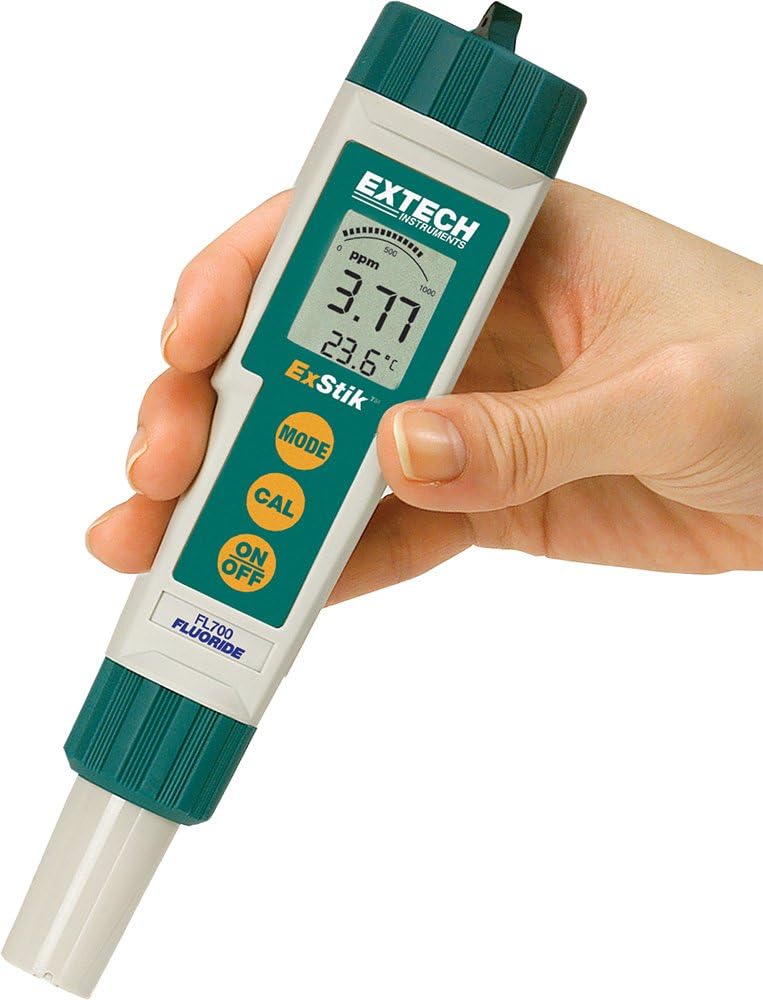


Ciri-ciri Utama:
- Penentukuran dua titik: Ensures accurate measurements across the fluoride range.
- Storan memori: Stores up to 25 labeled readings for later review.
- Field or lab testing: Designed for versatile use in various environments.
- Fast response: Provides fluoride measurements in less than 1 minute.
- Large dual LCD: Simultaneously displays ppm (or mg/L) and temperature with a bargraph.
4. Persediaan
4.1. Pemasangan Bateri
The Extech FL700 requires four 3V button batteries (included). To install or replace batteries:
- Twist off the battery compartment cap located at the top of the meter.
- Insert the four 3V button batteries, ensuring correct polarity as indicated inside the compartment.
- Replace the battery compartment cap and twist to secure.
4.2. Persediaan Awal
Before first use or after prolonged storage, prepare the electrode:
- Remove the sensor cap from the electrode tip.
- Rinse the electrode tip with distilled water.
- Condition the electrode by immersing it in a fluoride standard solution (e.g., 1 ppm or 10 ppm) for approximately 15-30 minutes.
5. Arahan Operasi
5.1. Menghidupkan/Mematikan
Tekan ke HIDUP/MATI butang untuk menghidupkan atau mematikan meter.
5.2. Calibration (Two-Point)
Accurate calibration is crucial for reliable measurements. The FL700 supports two-point calibration.
- Prepare two fluoride standard solutions, typically one low concentration (e.g., 1 ppm) and one high concentration (e.g., 10 ppm). Ensure the solutions are at a stable temperature.
- Bilas elektrod dengan air suling dan keringkan.
- Immerse the electrode into the first standard solution.
- Tekan dan tahan butang CAL / RECALL button until 'CAL' appears on the display. The meter will automatically recognize the standard and calibrate. Wait for the reading to stabilize.
- Rinse the electrode again and immerse it into the second standard solution.
- Tekan dan tahan butang CAL / RECALL button again. The meter will complete the two-point calibration.
- The meter is now calibrated and ready for measurement.
5.3. Mengambil Pengukuran
To measure fluoride concentration in a sample:
- Ensure the meter is calibrated.
- Bilas elektrod dengan air suling dan keringkan.
- Add TISAB (Total Ionic Strength Adjustment Buffer) reagent to your sample according to the reagent instructions. TISAB ensures that the fluoride ions are in a measurable form and minimizes interference.
- Immerse the electrode tip into the prepared sample solution. Ensure the tip is fully submerged.
- Allow the reading to stabilize on the display. The large dual LCD will show the fluoride concentration in ppm (or mg/L) and the temperature.
- Untuk menyimpan bacaan semasa, tekan butang MODE / HOLD button. Press again to release.
5.4. Mengingati Bacaan Tersimpan
The meter can store up to 25 labeled readings.
- To recall stored readings, press the CAL / RECALL button briefly when not in calibration mode.
- Gunakan MODE / HOLD button to scroll through the stored readings.
6. Penyelenggaraan
6.1. Pembersihan Elektrod
Regular cleaning of the electrode ensures optimal performance.
- Selepas setiap penggunaan, bilas elektrod dengan teliti menggunakan air suling.
- If the electrode becomes fouled or readings become erratic, clean it with a mild detergent solution or a specialized electrode cleaning solution. Rinse thoroughly with distilled water afterward.
6.2. Penyimpanan
Proper storage extends the life of the electrode and meter.
- Always replace the sensor cap on the electrode tip when not in use. The cap should contain a small amount of electrode storage solution or a fluoride standard solution to keep the membrane hydrated. Do not store dry.
- Simpan meter di tempat yang sejuk dan kering.
6.3. Penggantian Bateri
Replace batteries when the low battery indicator appears on the display or when the meter fails to power on. Refer to Section 4.1 for battery installation instructions.
7. Penyelesaian masalah
| Masalah | Kemungkinan Punca | Penyelesaian |
|---|---|---|
| Meter tidak dihidupkan | Bateri mati atau tidak dipasang dengan betul | Periksa kekutuban bateri; menggantikan bateri. |
| Erratic or unstable readings | Dirty electrode; air bubbles on electrode; insufficient sample volume; expired or incorrect TISAB. | Clean electrode; gently tap electrode to remove bubbles; ensure electrode is fully submerged; check TISAB. |
| Meter fails to calibrate | Incorrect standard solutions; dirty electrode; electrode not conditioned; damaged electrode. | Verify standard concentrations; clean and condition electrode; replace electrode if damaged. |
| Penunjuk bateri rendah | Bateri hampir habis. | Replace all four 3V button batteries. |
8. Spesifikasi
| Spesifikasi | Perincian |
|---|---|
| Pengeluar | Extech |
| Nombor Bahagian | FL700 |
| Berat Barang | 7.7 auns |
| Dimensi Produk | 6.8 x 1.6 x 1.4 inci |
| Nombor Model Item | FL700 |
| Bateri | 4 bateri Lithium Metal diperlukan (termasuk) |
| Gaya | FL700 |
| Kuantiti Pakej Item | 1 |
| Bilangan Kepingan | 1 |
| Komponen yang Disertakan | Unit, Panduan Arahan |
| Jenis Sel Bateri | Beralkali |
| Tarikh Tersedia Pertama | 15 Julai 2008 |
9. Maklumat Waranti
The Extech FL700 Fluoride Meter comes with a full one-year warranty on parts and workmanship, unless otherwise specified. This warranty does not cover defects resulting from user actions such as misuse, improper wiring, operation outside of specified parameters, improper maintenance or repair, or unauthorized modification.
10. Sokongan
For technical support, service, or additional information, please visit the official Extech weblaman web atau hubungi jabatan khidmat pelanggan mereka. Anda juga boleh mendapatkan lebih banyak maklumat dan produk di Kedai Extech di Amazon.


