1. Pengenalan
Thank you for choosing the MEDION Life X47023 Full HD Camcorder. This manual provides essential information for the safe and efficient operation of your device. Please read it thoroughly before use and keep it for future reference.
2. Maklumat Keselamatan
- Sumber Kuasa: Gunakan hanya penyesuai kuasa dan bateri yang dinyatakan.
- Pendedahan Air: Jangan dedahkan camcorder kepada air atau lembapan.
- Suhu: Avoid extreme temperatures. Operate and store the device within recommended ranges.
- Pembersihan: Disconnect power before cleaning. Use a soft, dry cloth.
- Pembongkaran: Do not attempt to disassemble or repair the camcorder yourself. Refer all servicing to qualified personnel.
- Pengendalian Bateri: Handle batteries carefully. Do not short-circuit, incinerate, or expose to high temperatures.
3. Kandungan Pakej
Sila pastikan semua item ada dalam pakej:
- MEDION Life X47023 Full HD Camcorder
- 1 x Bateri Li-ion
- Kabel HDMI
- Kabel AV/USB
- Bekalan Kuasa USB
- Membawa Beg
- CD Perisian
- Manual Pengguna (dokumen ini)
4. Produk Lebihview
Familiarize yourself with the components of your camcorder:
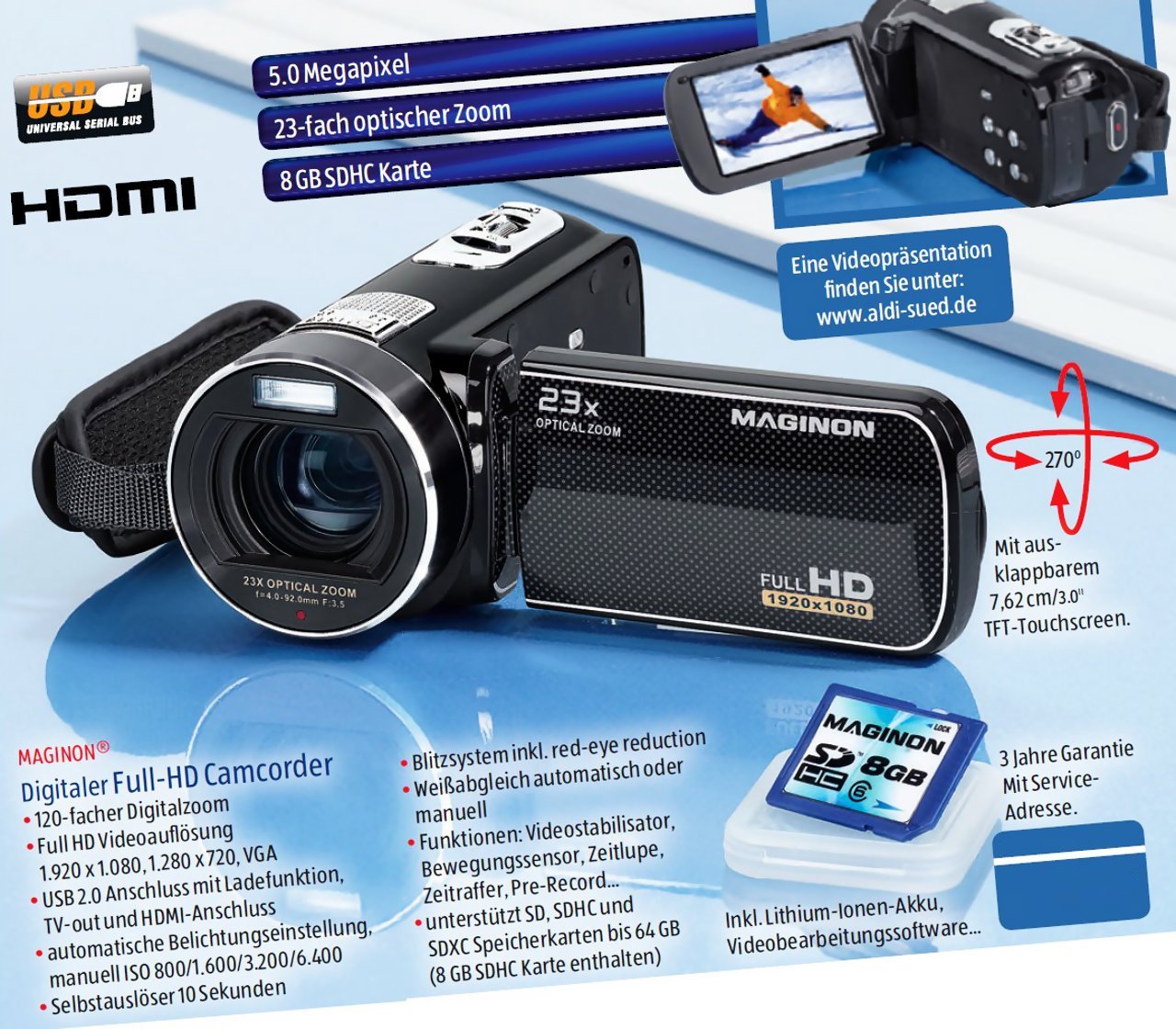
This image displays the MEDION Life X47023 Full HD Camcorder from various angles, highlighting its key features. The main view shows the camcorder with its lens, flash, and hand strap. An inset image on the left shows an 8GB SD card, indicating memory expansion. Text overlays point out "5.0 Megapixel" for photo resolution and "23x Optical Zoom" for the lens capability. Another inset on the top right shows the camcorder with its 7.62 cm (3.0 inch) TFT-Touchscreen display open and rotated, displaying a video scene. A red arrow graphic illustrates the 270-degree rotation capability of the touchscreen. The "FULL HD 1920x1080" logo is visible on the side of the camcorder's body. The "HDMI" and "USB" logos are also present, indicating connectivity options.
- Kanta: Menangkap video dan imej pegun.
- Flash/Light: Provides illumination for photos and videos in low light.
- 3.0'' TFT-Touchscreen Display: Rotatable display for viewing and controlling camcorder functions.
- Tuas Zum: Mengawal zum optik dan digital.
- Butang Rekod: Memulakan dan menghentikan rakaman video.
- Butang Foto: Menangkap imej pegun.
- Petak Bateri: Meletakkan bateri Li-ion.
- Slot Kad Memori: For SD/SDHC memory cards.
- Port HDMI: For connecting to an HDTV.
- AV/USB Port: For connecting to a TV (AV) or computer (USB).
5. Persediaan
5.1. Pemasangan Bateri
- Buka penutup petak bateri di bahagian bawah camcorder.
- Masukkan bateri Li-ion, pastikan sesentuhnya diselaraskan dengan betul.
- Close the battery compartment cover until it clicks into place.
5.2. Pemasangan Kad Memori
The camcorder requires an SD or SDHC memory card (not included) to store recordings.
- Locate the memory card slot, usually near the battery compartment or on the side.
- Insert the memory card with the metal contacts facing down (or as indicated by the diagram near the slot) until it clicks.
- Untuk mengalih keluar, tolak kad masuk perlahan-lahan sehingga ia keluar.
5.3. Mengecas Bateri
- Connect the USB power supply to a power outlet.
- Connect the AV/USB cable to the camcorder's USB port and the USB power supply.
- The charging indicator light will illuminate. Charging is complete when the light changes color or turns off.
- Pengecasan penuh biasanya mengambil masa kira-kira 2-3 jam.
6. Mengendalikan Camcorder
6.1. Hidupkan/Mati Kuasa
- Untuk Menghidupkan: Open the LCD touchscreen display. The camcorder will automatically power on.
- Untuk Mematikan: Close the LCD touchscreen display. The camcorder will automatically power off. Alternatively, press and hold the power button (if available) for a few seconds.
6.2. Rakaman Video
- Ensure a charged battery and a memory card are installed.
- Power on the camcorder. It will typically start in video recording mode.
- Bingkaikan tangkapan anda menggunakan paparan skrin sentuh.
- Tekan ke Butang Rekod (usually a red circle) to start recording. A red indicator will appear on the screen.
- Tekan ke Butang Rekod sekali lagi untuk menghentikan rakaman.
6.3. Mengambil Foto
- While in video recording mode, press the Butang Foto (often indicated by a camera icon) to capture a still image.
- The camcorder will briefly pause video recording to take the photo, then resume.
6.4. Fungsi Zum
- Gunakan Tuas Zum (typically located near the top or back) to zoom in or out.
- Push the lever forward to zoom in (telephoto) and pull it back to zoom out (wide-angle).
- The camcorder features 23x optical zoom and 120x digital zoom. Optical zoom maintains image quality, while digital zoom may reduce it.
6.5. Operasi skrin sentuh
The 3.0-inch touchscreen allows for intuitive navigation and settings adjustments.
- Tap icons to select menu options or functions.
- Swipe to scroll through menus or playback files.
- The display can rotate 270 degrees for flexible viewsudut-sudut.
6.6. Main balik
- Switch the camcorder to playback mode (usually via a dedicated button or touchscreen icon).
- Browse through your recorded videos and photos using the touchscreen.
- Ketik a file kepada view it. Use on-screen controls for play, pause, fast forward, and rewind.
6.7. Connecting to a TV (HDMI/AV)
- HDMI: Connect the camcorder to an HDTV using the provided HDMI cable. Select the correct HDMI input on your TV.
- DARI: Connect the camcorder to a standard definition TV using the AV part of the AV/USB cable. Select the correct AV input on your TV.
- Setelah disambungkan, anda boleh view your recordings on the TV screen.
6.8. Menyambung ke Komputer (USB)
- Connect the camcorder to your computer using the provided AV/USB cable.
- The camcorder will appear as a removable disk drive on your computer.
- You can then transfer video (MP4) and photo files ke komputer anda.
- The included software CD may contain additional tools for managing your media.
7. Penyelenggaraan
7.1. Pembersihan
- Gunakan kain lembut dan bebas lin untuk membersihkan badan camcorder.
- For the lens and touchscreen, use a specialized lens cleaning cloth and solution. Do not apply liquid directly to the screen or lens.
- Elakkan menggunakan pembersih atau pelarut yang kasar.
7.2. Penjagaan Bateri
- Cas bateri sepenuhnya sebelum penggunaan pertama.
- If storing the camcorder for an extended period, remove the battery.
- Simpan bateri di tempat yang sejuk dan kering.
7.3. Penyimpanan
- Store the camcorder in its carrying bag to protect it from dust and scratches.
- Avoid storing in areas with high humidity or extreme temperature fluctuations.
8. Penyelesaian masalah
| Masalah | Kemungkinan Punca / Penyelesaian |
|---|---|
| Camcorder tidak dihidupkan. | Battery is not charged or incorrectly installed. Ensure battery is charged and properly seated. |
| Tidak boleh merakam video/mengambil gambar. | Memory card is full, not inserted, or corrupted. Insert a new card, format the current card (this will erase data), or check insertion. |
| Kualiti imej/video yang lemah. | Lens is dirty. Clean the lens with a soft cloth. Insufficient lighting. Ensure adequate lighting for recording. |
| Camcorder not recognized by computer. | USB cable is not connected properly. Try a different USB port or cable. Ensure camcorder is powered on. |
9. Spesifikasi
| Ciri | Perincian |
|---|---|
| Jenama | MEDION |
| Nombor Model | X47023 (50037683) |
| Resolusi Video | HD Penuh 1080p |
| Resolusi Foto | Sensor CMOS 5.0 Megapixel |
| Zum Optik | 23x |
| Zum Digital | 120x |
| Paparan | 3.0-inch (7.62 cm) TFT Touchscreen, 270° rotatable |
| Format Video | MP4 |
| Format Audio | AAC |
| Ketersambungan | HDMI, AV/USB |
| Media Storan | SD/SDHC Memory Card (not included) |
| Bateri | 1 x Li-ion Battery (included) |
| Dimensi (L x W x H) | 7 x 12.7 x 6.2 cm |
| Berat badan | 374 g |
10. Waranti dan Sokongan
For warranty information and technical support, please refer to the documentation provided with your purchase or visit the official MEDION webtapak. Simpan bukti pembelian anda untuk tuntutan waranti.


